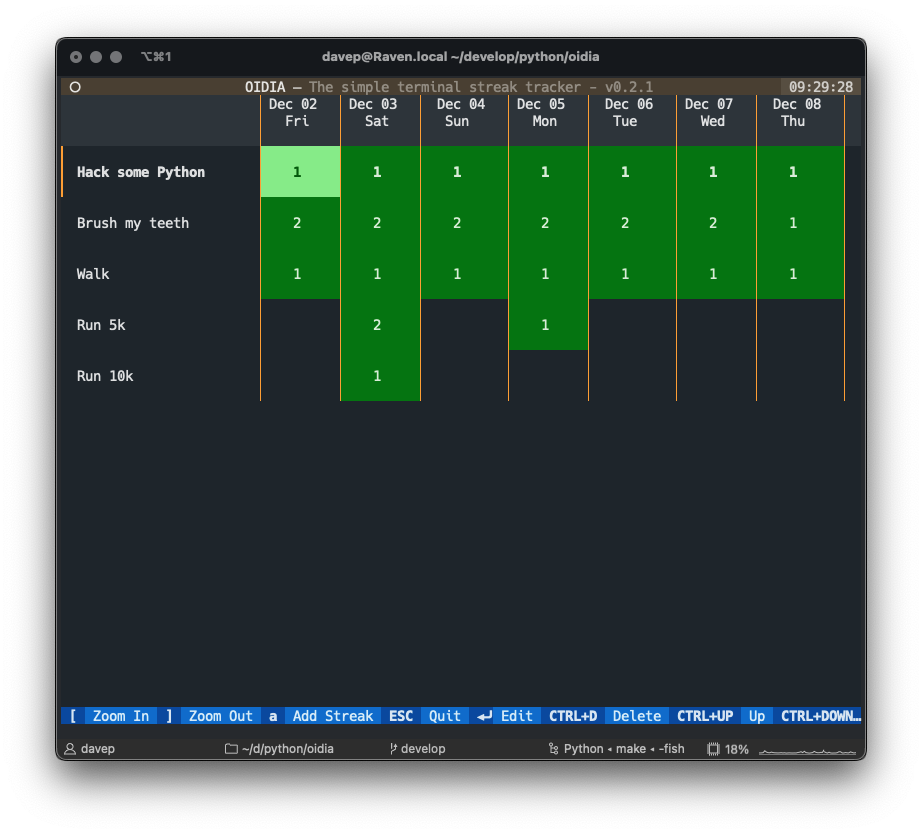
Another little thing that's up on PyPI now, which is the final bit of fallout from the Textual dogfooding sessions, is a little project I'm calling OIDIA.
The application is a streak tracker. I'm quite the fan of streak trackers. I've used a few over the years, both to help keep me motivated and honest, and also to help me track that I've avoided unhelpful things too. Now, most of the apps I've used, and use now, tend to have reminders and counts and stats and are all about "DO NOT BREAK THE STREAK OR ELSE" and that's mostly fine, but...
To keep things simple and to purely concentrate on how to build Textual apps, I made this a "non-judgement" streak tracker. It's designed to be really simple: you add a streak, you bump up/down the number of times you did (or didn't do) the thing related to that streak, for each day, and that's it.
No totals. No stats. No reminders and bugging. No judgement.
Here it is in action:
When I started it, I wasn't quite sure how I wanted to store the data. Throwing it in a SQLite database held some appeal, but that also felt like a lot of faff for something so simple. Also, I wanted to make the data as easy to get at, to use elsewhere, and to hack on, as possible. So in the end I went with a simple JSON file.
On macOS and GNU/Linux streaks.json lives in ~/.local/share/oidia, on Windows it'll be in... I'm not sure off the top of my head actually; it'll be in whatever directory the handy xdg library has chosen. and because it's JSON that means that something like this:
ends up looking like this:
[{"title":"Hack some Python","days":{"2022-12-02":1,"2022-12-03":1,"2022-12-04":1,"2022-12-05":1,"2022-12-06":1,"2022-12-07":1,"2022-12-08":1,"2022-12-01":1,"2022-11-30":1,"2022-11-29":1,"2022-11-28":1}},{"title":"Brush my teeth","days":{"2022-12-02":2,"2022-12-03":2,"2022-12-04":2,"2022-12-05":2,"2022-12-06":2,"2022-12-07":2,"2022-12-08":1,"2022-12-01":2,"2022-11-30":2,"2022-11-29":2,"2022-11-28":2}},{"title":"Walk","days":{"2022-12-02":1,"2022-12-03":1,"2022-12-04":1,"2022-12-05":1,"2022-12-06":1,"2022-12-07":1,"2022-12-08":1,"2022-12-01":1,"2022-11-30":1,"2022-11-29":1,"2022-11-28":1}},{"title":"Run 5k","days":{"2022-12-03":2,"2022-12-05":1,"2022-11-30":1,"2022-11-28":2}},{"title":"Run 10k","days":{"2022-12-03":1,"2022-11-28":1}}]
Of course, it remains to be seen how well that actually scales; possibly not so well over a long period of time, but this was written more as another way to explore Textual than anything else. Even then, it would be pretty trivial to update to something better for holding the data.
If this seems like your thing (and I will be supporting it and onward developing it) you can find it over on PyPI, which means it can be installed with pip or the ever-handy pipx:
So... yeah... the dogfooding... When I wrote my previous post I had wanted to try and do a post towards the end of each week, highlighting what I'd done on the "dogfooding" front. Life kinda had other plans. Not in a terrible way, but it turns out that getting both flu and Covid jabs (AKA "jags" as they tend to say in my adopted home) on the same day doesn't really agree with me too well.
I have been working, but there's been some odd moments in the past week and a bit and, last week, once I got to the end, I was glad for it to end. So no blog post happened.
While mostly sat feeling sorry for myself on my sofa, I have been coding. Rather than list all the different things here in detail, I'll quickly mention them with links to where to find them and play with them if you want:
I wanted to put together a very small example of how someone may put together a third party widget library, and in doing so selected what I thought was going to be a mostly-useless example: a wrapper around a text-based QR code generator website. Weirdly I've had a couple of people express a need for QR codes in the terminal since publishing that!
PISpy is a very simple terminal-based client for the PyPI API. Mostly it provides a hypertext interface to Python package details, letting you look up a package and then follow its dependency links. It's very simple at the moment, but I think more fun things can be done with this.
I'm a big fan of the use of streak-tracking in one form or another. Personally I use a streak-tracking app for keeping tabs of all sorts of good (and bad) habits, and as a heavy user of all things Apple I make a lot of use of the Fitness rings, etc. So I got to thinking it might be fun to do a really simple, no shaming, no counting, just recording, streak app for the Terminal. OIDIA is the result.
As of the time of writing I only finished the first version of this yesterday evening, so there are plenty of rough edges; but having got it to a point where it performed the basic tasks I wanted from it, that seemed like a good time to publish.
Expect to see this getting more updates and polish.
Ahh, yes, about that... So one of the handy things I'm finding about Textual is its key binding system. The more I build Textual apps, the more I appreciate the bindings, how they can be associated with specific widgets, the use of actions (which can be used from other places too), etc.
But... (there's always a "but" right -- I mean, there'd be no blog post to be had here otherwise).
The terminal doesn't have access to all the key combinations you may want to use, and also, because some keys can't necessarily be "typed", at least not easily (think about it: there's no F1 character, you have to type F1), many keys and key combinations need to be bound with specific names.
So there's two problems here: how do I discover what keys even turn up in my application, and when they do, what should I call them when I pass them to Binding?
That felt like a "well Dave just build an app for it!" problem. So I did:
If you're building apps with Textual and you want to discover what keys turn up from your terminal and are available to your application, you can:
pipxinstalltextual-keys
and then just run textual-keys and start mashing the keyboard to find out.
There's a good chance that this app, or at least a version of it, will make it into Textual itself (very likely as one of the devtools). But for now it's just an easy install away.
I think there's a call to be made here too: have you built anything to help speed up how you work with Textual, or just make the development experience "just so"? If so, do let folk know, and come yell about it on the #show-and-tell channel in the Discord server.
So, it's fast approaching 2 months now since I started the new thing and it's been a busy time. I've had to adjust to a quite a few new things, not least of which has been a longer and more involved commute. I'm actually mostly enjoying it too. While having to contend with buses isn't the best thing to be doing with my day, I do have a very fond spot for Edinburgh and it's nice to be in there most days of the week.
Part of the fallout from the new job has been that, in the last couple of weeks, I've thrown some more stuff up on PyPI. This comes about as part of a bit of a dog-fooding campaign we're on at the moment. While they have been, and will continue to be, mentioned on the Textualize blog, I thought I'd give a brief mention of them here on my own blog too given they are, essentially, personal projects.
This is one I'd like to tweak some more and improve on if possible. It is, in essence, a Python-coded terminal tool that does more or less the same as slstats.el. It started out as a rather silly quick hack, designed to do something different with rich-pixels.
Here's the finished version (as of the time of writing) being put through its paces:
Download from here, or install and play with it with a quick pipx install gridinfo.
The next experiment with Textual was to write a terminal-based client for the Bored-API. My initial plan for this was to just have a button or two that the user could mash on and they'd get an activity suggestion dropped into the middle of the terminal; but really that seemed a bit boring. Then I realised that it'd be a bit more silly and a bit more fun if I did it as a sort of TODO app. Bored? Run it up and use one of the activities you'd generated before. Don't like any of them? Ignore them and generate some more! Feeling bad that you've got such a backlog of reasons to not be bored? Delete a bunch!
And so on.
Here's a short video of it in action:
Download from here, or install and play with it with a quick pipx install unbored.
This one... this one I'm going to blame on the brain fog that followed flu and Covid jabs that happened the day before (and which are still kicking my arse 4 days later). Monday morning, at my desk, and I'm wondering what to next write to experiment with Textual, and I realised it would be interesting to write something that would show off that it's easy to make a third party widget library.
And... yeah, I don't know why, but I remembered qrencode.el and so textual-qrcode was born!
I think the most amusing part about this is that I did it in full knowledge that it would be useless; the idea being it would be a daft way of showing off how you could build a widget library as an add-on for Textual. But... more than one person actually ended up saying "yeah hold up there this could actually be handy!"
While I was on a roll putting stuff up on PyPI, I also decided to tweak up my Textual-based 5x5 and throw that up too. This was my first app built with Textual, initially written before I'd even spoken to Will about the position here. At one point I even did a version in Lisp.
It's since gone on to become one of the example apps in Textual itself but I felt it deserved being made available to the world via an easy(ish) install. So, if you fancy trying to crack the puzzle in your terminal, just do a quick:
Finally... for this week anyway, is a tool I've called PISpy. It's designed as a simple terminal client for looking up package information on PyPI. As of right now it's pretty straightforward, but I'd like to add more to it over time. Here's an example of it in action:
One small wrinkle with publishing it to PyPI was the fact that, once I'd chosen the name, I checked that it hadn't been used on PyPI (it hadn't) but when it came to publishing the package it got rejected because the name was too similar to another package! I don't know which, it wouldn't say, but that was a problem. So in the end the published name ended up having to be slightly different from the actual tool's name.
See over here for the package, and you can install it with a:
It's been a fun couple of weeks coming up with stuff to help exercise Textual, and there's more to come. Personally I've found the process really helpful in that it's help me learn more about the framework and also figure out my own approach to working with it. Each thing I've built so far has been a small step in evolution on from what I did in the previous thing. I doubt I've arrived at a plateau of understanding just yet.
Cutler, armed with a schedule, was urging the team to "eat its own dog food". Part macho stunt and part common sense, the "dog food diet" was the cornerstone of Cutler’s philosophy.
G. Pascal Zachary — Show-Stopper!
I can't remember exactly when it was -- it was likely late in 1994 or some time in 1995 -- when I first came across the concept of, or rather the name for the concept of, "eating your own dog food". The idea and the name played a huge part in the book Show-Stopper! by G. Pascal Zachary. The idea wasn't new to me of course; I'd been writing code for over a decade by then and plenty of times I'd built things and then used those things to do things, but it was fascinating to a mostly-self-taught 20-something me to be reading this (excellent -- go read it if you care about the history of your craft) book and to see the idea written down and named.
While Textualize isn't (thankfully -- really, I do recommend reading the book) anything like working on the team building Windows NT, the idea of taking a little time out from working on Textual, and instead work with Textual, makes a lot of sense. It's far too easy to get focused on adding things and improving things and tweaking things while losing sight of the fact that people will want to build with your product.
So you can imagine how pleased I was when Will announced that he wanted all of us to spend a couple or so weeks building something with Textual. I had, of course, already written one small application with the library, and had plans for another (in part it's how I ended up working here), but I'd yet to really dive in and try and build something more involved.
Giving it some thought: I wasn't entirely sure what I wanted to build though. I do want to use Textual to build a brand new terminal-based Norton Guide reader (not my first, not by a long way) but I felt that was possibly a bit too niche, and actually could take a bit too long anyway. Maybe not, it remains to be seen1.
Eventually I decided on this approach: try and do a quick prototype of some daft idea each day or each couple of days, do that for a week or so, and then finally try and settle down on something less trivial. This approach should work well in that it'll help introduce me to more of Textual, help try out a few different parts of the library, and also hopefully discover some real pain-points with working with it and highlight a list of issues we should address -- as seen from the perspective of a developer working with the library.
So, here I am, at the end of week one. What I want to try and do is briefly (yes yes, I know, this introduction is the antithesis of brief) talk about what I built and perhaps try and highlight some lessons learnt, highlight some patterns I think are useful, and generally do an end-of-week version of a TIL. TWIL?
I started the week by digging out a quick hack I'd done a couple of weeks earlier, with a view to cleaning it up. It started out as a fun attempt to do something with Rich Pixels while also making a terminal-based take on slstats.el. I'm actually pleased with the result and how quickly it came together.
The point of the application itself is to show some general information about the current state of the Second Life grid (hello to any fellow residents of the original Metaverse!), and to also provide a simple region lookup screen that, using Rich Pixels, will display the object map (albeit in pretty low resolution -- but that's the fun of this!).
Use of the default Screen that's provided by the App is handy enough, but I feel any non-trivial application should really put as much code as possible in screens that relate to key "work". Here's the entirety of my application code:
classGridInfo(App[None]):"""TUI app for showing information about the Second Life grid."""CSS_PATH="gridinfo.css""""The name of the CSS file for the app."""TITLE="Grid Information""""str: The title of the application."""SCREENS={"main":Main,"region":RegionInfo}"""The collection of application screens."""defon_mount(self)->None:"""Set up the application on startup."""self.push_screen("main")
You'll notice there's no work done in the app, other than to declare the screens, and to set the main screen running when the app is mounted.
My initial version of the application had it loading up the data from the Second Life and GridSurvey APIs in Main.on_mount. This obviously wasn't a great idea as it made the startup appear slow. That's when I realised just how handy call_after_refresh is. This meant I could show some placeholder information and then fire off the requests (3 of them: one to get the main grid information, one to get the grid concurrency data, and one to get the grid size data), keeping the application looking active and updating the display when the replies came in.
While building this app I think there was only really the one pain-point, and I suspect it's mostly more on me than on Textual itself: getting a good layout and playing whack-a-mole with CSS. I suspect this is going to be down to getting more and more familiar with CSS and the terminal (which is different from laying things out for the web), while also practising with various layout schemes -- which is where the revamped Placeholder class is going to be really useful.
The next application was initially going to be a very quick hack, but actually turned into a less-trivial build than I'd initially envisaged; not in a negative way though. The more I played with it the more I explored and I feel that this ended up being my first really good exploration of some useful (personal -- your kilometerage may vary) patterns and approaches when working with Textual.
The application itself is a terminal client for the Bored-API. I had initially intended to roll my own code for working with the API, but I noticed that someone had done a nice library for it and it seemed silly to not build on that. Not needing to faff with that, I could concentrate on the application itself.
At first I was just going to let the user click away at a button that showed a random activity, but this quickly morphed into a "why don't I make this into a sort of TODO list builder app, where you can add things to do when you are bored, and delete things you don't care for or have done" approach.
This came about from me overloading the use of the escape key. I wanted it to work more or less like this:
If you're inside an activity, move focus up to the activity type selection buttons.
If the filter pop-over is visible, close that.
Otherwise exit the application.
It was easy enough to do, and I had an action in the Main screen that escape was bound to (again, in the Main screen) that did all this logic with some if/elif work but it didn't feel elegant. Moreover, it meant that the Footer always displayed the same description for the key.
That's when I realised that it made way more sense to have a Binding for escape in every widget that was the actual context for escape's use. So I went from one top-level binding to...
...classActivity(Widget):"""A widget that holds and displays a suggested activity."""BINDINGS=[...Binding("escape","deselect","Switch to Types")]...classFilters(Vertical):"""Filtering sidebar."""BINDINGS=[Binding("escape","close","Close Filters")]...classMain(Screen):"""The main application screen."""BINDINGS=[Binding("escape","quit","Close")]"""The bindings for the main screen."""
This was so much cleaner and I got better Footer descriptions too. I'm going to be leaning hard on this approach from now on.
Until I wrote this application I hadn't really had a need to define or use my own Messages. During work on this I realised how handy they really are. In the code I have an Activity widget which takes care of the job of moving itself amongst its siblings if the user asks to move an activity up or down. When this happens I also want the Main screen to save the activities to the filesystem as things have changed.
Thing is: I don't want the screen to know what an Activity is capable of and I don't want an Activity to know what the screen is capable of; especially the latter as I really don't want a child of a screen to know what the screen can do (in this case "save stuff").
This is where messages come in. Using a message I could just set things up so that the Activity could shout out "HEY I JUST DID A THING THAT CHANGES ME" and not care who is listening and not care what they do with that information.
So, thanks to this bit of code in my Activity widget...
classMoved(Message):"""A message to indicate that an activity has moved."""defaction_move_up(self)->None:"""Move this activity up one place in the list."""ifself.parentisnotNoneandnotself.is_first:parent=cast(Widget,self.parent)parent.move_child(self,before=parent.children.index(self)-1)self.emit_no_wait(self.Moved(self))self.scroll_visible(top=True)
...the Main screen can do this:
defon_activity_moved(self,_:Activity.Moved)->None:"""React to an activity being moved."""self.save_activity_list()
⚠️ Warning
The code above used emit_no_wait. Since this blog post was first published that method has been removed from Textual. You should use post_message_no_wait or post_message instead now.
On top of the issues of getting to know terminal-based-CSS that I mentioned earlier:
Textual currently lacks any sort of selection list or radio-set widget. This meant that I couldn't quite do the activity type picking how I would have wanted. Of course I could have rolled my own widgets for this, but I think I'd sooner wait until such things are in Textual itself.
Similar to that, I could have used some validating Input widgets. They too are on the roadmap but I managed to cobble together fairly good working versions for my purposes. In doing so though I did further highlight that the reactive attribute facility needs a wee bit more attention as I ran into some (already-known) bugs. Thankfully in my case it was a very easy workaround.
Scrolling in general seems a wee bit off when it comes to widgets that are more than one line tall. While there's nothing really obvious I can point my finger at, I'm finding that scrolling containers sometimes get confused about what should be in view. This becomes very obvious when forcing things to scroll from code. I feel this deserves a dedicated test application to explore this more.
The first week of "dogfooding" has been fun and I'm more convinced than ever that it's an excellent exercise for Textualize to engage in. I didn't quite manage my plan of "one silly trivial prototype per day", which means I've ended up with two (well technically one and a half I guess given that gridinfo already existed as a prototype) applications rather than four. I'm okay with that. I got a lot of utility out of this.
Now to look at the list of ideas I have going and think about what I'll kick next week off with...
With my previous employer, while I was the only developer, I wasn't the only person writing code and more than one other person had this issue so I eventually wrote up my approach to solving this problem. That document is on their internal GitLab, but I thought it worth me writing my personal macOS/Python "rules" up again, just in case they're useful to anyone else.
I am, of course, not the first person to tackle this, to document this, to write down a good approach to this. Before and after I settled on my approach I'd seen other people write about this. So... this post isn't here to try and replace those, it's simply to write down my own approach, so if anyone asks again I can point them here. I feel it's important to stress: this isn't the only way or thoughts on this issue, there are lots of others. Do go read them too and then settle on an approach that works for you.
One other point to note, which may or may not make a difference (and may or may not affect how this changes with time): for the past few years I've been a heavy user of pipenv to manage my virtual environments. This is very likely to change from now on, but keep in mind that what follows was arrived at from the perspective of a pipenv user.
When I first got back into writing Python it was on macOS and, really early on, I ran into all the usual issues: virtual environments breaking because they were based on the system Python and it got updated, virtual environments based on the Homebrew-installed Python and it got updated, etc... Simply put, an occasional, annoying, non-show-stopping breaking of my development environment which would distract me when I'd sat down to just hack on some code, not do system admin!
As mentioned earlier, what I'm writing here assumes that virtual environments are being managed with pipenv (something I still do for personal projects, for now, but this may change soon). Your choices and mileage may vary, etc... This is what works well for me.
Unless it comes from the Mac App Store, I try and install everything via Homebrew. It's really handy for keeping track of what I've got installed, for recreating a development environment in general, and for keeping things up to date.
With Homebrew installed the next step for me is to install pyenv. Doing so is as easy as:
brewinstallpyenv
Once installed, if it's not done it for you, you may need to make some changes to your login profile. I'm a user of fish so I have these lines in my setup. Simply put: it asks pyenv to set up my environment so my calls to Python go via its setup.
Plenty of help on how to set up pyenv can be found in its README.
Once I've done this I tend to go on and install the Python versions I'm likely to need. For me this tends to be the most recent "active" stable versions (as of the time of writing, 3.7 through 3.10; although I need to now start throwing 3.11 into the mix too).
I use this command:
pyenvinstall--list
to see the available versions. If I want to see what's available for a specific version I'll pipe through grep:
pyenvinstall--list|fgrep" 3.9"
This is handy if I want to check what the very latest release of a specific version of Python is.
When I'm done with the above I then tend to use pyenv to set my "global" Python. This is the version I want to get when I run python and I'm not inside a virtual environment. Doing that is as simple as:
pyenvglobal3.10.7
Of course, you'd swap the version for whatever works for you.
It seems more rare these days, but on occasion I've had it such that some update somewhere still causes my environment to break. Now though I find that all it takes is a quick:
With all of the stuff above being mostly a one-off (or at least something I do once when I set up a new machine -- which isn't often), the real "work" here is when I set up a fresh repository when I start a new project. Really it's no work at all. Again, as I've said before, I've tended to use pipenv for my own work, and still do for personal stuff (but do want to change that), mileage may vary here depending on tool.
When I start a new project I think about which Python version I want to be working with, I ensure I have the latest version of it installed with pyenv, and then ask pipenv to create a new virtual environment with that:
pipenv--python3.10.7
When you do this, you should see pipenv pulling the version of Python from the pyenv directories:
The key thing here is seeing that pipenv is pulling Python from ~/.pyenv/versions/. If it isn't there's a good chance you have a Python earlier in your PATH than the pyenv one -- something you generally don't want. It will work, but it's more likely to break at some point in the future. That's the key thing I look for; if I see that I know things are going to be okay.
Since I adopted these personal rules and approaches (and really, calling them "rules" is kind of grand -- there's almost nothing to this) I've found I've had near-zero issues with the stability of my Python virtual environments (and what issues I have run into tend to be trivial and of my own doing).
As I said at the start: there are, of course, other approaches to this, but this is mine and works well for me. Do feel free to comment with your own, I'm always happy to learn about new ways!
As mentioned yesterday, I'm about to start working at Textualize, and building Open-source software is important to the company. Will -- the CEO -- is all about building in public. If you follow him on Twitter you'll notice that his Python coding adventure tweets actually outnumber is cooking tweets!
As someone who has long been a supporter of and fan of Free Software and Open-source software, and has made some small contributions along the way, I've also always made a point of building my own tools in public. In most cases they're things that are likely only helpful to me, but some are more generally useful. The point being though: it's all there in case it's helpful to someone else.
Which means that, as much as possible, when I'm writing code, I write it as if it's going to be visible in public and someone else is going to be reading it. I try and make the code tidy. I try and comment it well. I try (but don't always manage for personal projects) to fully document it. The important thing here being that someone coming to the code fresh should be able to follow what's going on.
Against that background, and having just gone through the process of handing off almost 5 years of work to someone else as a left an employer, I got to thinking: we should always "build in public", even if it's in private.
When I started with my previous employer, and even to the day I left, I was the only software developer there. I worked with a team who wrote code, but being software developers wasn't what they did. Bioinformaticians and machine learning scientists have other things to be doing. But, as I wrote my code, I wrote every line assuming they, or some other developer down the line, would be reading it. Pretty much every line was written for an audience I couldn't see and didn't fully know. This, as mentioned above, meant trying to keep the code clean, ensuring it was commented in helpful ways, ensuring the documentation was helpful, and so on.
But it wasn't just about the code. Any non-trivial system will have more to it than code. We had an internal instance of GitLab and I tracked all of my work on there. So, as I planned and worked on new features, or went on bug hunts, I'd document the process in the issue tracker. As much as possible I'd be really verbose about the process. Often I wouldn't just open an issue, go work on it, and then mark it closed; as I worked through the issue I'd add comment after comment under it, documenting my thinking, problems, solutions, cite sources when looking something up, that sort of thing.
The whole process was an act in having a conversation with current or future team members if they ever needed to look; with future me (really, that helped more than once -- we all have those "that the hell was I thinking?" moments); with any developer(s) who took over from me in the future.
I did all this as if I was broadcasting it in public on Twitter or on GitHub, etc. It was in private, of course, but I approached it as if it was in public.
There were always three main reasons for this, I felt:
Accountability. At any moment someone who I worked with could review what I was doing and why I was doing it; it was an invitation to anyone curious enough to talk with me about what I was building and how I was building it.
Continuity of support for unplanned reasons. Life happens, sometimes you may, unplanned, never be available at work again. I never wanted to leave my employer in a position where picking up from such an event was a nightmare.
Continuity of support for planned reasons. It was possible, and it became inevitable, that I'd move on to something else. If that was to happen I wanted to be sure that whoever picked up after me would be able to do so without too much effort.
In the end, item 3 seemed to really pay off. When it came time for me to hand over my work to someone else, as I left, the process was really smooth and trouble-free. I was able to point the developer at all the documentation and source code, at all the issues, and invite them to read through it all and then come back to me with questions. In terms of time actually spent talking about the main system I was handing over I'd say that 4 years of work was handed over with just a few hours of actual talking about it.
It remains to be seen if it really paid off, of course. If they get really stuck they do have an open invitation to ping me a question or two; I care enough about what I designed and built that I want it to carry on being useful for some time to come. But... I like to think that all of that building in public, in private, will ensure that this is an invitation that never needs to be called on. I like to think that, if something isn't clear, they'll be able to check the code, the documentation and the issue history and get to where they need to go.
Just over five years ago I got a message from my then employer to say I was going to be made redundant after 21 years working for them. After the 3 month notice period the final day came. Meanwhile, I found something new that looked terrifying but interesting. In the end it was less terrifying and way more interesting than I imagined it would be. It was fun too.
But... (there's always a but isn't there?)
In the four and change years I've been there the company got bought out, and then the result of that got bought up. As I've mentioned before I'm generally not a "big company" kind of person; in all my years I've found that I'm happier working in a smaller place. After a couple of buyouts my employer had gone from being 10s of people in size to 100s of people in size (and technically 10s of 1,000s of people in size depending on how you look at it).
This change in ownership and size meant the culture became... well, let's just say not as friendly as you tend to enjoy when it's a smaller group of folk. On top of that I was starting to notice that my efforts were making less of an impact as things got bigger, and I started to feel like my contributions weren't really relevant any more. There were some problematic things happening too: undermining of efforts, removal of responsibilities without consultation or communication, that sort of thing. Plus worse. There's little point in going into the detail, but it's fair to say that work wasn't as fun as it used to be.
That felt like a good time to start to look around. If work makes you feel unhappy and you can look around... look around.
Thing is, I wasn't sure what to look for. I was in the comfortable position of, unlike last time, not needing to find something, so I could take my time at least. Over the course of the last year I've spoken to many different companies and organisations, some big (yes, I know, I said I don't like big places -- sometimes what's on offer deserves a fair hearing), some small, but none of them quite said "this feels like me". In some cases the whole thing didn't have the right vibe, in others the industry either didn't interest me, or felt uncomfortable given my personal values. In one particular case a place looked interesting until I checked the CTO's socials and OMG NO NO NO AVOID AVOID (that was a fun one).
Then I saw Will McGugan saying he was hiring to expand Textualize. This caught my interest right away for two reasons.
I can't remember how long I've been following Will on Twitter; I likely stumbled on him as I got back into Python in 2018 and I also remember noting that he was a Python hacker just up the road from me. We'd vaguely chatted on Twitter, briefly, in that "Twitter acquaintance" way we all often do (I remember one brief exchange about fungus on The Meadows). A small company run by someone I was acquainted with seemed like a safe bet.
The second reason was Textual itself. I'd been watching Will develop it, in open, with great interest. I had (and still have) a plan to write a brand new CHUI-based (okay fine TUI-based as the kids like to say these days!) Norton Guide reader1, all in Python, and Textual looked like the perfect framework to do the UI in. The chance to be involved with it sounded awesome.
Now, I said two reasons, but there's also a third I guess: Will's pitch for applying to Textualize felt so damn accessible! I'm on the older end of the age range of this industry; for much of my working life as a developer I've worked in isolation from other developers; while I first touched Python in the 90s, I've only been using it in anger since 2018 and still feel like I've got a lot to learn. Despite all these things, and more, saying "aye Dave this is beyond you" I felt comfortable dropping Will a line.
Which resulted in a chat.
Which resulted in some code tinkering and chatting.
Which resulted in...
Something new.
So, yeah, as of 2022-10-10 I'm on yet another new adventure. Time for me to really work on my Python coding as I work with Will and the rest of the team as part of Textualize.
Or, as I put it on Twitter a few days ago: "I'm going to be a Python impostor syndrome speedrunner".
A little earlier this evening I got a new issue raised against boxquote.el. Apparently Emacs 29 (I'm running 28.1 as of the time of writing) is moaning about the likes of:
(setf(point)some-location-or-other)
and
(setf(buffer-string)"")
There's a whole background to why I've tended to code like that, that stems from enjoying Common Lisp, my days reading (and sometimes posting to) comp.lang.lisp, and I think some of the stuff Erik Naggum wrote back in the day. I won't get into it all now; I'm not sure I can even remember a lot of how I got there given how far back it was.
But...
Wanting to quickly get to the bottom of why the above was suddenly an issue, I dived into the NEWS file and found the following:
** Many seldom-used generalized variables have been made obsolete.
Emacs has a number of rather obscure generalized variables defined,
that, for instance, allowed you to say things like:

   (setf (point-min) 4)

These never caught on and have been made obsolete.  The form above,
for instance, is the same as saying

   (narrow-to-region 4 (point-max))

The following generalized variables have been made obsolete:
'buffer-file-name', 'buffer-local-value', 'buffer-modified-p',
'buffer-name', 'buffer-string', 'buffer-substring', 'current-buffer',
'current-column', 'current-global-map', 'current-input-mode',
'current-local-map', 'current-window-configuration',
'default-file-modes', 'documentation-property', 'frame-height',
'frame-visible-p', 'global-key-binding', 'local-key-binding', 'mark',
'mark-marker', 'marker-position', 'mouse-position', 'point',
'point-marker', 'point-max', 'point-min', 'read-mouse-position',
'screen-height', 'screen-width', 'selected-frame', 'selected-screen',
'selected-window', 'standard-case-table', 'syntax-table',
'visited-file-modtime', 'window-height', 'window-width', and
'x-get-secondary-selection'.
As suggested above... this is my thing, this is how I coded some Elisp stuff. Look through much of my Emacs Lisp code and you'll find me setfing stuff all over the place.
Apparently my style is "obscure". Actually, I'm kinda okay with that if I'm honest.
This is going to be a bit of a pain in the arse; I'm going to have to go through a whole bunch of code and make it "less obscure", at some point.
But...
This isn't the part that had me thinking I must be getting old. Oh no. The NEWS file had another little surprise in store:
** The quickurl.el library is now obsolete.
Use 'abbrev', 'skeleton' or 'tempo' instead.
That.... that's me that is. Well, it's one of the me things. If you run about-emacs, dive into Authors, and search for my name, in any copy of GNU Emacs from the last decade or two, you'll find this:
Dave Pearson: wrote 5x5.el quickurl.el
quickurl.el was a package I wrote back in the late 1990s, back when I was a very heavy user of Usenet, and often found myself posting the same URLs in posts again and again; especially in comp.lang.clipper. As a fairly quick hack I wrote the code so that I could very quickly insert often-used URLs.
Some time later, I got an email from the FSF (I actually think it was from RMS -- but that's an mbox I've long ago lost -- or a backup of it might be in storage back in England, on a DVD), asking if I wanted to contribute it to Emacs proper. This seemed like an odd thing to add to Emacs but, sure, why the hell not?
And so I had my second contribution to a body of code I used a lot (the first being 5x5.el -- which itself was my first ever attempt at writing some non-trivial Elisp code).
So... yeah... here we are. I'm now old enough to have written some Emacs Lisp code, had it requested by the FSF for inclusion in Emacs, had it live in there for something like two decades, and then become obsolete!
A couple of days back (for vague values of "couple", of course), first of the month, having my morning coffee, I go and open my bank's mobile app to move a bit of money about and pay a couple of things. This happens every month. This is so routine I do it almost on autopilot.
Yeah, yeah, I know, it's banking, pay attention! But still... morning, coffee, routine.
I get to the final movement/payment and then notice something:
That.... that text! WTF? So then I look back at my payment history and notice that all but one payment hadn't gone through! O_o
This alone is fine. Stuff happens. Things fail. I'm okay with that. It's an inconvenience for sure but doubtless whatever the problem is will be fixed and I can make the payments again later. But...
That result. There's a tick. A GREEN tick. And a "Thank you". It's natural to see that image, know that it's always meant "shit worked" and just carry on.
In one of my systems at work there's a tool I wrote for checking a repository of code to make sure it conforms to a certain standard. When folk use it they get a night big, bold and bright green thumb-up above the text that says everything is cool. If there's a problem, any sort of problem at all, then the display is red and there's no jolly icon and it's obvious that things are different and you likely want to pay attention to the explanation of what isn't right.
This isn't news, of course. This isn't some revelation about UI design or anything. We know this stuff. I think what boggles my mind a little bit about this is that something as important -- and hopefully by this point as mature -- as a mobile banking app should get something as obvious as this right.
But here we are, with a nice friendly green icon showing a tick and a friendly big "Thank you" followed by smaller text going "aye shit didn't work pal".
For well over a year now I've been recording my VR gameplay and uploading it to YouTube. Less as a "content creation" thing, more as a nice record of games I've played and, on occasion, as a little bit of help to others; in the past I've watched other folk play games I like to get ideas for approaches to them, and I've also received the odd comment now and again where my play-through has helped someone else.
A question I've had a couple of times is what I use to do the recording, so I thought I'd make an effort to write it all down here.
First up, a couple of things to note: I started recording PCVR around April 2021 and the initial setup was a bit trial-and-error and Google searching and blog reading. As such, not all of the details of how to set up will be here, and I may even miss off some stuff I changed and is worthy of note; at the same time I might mention stuff that's just an obvious default.
Consider this blog post as being a written version of one of my videos: it's for my own fun and benefit and might also help me in the future should I want to apply some of this again, and if it helps someone else that's a lovely bonus.
While it's not exactly the point of this post, I guess it's worth mentioning the hardware I use as of the time of writing. Given this is about PCVR, I of course have a PC which is running Windows. The machine information within Windows says it's a:
Intel(R) Core(TM) i5-10400F CPU @ 2.90GHz
Warning: I don't do hardware. I buy it from time to time, but hardware leaves me bored. It runs VR on a PC. This is fine.
The machine itself has 16 GB of memory, is running Windows 10 Home and has a GeForce RTX 3060 for handling the graphics.
The headset I'm using is an Oculus Meta Quest 2. I've had this since around November 2020, playing Quest-native games for the first few months, until I cracked and got the PC mentioned here to get into PCVR.
The headset is connected to the PC with a USB cable.
It should be said that, yes, sometimes, I do get a little caught up in things with two cables hanging off me. If I could give one tip here it would be that running the microphone cable up your trousers and shirt makes life a ton easier. As a bonus I have the USB cable for the headset running around the headset's strap and connected to it at the back and then running down my back.
The core software used is OBS Studio. This has got to be one of the best bits of free software I've ever used, in terms of interface and what it delivers.
Years back my son used to record and upload gameplay to YouTube and I can remember him having no end of issues using different recording software; some working with one game but not another, some other working with a different set of games, video and sync issues, etc... Lots of pain quite often. With OBS Studio the only issues I've ever had have been my own mistakes.
At this point I have to confess that when I set it up I didn't make a point of keeping a recording of what I changed -- I was experimenting and not expecting much to come of it. So what I note here are the things that feel like they're important, and only the things that relate to recording PCVR, not streaming it (that might end up being a different blog post).
That said, here are things I seem to remember as being key:
The items in the output pane in settings that I have and which might be important are:
Output Mode: Simple
Recording Quality: High Quality, Medium File Size
Recording format: mkv
Encoder: Hardware (NVENC)
I do remember the recording format being set to mkv as something that's really important. I think it's mp4 by default, or was when I first installed, and if your machine crashes or OBS were to crash or something, you could end up with footage that can't be used. Using mkv means you can still use the footage (as I understand it). It does mean that once you're finished you have to use the "remux" option under the File menu, but that's a small price to pay.
I can say that at least once I've had to hard-reboot my machine when a game and SteamVR and the like all got upset. I likely saved 45 minutes or more of footage thanks to mkv.
Nothing really special in here, I simply have both the base and output resolutions set to the desktop resolution. This might be something for me to tinker with in the future, but so far I've not run into any problems.
Now, of course, all of the above is great and fine and all but there's the issue of how you capture the VR gameplay. I approach this a couple of different ways. The first is I use the OpenVR Capture plugin for OBS. This makes capturing footage from SteamVR really easy. The only downside I found is that out of the box there's no default crop setting for using a Quest 2 (or I guess the Rift, as the Quest 2 sort of appears as a Rift to SteamVR games). As such I remember playing trial and error with that until I was happy I was getting as much footage as possible without having black bars and the like.
Something I also like about the OpenVR Capture plugin is you can say if you want to capture the left or right eye. Normally not that big a deal for some things, but if you're playing a shooter and want people to see exactly what your dominant eye is seeing, that matters.
Sadly, of course, not every game can be captured with that plugin. So far I've found that any game that can't be has its own mirror window on the desktop. In that case I use a Game Capture source and set it to capture that specific window. I could of course just get it to capture the focused window or something like that but I prefer to know that it's only grabbing what I want it to grab.
That's pretty much it I think. There's not a lot to it, although on occasion a lot can go wrong. Mostly it's a wonder any of it works. I mean, think about it, I have a computer with two screens strapped to my face, with two controllers in my hands talking to it; it's then connected via the Oculus Link to the Oculus Home; from which I start up SteamVR; and from the SteamVR home I start up the game and then "live" inside the game. It's a virtual world inside a virtual world inside a virtual world inside a real world; with lots of software along the way, all talking at once.
That is then being recorded.
Sometimes, on occasion, it takes a reboot or five to make it all work together.