I've just made a small update to BlogMore. This fixes a minor cosmetic issue that's been bugging me for a while, but one that I kept forgetting to address. I noticed it again on a recent post. The issue is that if there are enough tags on a post that the collection of tags runs to a second line, there was no space between those lines.
Now, as of v2.15.0, there's a little bit of breathing room between those lines.
When I'm working in Emacs I use the *scratch* buffer quite a bit. I find it especially useful if I'm working on some Emacs Lisp code, but I also find it handy as a place to drop something I want to retrieve soon, or a quick note that I want to refer back to soon; sometimes I even paste some text there and copy it back just to strip the formatting from it before using it elsewhere1.
The command (itch-scratch-buffer) is simple enough: run it and I get switched to my *scratch* buffer. If I run it with a prefix argument it switches to *scratch* and resets the content back to the initial-scratch-message.
More recently I've found that I'm wanting a scratch buffer that is for writing Markdown. Like many folk I use it a lot for documentation, and of course I also use it for this blog. I also use it heavily for keeping notes in Obsidian2. So, often, I find myself switching to a temporary buffer (*foo* or something), setting it to markdown-mode, and then writing what I need.
So yesterday I finally cracked and added itch-markdown-scratch-buffer. It's just like itch-scratch-buffer, only it creates a *scratch:
Markdown* buffer, using the same clear-if-prefix rule.
So now I've got this bound to M-S-s and I can faff around just a little less when I want a Markdown scratchpad.
On macOS at least, I find the "paste without formatting" support of some applications to be really inconsistent; a quick layover in the *scratch* buffer does the trick every time. ↩
Yes, I know, I should be using Org, but sadly it's just never clicked for me, and I also find good syncing and having a consistent application on mobile and desktop are important. ↩
Back in the late 1990s, like plenty of people who were very online, I was a very avid user of Usenet. There were a few groups I was very active in, even a couple that I maintained a FAQ for. Being that active and wanting to help and answer questions, I was forever posting and pasting links to various resources. Given that I used Emacs to edit my posts1, I eventually realised that I should come up with a tool that let me call on common URLs quickly.
So back in 1998 handyurl.el was born. It was a simple idea: have a file of URLs that I commonly refer to and let me quickly pick from one and paste it. This made for a useful tool and also gave me something to build given I was learning Emacs Lisp at the time.
For reasons I can't quite recall, some time later (the next year, by the looks of things), I wrote quickurl.el as a successor to handyurl.el. I honestly can't remember why this happened, I can't remember why I didn't just keep extending handyurl.el. But, anyway, quickurl.el did more and was more flexible, with built-in URL-grabbing and editing and so on.
Not that long later I got an email from the FSF asking if I might be willing to hand over copyright so that quickurl.el could become part of Emacs itself. I was, of course, delighted to do so.
Eventually quickurl.el was declared obsolete and, while it seems to still be shipped with Emacs, it's not documented or easy to discover.
In the deprecation notice in NEWS the suggestion is that the user should switch to one or more of 3 alternatives:
** The quickurl.el library is now obsolete.
Use 'abbrev', 'skeleton' or 'tempo' instead.
abbrev I know, the other two I've never noticed and don't know anything about.
Obviously, between quickurl.el being pulled into Emacs, and it being made obsolete, my use of it fell right off. I eventually stopped posting to and reading Usenet, I also stopped using mutt+Emacs as my mail client of choice, and so found myself seldom writing things that needed lots of links, in Emacs.
Until recently.
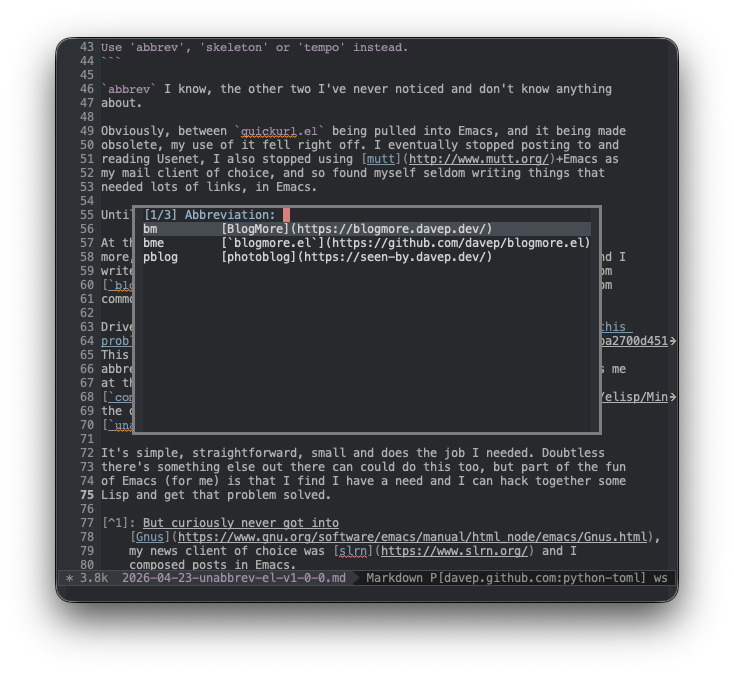
At the moment I'm finding that I'm wanting to write on my blog more and more, and doing that means I often want to include some common links, and I write my posts in Emacs using markdown-mode and with a little help from blogmore.el; the need to have an easy-to-pick-from common menu of URLs is back.
It's simple, straightforward, small and does the job I needed. Doubtless there's something else out there that can do this sort of thing too, but part of the fun of Emacs (for me) is that I find I have a need and I can hack together some Lisp and get that problem solved.
I suppose what I should do is revive either handyurl.el or quickurl.el and tweak and update whichever, at the very least adding some sort of insert formatting facility that is sensitive to the underlying mode (because links in Markdown need a format different from links in HTML, etc).
For now though unabbrev.el is going to help my failing memory when I want to link a common resource.
As an aside, all of this does have me wonder about one thing: is the Free Software Foundation the place that code goes to die? Like, sure, of course I can make changes to quickurl.el and do my own thing with it, as long as I don't misrepresent the copyright status and maintain a compatible licence, etc; but there is this thing where, if Emacs doesn't want that code any more, if the FSF don't want that code any more, wouldn't it be nice if they'd sign it back over again?
I am tempted to drop them a line and see what the deal is. I did tag-ask on Mastodon but got no reply. Unfortunately though that account looks like the FSF treat Mastodon as a write-only resource.
But curiously never got into Gnus, my news client of choice was slrn and I composed posts in Emacs. ↩
Recently I've had an odd problem with Emacs: occasionally, and somewhat randomly, as I wrote code, and only when I wrote Emacs Lisp code, and only when working in emacs-lisp-mode, I'd find that the buffer I was working in would disappear. Not just fully disappear, but more like if I'd used quit-window. Worse still, once this started happening, it wouldn't go away unless I turned Emacs off and on again.
Very un-Emacs!
Normally this would happen when I'm in full flow on something, so I'd just restart Emacs and crack on with the thing I was writing; because of this I wasn't diagnosing what was actually going on.
Then, today, as I was writing require in some code, and kept seeing the buffer go away when I hit q, it dawned on me.
So, after opening a window for the purposes of displaying the expanded macro, switch to emacs-lisp-mode, locally set the binding so q will call on quit-window, and I'm all good.
Except... not, as it turns out.
To quote from the documentation for local-set-key:
The binding goes in the current buffer’s local map, which in most cases is shared with all other buffers in the same major mode.
D'oh!
Point being, any time I used expando-macro, I was changing the meaning of q in the keyboard map for emacs-lisp-mode. :-/
And so v1.6 of expando.el is now a thing, in which I introduce a derived mode of emacs-lisp-mode and set q in its keyboard map. In fact, I keep the keyboard map nice and simple.
(defvarexpando-view-mode-map(let((map(make-sparse-keymap)))(define-keymap(kbd"q")#'quit-window)map)"Mode map for `expando-view-mode'.")(define-derived-modeexpando-view-modeemacs-lisp-mode"expando""Major mode for viewing expanded macros.The key bindings for `expando-view-mode' are:\\{expando-view-mode-map}")
From now on I should be able to code in full flow state without the worry that my window will disappear at any given moment...
Another wee update to blogmore.el, with a bump to v4.2.
After adding the webp helper command the other day, something about it has been bothering me. While the command is there as a simple helper if I want to change an individual image to webp -- so it's not intended to be a general-purpose tool -- it felt "wrong" that it did this one specific thing.
So I've changed it up and now, rather than being a command that changes an image's filename so that it has a webp extension, it now cycles through a small range of different image formats. Specifically it goes jpeg to png to gif to webp.
With this change in place I can position point on an image in the Markdown of a post and keep running the command to cycle the extension through the different options. I suppose at some point it might make sense to turn this into something that actually converts the image itself, but this is about going back and editing key posts when I change their image formats.
Another change is to the code that slugs the title of a post to make the Markdown file name. I ran into the motivating issue yesterday when posting some images on my photoblog. I had a title with an apostrophe in it, which meant that it went from something like Dave's Test (as the title) to dave-s-test (as the slug). While the slug doesn't really matter, this felt sort of messy; I would prefer that it came out as daves-test.
Given that wish, I modified blogmore-slug so that it strips ' and " before doing the conversion of non-alphanumeric characters to -. While doing this, for the sake of completeness, I did a simple attempt at removing accents from some characters too. So now the slugs come out a little tidier still.
The slug function has been the perfect use for an Emacs Lisp function I've never used before: thread-last. It's not like I've been avoiding it, it's just more a case of I've never quite felt it was worthwhile using until now. Thanks to it the body of blogmore-slug looks like this:
I'm sat on the sofa, MacBook perched on my lap, going over some photos and generally feeling pretty tired in a really satisfying way.
We've just had a brief weekend run to one of my favourite places on the planet, back in the county I was born in: Whitby.
The plan for the weekend, as it always is when we do a run down there, was to head down, wander around town and do some vague tourist-type things in the afternoon/evening, wake up early in the morning, head to the east beach and go fossil hunting.
Neither of us are fossil-hunting experts, but it's something we like to try and do at least once a year. For me it's a bonus that it's in Whitby as that's a place I just never get bored of. Its connection with all things Gothic and photographic is a constant draw for me.
As for the hunt itself: we managed to find a good few fossils, some being easily uncovered on the beach, some being found as ready-to-pick-up fragments, and some deeply-embedded in nodules that we've brought home to extract at a later date.
Backpacks came off the beach heavier than they went on.
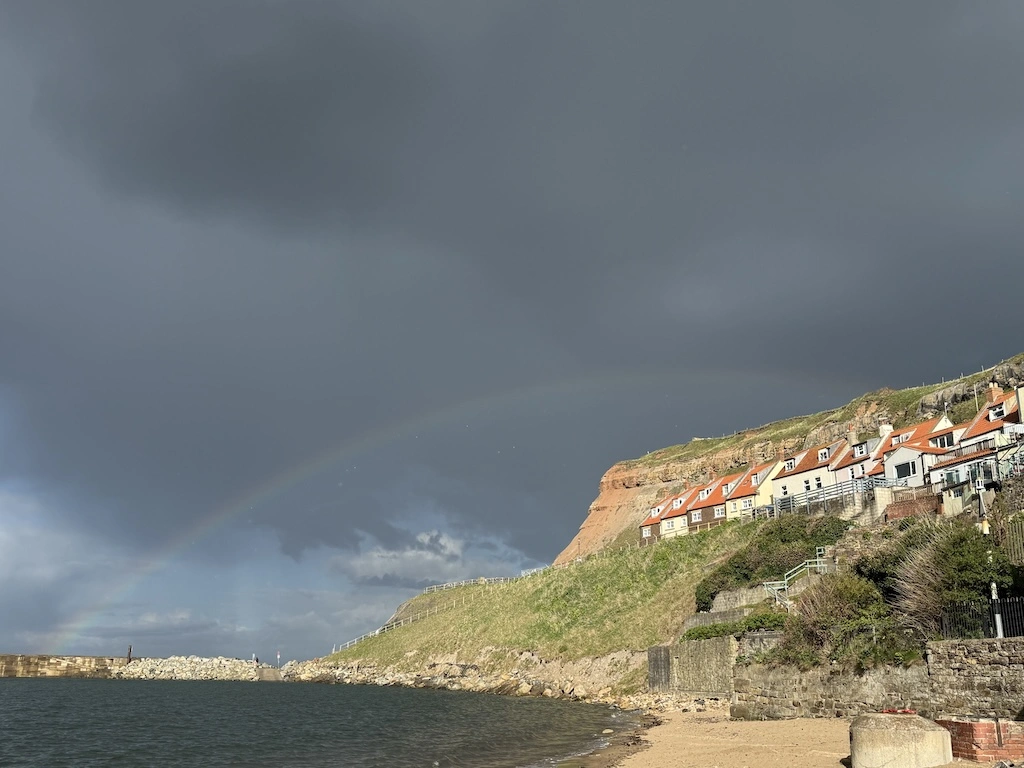
We were pretty lucky with the weather for the trip. While we saw some heavy rain while walking around on Saturday evening (which was enjoyable anyway as the skies were pretty dramatic for it, and we got a pretty neat rainbow as the reward for the wee soaking), Sunday was cool but sunny all the time we were on the hunt. The tide was very much in our favour too (although we'd planned it that way, of course) with low tide being around noon.
We did manage to cut it fine getting back off the beach though. This is a thing you have to watch out for while on the hunt there. While we had plenty of sand/rock to be walking around on where we were hunting, by the time we headed back to the slipway back off the beach the tide was up enough that we had to hop over a crashing wave or two. That part of the beach can be misleading so it's something you do have to watch out for.
So, like I said: I'm happy-knackered on the sofa and satisfied after a fun weekend away. We keep promising ourselves that we will hunt other spots on the North Yorkshire coast, and probably even hunt other parts of the UK, but Whitby is an easy drive and a fun place to just hang out.
Following on from yesterday's experiment with webp I got to thinking that it might be handy to add a wee command to blogmore.el that can quickly swap an image's extension from whatever it is to webp.
So v4.1 has happened. The new command is simple enough, called blogmore-webpify-image-at-point; it just looks to see if there's a Markdown image on the current line and, if there is, replaces the file's extension with webp no matter what it was before.
If/when I decide to convert all the png files in the blog to webp I'll obviously use something very batch-oriented, but for now I'm still experimenting, so going back and quickly changing the odd image here and there is a nicely cautious approach.
I have, of course, added the command to the transient menu that is brought up by the blogmore command.
One other small change in v4.1 is that a newly created post is saved right away. This doesn't make a huge difference, but it does mean I start out with a saved post that will be seen by BlogMore when generating the site.
For a good while now I've been pretty happy with the PageSpeed measurements of this blog, which in turn means I've been happy with the state of what's generated by BlogMore. I have pretty much everything that can be minified nice and minimal. At this point, the main thing that causes the speed measurement to fluctuate is image sizes.
I use a lot of PNGs on this blog. When I'm using images, they're almost always in posts that include screenshots, which in turn pretty much demand that I use a lossless format. When I take these screenshots I don't worry too much about the dimensions (within reason), and of course I don't really do anything to optimise how they'll work and appear on different display sizes. If I was to get too into that, it would add friction to writing something, and the whole point of this is to feel less friction when it comes to sitting at the keyboard.
So I've been living with the fact that some images can be pretty big. While I do make a point of using pngcrush on every image, it generally doesn't make a huge saving.
In my case, at least in the initial experiment, I decided to keep it all lossless. So far the results have been really good, cutting the image sizes down by a significant amount. For example, if I look at the images for yesterday's posts:
So far all I've done is convert the few latest posts that make up the front page of my blog, just so I can see what impact it has. I'm getting improved load times on mobile, for sure.
There are a couple of downsides to this, of course.
Now I want to do the whole blog, so while I can easily go through and convert all the png files to webp, converting all the image markup in the Markdown files isn't quite so simple, and even if I do write something to automate it, I'm then going to want to review it to make 100% sure nothing has broken.
I can't just then remove all the png files to cut back on the space used by the generated site. The front page of the site has a feed, and all the categories have a feed each too. This means that there could be HTML out there from some of my oldest posts, referring to the png files, and just removing them will result in broken images.
Overall though, it might be worth doing at some point soon. Meanwhile, from now on, I think I'm going to replace my pngcrush step with a mkwebp step and just use webp instead of png now.
boxquote.el is another of my oldest Emacs Lisp packages. The original code itself was inspired by something I saw on Usenet, and writing my own version of it seemed like a great learning exercise; as noted in the thanks section in the commentary in the source:
Kai Grossjohann for inspiring the idea of boxquote. I wrote this code to mimic the "inclusion quoting" style in his Usenet posts. I could have hassled him for his code but it was far more fun to write it myself.
While I never used this package to quote text I was replying to in Usenet posts, I did use it a lot on Usenet, and in mailing lists, and similar places, to quote stuff.
The default use is to quote a body of text; often a paragraph, or a region, or perhaps even Emacs' idea of a defun.
,----
| `boxquote.el` provides a set of functions for using a text quoting style
| that partially boxes in the left hand side of an area of text, such a
| marking style might be used to show externally included text or example
| code.
`----
Where the package really turned into something fun and enduring, for me, was when I started to add the commands that grabbed information from elsewhere in Emacs and added a title to explain the content of the quote. For example, using boxquote-describe-function to quote the documentation for a function at someone, while also showing them how to get at that documentation:
,----[ C-h f boxquote-text RET ]
| boxquote-text is an autoloaded interactive native-comp-function in
| ‘boxquote.el’.
|
| (boxquote-text TEXT)
|
| Insert TEXT, boxquoted.
`----
Or perhaps getting help with a particular key combination:
,----[ C-h k C-c b ]
| C-c b runs the command boxquote (found in global-map), which is an
| interactive native-comp-function in ‘boxquote.el’.
|
| It is bound to C-c b.
|
| (boxquote)
|
| Show a transient for boxquote commands.
|
|   This function is for interactive use only.
|
| [back]
`----
Or figuring out where a particular command is and how to get at it:
,----[ C-h w fill-paragraph RET ]
| fill-paragraph is on fill-paragraph (M-q)
`----
While I seldom have use for this package these days (mainly because I don't write on Usenet or in mailing lists any more) I did keep carrying it around (always pulling it down from Melpa) and had all the various commands bound to some key combination.
(use-packageboxquote:ensuret:bind("<f12> b i".boxquote-insert-file)("<f12> b M-w".boxquote-kill-ring-save)("<f12> b y".boxquote-yank)("<f12> b b".boxquote-region)("<f12> b t".boxquote-title)("<f12> b h f".boxquote-describe-function)("<f12> b h v".boxquote-describe-variable)("<f12> b h k".boxquote-describe-key)("<f12> b h w".boxquote-where-is)("<f12> b !".boxquote-shell-command))
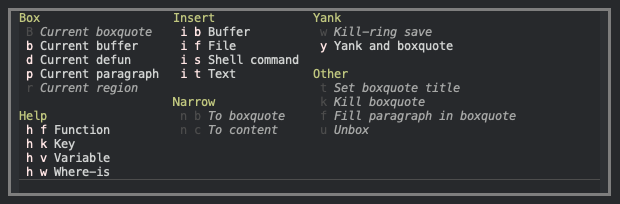
Recently, with the creation of blogmore.el, I moved the boxquote commands off the b prefix (because I wanted that for blogging) and onto an x prefix. Even then... that's a lot of commands bound to a lot of keys that I almost never use but still can't let go of.
and all the commands are still easy to get to and easy to (re)discover. I've also done my best to make them context-sensitive too, so only applicable commands should be usable at any given time.
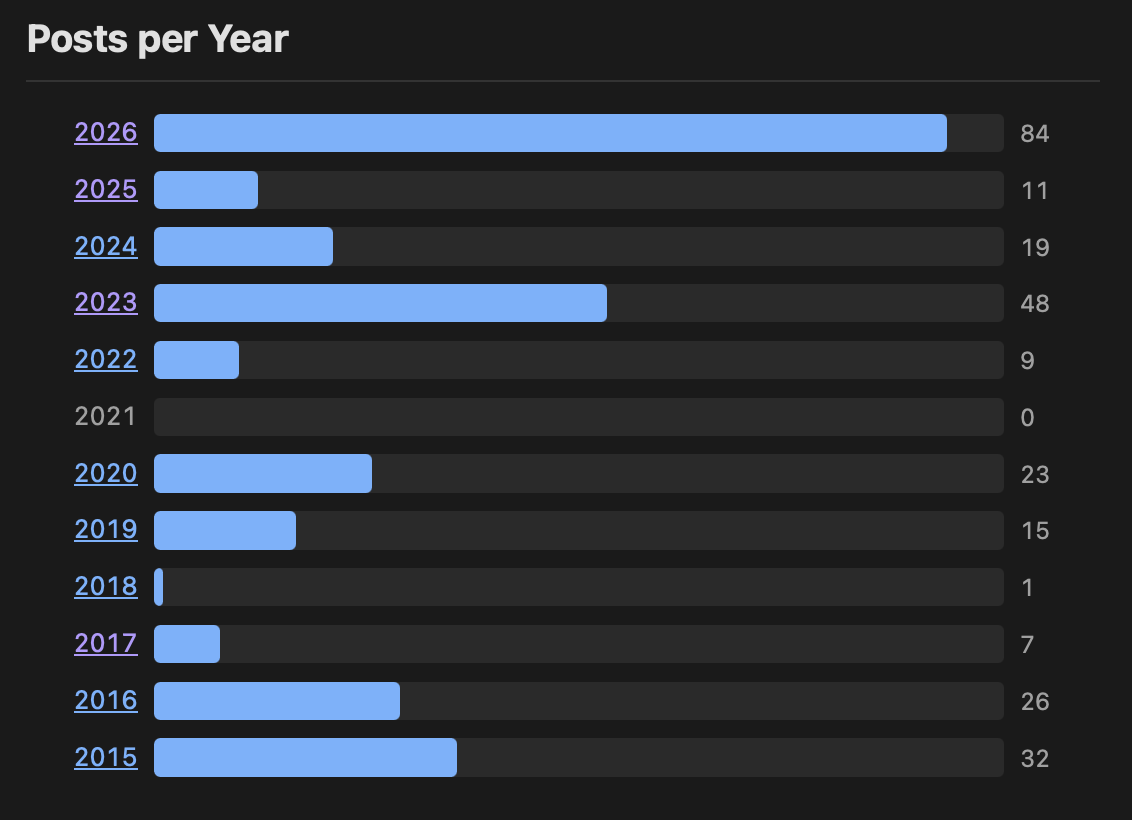
Quick little update for BlogMore, with a bump up to v2.14.0. This release comes from another feature request from Andy1, where he asked if it would be possible to have a year-based bar chart in the stats page.
Funnily enough I'd been thinking about the same thing just yesterday. I'd been wondering if it was worth adding, or if it would be overkill given the numbers can be seen in the archive. Having been asked by someone else... that was all the prompting I needed to kick that off.
Now I'm glad I did this. I like the result, it's a different way to visualise the values, and it's yet another way for people to discover past posts on the blog.