Quite a few weeks ago now -- I think it was around the time I started work on blogmore.el and got the new MacBook Air -- I remember sitting in a cafe in Edinburgh and via Mastodon having a conversation with Andy about tweaking better results out of PageSpeed Insights. I seem to remember him correctly observing that one of the big hits on the performance score was the size of images, and also the format, and that some SSG engines would go to the trouble of converting to the likes of WebP and/or generating different sizes that are appropriate to different screens, that sort of thing.
I can't quite remember where we left it, but I think it was considered more work than was worth worrying about, and perhaps swapping all images on our blogs to WebP would solve most of the issues.
For a couple of different reasons, late last week, I decided it was time to play with the problem. For some reason I've been pretty cautious with this PR. I planned it out last Friday night, kicked off work on it on Saturday morning, and have then been tinkering and changing it and testing it and iterating over it all weekend. Something about the nature of the change made me want to go very slowly with this. I think it was an unease about messing with the images that would get served, the nature of the new tags that would get emitted, the fact that there would be even more HTML tinkering going on, the possible complexity of maintaining the cache... lots of things to consider and this is supposed to be a nice, simple, unfussy site generator.
Anyway, I've just released v2.24.0 with this feature added. It's off by default, and is turned on by setting optimise_images to true. Then, when you build your blog, each PNG, JPEG or WebP image will be converted into one or more WebP images stored below static/images/optimised. How many are made for each image will depend on how image_widths is set. The physical size of each image (and how the image looks) can be affected by image_quality.
This does have two very obvious effects:
- It will result in your generated site being quite a bit bigger, if you have lots of images.
- It will result in the build time taking much longer.
The first issue is something I can't do anything about; it is what it is. The second issue, however, is something that can be dealt with. Given I've just made a release that speeds up build times, this would be a huge step backwards. So with this in mind, as the optimised images are created, a cache of them is also created in BlogMore's cache directory. This, again, does mean that more space is taken on your local storage to build your site, but it also means that repeated builds will remain fast.
If you run into problems or need space back, don't forget you can easily clear the cache.
So what's the result of all of this? Is it worth the effort? Well, to be sure, before I upgraded the version of BlogMore that I build this site with, I measured its performance.
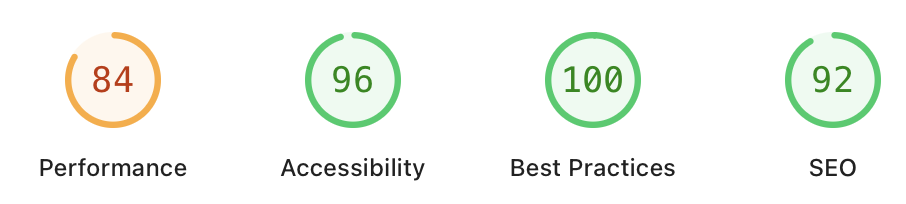
After upgrading and rebuilding, here is how the same home page measures up.
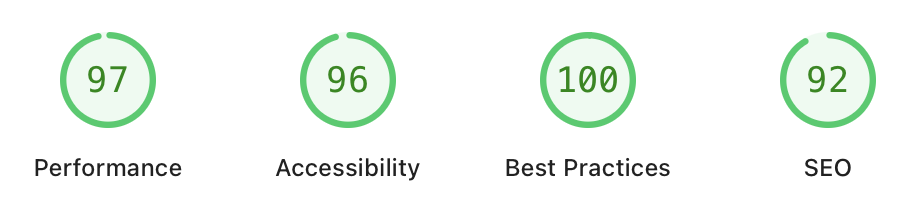
I was genuinely surprised by the difference. The settings I used were:
optimise_images: true
image_quality: 95
and, of course, almost all the images on this site are now WebP anyway. I think I was expecting it to have a small impact, but even having those WebP images turned into stepped sizes seems to have a very measurable effect.
I'm going to be keeping a close eye on how this works for the next few days. As I say, I've tested this as much as possible and gone over the code as carefully as time has allowed. If this feature does break something I hadn't anticipated I can always just turn it off again anyway. Meanwhile though, the improvement on mobile does seem genuinely worth it.
Have a comment or query about this post? Feel free to drop me a line about it.