Posts from May 2026

Gemini CLI vs GitHub Copilot (the result)

4 min read; 11 GFI

Following on from this morning's initial experiment, I think I'm settling on a winner. Rather than be annoying and have you scroll to the bottom to find out: it's Gemini CLI. Here's how I found the process played out, and why I'm settling for one over the other.


Gemini CLI

Initially this was an absolute mess. After letting it initially work on the problem, the resulting code didn't even really run. The first go, and the three follow-up prompt/result cycles that followed, all resulted in code that had runtime errors. I'm pretty sure it didn't even bother to try and do any adequate testing. This is odd given I've generally seen it do an okay job when it comes to writing and running tests.

Once I had the code in a stable state, with all type checking, linting and testing passing, it still didn't work. No matter how I tried to use the new facility it just didn't make a difference. No images were optimised. In the end I dived into the code, with the help of its attempt at debugging (it added print calls to try and get to the bottom of things -- how very human!), diagnosed what I thought was the issue (it was looking in the wrong location for the files to optimise), told it my hypothesis and let it check if I was right. It concluded I was and fixed the problem.

Since then I've had a working implementation of the initial plan.

Once that was in place it's been a pretty smooth journey. I've asked it questions about the implementation, had my concerns set to rest, had some concerns addressed and fixed, improved some things here and there, added new features, etc.

All of this has left me with 18% of my daily quota used up. While I think this is the highest I've ever got while using Gemini CLI, it still feels like I got a lot of things done for not a lot of quota use.

GitHub Copilot

Initially I thought this had managed to one-shot the problem. Once it had finished its initial work the code ran without incident and produced all the optimised files. Or so I thought. Doing a little more testing, though, it became clear it was only optimising a subset of the images and it didn't seem to be producing the actual HTML to use the images.

On top of this it didn't even follow the full plan that was laid out in the issue it was assigned. For example: once I'd got it doing the main part of the work, it became apparent that it had pretty much ignored the whole idea of using a cache to speed this process up. I had to remind it to do this.

At one point I switched from the in-PR web interaction with Copilot, and used the local CLI instead. When I ran that up it warned me that I was already 50% of the way through some sort of rate limit and this wouldn't reset for another 3 hours. I think I was about 40 minutes into letting it try and do the work at this point.

After a bit more testing and follow-up prompts, I got to a point where I had something that looked like it was working; albeit in a slightly different way from how Gemini CLI did it (the Copilot approach was writing the optimised images out to the extras directory, mixing them in with my own images; Gemini opted for having a separate directory for optimised images within the static hierarchy).


At this point I will admit to not having carefully reviewed the code of either agent; that's a job still to do. But while Gemini got off to a very rocky start, with a bit of guidance it seemed to arrive at an implementation I'm happy with, and one that seems to be working as intended. While it didn't anticipate all the edge cases, when I asked about them it easily found and implemented solutions for them. Moreover, the fact that I could do all of this and confidently know the "cost" made a huge difference. Copilot seems to generally approach this like a quota or rate limit should be a lovely surprise that will destroy your flow; Gemini has it there and in front of you, all the time.

As for the general idea that I'm working on: I think I'm going to implement it. Weirdly I'm slightly nervous about building the blog such that it won't be using the images I created, but I also recognise that that's a little irrational. Meanwhile I'm very curious about the impact this might have on the PageSpeed measurement of the blog. While it's far from horrific, image size optimisation and size declaration seem to be fairly high on the things that are impacting the performance score (currently sat at 89 for the front page of the blog, as I type this).

The other thing that gives me pause for thought about merging this in, and then subsequently using it, is that I've just finished migrating all images to webp, and so saving a lot of space in the built version of the blog. Generating all the responsive sizes of the images eats that up again. With this feature off, the built version of the blog stands at about 84MB; with it on, this rises to 133MB. That extra 49MB more than eats up the 24MB saving I made earlier.

On the other hand: storage is a thing for GitHub to worry about, what I'm worrying about here, and aiming to improve, is the reader's experience.

I'm going to sit on this for a short while and play around with it, at least until I get impatient and say "what the hell" and run with it.
Gemini CLI vs GitHub Copilot (redux)

1 min read; 10 GFI

Given I'm almost certainly going to drop GitHub Copilot starting next month, I'm using Gemini CLI more and more for BlogMore. Yesterday evening, I used it to plan out an idea for a change to the application. Now that I've migrated all images to WebP, I thought it might be interesting to look at the idea of having a responsive approach to images. This is something I don't know a whole lot about (never having needed to bother with it before), but it also happens that I need to read up on this anyway for something related to the day job; given this, it felt like a good time to experiment.

Together with Gemini CLI a plan was created.

This morning, over second coffee, I've kicked off the job of implementing it and, honestly, Gemini CLI is really struggling. It "implemented" the change pretty quickly, within minutes, but it just plain didn't work. Since then I've had it iterate over the issue four times and now it's struggling to make it work at all. It's still beavering away on this as I type, and consuming daily quota at a fair rate too.

So, while I still have GitHub Copilot, this feels like a good point to play them off against each other at least one more time. Having saved the plan Gemini wrote last night as an issue, I've assigned it to Copilot (using Claude Sonnet 4.6). As I type this, I have Gemini racing to get this working in a terminal window behind Emacs, meanwhile there's Claude doing its thing in GitHub's cloud.

It'll be interesting to see if Copilot manages to one-shot this, for sure Gemini is far off a one-shot implementation.

Converted to WebP

1 min read; 11 GFI

The job is finally done. After considering moving all the images in the blog over to WebP, and then finally getting the migration under way, I'm all done.

As I mentioned before: I've done this by hand, one post at a time, also adding missing covers as I go. The process went faster than I anticipated and I found that adding linting support to BlogMore really helped with this process. Each time I made a batch of changes I could run the linter to make sure I'd not broken any image links.

As for the result: I've brought the total size of images on the blog down from around 56MB to about 32MB, give or take (keep in mind the latter figure also includes all the WebP images I've added while blogging since I started this process). While I don't really have to worry so much about the storage costs of these images (I'm using GitHub Pages after all), overall, over time, there should be savings in the time it takes for readers to load any given page.

Braindrop v1.1.0

1 min read; 9 GFI

Braindrop

It's now well over a year since I released Braindrop and it's in constant use by me. I continue to find raindrop.io a really useful resource, and more often than not manage, edit, tag, and review what I save there with Braindrop, including which become public, and which don't.

I've made a few small changes to the application in the past year and a bit, but not much. It's been stable and useful. But on the back of a recent change I made to OldNews, I felt I needed to make the same change here.

So with the release of v1.1.0 I've added three new commands to the application:

  • JumpToNavigation - Jump to the navigation panel; bound to 1 by default
  • JumpToRaindrops - Jump to the main raindrops list panel; bound to 2 by default
  • JumpToDetails - Jump to the details panel for the selected raindrop, if the panel is visible; bound to 3 by default

Now it's just a little easier and quicker to get around the UI.

If raindrop.io is your thing, and you want to work with your saved bookmarks in the terminal: Braindrop is licensed GPL-3.0 and available via GitHub and also via PyPI. It can also be installed using uv:

uv tool install braindrop

If you don't have uv installed you can use uvx.sh to perform the installation. For GNU/Linux or macOS or similar:

curl -LsSf uvx.sh/braindrop/install.sh | sh

or on Windows:

powershell -ExecutionPolicy ByPass -c "irm https://uvx.sh/braindrop/install.ps1 | iex"

If uv isn't your thing then it can also be installed with pipx:

pipx install braindrop

Once installed, run the braindrop command.

Planning on returning to streaming

2 min read; 8 GFI

For the past few years, pretty much every evening for a couple of hours, I would stream while playing games on my PS5. Before that I went through a period of streaming while playing games on my VR gaming setup, often mucking about in things like cyubeVR and Gunman Contracts. It was a fun time and I got the chance to make some fun acquaintances online. All of this was made possible by the fact that I had a really nice, fast fibre connection where I lived.

Late on last year I moved. Unfortunately the location I moved to didn't have fibre available. That's not to say the house lacked fibre; it was that it wasn't even possible to get it to the house. For some time it wasn't clear that it ever would be. So I was back on 35Mbps down and 3Mbps up, on a good day. Not a good streaming experience at all.

I tried. I had a few sessions. Sometimes it would fail. Sometimes it would work but the quality would be bad. It wasn't a good time. Because of this I've taken an extended break from streaming.

The complete lack of availability of fibre changed a couple of months ago. Since moving I've made a point, every few weeks, of going and seeing if there are any plans to run fibre to our location. Finally, back in March, one day, I checked and I COULD ORDER FIBRE!

I'd actually been through this whole thing once before. When I moved back in 2019, I went from a 35/3 connection (which still seemed pretty fast then) down to a horrible 5/0.6, on a good day, kind of connection. That was hard (although a deeply worthwhile trade under the circumstances at the time). When I finally got fibre at that place it was amazing. I went from 5/0.6 to 950/150 overnight. It felt like I had my whole Steam Library locally available the whole time.

So, when I realised that fibre was available to me again, that was an instant sell. As I say, this happened back in March and I still don't have it, because actual digging and stuff has had to happen. People had to write to people to get permission to do things, and so on. It's been kind of agonising watching the slow but steady progress towards being very online again.

But, soon enough, I should be back. I won't stream as much as I used to, just because the move entailed having other things to be doing in my evenings, and having new responsibilities. But I do aim to get some gaming in two or three times a week, most weeks. Also, whereas the last few times I've streamed it's been me mostly messing about in Death Stranding 2, once I have a reasonable connection again I think it'll be time to pick a new game and (attempt to) play it through.

No plans on which game yet, but there's a handful on my "to consider" list.

BlogMore v2.23.0

1 min read; 11 GFI

I wasn't quite planning on making a new release of BlogMore so soon after the previous version, but I had a couple of ideas that I wanted to add, and then also got a nifty request too; so here we are: we have v2.23.0.

The first couple of changes relate to the cache. In the previous release I added a cache of the FontAwesome metadata, which in turn means that a cache directory is being created. I felt it would be fair and useful to provide a command that both lets the user know where the cache lives, and to also remove it. So now BlogMore has a cache command with two sub-commands:

  • location: tells you where the cache directory is located
  • clear: removes the cache directory

Also, now that we have a cache directory, it makes sense to use it a bit more to squeeze even more time out of the build process. So starting with this release, per content directory, the various icons that are created for the site are cached. This means that if the source image doesn't change, for each subsequent build there's no conversion and resize for every variation. This saves a good fraction of a second, making the build of my blog feel noticeably quicker.

Finally, earlier today, Andy asked if it would be possible to have the BlogMore serve mode auto-reload any page being viewed in a browser, when the site is regenerated. It was something I'd considered myself a couple of times so that was a good reason to finally look into it. Not knowing how this could be achieved1, I prompted Gemini for an idea, stressing I wanted a solution that didn't disturb a generated site; it came up with a convincing solution. I let it run at it and, along with a few changes of my own, it seems to be working a treat.

This, of course, now makes me want to squeeze even more time out of the build process.


  1. Web development has never been my primary area of knowledge. 

Gemini is kind of messy

1 min read; 11 GFI

As I've mentioned a few times recently, I'm using Google's Gemini CLI more at the moment; in part because I have a Gemini Pro account so it makes sense to use it, but also in anticipation of dropping anything to do with Copilot.

While I've had some troubles with it -- as can be seen here, here and here for example -- I'm mostly having an okay time. The code it writes isn't too bad, and while it seems to need a little more direction and overseeing than I've been used to while using Copilot/Claude, it generally seems to arrive at sensible solutions for the problems I'm throwing at it1.

One difference with working with Copilot CLI that I have noticed, however, is that Gemini doesn't seem to care for cleaning up after itself. When faced with a problem it'll often write a test program or two, perhaps even create a subdirectory to hold some test data, run the tests and be sure about the outcome. This is good to see. It's not unusual for me to do this myself (or at least in the REPL anyway). But it really doesn't seem to care to actually clean up those tests. A handful of times now I've had it leave those files and directories kicking around. I've even said to it "please clean up your test files" and it's gone right ahead and done so, which suggests it "knows" what it did and what it should do.

This also feels like a new source of mess for all the people who commit their executables and the like to their repositories. That should be fun.

The thing I don't know or understand, at least at the moment, is if this is down to the CLI harness itself, or the choice of model, or a combination of both, or something else. I'm curious to know more.


  1. There is a weird thing I'm seeing, which I want to try and properly capture at some point, where it'll start tinkering with unrelated code, I'll undo the change, it'll throw it back in the next go, I'll undo, rinse, repeat... 

When Gemini CLI gets stuck

1 min read; 7 GFI

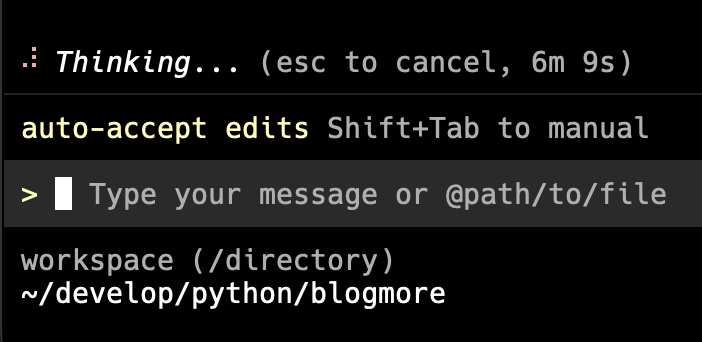
Another evening, and another period of Gemini CLI getting stuck thinking. So this time I thought I'd try something: cancel it while it was thinking and change the model.

Gemini Thinking...

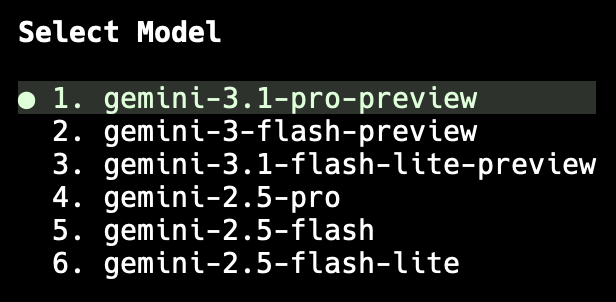
I was working on something new for BlogMore and, sure enough, after a wee while, we got stuck in "Thinking..." mode. So I hit Escape and asked to pick a different model. I chose to pick manually, and went with gemini-3.1-pro-preview.

Picking the model

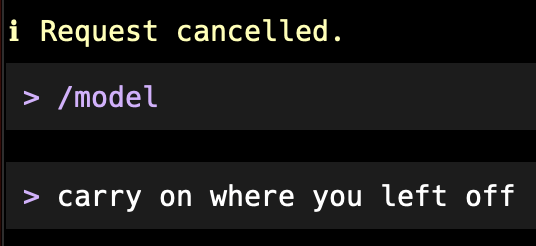
I then literally asked that it carry on where it left off...

Carry on

...and it did! It worked. No more sitting around thinking for ages.

Watching the quota after doing this, it looks like the model I was using ate quota faster, but that was worth it given I've never come close to hitting full quota with Gemini CLI.

Once the immediate job was done, I went back to auto and it worked for a bit, only to get stuck thinking again. I repeated this process and it did the trick a second time. From now on I'm going to use this approach.

It does, again, highlight how unreliable these tools are, but at least I've found a workaround that works for now.

Stopping an accidental push

1 min read; 13 GFI

After starting to make use of the GitLab/Codeberg sync approach for various repositories, I found that my muscle memory in Magit was getting the better of me and, on occasion, I'd push a new branch to backups when I wanted origin. I sensed there had to be a way round that.

Here's what I settled on:

(advice-add
 'magit-list-remotes
 :filter-return (lambda (remotes) (delete "backups" remotes)))

Now I never see backups in Magit and now I can keep using my muscle memory (rather than actually reading what is in front of me, it seems).

BlogMore v2.22.0

2 min read; 9 GFI

As mentioned a couple of days ago, I've been toying with finding areas of improvement in respect to the performance of BlogMore. Until now, for good reasons, I've not really paid any attention to how fast (or slow) BlogMore is when it comes to generating my blog. While it's never been blindingly fast, it's always been fast enough and I was more keen on making it work right. So for a good while the focus has been on well-formed output, stuff that keeps the crawlers happy, that sort of thing.

But now that I'm in a place where new features aren't really so necessary, it does feel like a good point to find any easy wins in speeding up the code. I think it's gone well.

BlogMore v2.22.0 contains quite a few internal changes that speed up some core parts of site generation. Many of the things identified by Gemini, back when I first kicked this process off, have been done. The amount of Markdown->HTML conversion work has been vastly reduced, which has had a pretty big impact on all sorts of things. There's also caching of the FontAwesome metadata1 which should save a fair bit of time on slower connections. I did avoid the whole business of parallel processing as I dabbled with this near the start of the project and I could not wrangle a win out of that at all; given how much of a win I've had with these changes, I doubt that would change (it could conceivably make things worse).

So, how much faster is it? Roughly, based on my tests, a site generates in about 1/4 of the time it did before. On my M2 Mac Mini my blog builds in under 3 seconds; with v2.21.0 it took around 13 seconds. In my case that's with all the optional features of BlogMore turned on.

Naturally this work has touched on a lot of internals of the code, and made significant changes to the generation pipelines of lots of different pages and features. I've done my absolute best to compare2 the output of v2.21.0 and v2.22.0 and I can't see any significant differences3. When trying out v2.22.0 I would suggest paying just a little extra attention to the result, to be sure you're happy that nothing has changed.


  1. It lives in ~/.cache/blogmore on Unix and Unix-like systems, or %LOCALAPPDATA%\blogmore\cache on DOS/VMS-influenced systems. 

  2. Lots of diff -rq and then diffing an assorted sample of files that showed differences to inspect what was actually different. 

  3. Actually, there's a small difference in the context shown in backlinks, but this was a deliberate change and a very small cosmetic enhancement.