Posts from May 2026

BlogMore v2.20.0

3 min read; 12 GFI

I've just released BlogMore v2.20.0. There are five main changes in this release, and a lot of changes under the hood.

First, the under-the-hood stuff: while this isn't going to make a difference to anyone using BlogMore (at least it shouldn't make a difference -- if it does that's a bug that deserves reporting), the main site generation code has had a lot of work done on it to break it up. The motivation for this is to make the code easier to maintain, and to try and steer it in a direction closer to how I'd have laid things out had I written it by hand. The outcome of this is that, where the generator was over 2,000 lines of code in a single file, it's now a lot more modular and easier to follow.

Some other internals have been cleaned up too. Generally I've had a period of reviewing some of the code and reducing obvious duplication of effort, that sort of thing.

Now for the visible changes and enhancements in this release:

Improved word counts

Until now the word counting (and so the reading time calculations) were done by stripping most of the Markdown and HTML markup from the Markdown source. I wasn't too keen on this approach given that the codebase had a method of turning Markdown into plain text. So in this release the regex-based cleanup code is gone and word counts (and so reading times) use the same Markdown to plain text pipeline as anything else that needs to work on plain text.

Fixed a word count and reading time disparity

It was possible, in the stats page, to have one post appear to have the lowest or highest word count, but to not have the lowest or highest reading time. This was because reading times are always calculated to the minute and so there could be a disparity due to this rounding. The calculation of those stats now takes this into account.

Added an optional title to the socials

The socials setting in the configuration file has had an optional title property added for each entry. Until now the tooltip for an entry would be whatever the site was set to. Generally this works but if you have two or more accounts on the same site, or if you want to use a site value for something different, there was no way of making the tooltip more descriptive.

As an example, currently it's not possible to support Codeberg as a site. On the other hand git is available so it can be used as a substitute icon. The problem is, with this:

- site: git
  url: https://codeberg.org/davep

the tooltip will just say "git". With this update you can do this:

- site: git
  title: Codeberg
  url: https://codeberg.org/davep

and the tooltip will say "Codeberg".

As mentioned: this is optional. If there is no title the previous behaviour still applies.

Wall-clock time measurement

Yesterday, Andy posted about BlogMore's performance with respect to the different optional features. It's something I haven't really considered yet (possibly in part because this blog isn't anywhere near as big as his), but could be a good source of tinkering in the near future. His work to test the different parts of the tool did get me thinking though: it would be neat to know how long each part of the generation process takes.

So now, when a site is generated (either when using build or serve), the time of each step is printed, as is the overall generation time.

Markdown in HTML support

Yesterday I noticed that, on one of my posts, what had been written as a simple caption for an image wasn't rendering as it used to. The actual content of the Markdown source for the post contained this:

<center>
*(Yes, the tin was once mine and was once full; the early 90s were a
different time)*
</center>

While the text was centred, the raw Markdown was left in place (it should have been italic text). The reason for this is that BlogMore had never enabled Markdown-in-HTML support. So, as of this release, if the enclosing tag has markdown="1", any Markdown inside the tags will be parsed. This means the above becomes this:

<center markdown="1">
*(Yes, the tin was once mine and was once full; the early 90s were a
different time)*
</center>

I did think about doing something to turn it on by default (the fact that I didn't have such a "switch" in the post before suggests that Pelican did just always do this), but really I feel this approach is more flexible and less likely to result in unintended consequences.

blogmore.el v4.5.0

1 min read; 6 GFI

Carrying on with the theme of being lazy while editing posts, I've released blogmore.el v4.5.0. This version adds blogmore-set-as-cover. With this, if you place point on a line that is an image and run the command, it is set as the cover for the post.

Sure, it's not like it's hard to copy, move, insert a new line, type cover: and then paste the text, but this is faster and more accurate.

And I'm lazy.

And I like hacking on Emacs Lisp that makes my workflow flow faster.

More Codeberg issues

1 min read; 11 GFI

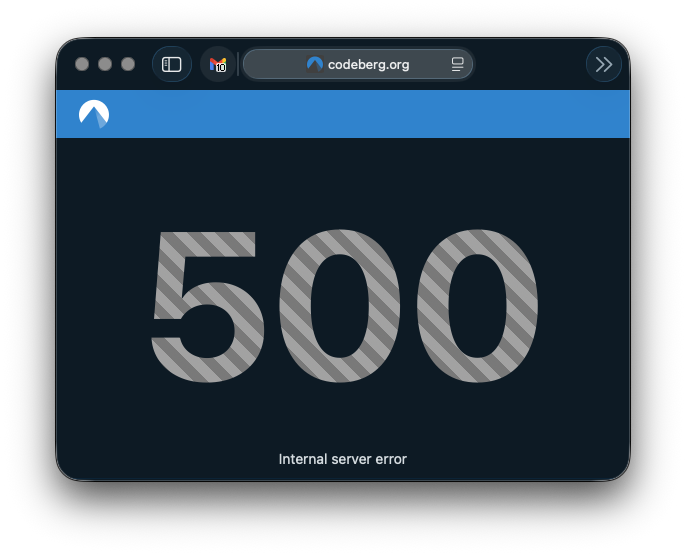
As I've said earlier, I'm not looking to move off GitHub any time soon, but I am curious about evaluating the options. So far, while trying out Codeberg, I am finding it to be very unstable.

A little earlier I was simply browsing some of the repositories I've been adding and got very slow load times, and then a 500.

Codeberg 500 error

As I've said elsewhere: I really wouldn't expect perfection. I doubt that Codeberg has the money behind it that GitHub does. But, again, there is that issue with moving off GitHub because of instability; from that point of view it would feel like swapping some occasional instability for what, at the moment, is feeling like regular instability to the point that I wouldn't get too much done.

Syncing GitHub to GitLab and Codeberg

2 min read; 10 GFI

I've had a GitLab account since December 2017. This came about because of the new job I started in January 2018. They used a self-hosted internal instance of GitLab for all their code, so it made sense I get familiar with it (it wasn't hard; especially back in 2017 it was near enough a clone of GitHub in terms of what it did). Since then, though, I've never really done anything with it. I think I had a repo or two on there for a short while, but I must have nuked them at some point because the account has been empty for the longest time.

A Codeberg account, on the other hand, only got created the other day. Having created this, I got to thinking about how I might use it. In doing so I thought back to my GitLab account and then also got to thinking about where all my public code lives, and how "safe" it is.

Now, sure, the whole point of Git is that it's distributed. Forges are a useful thing to have and work with, but they shouldn't be the place where your code lives. On the other hand, I've had so many machines, and so many work environments, that it has become the case that my GitHub account has become the storage location for my code and projects.

Mostly this is fine. If GitHub were to disappear tomorrow I imagine we'd all have bigger things to be worrying about anyway. But the principle stands: why not distribute the load? Why not distribute the effort when it comes to sharing code I write?

So yesterday I finally decided on a plan: for the moment at least, I'm going to keep using GitHub as my "primary" location for working on stuff. It's where I'll have WiP branches, it's where I'll keep issues, it's where I'll encourage people to raise requests and stuff, it's where I'll host this blog. But I'm going to start syncing projects to both GitLab and Codeberg. I see this as having two benefits: anyone who doesn't want to interact with GitHub can now easily fork code, and if they wish they can raise issues and the like too. Meanwhile, in doing this, I'll also have the added benefit of my code being "backed up" in at least three different locations1.

The approach I've settled on, for the moment, is based around this little shell script:

#!/bin/sh

# Check if a repository name was provided
if [ -z "$1" ]; then
    echo "Error: No repository name provided."
    echo "Usage: $0 <repo-name>"
    exit 1
fi

REPO_NAME="$1"

# Check if the current directory is a Git repository
if ! git rev-parse --is-inside-work-tree > /dev/null 2>&1; then
    echo "Error: This directory is not a Git repository."
    exit 1
fi

echo "Configuring multi-forge backup sync for: $REPO_NAME"

# Set up the remote called backups. Anchor it to Codeberg.
git remote remove backups > /dev/null 2>&1
git remote add backups "ssh://git@codeberg.org/davep/${REPO_NAME}.git"

# Set up the push URLs.
git remote set-url --push backups "ssh://git@codeberg.org/davep/${REPO_NAME}.git"
git remote set-url --add --push backups "git@gitlab.com:davep/${REPO_NAME}.git"

# Only ever backup main.
git config remote.backups.push refs/heads/main:refs/heads/main

echo "----------------------------------------------------"
echo "Backups configured:"
git remote -v
echo "----------------------------------------------------"
echo "To perform the initial sync, run: git push backups main"

### setup-forge-sync ends here

I'm going to keep all repo names the same2. So when I use this script it'll set things up so I can git push backups and main will then get pushed up to both GitLab and Codeberg. I don't feel the need to be keeping any WiP branches in sync or kicking about, likewise any gh-pages branches.

While I'm sure I could have done something a little more automated, this feels like a neat and simple approach, and also allows me to curate what appears in the two other places over time (I suppose, eventually, I'll mirror everything that isn't a dead experimental repo, but meanwhile I'll prioritise projects that are either still very useful or which I'm actively developing and maintaining).


  1. Yes, I have other backups too, but they're always current-working-machine type backups. 

  2. Except, perhaps, for any repo whose name starts with .; I seem to recall that GitLab can't handle that, for some bizarre reason. Perhaps that's fixed now? 

blogmore.el v4.4.0

1 min read; 8 GFI

I've released an update to blogmore.el, my Emacs package that helps me out when writing this blog. I've added two commands to this version which help me be lazier than ever.

The first is blogmore-become-like. When run, this prompts for another post and, once selected, it sets this post's category and tags to be the same as the other one. I added this because I'm often writing an occasional series of posts that are all about the same project, and so I always find myself copying and pasting those frontmatter properties from another post.

The second command I've added is blogmore-toggle-image-centre. Built into BlogMore is a little bit of styling that will ensure an image is placed in the centre of the page, if the URL for the image has #centre on the end. This means that, for most images I add, I have to go and edit the URL to add that. Now I can just run a single command when the cursor is on an image and it'll add (or remove, if it's already there) that styling hint.

In both cases, I've added the commands to the transient menu too.

The webp migration is under way

2 min read; 11 GFI

I've finally made a proper start on the planned migration to webp for images. I did consider writing a tool that would go through and migrate the files, and update the Markdown, all in one go, but something about that makes me kind of nervous. While it wouldn't be a destructive approach (the whole blog is under version control after all), I just have this niggling feeling that I'd miss something and it would sit broken, unnoticed, for ages.

So instead I've decided to take a one-post-at-a-time approach, making the migration by hand. As well as having the benefit of letting me go slowly and check my work as I go, I can also do some tidying up of old posts. So while I do this I'm also going to tidy up obviously broken links when I notice them, and also remove embedded tweets (swapping to the simple blockquote version).

Another thing I'm doing is adding cover images where possible. I'd been running this blog for a long time before I started to use cover (it might be that I didn't start until I moved to Pelican). Since then I've tried to use it any time there's an appropriate image in a post. More recently, I added cover images to the graph view so they're even more useful now. Back-adding a cover to older posts will make them more appealing to discover in the graph because those older notes will acquire attention-grabbing thumbnails too.

One thing I wanted to do was have an easy way to keep track of where I'm up to in the migration. It's going to be a steady process that's going to take a few days, doing a few posts at a time. So to aid this I've added this to the Makefile of the blog:

cd content/extras/attachments
find -E ./ -iregex '.*\.(png|jpg|jpeg)$' | cut -d'/' -f2,3,4 | sort -u

With this I get a handy list of dates of posts that still have unconverted PNG or JPEG files.

Of course, for a wee while, this will not get to an empty list because I want to make sure some of the more recent posts still have their older images available as they might be in feeds out there. More recently I've only been using webp for images, so once the webp-using posts fill the main RSS and Atom feeds I can clean out the last of the bulkier images.