It's been a short while since I last made a release of BlogMore; in fact, the time since the last update might be the longest I've gone between versions since the first release. I think this might mean it is actually more or less feature complete!
More or less.
Except... I did have to spend a bit of time (and some Antigravity quota) this morning adding something I've been wanting to add: automatic generation of cover images aimed at social media sites (so the kinds of images that show up when you post to Mastodon, Bluesky, or that other terrible site some people still seem intent on using for some perverse reason).
BlogMore has supported the declaration of a cover from the very first release. This was done in a way that it was up to the author of the post to create and include the image. Personally, in my posts, I've tended to set the cover to point at the most relevant image in the post, if a post has any images. I've also had BlogMore always work such that a post without a cover has the social image set to the site's logo image (if it has one).
This works, but it does mean that all of the posts I make that have no cover (feels like that's roughly half of them -- I could probably do something fun with the dump of posts to know for sure) simply show my masked face when I share them. That's by design, but not ideal.
So v2.44.0 adds support for an "auto covers" feature. I've tried to do this in a way that is fully backward-compatible. The feature itself is off by default, won't override any covers you have specifically set for posts, and can also be used and controlled on a per-post basis.
The core of the feature is controlled by a new auto_covers section in the configuration file. In here you can control if the feature is on or off by default, what layout to use for the cover images, what colours to use, and so on. There's plenty to experiment with and it should be fairly straightforward to create covers that look unique to your blog.
There are three styles of cover that can be generated. The minimalist does as the name suggests: it tries to keep things as minimal as possible (and will generally result in the smallest file).

The split type is a little richer, including the site logo if you've set one. Generally the image size will be bigger than minimalist.

Finally there is editorial, which includes the title, logo, the description for the post, the category and the tags. Because this is the busiest style it will generally result in the biggest file.
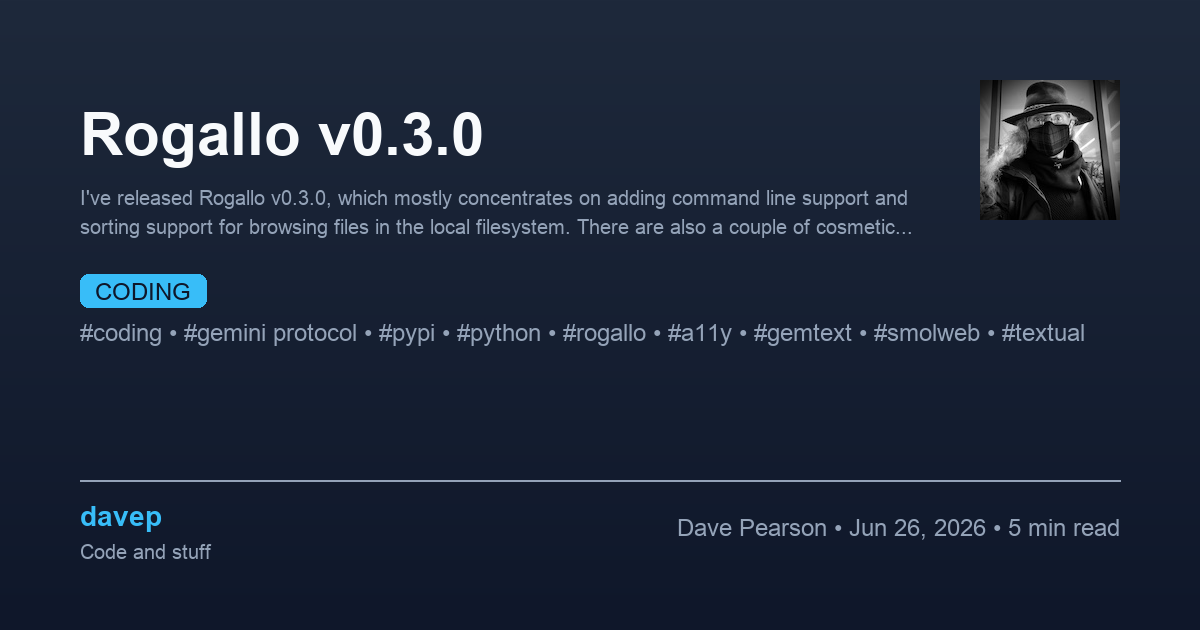
As you might imagine, generating these images for every post that doesn't have a cover set can be very time-consuming. Because of this the generated images are cached, so subsequent site generations should hardly ever be affected (unless you change any of the parameters relating to cover generation).
As with image optimisation, this does mean that more storage is going to be used between blog builds. If you use this cover feature, not only will more images be created in your static site output, but the BlogMore cache related to the blog will also grow. Keep this in mind when deciding to use this feature.
It might also be the case that you don't want to generate cover images for all of your historical posts, but you do want them for all future posts. That approach is possible. All you need to do is set everything as you want it in the configuration file but set enabled under auto_covers to false. Then, for any post where you do want an auto-generated cover, simply set auto_cover in its frontmatter to an appropriate value. To go with the default settings, set it to default, or if you want to control the layout per-post, set it to the desired layout for that post.
To try and summarise, the rules for selecting a cover for a given post are something like:
- If it has a
coverset in its frontmatter, that is used. - If it has an
auto_coverset to anything other thannonein its frontmatter, the desired type of auto-cover will be used. - If it has neither
covernorauto_coverset, a cover will be generated ifauto_covers.enabledis set totrue.
Hopefully that's clear.
Despite this post having images in it, I've not set a cover for it and I have the following setup in my configuration file:
auto_covers:
  enabled: true
  layout: editorial
  background_type: gradient
  background_color: "#0f172a"
  gradient_colors:
    - "#1e293b"
    - "#0f172a"
  font_family: "Inter"
  text_color: "#f8fafc"
  meta_color: "#94a3b8"
  accent_color: "#38bdf8"
  show_author: true
  show_read_time: true
  show_date: true
  show_logo: true
This should mean that, if I've got this all working correctly, this post, and all historical posts without a cover, get auto-generated covers. This should also be very evident as you hover over posts in the graph.
Fingers crossed it all works out...
Have a comment or query about this post? Feel free to drop me a line about it.