I've just made a small release to Rogallo, bumping the version to v2.1.0. This release mostly has some small cosmetic fixes and improvements, and one new feature.
The cosmetic improvements include:
- Fixed the verification method and client certificate status icons in the viewer title bar so they don't use the "this is clickable" mouse cursor when there's nothing worth clicking.1
- Adjusted the styling of tooltips so they better stand out against the background text.
- Fixed the cosmetics of the viewer when the content is set to a narrowed state (some of the changes in v2.0.0 had inadvertently changed some of the styling).
The new feature is one of the last issues I wanted to address when it came to all things related to Gemini and security: the option to "forget" the certificate fingerprint of a host when the fingerprint has changed.
Until now, if you visited a site that was using a self-signed certificate, and the fingerprint for that certificate had changed, you'd just get an error toast and the page would not be loaded. Technically this is the safest thing to do, but it's not the most pragmatic approach most of the time; capsules will change up certificates and you probably know you can still trust them.
So, from now on, rather than simply refusing to load the page, Rogallo will tell you about the issue and then offer to forget the fingerprint and try again.
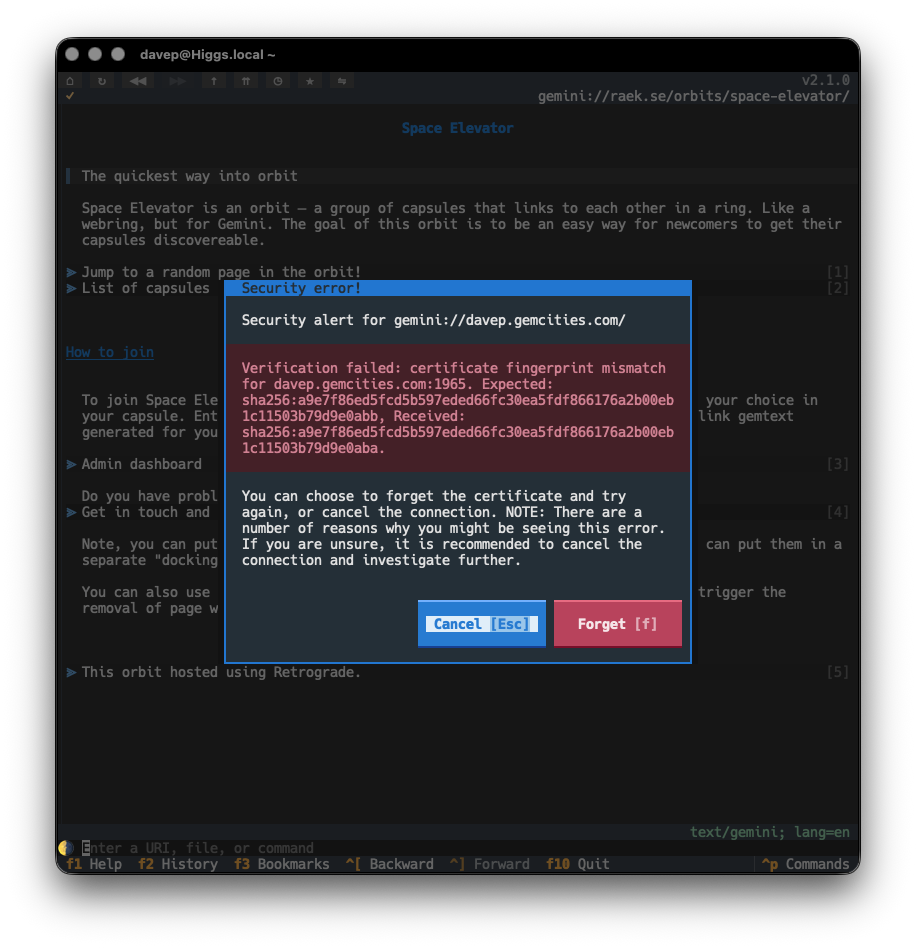
This should make the issue more noticeable and also easier to handle.
If you're wondering what that even means... it only matters if your terminal of choice supports the kitty mouse pointer shapes protocol. ↩
Have a comment or query about this post? Feel free to drop me a line about it.