Posts from October 2026

TIL: XScreenSaver for iOS

1 min read; 8 GFI

Today I learned that there's a version of XScreenSaver for iOS. I haven't used XScreenSaver in years; probably decades at this point. Not because I don't like it or anything; it's just because I've not had a GNU/Linux desktop machine in that long. But the chance to install the app on my phone and scroll through all the different graphics demos is too good to pass up.

Tron Bit

I noticed this because I saw xscreensaver-official/xscreensaver pop up in my feed on GitHub.

Digital Rain

I, of course, added a star to the repo because the owner asked nicely.

Flying Toasters

Now I might have to throw the Mac version on my Macs.

Or, you know, turn one of my older MacBooks into a Linux laptop and use it there (something I keep meaning to do).

Rogallo v3.2.0

1 min read; 7 GFI

I've just bumped Rogallo to v3.2.0. This release has one small new feature and one wee bug fix.

The new feature is something I found myself wanting a short while ago. I was copying some URIs and then turning them back into Gemtext links in another document; after doing that a few times, I realised that it might be handy to extend the "copy URI" facility in the viewer so that there's a "copy URI as Gemtext" version. To this end, I've added gemtext_link.copy_link_as_gemtext as a viewer widget binding, bound to Shift+c by default.

The fix is a small one to how MIME type checks are done. In one particular case, Rogallo wasn't stripping off any parameters where it should have. This is now fixed.

Steam Machine set up

3 min read; 10 GFI

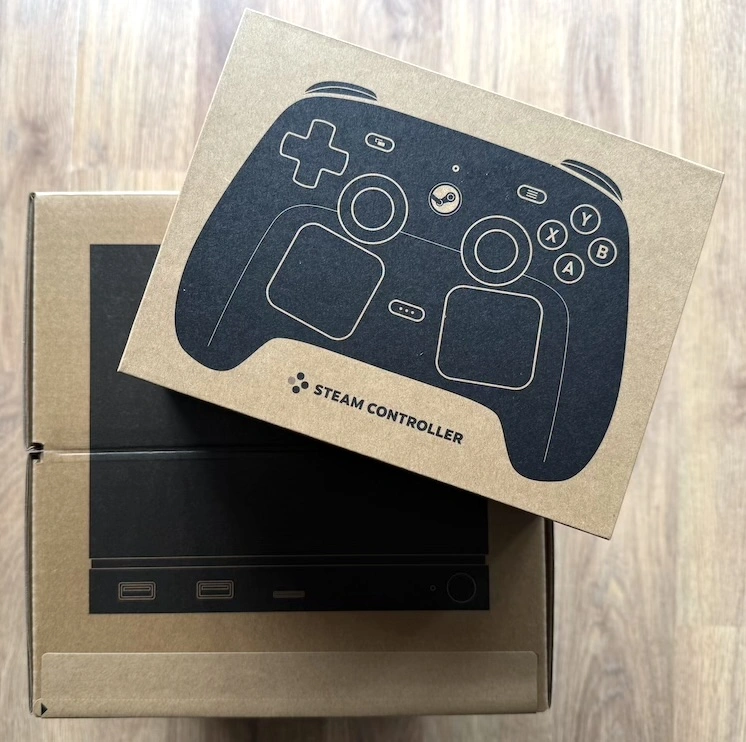
A couple of days ago, thanks to some free time on a Sunday afternoon, I got round to setting up my newly acquired Steam Machine. While I don't have a lot to say about it, I thought I'd note here that the event happened and jot some notes about how it went.

On unboxing, two things struck me: just how small it is, while also how hefty it feels. I'm not a hardware person, as I've mentioned here many times before, so can't speak to the how and why -- but it feels like the whole thing is cleverly and densely packed. Having owned plenty of PCs over the years, especially a lot of towers and mini towers, it was pretty neat to hold in my hands a machine that would put most of them to shame.

I also really appreciate that it can pretty much hide behind a plant pot next to the TV. It's just... there. It's not a feature.

As for setting up, that was dead simple. I pulled the machine and cable out of the box, unboxed the controller that came with it too, plugged an Ethernet cable between it and my router, fired it up and followed the instructions. Logging in was the usual dead-simple QR code scan from the Steam app on my phone.

The only issue I ran into was when setting up the Steam Controller itself. While it worked perfectly with its own puck plugged in, right from the start (so I could do the setup without need for a keyboard and mouse), things didn't go so well when it offered to switch over to the internal puck. When it asked if I wanted to do that, the Pair button (I think that's what it was called) could be pressed but always resulted in an instant error. Then using Retry was an instant error too. I tried a few times, to no success, so then just carried on using the controller's own puck on the end of a cable.

After going through that, it then wanted to do updates on the puck and controller, which I followed. I had hoped that at that point it might repeat the process to move to the internal puck but that wasn't offered as an option.

Once through all that I was all up and running and my library was available. I tried a couple of games and the whole thing felt nice and fast. In fact, it felt like exactly what I wanted: a better-performing Steam Deck that is always plugged into my TV.

After testing a couple of games, I searched online and then dived into the settings and found that, from there, I could swap the controller over to the internal puck. The method for doing this wasn't obviously available in the settings, hence the search online. Annoyingly I can't find the page I landed on, but I seem to remember it simply involved directly plugging the controller into the machine (USB->USB, not connected to the puck) and then messing in the controller settings on the machine.

Overall, while there was that little hiccup, the experience pretty much felt like setting up a console -- which seems ideal to me. As for what I can do with it: the "Great on Machine" tab in my library looks to contain about a fifth of my total library, and a lot of that is made up of games I'm happy to play. I've not paid too much attention to the what and why of the other four-fifths -- I also imagine there are a good few in there that would also work but which haven't had the seal of approval yet.

Would I recommend this to anyone? Eh, if you're a full-on "PC master race" type who loves to build their own kit and cares about the hardware and stuff... I would imagine not. On the other hand, if you're someone who has a reasonable library on Steam and wants a low-to-no-maintenance PC that's almost invisible in your living room: I'd say it's ideal. Sure, the price isn't great, but that's the way stuff is at the moment1. Additionally, you're getting a desktop Linux machine and something that can be tweaked and tailored how you like, if that's your thing.

Next up on my list of things to do with it, aside from playing on it more (currently low-key obsessed with Iron Nest and am also enjoying having more runs in Vampire Survivors), is to figure out the easiest and best way to record video (with audio and voice) and, ideally, also stream to YouTube. Given the nature of the machine (Linux box with gaming UI) I imagine it's as "simple"2 as adding OBS and setting things up. To be fair to the consoles though: this is where they do win just a little; on both my Xbox Series S and my PS5 there are dedicated tools for streaming. I wish the Steam Machine came with similar built-in functionality so I could be extra lazy and also have a setup that is very unlikely to be disturbed by random updates.



  1. Thanks AI, I guess. ↩

  2. As in: likely doable with some tinkering and work. ↩

Recently I found - 9

1 min read; 8 GFI

Introduction

An occasional collection of things I've recently found on the Internet and added to my bookmarks.

DHH Is Way Worse Than I Thought

While a year old at the point of saving this, it's still a pretty good collection of details of problematic things related to DHH. It's only got worse since.

Awesome Steam Frame

An "awesome" list of all sorts of things related to the Steam Frame.

Mach Run

Fun arcade-style flying game that runs well in the browser. A great way to kill 10 minutes.

Hole Punch

A web-based gravity puzzle game.

Gravity Assist

Another web-based gravity puzzle game.

Getting Started With XR in Godot 4.3 Tutorial!

A video tutorial that goes into the basics of getting some VR code going in Godot.

R U STILL THERE?

How well are Reform folk doing after they got jobs they didn't know they had to work at?

You are a tornado

There's plenty of tornado-chasing games out there. Quite a lot of them. Games where you are the tornado... not so many. Here's one.

If you accept something is unethical, its usefulness is irrelevant, isn't it?

A good toot-sized argument against the "both sides balanced" take on the current state of AI use. Or, rather, it's a good argument in favour of the "it's unethical so I won't use it" approach not being stupidly stubborn.

Why is Hacker News like that?

Good essay that goes over the general political feel of Hacker News, and goes into the background of why it is that way.

Free Promotions on Steam

A list of stuff that is currently free on Steam.

Steam Machine (and Steam Controller)

2 min read; 9 GFI

Some might remember that, earlier this year, Valve made the Steam Machine available for purchase. I'd had my eye on one since they were first announced; I had it on my wishlist. Having had a lot of fun with my Steam Deck, I was sure I'd appreciate what was looking to be its bigger sibling (in terms of size and power, if not age).

Also, having had success with buying the Steam Controller, I was all set to sign up for the "lottery" and see if I could get into the queue for a Machine too. But there was a wrinkle: the opening of the window to throw your hat into the ring, and the projected delivery date should you be lucky, coincided with our holiday in the Netherlands. If I'd been successful, delivery would have taken place while I was out of the country1.

Given this, I waited until I got back and then put my name down for a 512GB machine without a controller. Unsurprisingly, I found myself on the waitlist, not a reservation list. So I waited. And waited. And waited. Along with a lot of other people.

Then, last week, I was scrolling through Reddit and saw a few people talking about how they'd left the 512/no-controller list, jumped on the 512/with-controller list, and then got a purchase invitation email pretty quickly; some within minutes, some within hours. After some wondering about this, I decided it was worth a try. What's the worst that could happen? I still have to wait, which I was anyway, or I get the offer to buy and I'm down about an extra £80 because I went for a controller too.

I decided that, just for the laugh if nothing else, I'd go for it. I removed myself from the 512-no-controller list, added myself to the 512-with-controller list, and... within minutes I had a purchase invitation email! Oh shit! Now I have to decide!

So I decided.

Fast forward to this afternoon and...

My own Steam Machine

So, yeah, along with the Steam Frame, that's my toy budget used up for a wee while to come!

I've not had the chance to unbox it yet and likely won't get the chance until the weekend. While, yes, I could be doing it now rather than typing this, I'm rattling this out between routine family duties and unboxing it would not have given me the free time to actually have a proper play.

Once I do get the chance, I'll try and make a point of jotting down my initial impressions.

Hopefully, at some point soon, I'll get to hook it up with the Steam Frame too and see how well they work together. As I understand it, that's still a bit of a "coming soon" thing, with work in progress on the SteamOS beta on both hardware platforms.

So, at this point, I've somehow ended up with a reasonable little Steam ecosystem:

  • Steam Controller (MkII) (times two)
  • Steam Deck
  • Steam Frame
  • Steam Machine

Also, if we're going to throw in Steam hardware of old, I even still own a Steam Link. At this point, I kind of wish I had my hands on a first generation Steam Controller, just to be somewhat completionist.


  1. Ironically, while in the country where the device would ship from. ↩

Rogallo v3.1.0

2 min read; 10 GFI

Rogallo v3.1.0 is now available. This release is in response to a recent user request.

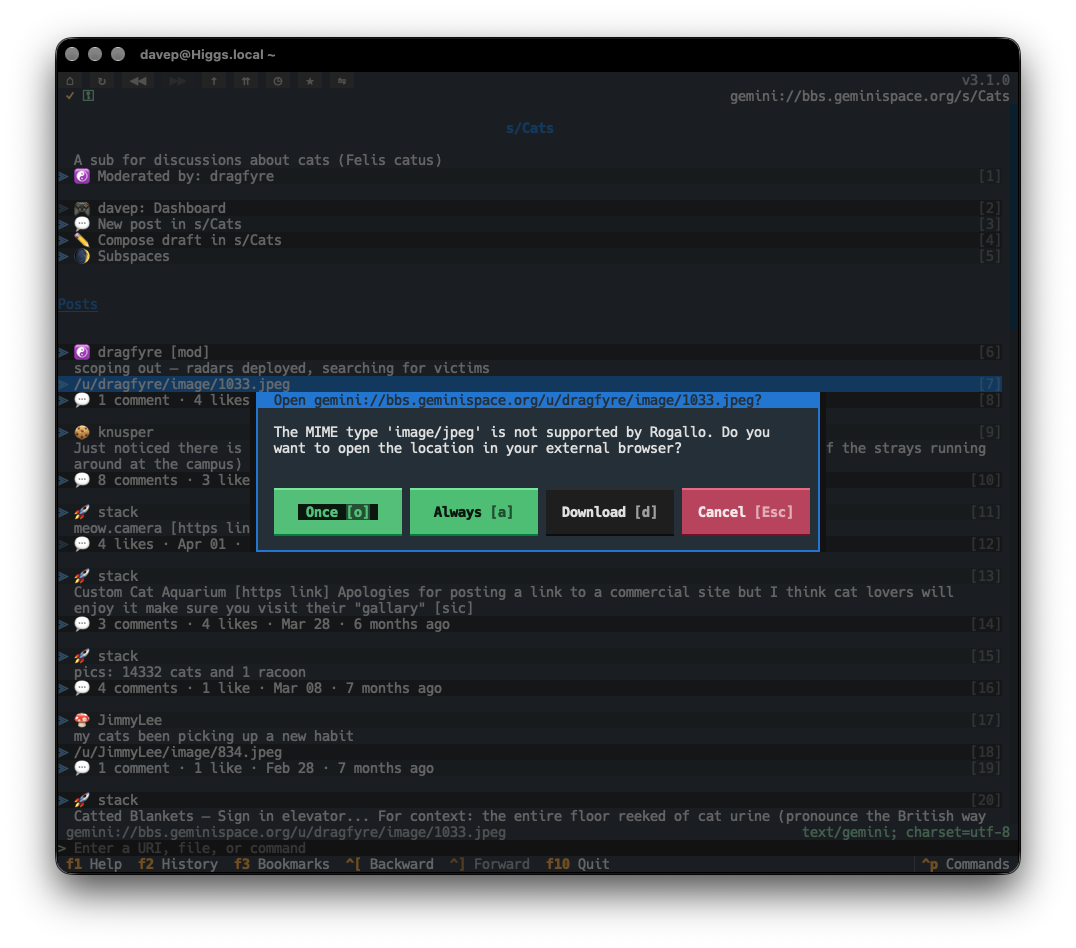
Right from the start of the development of Rogallo, I ensured that any MIME types that the application couldn't handle were correctly handed off to the operating system, to allow it to work out what to do. While it is possible for me to do some work to allow images inline -- something I might explore at some point in the future -- Rogallo doesn't currently support this and, accordingly, when faced with image/jpeg or image/png, etc, it delegates to the wider environment.

The problem, of course, is that the user might not have a tool in their environment that's capable of taking over the duties of downloading an image from a gemini URI and displaying it. So the next best thing is that Rogallo itself offers to download the file for you. With v3.1.0 this is now an option.

If you encounter a MIME type that hasn't already been marked for always opening in an external tool, there's a new Download button.

Download as an option

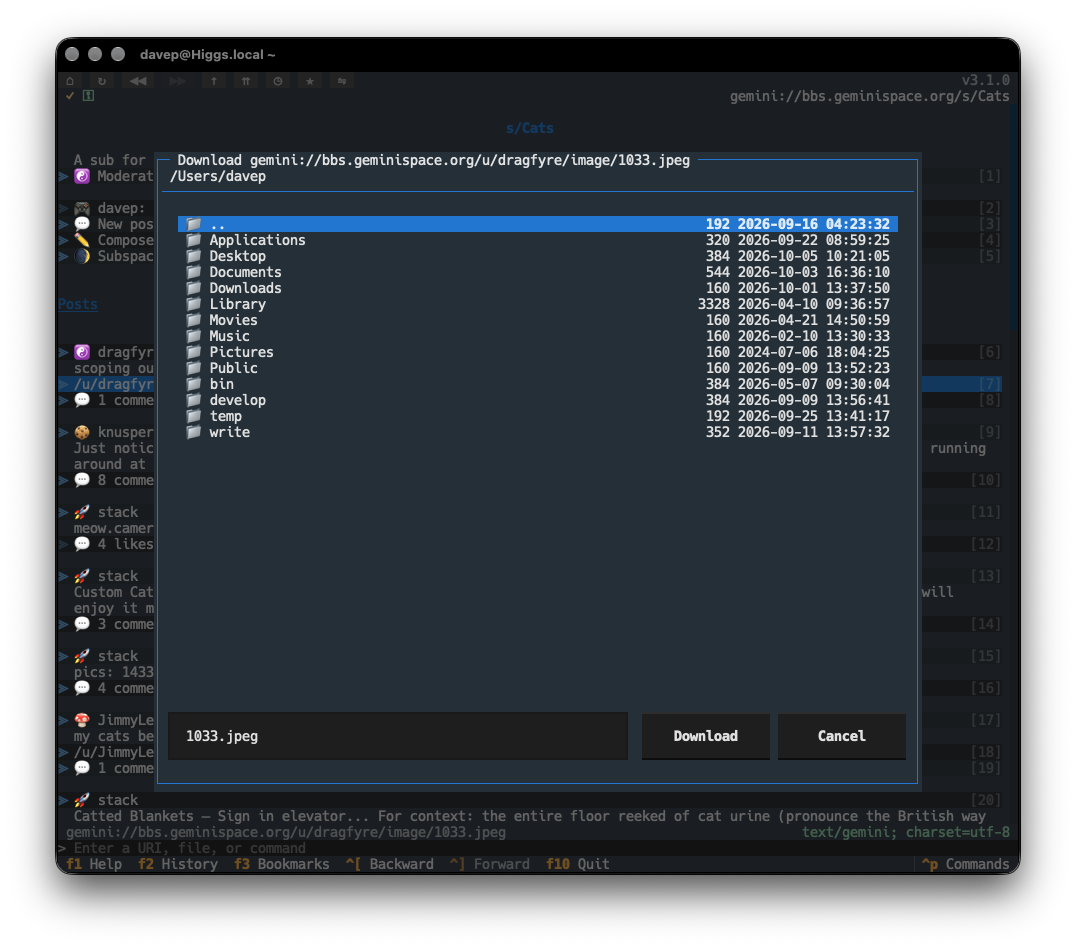
If selected, you'll be asked for a location to save the file.

The download dialog

To augment this, I've also added downloading support for links in the viewer. It might be, for example, that you've already marked image/jpeg and image/png as MIME types that should always be handed off to the operating system (perhaps you have a GUI-based client such as Lagrange or Major Tom installed and it's configured to pick up the URI and handle it). In that case, you'd never be shown the dialog that would allow for downloading. So now, on the occasion that you do want to download within Rogallo, you can navigate to the link and press d. The download dialog will then appear, and you can save the content of the link that way.

ℹ️ Note

If you want to change the binding for the link-based download, you can use the recently added UI element binding facility to bind gemtext_link.download_link to something else.

For now, at least, the download process is pretty simple. It follows the same approach as acquiring the content of a URI for display purposes, but instead writes it to the file you picked. There's no "download manager" or similar and no sticky "download directory". These are things I might consider adding in the future.

Rogallo v3.0.0

3 min read; 10 GFI

It's been a while since I last published an update to Rogallo. In part this is because I've had other distractions, but also in part because I've not had a huge need to add any new features of late. For the most part I feel Rogallo is "done"1.

I haven't, however, been doing nothing with the code. On and off, over the last handful of weeks, I've been addressing something that I've wanted to tidy up since the early days of development: application configuration. The majority of my Textual-based applications use a simple JSON configuration file, and that's generally good enough. When I started Rogallo I used the same approach. Rogallo has since grown quite a lot and there's much that can be configured and so the "honking great pile-o-JSON" approach was starting to feel quite untidy.

So Rogallo v3.0.0 addresses this. The headline change is that the single JSON file has been replaced with a number of focused YAML files, and some items that were in the original configuration file have been moved out to either the data directory or the state directory, depending on their purpose.

Now for some details on the changes.

❗ Important

There are a lot of changes to how Rogallo is configured. As is mentioned at the end of this post, Rogallo will make a best effort to migrate your old configuration to the new format. However, as a precaution, you might want to think about making a backup copy of your configuration.json file before upgrading Rogallo.

Focused configuration files

As mentioned above, whereas before Rogallo kept all of its configuration in a single file, it now looks to a number of different YAML files that focus on a different aspect of configuration. These include:

General configuration

For the configuration items that remain, that aren't exactly focused on a particular Rogallo feature, the settings have moved to general.yaml.

Removal of some application commands

Rogallo's design is based around the idea of some "actions" being application-wide commands, and some actions being UI-control-specific. As I worked through the configuration changes I decided that it was time to "demote" some application-wide commands to either being UI-control-specific bindings or just simple configuration properties. With this in mind I've removed the following commands:

  • ChangeCommandLineLocation
  • StripeLinks
  • ToggleANSIEscapeSequenceHandling
  • ToggleCosyLinkNumbers
  • ToggleEmojiRemoval
  • ToggleLinkNumbers

All but ChangeCommandLineLocation are now keyboard shortcuts specific to the viewer widget itself (press F1 when the viewer has focus to get more details). ChangeCommandLineLocation is now a simple configuration property in general.yaml.

UI element action keyboard bindings

From the very start, Rogallo has supported some degree of control over keyboard bindings. As mentioned above, there's a split between "application-wide commands" and "UI-element-specific" actions. Until now it's always been possible to configure the bindings for the former, but never the latter.

In other words: you could always configure the binding for the HandOffToOperatingSystem application command (hands the URI of the currently-viewed document to your OS), but you couldn't change the in-viewer binding for the o key, which opens the URI of the focused link in the OS.

Rogallo v3.0.0 adds support for changing the bindings of the latter. So if you wanted to change o to b for opening a URI externally:

gemtext_link.open_link_externally: b

You can find the bindable IDs for each of the UI controls at the bottom of each page for each of the controls.

New Gophermap badges

Not directly a configuration setup change, but something I noticed while doing the work, was the fact that Rogallo (and the underlying Gophermap library) didn't handle PNG and RTF item types. They're now directly supported.

Conclusion

I believe all of the above changes make it easier to configure Rogallo, and more importantly easier to backup and share the configuration. Technically all of this is one huge breaking change -- everything that was in configuration.json now lives elsewhere. However, I've added some code to Rogallo that detects when you still have a pre-v3.0.0 configuration active, loads up the values, creates the new files, and then renames the old file to configuration.migrated.json. As mentioned near the start of this post, you might want to think about making a backup copy of configuration.json before upgrading.


  1. One last big thing I do want to add is support for tabs. Still to come. ↩

Virtual Fighter Maneuvers

2 min read; 9 GFI

I realise I've been a bit quiet on the blog front for a few days, in part because I've also been a bit quiet on the coding front too. Looking at my GitHub contribution graph, the previous three days where I didn't commit anything are the longest run of no-commit days I've had in about 10 months. There are a couple of reasons for this: the first is that I've reached a bit of a natural pause point with my work on Rogallo (there's a biggish update brewing, but I've been taking my time with it), the second is -- as I expected -- getting my hands on the Steam Frame.

I haven't been playing with it exclusively -- when I have a good amount of free time I am back to streaming -- but I have been dipping in on occasion, and some of those occasions would be moments where I'd reach for the MacBook and bang out some code.

I'm still not set up for full-on PCVR, but I have "discovered" a game that runs really well on the Steam Frame, and it's one that's related to a favourite of mine in VR: Virtual Fighter Maneuvers.

Simply put: it's a very cut-down version of VTOL VR, designed to run well on standalone headsets. Graphically it's simplistic, and from a gameplay point of view it's very focused. There's no single-player campaign. There's no multiplayer campaign. There's no story at all. You strap on your headset, fire up the game, jump into a lobby and off you go: dogfight time!

I love it for that. I've always loved flight sims, and they're even more fun in VR. I like the slow pace and the sense of immersion. But if you're going to fly in VR it takes a bit of time to get set up and plan things. This is the total opposite. I love that I can dive in for 30 minutes, have a fun experience, and then be done. It's ideal for quick, casual sessions.

That's not to say I only want to play for those short bursts -- I have played longer sessions -- it's more to point out that it's a game that combines perfectly with the low-activation-energy accessibility of the Steam Frame. It's a game that makes the Frame feel as easy to pick up as the Steam Deck.

Of course, being a mainly multiplayer game, your chances of having a good time are mixed1. I've been into a couple of lobbies that have been really fun, with a good mix of folk, who all seem to have joined to have a good time. I've also joined matches where it's just kids wanting to be edgelords on the Internet. Thankfully, so far, it's more the former than the latter. Sadly, though, there don't seem to be that many people playing it. In my (UK timezone) evenings there's normally, at most, four matches on the go that you might be able to join.

There also seems to be a 1v1 matchmaking service so you can get a ranking by battling folk at a similar level to you (I'm a newb to the game, of course); I've yet to actually get such a match going.

This one is a keeper and I can see myself diving into it often for a good while to come.


  1. It does have bot matches too, so you can do some limited single-player gameplay. ↩