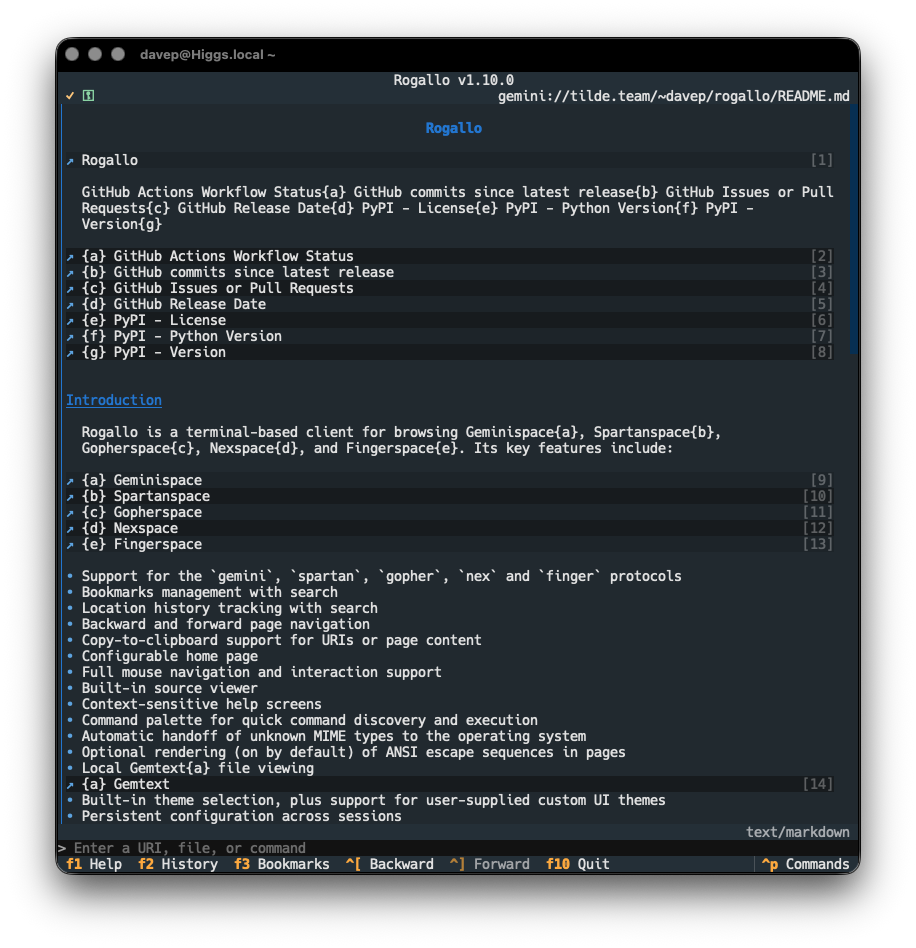
Rogallov1.10.0 has been released. This is a pretty small release, with a bug fix to navigation, and an improvement to how navigable Markdown documents are if viewed in the application.
In Rogallo v1.8.0 I made some changes to how Markdown documents are shown, if they're encountered and detected in Geminispace (or any of the other protocol spaces that might let you know the content type of a document). Whereas originally the document was shown in its raw form (marked up with syntax highlighting), v1.8.0 moved to using a fully-rendered form thanks to the internal Markdown widget.
But, as I've mentioned elsewhere in this blog, I wasn't 100% happy with this. The main problem is that the Markdown widget supplied by Textual is pretty unfriendly to keyboard navigation, and I want as much of Rogallo to be navigable with the keyboard as is possible.
To solve this I've created md2gemtext and started using it here in Rogallo. This means that, by default, from now on, any time a Markdown document is received by Rogallo, the content is converted into Gemtext before being displayed. The big advantage here is that links are far easier to see and follow and the document as a whole looks more in keeping with most other pages you'll visit.
I'm sensitive to the fact that some folk might prefer the previous method of viewing Markdown, so this feature is configurable. If you'd prefer the widget-based rendering instead, set this value:
"convert_markdown_to_gemtext":true
to false.
The other change in this release is a fix to how navigation history is saved and restored. For a couple or so weeks now, on occasion, I was finding that when I ran up Rogallo again, navigated from the restored page, and then used Backward, I would end up somewhere else. It was intermittent and, for a while, hard to pin down. Mostly I'd notice this while rapidly closing and opening Rogallo while working on some other feature. Eventually I figured out the sequence of events causing the problem and it was an easy enough fix.
Another update to Rogallo, another new protocol! The main change in v1.9.0 is the addition of support for the Nex protocol.
As with any other supported protocol, entering a nex:// URI into the command line will cause Rogallo to load up the response in the viewer and render it. Nex is kind of fun in that it's almost a plain text system, by default, but the expectation is that any text/plain document that has => at the start of a line will have those lines be treated just like Gemtext links. So, in Rogallo, when you visit a page, and that page is text/plain, the result will be rendered like it's very simplistic Gemtext that only supports links.
Also, as per the Nex specification, the MIME type of a document is worked out from the extension of the file it points at; so if you happen to get a Gemtext or Markdown file back from a nex:// URI, this will be suitably rendered.
Another addition is a SaveSource command (bound to Ctrl+s by default). As you can probably work out from the name, this will save the source of the document you're currently viewing.
A small housekeeping addition in this release is the cleaning of the content cache. When you start up Rogallo, in the background, any cache entries that have exceeded their time-to-live (something you can set in the configuration file) will be removed. If this results in any cache directories being left empty, they will also be removed. This should result in a nice clean cache directory that's easier to navigate and manage, if you want to go diving into it.
I've also added a small experimental development tool, mostly for myself but it might be something someone else wants to play with. I realised a few days ago that it could be fun to include screenshots of Rogallo in action in my Gemini capsule. The thing is: Gemtext doesn't allow for inline images. What it does allow for, and many clients support, is ANSI escape sequences. Meanwhile, Rogallo is a terminal-based application; its whole method of display is ANSI escape sequences. As such, it should be trivial to capture the sequences for any given screen and just include them in a Gemtext page.
I tried it out and it works a treat! So, if you happen to have ROGALLO_SCREENSHOTS in your environment and it's set to any non-empty value, pressing Ctrl+Shift+F12 writes the current screen to ~/rogallo-screenshot.ansi.
Yes, it's all horribly hard-coded: the key combination is hard-coded (and probably only good for more modern terminal emulators), and the name of the file is hard-coded. As I said: it's a development tool that's there for my own use. I might make it a little more generic in the future.
One final tweak to this release is a fix to the ToggleView command, which stopped letting you view the source of a Gopher map. That ability is now back.
So I've dropped v1.1.0 on PyPI, which adds support for running up a simple just-good-enough Nex server (although, to be fair, Nex is so simple this is probably a fully capable one just by the very nature of how trivial the protocol is).
While Rogallo is, of course, primarily aimed at loading and rendering Gemtext documents, I have written it so that it'll try and display anything whose content type matches text/*. In most cases this will result in something being shown as plain text and, as of v1.6.0, it will also attempt to add some syntax highlighting where appropriate. So, if you happened to come across a Markdown file in Geminispace, and the server told Rogallo that it was a Markdown file, it would look something like this:
Simply put: raw Markdown but syntax-highlighted.
The thing is, Rogallo contains everything needed to actually render the Markdown; it's carrying that code around due to it being built on top of the Textual framework, so it seemed a shame to not use it. So as of this version, if a Markdown file is encountered, by default it'll be shown as a full Markdown widget.
Having added the above, I got to thinking that it might be interesting to consider other text/* types that I could render in a more Rogallo-friendly way. The next that came to mind was text/html. While it's not going to be that common to encounter HTML on the end of a gemini:// connection, it's not impossible. Initially I did consider going via a route that had me turn the HTML into Markdown and then use the Markdown widget to show the result, but in the end I decided to turn it into Gemtext instead; in part because it's a fun challenge, and in part because it feels more in keeping with the Geminispace aesthetic1.
So, whereas before, if you landed on some HTML in Geminispace, you'd see this:
From now on you'll see something more like this:
This HTML to Gemtext support is still in its infancy so I imagine there's going to be a lot of fun corner cases that don't quite work out, but for me the utility makes it worth working on.
Until now the ToggleView command (bound to F4 by default) simply toggled Gemini-based Gemtext and Gopher maps between their rendered and raw views (acting as a sort of "view source" command). With the addition of richer rendering of Markdown and HTML it will also toggle those content types. The point here being, if you really need to look at the raw content of a Markdown or HTML document found in Geminispace, it's still there for you.
A key feature of Rogallo is the automatic handing off of URIs and MIME types that it can't directly handle. On occasion, though, I find myself wanting to do the same hand-off with a document I'm successfully viewing in Rogallo. This was easy enough to do with the CopyLocationToClipboard command (bound to Ctrl+Shift+c by default), pasting the URI into my normal web browser and going from there. But it felt like this should be a command in its own right.
So now there's HandOffToOperatingSystem (bound to Ctrl+Shift+o by default), which will ask your environment to open the current URI.
Yesterday, I saw a post on Station which was talking about the site logo. The main thrust of it being, while the logo is cool and all, it does use up a fair bit of vertical space that you have to get past to get to the content. I can see this being an a11y issue in some situations, if nothing else.
So I got to thinking: in the case of Station, the author of the site has been kind enough to give the pre-formatted text block some alt-text2, so that means it's possible to have a targeted filter for such well-designed sites. Given this, I've added a method of filtering out pre-formatted blocks, keyed on a URI and alt-text. So now, with the addition of this to my configuration:
I can get straight to the content when landing at the Station:
ℹ️ Note
I did hesitate before adding this. There's a part of me that was thinking "but the creator of the site has designed the site this way, does it make sense to override their choice?" -- but then I decided that, if Geminispace is about anything, it's about privacy, freedom and control over your experience of it. Moreover, using this is a choice on the client side, and like I say, it's in part an a11y feature.
More as an accident of how I was working on things than a conscious choice, the only protocols in Rogallo that also used the content cache were Gemini and Spartan. With this release of Rogallo I've extended it to Gopher responses too. I've made a point of not using the cache for any response that is going to be the result of a search, as that feels like something that's often going to have more dynamic content.
Talking of Gopher: there's also a small fix to Gopher responses in this release. When looking for responses that indicated an error from Gopher servers, Rogallo was a little too keen in how it worked, which could result in a plain text response, that just happened to have a 3 in the first column of any line, being seen as a Gopher map that indicated an error.
This is now fixed.
Which also has me wanting, longer-term, to do the same for Markdown. While using the Markdown widget is neat and all, I think it would be far more in keeping with the purpose of this project to turn Markdown into Gemtext. ↩
As I write more Gemtext myself, I'm going to do my very best to always do the same. ↩
I've just made a small release of Rogallo, bumping the version to v1.7.0. Most of the changes in this version aren't very visible, but quite a few things have changed under the hood.
One change that might show up on occasion is the addition of an encoding fallback if you encounter an ISO-8859-1 file out in the wild (oh how that takes me back). Before, Rogallo would pop up an error and refuse to show the file; now it will show it just fine.
I've also made some improvements to how Rogallo navigates Gemtext files being browsed locally in the filesystem. Before now, when viewing local files, if a link was for another local file, it would show an external link icon rather than a Gemini link icon. This is now fixed. The other change is that, if you're browsing local files that have links to a directory rather than a file -- thereby implying that an index.gmi should be looked for -- Rogallo will take a peek at the directory, see if there is an index file available, and take this into account.
This should make it a smoother experience if you're using Rogallo to locally preview some Gemtext files before you upload them to a capsule.
The final noticeable change is the addition of a ViewChangeLog command (AKA !view_change_log in the internal command line). Bound to Ctrl+Shift+l by default, this navigates you to the Gemtext version of the Rogallo ChangeLog.
In addition to this, I've made a lot of changes to some of the internals. The class that handles the main screen of Rogallo was getting pretty large, with a lot of detail of how to handle different protocols sitting in the code. While not causing any runtime issues, it made the code increasingly bloated and untidy (and I really hate large Python files). So I've moved the handling of each of the protocols into their own files. This also has the benefit of making it a little easier and a little more maintainable if/when I add another protocol or two. It should also make the code more readable for anyone else looking over it.
As Rogallo got close to being "stable", I did a fair bit of work on its documentation. Something that I wanted to include in the site was a good collection of up-to-date screenshots. These are all created on the fly. To do this, of course, requires something that looks like a Gemini server.
Initially, this was simple: Rogallo only supported Gemini capsules, so I could illustrate most things just using Gemtext files in the local filesystem (with an admonition in the documentation to point out that Rogallo was for more than viewing local files). This, of course, wasn't going to scale when I added Finger support, and neither was it going to work well for Gopher support.
The solution seemed obvious: use a lightweight local server for these protocols. With this need in place SmolServe was born. As mentioned when I released Rogallo v1.5.0, this isn't a project to build a comprehensive smolweb server. The aim is to build myself a minimal just-good-enough server that helps me with local testing and documentation.
As it stands, SmolServe supports Gemini, Gopher, Finger and Spartan. Or, rather, it supports a just-enough-to-get-by version of each of those protocols. None are implemented in a way that would serve as a "production" server; they're implemented to allow me to generate screenshots for the Rogallo documentation, involving any of the supported protocols, without the need to rely on services I don't control and which aren't local.
The big benefit of SmolServe is the exec support. With this, you can run up the server and then have it run another command. Once that command finishes its work, SmolServe will close down too. This means that, when it comes to producing the Rogallo documentation, I can just have the server running when I need it. Pulling some snippets from the Rogallo Makefile:
The idea is that, when I build the documentation, I actually run smolserve, which in turn runs mkdocs, which then produces the documentation while the local server is available.
My aim now is that, if I add any other protocols to Rogallo, I'll add a just-good-enough version of them to SmolServe to help me with testing and documentation. For the moment, though, I think it's in a stable and usable state.
Rogallov1.6.0 is now available. This release concentrates on the addition of a newly-supported protocol, and improving what can be displayed in the viewer and how it looks.
The headline change is the addition of support for the Spartan protocol. Having run into a couple of sites that either offered this as an alternative access method to their content, or the only access method, and noticing its vague similarity to Gemini (and also its reliance on Gemtext as the main hypertext language), it seemed like an obvious feature to add. So, having built a library to handle the low-level details, I got to adding support for this to Rogallo.
Anyone using Rogallo should find that spartan:// URIs are handled in just the same way as gemini:// URIs are, so following them from within documents, or entering them into the command line all works. On top of this, Rogallo now supports Spartan's =: line type in documents served from a Spartan server. This means that this form of input is now supported.
I suspect this won't be the last of them, but I sense I'm close to adding the most useful ones.
The two other changes in this release are closely related. Rogallo has always handed off any MIME types that it can't directly handle, and the types it could handle were set to a very narrow collection -- Gemtext, Gopher maps and plain text, pretty much. With this release the list has been expanded to anything text/*. Working on the (pretty safe) assumption that any text/ MIME type can be displayed as text, this seemed like a sensible switch to make.
Working in conjunction with this, Rogallo will now also attempt to infer what kind of text is being shown, and apply some syntax highlighting where appropriate. So, for example, if you visit a text file that is Python code, it will be highlighted as Python code (if the server tells us that we're looking at Python code).
One final change in this release is a small fix to Gopher support. Rogallo lets you configure a connection timeout value, but this wasn't being used for Gopher support. This is now fixed.
Before I get to that though, there's a small number of other fixes, additions and tweaks. The first is a small change to the Gopher support. As of this version, if there's a type 8 item in a Gopher menu, it will now be turned into a telnet:// URI rather than being left as a gopher:// URI. This should help in handing off such an item to the correct application in your environment.
I've also added a new command: PipeDocument. This is bound to Ctrl+Shift+p by default. If you're viewing a document and run this command, you'll be prompted for a shell command that the source of the document will be piped through. This could be useful for transforming the source and passing it on elsewhere. For example:
One small fix in this release is the correction of a typo in the code that resulted in a misspelled item in the configuration file. The bookmarks_visble configuration setting has been changed to bookmarks_visible (the spelling of visible was wrong). Technically this is a breaking change but, because the impact is almost zero, I'm running with it. The worst possible outcome after installing v1.5.0 is that the bookmarks aren't showing in the sidebar when they were before; calling them back up will fix the issue.
Now on to the main change: custom themes. Rogallo has always had theme support, and the themes that were made available were most of the themes built into Textual. There was a request to be able to create additional themes, and so, here's that feature. Using this, if you want to have Rogallo look just so, you can now follow the documentation, or look over the examples, and have a play. So if you fancied a version of Rogallo that looked like it was running on a good old green terminal:
Or perhaps an amber terminal is more your thing?
Maybe you hanker after the days of MS-DOS and those Turbo IDEs?
Even better: perhaps the CBM64 was your thing back in the day?
Note that none of these themes are part of Rogallo itself, and don't ship with it; they're just examples of what you could do if you wished. I don't even offer them as good examples of what you could do (for example: I can see that I've managed to end up with the jump labels being far too dim to be readable). I'm sure other people with more talent for design than I have will be able to do far better. If anyone wants to make their own themes and share them, I've created a spot just for that.
One last thing: while it's not a feature of this version of Rogallo, I've also done some work on the site to try and add a little more detail about using Rogallo. This process will be ongoing. The main additions here are some background on the supported protocols and some help on the key UI elements.
The documentation is also greatly improved with better examples thanks to smolserve -- this is a little helper project I've been tinkering with. Note that this is not and will never be intended to be an actual small web server; it is and always will be a tool to help development and to support the production of Rogallo's documentation.
I've updated Rogallo to v1.4.0. The main change in this release is to how server certificates are handled, which in turn should solve a bit of friction Rogallo had when using some popular Gemini capsules.
Until now, Rogallo simply used a TOFU approach for all capsules it encountered. In part, this was because that's all I'd really read about until that point, and also in part because, as Rogallo became more capable and I started to use it as my daily-driver, it just worked. Then, within the space of about a week, I had two popular capsules apparently change their fingerprint. I wasn't expecting that so soon (hence one issue about dealing with this still needing to be worked on).
From this version, Rogallo uses a kind of "hybrid" approach to validating the certificate of a capsule. Simply put, here's how it goes:
Can we check with a certificate authority? If so, perform that check and raise an error if there's a problem.
If, on the other hand, the certificate is self-signed, use the TOFU route.
To help keep an eye on this approach, and because it's just generally handy to know, I've added a small new element to the UI of Rogallo: a verification badge. This can be seen up in the top-left corner of the viewer. It has three states:
It will show ⛉ if we're visiting a capsule that was validated using a CA
It will show ✓ if we're visiting a capsule that was validated using TOFU
It will show no icon if we're visiting a location where this isn't applicable
This is alongside the already-existing ⚿ icon that is shown if we're making use of a client certificate.
While I've not documented them yet (I need to do a round of website updates), each of these icons can be changed if you prefer something different. Just take a look in the configuration.json file for Rogallo.
Note that under normal circumstances the off icon there should never be needed or seen. That's just more for testing.
All of this ends up looking something like this:
To help test and keep an eye on this, I've also added a new command to Rogallo: AboutThisPage, bound to F7 by default. With it you can check on some information about the current page, and also the certificate that was checked when acquiring it.
Note that if a page is loaded from cache you won't see certificate information in this dialog, as that isn't (currently) recorded in the metadata in the cache. I might do that at some point in the future, but it didn't seem necessary for now.
Rogallo has been updated to v1.3.0. This release adds an extra cosmetic feature to the Gopher support, and also extends what the internal command line is capable of.
Both of the changes come from suggestions made by -fab-, who's been an avid tester of Rogallo and a good source of pointers and ideas. The first change comes from a mention they made of how some Gopher clients will prefix links in a map with a three-letter ID to give a clue as to what the linked resource is. TXT for a text file, SND for any audio file, MNU for a link to a further map, that sort of thing. While I didn't add that when I initially added Gopher support, it did seem like a useful option to provide.
However, this being a "modern" TUI application, with access to a wee bit more than plain old ASCII, I thought I'd mix it up a little. By default, little "icons" or "badges" are shown with each link. So to take the examples given above, I'm using 📄 for a text file, 🎵 for an audio file, and 📁 for a menu.
Of course, some people might not want this, and this can be turned off entirely in the configuration file by setting gopher_show_type_badges to false. However, it might be that someone wants this, but not the emoji. That's where gopher_type_badges comes in. This is an association of Gopher types with text to use as the "badge". If three-letter all-ASCII "badges" are what you want:
The other feature springs from another suggestion -fab- made. This time it was the idea of adding direct command-line support for Gemini and Gopher search engines. This struck me as an excellent idea, but I got to thinking that it could be a little more generic than that. So I've added support for declaring simple command-line aliases. There's now a section in the configuration file1 called aliases. It's an association of a command alias and an expansion. The alias itself must be a single "word" of characters, and the expansion the actual command that will be used. It can be any other command-line command, or a URI. Anything that the command line can normally handle.
When the user types something into the command line, the input will be split on the first space. If the first half matches an alias, it will be substituted for the input, and the tail of the input will be made available as a parameter to the expansion.
There are three placeholders that do the expansion:
{q} -- The tail of the command quoted for use in a URI
{qp} -- As above, but spaces will be + rather than %20
{r} -- The raw, unquoted, tail of the command
I've probably done a bad job of explaining it. But hopefully the following default set of aliases will nicely illustrate it:
Given this, if you type ken test search, the actual command that gets input is gemini://kennedy.gemi.dev/search?test%20search. As I said, it's not just about search engines; you can also expand to other built-in commands. For example:
"whois":"!finger {r}"
Would have whois davep@plan.cat expand to !finger davep@plan.cat.
I feel this nicely solves the original request and adds an extra layer of utility to the internal command line.
Which I totally forgot to document when putting together this release. It'll come to the docs soon. ↩