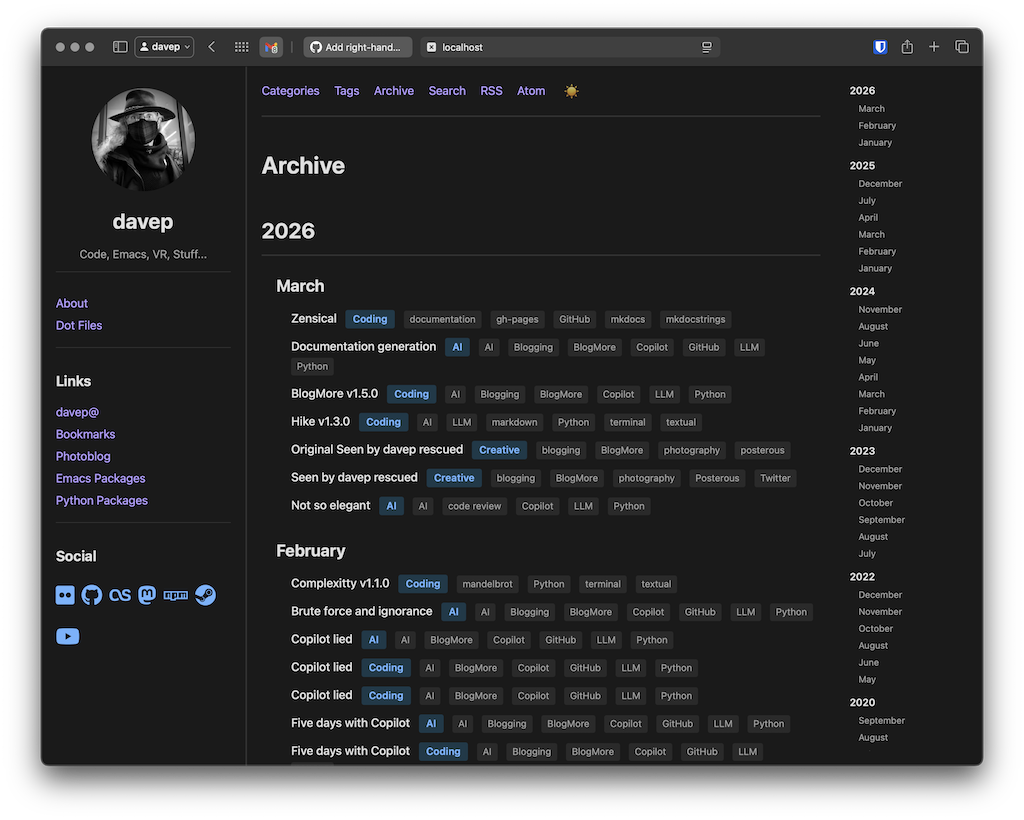
Posts in category "Coding"

BlogMore v2.1.0

2 min read

It's been a couple or so days since I last made any changes to BlogMore -- mainly because I've been messing with blogmore.el -- but yesterday morning I decided to make a change I've been wanting to make for a wee while.

Ensuring fenced codeblocks were handled was one of the things that was important when I started planning BlogMore and, while the result was looking good (thanks to Pygments), the way the block itself looked in the page wasn't quite to my taste. So yesterday I wrote out how I wanted things to be changed and tasked Copilot with getting the job done.

I'm pretty happy with the result.

(defun greet (name &optional (greeting "Hello"))
  "Prints a greeting to standard output."
  (format t "~A, ~A!~%" greeting name))

For the sake of any future reader, should I happen to tweak this even more at some point in the future, here's what the above looks like at the time of writing:
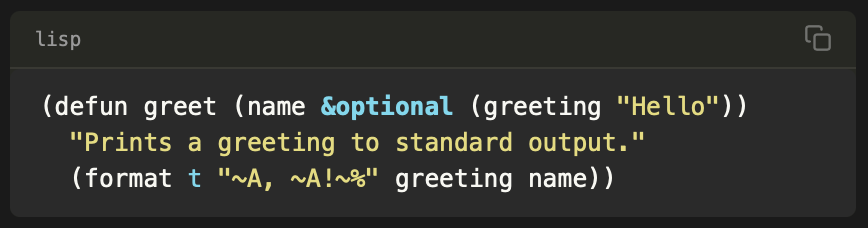
Example code block

As you can see: the language for the block is now shown to the left, and there's a handy "copy to clipboard" icon to the right. I'm still not sure I'm loving the subtle border around the sides and the bottom, I think I'm going to live with that for a few days and see how it sits with me.

I'm also wondering if I should tweak the name of the language a little too, so that it's capitalised correctly. Of course, I could just get into the habit of writing the language name in the start of the block with the correct casing...

def greet(name: str, greeting: str = "Hello") -> None:
    """Print a greeting to standard output.

    Args:
        name: The name of the person to greet.
        greeting: The greeting to use.
    """
    print(f"{greeting}, {name}!")

but given how many code blocks I've got in my blog by this point, where I've typed them in lower case... it's probably easier to just tweak it when presenting it. Moreover, I do want to try and keep my Markdown sources compatible with as many rendering engines as possible and I can't be sure that all of them would downcase before doing the language lookup (although you'd hope they all would).

Meanwhile... given how much more I like how code is looking now, I'm going to have to find more reasons to include code, and Pygments supports so many languages too! Even ones from my distant past...

Function Greet( cName, cGreeting )
   If cGreeting == NIL
      cGreeting := "Hello"
   EndIf
   ? cGreeting + ", " + cName + "!"
Return NIL

As an aside: I also just noticed that they list FoxPro, Clipper, xBase and VFP as aliases for xBase-type languages, but no Harbour! I might have to see about doing a PR for that...
BlogMore v2.0.0

3 min read

Well... I thought I was done with all the major changes with BlogMore, but then a fairly simple request came in and that kicked off a whole load of changes (which in turn ran into one or two problems with GitHub Copilot).

I dived into this because I liked the idea anyway and I think it's time that I, as much as possible, moved the layout of my blog to clean URLs almost everywhere. I can't reasonably do it for actual posts because a) lots of posts point to other posts so there's a whole editing job to do there1 and b) there are some links out there that point to my blog posts2.

The result is BlogMore v2.0.0.

Anyone who's been following the experiment with BlogMore might wonder that the version number is up to v2 already, given it's barely a month old. The answer to that is pretty simple: I'm using semver for the version number and there's a breaking change in this release with no real way of maintaining backward compatibility.

So what's changed? First the simple ones: I added some more *_path configuration options to control the locations of:

All of those keep their default values from before, and so can remain backward compatible. Personally, I've updated the configuration for this blog so that I'm using:

archive_path: "/archive/index.html"
categories_path: "/categories/index.html"
search_path: "/search/index.html"
tags_path: "/tags/index.html"

which, combined with:

clean_urls: true

results in cleaner URLs for all of those site features.

Another thing that came to mind was what to do about pagination. Things like the date-based archives, categories, tags, and so on, can all run to multiple pages and so all generated pages of content using a pagination scheme. This needed its own approach. I decided on adding a setting to control the first page of content (page_1_path) and a setting for all subsequent pages (page_n_path). But there was a problem here: to keep this approach backward compatible I'd need to have different settings per area of the blog. That would mean something like tags_page_1_path, tags_page_n_path, year_page_1_path, year_page_n_path, month_page_1_path, month_page_n_path, and so on; the reason being each one would need its own set of variables so the user can set where {tag} goes in the path, or {year}, or {month}, but one of those is no use in another context, and so on.

All of this would have been total overkill and an unnecessary explosion of things that can and might need to be modified in the configuration file; it would also be a nightmare to document.

So I decided this: the page_1_path and page_n_path settings simply describe what goes on the end of any other URL in the blog, and because of that the defaults would have to be incompatible. I think the result is a lot tidier.

This also felt like a good time to make this change because, aside from one other blog out there, I don't think anyone else other than me is using BlogMore at the moment.

This change did mean that I'd need to edit some of the posts in my blog to update for the slightly changed layout, but it was a small enough job with minimal impact so it was worth it. I also used a tweaked setting for page_n_path:

page_n_path: "/page/{page}/index.html"

so that any paginated page has a URL that ends something like .../page/2/. This holds for any page on the blog that has multiple pages.

This is the point where I'd say something about how I think that's all the big changes in this project done... but I'm starting to suspect this isn't the plan the coding gods have for BlogMore.


  1. Although I suspect I could agent the shit out of that problem

  2. Although few enough that I probably should't let it stop me doing this. 

BlogMore v1.16.0

1 min read

Prompted in part by the changes I made yesterday, I've made another small release of BlogMore today. The stuff to do with human.json made mention of having a /ai page, something I remember as being part of the slash pages moment. While I've never leaned into it myself, I do consider it a fun idea and, given the current experiment, I did think it made sense to have a /ai page for this blog, at least1.

Yesterday's changes, to allow modifying the path used for pages, and also to apply the clean_urls setting to them too, meant it was easily doable now. But I also got to thinking that someone might not want the page to appear in the sidebar; perhaps they just want the page there but not obviously linked to.

So with today's release I've added an optional pages: configuration setting. If it's omitted, BlogMore works as it always did (listing every page in the sidebar). If it's included, only the pages in the given list appear in the sidebar.

Personally I think I'd prefer to have the /ai page visible in the sidebar, and that's what I've gone with. But if anyone wants the option of having better control over this, it's there now.

While I was tinkering on sidebar things I also added a setting for overriding the title of the links list. Again, I think Links works fine for my purposes, for this particular blog, but I can see the need to want to customise it.


  1. I should probably add one to my main site too now I think about it. 

BlogMore v1.15.0

1 min read

It feels like this blog has turned into the BlogMore blog at the moment, and to be fair part of the idea of BlogMore was to encourage me to blog more again. So I guess it's worked?

Anyway, another wee update with a couple of additions. The first is a follow-up to some work I did a little earlier last week that meant that the user can configure how paths for posts are created. This takes the same idea and applies it to pages too, adding a page_path setting. Pages now also make use of the recently-added clean_urls setting so you can use "clean URLs" for pages too.

Another change I've added has been, in part, prompted by a thing I've seen going around the socials the past couple of days: human.json. I did initially think about adding some special support for it1 -- allowing declaring the values in the BlogMore configuration file -- but then I decided it made more sense to just include the human.json file in the extras directory and allow for adding a header.

Now... adding custom headers can be done with BlogMore's templates, but that felt a bit heavyweight for just one simple header, so instead I've added a head configuration option that lets you inject some simple tags into every page's head.

This is good for fans of humans.txt too; something I sense could have been quickly and easily extended to serve the purposes of what human.json does, but I guess we have to reinvent wheels every so often, and using a machine-readable file format is so much more... human.


  1. Probably kind of ironic in a project that is 100% about understanding the AI-all-the-way approach to developing an application. 

BlogMore v1.14.0

2 min read

Somehow minor version numbers are tracking the day of the month at the moment, and that isn't on purpose, but here we are on March 14th with BlogMore v1.14.01.

This release has a couple of changes: one is directly practical and the other a little more experimental/hopeful.

For starters, I've added a minify_html option. Having added minification for CSS and JavaScript files, it made sense to finally do this for all the HTML that's output too. So, if minify_html is set to true in the configuration file, or --minify-html is passed on the command line, any generated HTML file will be squished down as much as possible to reduce its overall byte size.

Every little helps, right?

The second change comes from a request that I don't directly know how to handle, so this is an experiment with allowing for it. The request was for "themes". Now, from the start, I created BlogMore such that the templates can be overridden and that custom stylesheets can be used, but the idea of "themes" suggests something more formal. Allowing for this and planning for this isn't straightforward because, honestly, I'm no web developer and no designer.

So what I have done is try and ensure that the templates and stylesheet are as sensible as possible and then also expand the documentation to try and make it possible for someone to step in and write their own theme.

I've also tried to ensure that there are adequate instructions for agents in the codebase such that no breaking change will be made in the templates and styling, without this being obvious. The plan here is to keep the core of the theme support as stable as possible and to adequately alert people to any breaking change (and, ideally, to never make any breaking change).

On top of all of that, I've got Copilot to also make three example themes. None are that radical, and I might see if I can coax it into making one or two more that are a bit wilder, but they should at least be helpful for someone with skills who feels more adventurous than me (or they might at least work as examples for an agent so that more themes can be AI-generated).


  1. If only it was v3.14... 🥧 

BlogMore v1.13.0

1 min read

I wasn't intending to make any changes to BlogMore today, but as luck would have it @andyc had a feature request which made sense and seemed easy enough to prompt for, so I did.

So the change is this: if you happen to configure BlogMore such that the post URLs end up being something that ends in index.html, if you turn on clean_urls, all emitted URLs will leave off the index.html. The result of this is that a URL that would look like:

https://blog.example.com/posts/my-first-post/index.html

can then always look like:

https://blog.example.com/posts/my-first-post/

In other words: it gives you a way to have clean URLs.

This is carried through all generated pages and the sitemap too.

It's not something I'd personally use for this blog (because it's been around long enough and has a specific URL layout that I want to keep working) but I can see it being useful for any future project, and of course I can see it being useful for anyone else wanting to use BlogMore.

Another wee change is to make sure that the rebuild-on-change feature of the local test server always loads any new values set in the configuration file. While it was reacting to some properties changing, it wasn't reacting to all; so I asked Copilot to check all the values and make sure all are handled.

BlogMore v1.12.0

2 min read

Another day, another tweak to BlogMore. This bump adds a couple of features relating to headings. The main change being that I've added support for custom IDs for links. To borrow from the docs:


If you need a specific id — for example because the auto-generated one is too long, or because you want a stable id that won't change if you reword the heading — you can set it explicitly by appending {#your-id} to the end of the heading line:

### My Great Heading {#custom-id}

This produces:

<h3 id="custom-id">My Great Heading</h3>

The custom id overrides the auto-generated one. Headings without a {#…} suffix keep their auto-generated IDs as usual.


Headings, of course, have a default "slugged" ID if a custom one isn't provided.

The other main change is that it's now easier for a reader to discover a link to a heading should they want to link someone to a specific part of a post or page. Again, to borrow from the docs:


To make it easy for readers to share a link to a specific section, BlogMore renders a small symbol at the end of every heading. The symbol is invisible by default and appears when the reader moves the mouse over the heading. Clicking the symbol navigates the browser to that heading's URL fragment, where the address can be copied from the browser's location bar.

The anchor appears and disappears with a smooth fade and does not affect the layout of the page in any way.


Another small change I added was to the "Generated by BlogMore" text that appears at the bottom of every generated page. I always think it's nice if some tool lets you turn that sort of thing off, and I'd not paid attention to that yet. So as of v1.12.0 you can add this to the configuration file:

with_advert: false

and you then don't have to have that at the bottom of each page.

Credit BlogMore if you want, but you don't have to.

BlogMore v1.11.0

2 min read

I was going to call this one "Yet more BlogMore" but I think, even after two posts with that naming scheme, the "...more BlogMore" thing has had its day. But here I am: another day, another wee change to the blogging engine I'm building as an experiment with developing using AI.

Just a couple of simple changes in this release. The first comes from the fact that I was updating my blog to include more of the "socials" icons (the ones you'll see towards the bottom of the sidebar if you're on a wide enough display, or in the collapsible header if not) and when I deployed some were missing. Which, after a moment of puzzling, made sense.

See: I made a change a while back such that I stopped using the full FontAwesome stylesheet, and instead only used a specially-built subset. This is handy in that it really reduces how much data goes into a page. But the downside, of course, is the browser will cache this file; so if you then add more "brands" to the list their icons will be missing until the cached version of the old generation of the CSS file goes stale.

So in this release I've added a generation-based cache buster; it's just the simple ?v=thing approach but it should work fine for what I need here.

The other change is I've added the generated FontAwesome CSS file to the list of files that get optionally minified at generation time. While it's not a massive change in terms of the total amount of data that gets pulled down, every little helps.

I feel like, at this point, I've managed to add everything I could possibly want from this little static site generator; yet somehow each day I have a new idea and off I go again.

It'll be finished soon. I'm sure.

Even more BlogMore

3 min read

While the additions have, for sure, slowed down, I'm still tinkering away with BlogMore. Recent changes stem from the fact that someone else has been mad enough to want to experiment with rebuilding their blog with it too, which, if I'm honest, is massively helpful with the ongoing GitHub Copilot experiment. Somehow it feels a little different, ganging up with the agent to implement changes for someone else's benefit.

Recent changes include:

  • Tweaking the size and layout of the "social" icons that appear in the sidebar (this one was for my benefit)
  • Making it possible to customise the title for the socials section in the sidebar (also for my benefit)
  • Providing control over the path used for posts -- this one was a request that made a ton of sense, it's at this point it stops being a tool for me and starts being a more general tool

Next up is the first breaking change where I'm going to remove a feature. This came from my very initial experiment last month, where I was concentrating purely on building a tool for my blog and my blog alone. I'd made it such that the /attachments directory in the content directory had special status, and it would be copied over to the output directory in full. Oddly, however, this never made it into the documentation.

Meanwhile, the /extras directory also had special status with its content, full hierarchy included, being copied over but moved up one level in the output. So, for example, extras/humans.txt became /humans.txt in the resulting site, etc.

Presumably, at this point, you can see where this is going. Why the heck did I have a special attachments folder being copied over, when a folder of any name could live below extras and also get copied over?

So, now, my blog, which uses /attachments for all inline images and covers, has been updated so that the attachments live under extras and it all works as it did before; no special messing with a special folder name.

Given all this, the next release of BlogMore will remove treating /attachments as a special case, making it less hard-coded for my habits and more of a general tool that could be useful for others.


Mildly related to this: I did a lunchtime talk at work today, having turned Five days with Copilot into a 20-25 minute presentation. It was fun to do. I've not written or given a talk or presentation in a long time -- probably the last time was when I helped run Newton's Astronomical Society in the early 2000s -- so the preparation for this was a little daunting to start with.

While doing this, not wanting to break a long streak of never having used PowerPoint, I discovered and gave sli.dev a go. Writing a single Markdown file to power the talk was exactly my kind of approach. I don't have any experience with any other such tools, but if you're ever looking for something like this I recommend giving it a try.

I'm also open to suggestions of other options, given I might end up doing this some more.

More BlogMore

3 min read

I've just released v1.7.0 of BlogMore, my ongoing experiment with GitHub Copilot. Since the last release I wrote about I've made a couple of cosmetic changes, and also addressed a couple of bugs.

The first cosmetic change relates to how the blog appears on mobile devices1. In such a circumstance, before the change, the sidebar content would, by design, relocate to the top of the page. This made sense, it meant that the information was still available, but it also had the unfortunate effect of pushing the actual post content way down the screen, sometimes off the bottom of the screen.

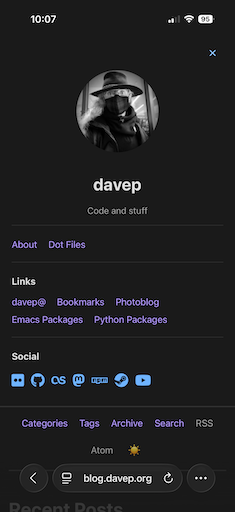
The expanded view

Not great.

So I decided to try and improve the mobile layout. As I have done so many times now, I started out with an issue that served as a prompt and assigned it to Copilot; despite the fairly vague request and the fact that I gave it an image to consider, and essentially gave it a hand-waved ASCII diagram of what I wanted, it mostly managed to one-shot the problem.

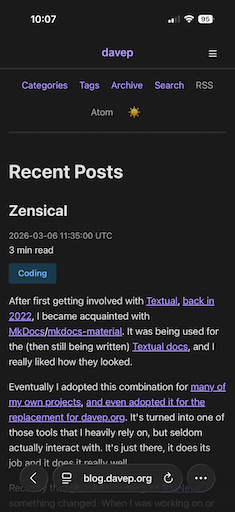
Now, when I visit the site on my phone, I see a lot less "admin" stuff at the start.

The collapsed view

As a reader I can still toggle the "sidebar" information into view and out of the way again, but the important thing is I can get into the post itself right away.

Another change that's mostly cosmetic, although has a purpose too, is an index in the archive page. I've created this to only be available on wider displays; a tool to make use of any "dead" space on the right hand side of the page. This gives a table of contents of years and months so the reader can skip around the archives faster.

The archive table of contents

There have been some under-the-hood changes too. One was an effort to reduce the repeated boilerplate that I noticed was creeping into the templates. While I'm mainly building this tool for myself and the "out of the box" design is how I want my blog to look, I do want the templates to be usable and as efficient and as easy to modify as possible.

As mentioned earlier, there's also been a couple of bug fixes; one example being tackling some misbehaviour on GNU/Linux when it comes to site generation. That issue was an interesting one in that I wasn't able to reproduce the problem, so I decided to let Copilot have at it and make its best deduction. From what I can tell it came through (I still need confirmation that it has solved the problem; but it does seem to have identified an actual edge-case that was worth taking care of).

At this point I'd also like to give a shout out to @andyc. He's been a great source of testing and feedback as I've been toying with this experiment. While I set out to build a useful tool for me and me alone, he's raised a few good issues that should push it in the direction of being of more general use.

I highly recommend having a read of his post reviewing a good number of static site generators. As I keep tinkering with BlogMore I'll be keeping this post in mind.


  1. Okay fine any narrow viewport but you know what I mean!