Posts in category "Coding"

BlogMore v2.21.0

2 min read; 10 GFI

After noticing a broken link in a post yesterday, I got to thinking that it would be useful to add a linter to BlogMore. So I've released v2.21.0 which adds linting support.

A number of things are checked and the results are broken down into things that are errors or warnings. Errors result from any of these checks:

  • Ensures all posts and pages have valid YAML frontmatter. If a file cannot be parsed, it is reported as an error.
  • Scans the generated HTML for links to non-existent internal paths (other posts, pages, categories, tags, archives, site features like search, or files in extras/).
  • Checks that all <img> sources resolve to valid internal paths or files in the extras/ directory.
  • Checks that the cover property in a post or page frontmatter points to a valid resource.
  • Verifies that all page slugs listed in sidebar_pages actually exist.
  • Checks that all internal-looking URLs in the links: and socials: configuration settings point to valid targets.

On the other hand, the following just result in a warning:

  • Flags if a post is missing a title, category, tags, or a date.
  • Reports if a post's date or modified date is set in the future.
  • Notes if a post's modified date is earlier than its original publication date.
  • Identifies if two or more posts share the exact same title.
  • Flags inline images missing an alt attribute, or those with an empty/whitespace-only alt attribute.
  • If clean_urls is enabled, warns if internal links point explicitly to index.html.
  • Reports internal links using the full site_url (e.g., https://example.com/path/) instead of a root-relative path (/path/).

I feel like all of these cover most of the things that are low-cost to detect but have a positive impact on the state of the content of a blog.

One thing I've not done is any sort of checking of external links. This would be costly and could possibly have unintended consequences that I don't want to be messing with (perhaps a tool to export the list of external links for checking could be useful, at some point).

Having run this against this blog, I did find some things that needed cleaning up, mostly absolute links that could be turned into root-relative links (always good for making the content portable).

I'm going to make this a standard part of my "I'm ready to publish" check for this blog, and it should also be helpful as I carry on migrating the images in the blog over to WebP.
More syncing GitHub to GitLab and Codeberg

1 min read; 10 GFI

Following on from my first post about this, I've tweaked the script I'm using to backup a repo to GitLab and Codeberg:

#!/bin/sh

# Check if the current directory is a Git repository
if ! git rev-parse --is-inside-work-tree > /dev/null 2>&1; then
    echo "Error: This directory is not a Git repository."
    exit 1
fi

REPO_NAME="$1"

# If no repository name was provided, try to get it from the origin remote
if [ -z "$REPO_NAME" ]; then
    ORIGIN_URL=$(git remote get-url origin 2>/dev/null)
    if [ -n "$ORIGIN_URL" ]; then
        REPO_NAME=$(basename -s .git "$ORIGIN_URL")
    else
        echo "Error: No repository name provided and no 'origin' remote found."
        echo "Usage: $0 <repo-name>"
        exit 1
    fi
fi

echo "Configuring multi-forge backup sync for: $REPO_NAME"

# Set up the remote called backups. Anchor it to Codeberg.
git remote remove backups > /dev/null 2>&1
git remote add backups "ssh://git@codeberg.org/davep/${REPO_NAME}.git"

# Set up the push URLs.
git remote set-url --push backups "ssh://git@codeberg.org/davep/${REPO_NAME}.git"
git remote set-url --add --push backups "git@gitlab.com:davep/${REPO_NAME}.git"

# Only ever backup main.
git config remote.backups.push refs/heads/main:refs/heads/main

# Also backup all tags.
git config --add remote.backups.push 'refs/tags/*:refs/tags/*'

echo "----------------------------------------------------"
echo "Backups configured:"
git remote -v
echo "----------------------------------------------------"
echo "To perform the initial sync, run: git push backups"

### setup-forge-sync ends here

The changes from last time include:

  • The repo name now defaults to whatever is used for GitHub, so I don't have to copy/paste it or type it out.
  • It now backs up all the tags too.

I've been running with this for a couple of days now and it's proving really useful. Well, when Codeberg is available to push anything to...

BlogMore v2.20.0

3 min read; 12 GFI

I've just released BlogMore v2.20.0. There are five main changes in this release, and a lot of changes under the hood.

First, the under-the-hood stuff: while this isn't going to make a difference to anyone using BlogMore (at least it shouldn't make a difference -- if it does that's a bug that deserves reporting), the main site generation code has had a lot of work done on it to break it up. The motivation for this is to make the code easier to maintain, and to try and steer it in a direction closer to how I'd have laid things out had I written it by hand. The outcome of this is that, where the generator was over 2,000 lines of code in a single file, it's now a lot more modular and easier to follow.

Some other internals have been cleaned up too. Generally I've had a period of reviewing some of the code and reducing obvious duplication of effort, that sort of thing.

Now for the visible changes and enhancements in this release:

Improved word counts

Until now the word counting (and so the reading time calculations) were done by stripping most of the Markdown and HTML markup from the Markdown source. I wasn't too keen on this approach given that the codebase had a method of turning Markdown into plain text. So in this release the regex-based cleanup code is gone and word counts (and so reading times) use the same Markdown to plain text pipeline as anything else that needs to work on plain text.

Fixed a word count and reading time disparity

It was possible, in the stats page, to have one post appear to have the lowest or highest word count, but to not have the lowest or highest reading time. This was because reading times are always calculated to the minute and so there could be a disparity due to this rounding. The calculation of those stats now takes this into account.

Added an optional title to the socials

The socials setting in the configuration file has had an optional title property added for each entry. Until now the tooltip for an entry would be whatever the site was set to. Generally this works but if you have two or more accounts on the same site, or if you want to use a site value for something different, there was no way of making the tooltip more descriptive.

As an example, currently it's not possible to support Codeberg as a site. On the other hand git is available so it can be used as a substitute icon. The problem is, with this:

- site: git
  url: https://codeberg.org/davep

the tooltip will just say "git". With this update you can do this:

- site: git
  title: Codeberg
  url: https://codeberg.org/davep

and the tooltip will say "Codeberg".

As mentioned: this is optional. If there is no title the previous behaviour still applies.

Wall-clock time measurement

Yesterday, Andy posted about BlogMore's performance with respect to the different optional features. It's something I haven't really considered yet (possibly in part because this blog isn't anywhere near as big as his), but could be a good source of tinkering in the near future. His work to test the different parts of the tool did get me thinking though: it would be neat to know how long each part of the generation process takes.

So now, when a site is generated (either when using build or serve), the time of each step is printed, as is the overall generation time.

Markdown in HTML support

Yesterday I noticed that, on one of my posts, what had been written as a simple caption for an image wasn't rendering as it used to. The actual content of the Markdown source for the post contained this:

<center>
*(Yes, the tin was once mine and was once full; the early 90s were a
different time)*
</center>

While the text was centred, the raw Markdown was left in place (it should have been italic text). The reason for this is that BlogMore had never enabled Markdown-in-HTML support. So, as of this release, if the enclosing tag has markdown="1", any Markdown inside the tags will be parsed. This means the above becomes this:

<center markdown="1">
*(Yes, the tin was once mine and was once full; the early 90s were a
different time)*
</center>

I did think about doing something to turn it on by default (the fact that I didn't have such a "switch" in the post before suggests that Pelican did just always do this), but really I feel this approach is more flexible and less likely to result in unintended consequences.

More Codeberg issues

1 min read; 11 GFI

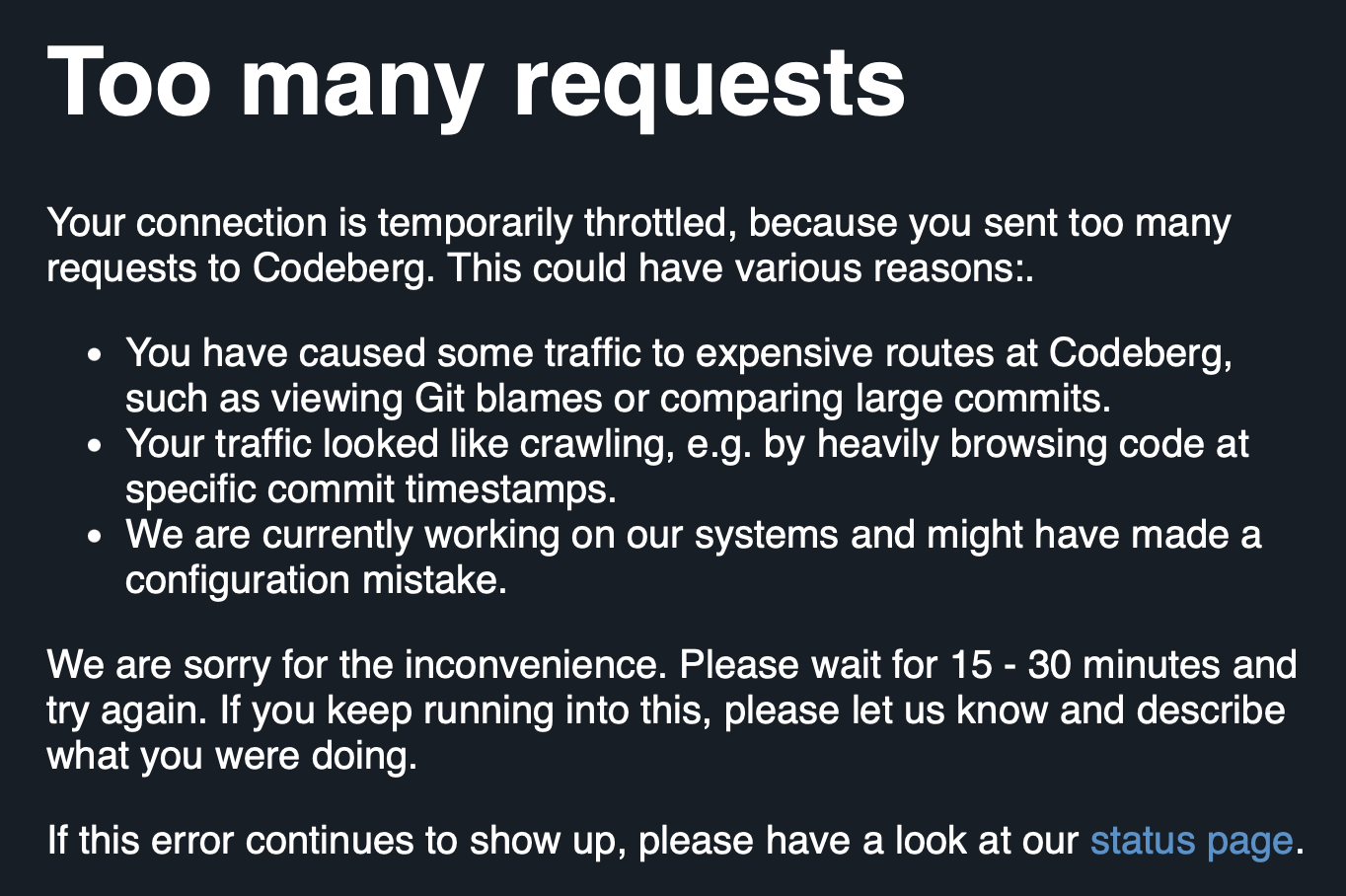
As I've said earlier, I'm not looking to move off GitHub any time soon, but I am curious about evaluating the options. So far, while trying out Codeberg, I am finding it to be very unstable.

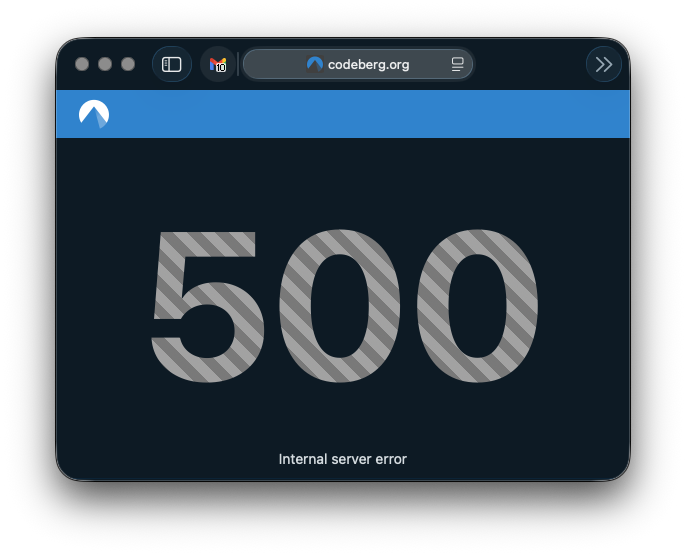
A little earlier I was simply browsing some of the repositories I've been adding and got very slow load times, and then a 500.

Codeberg 500 error

As I've said elsewhere: I really wouldn't expect perfection. I doubt that Codeberg has the money behind it that GitHub does. But, again, there is that issue with moving off GitHub because of instability; from that point of view it would feel like swapping some occasional instability for what, at the moment, is feeling like regular instability to the point that I wouldn't get too much done.

Syncing GitHub to GitLab and Codeberg

2 min read; 10 GFI

I've had a GitLab account since December 2017. This came about because of the new job I started in January 2018. They used a self-hosted internal instance of GitLab for all their code, so it made sense I get familiar with it (it wasn't hard; especially back in 2017 it was near enough a clone of GitHub in terms of what it did). Since then, though, I've never really done anything with it. I think I had a repo or two on there for a short while, but I must have nuked them at some point because the account has been empty for the longest time.

A Codeberg account, on the other hand, only got created the other day. Having created this, I got to thinking about how I might use it. In doing so I thought back to my GitLab account and then also got to thinking about where all my public code lives, and how "safe" it is.

Now, sure, the whole point of Git is that it's distributed. Forges are a useful thing to have and work with, but they shouldn't be the place where your code lives. On the other hand, I've had so many machines, and so many work environments, that it has become the case that my GitHub account has become the storage location for my code and projects.

Mostly this is fine. If GitHub were to disappear tomorrow I imagine we'd all have bigger things to be worrying about anyway. But the principle stands: why not distribute the load? Why not distribute the effort when it comes to sharing code I write?

So yesterday I finally decided on a plan: for the moment at least, I'm going to keep using GitHub as my "primary" location for working on stuff. It's where I'll have WiP branches, it's where I'll keep issues, it's where I'll encourage people to raise requests and stuff, it's where I'll host this blog. But I'm going to start syncing projects to both GitLab and Codeberg. I see this as having two benefits: anyone who doesn't want to interact with GitHub can now easily fork code, and if they wish they can raise issues and the like too. Meanwhile, in doing this, I'll also have the added benefit of my code being "backed up" in at least three different locations1.

The approach I've settled on, for the moment, is based around this little shell script:

#!/bin/sh

# Check if a repository name was provided
if [ -z "$1" ]; then
    echo "Error: No repository name provided."
    echo "Usage: $0 <repo-name>"
    exit 1
fi

REPO_NAME="$1"

# Check if the current directory is a Git repository
if ! git rev-parse --is-inside-work-tree > /dev/null 2>&1; then
    echo "Error: This directory is not a Git repository."
    exit 1
fi

echo "Configuring multi-forge backup sync for: $REPO_NAME"

# Set up the remote called backups. Anchor it to Codeberg.
git remote remove backups > /dev/null 2>&1
git remote add backups "ssh://git@codeberg.org/davep/${REPO_NAME}.git"

# Set up the push URLs.
git remote set-url --push backups "ssh://git@codeberg.org/davep/${REPO_NAME}.git"
git remote set-url --add --push backups "git@gitlab.com:davep/${REPO_NAME}.git"

# Only ever backup main.
git config remote.backups.push refs/heads/main:refs/heads/main

echo "----------------------------------------------------"
echo "Backups configured:"
git remote -v
echo "----------------------------------------------------"
echo "To perform the initial sync, run: git push backups main"

### setup-forge-sync ends here

I'm going to keep all repo names the same2. So when I use this script it'll set things up so I can git push backups and main will then get pushed up to both GitLab and Codeberg. I don't feel the need to be keeping any WiP branches in sync or kicking about, likewise any gh-pages branches.

While I'm sure I could have done something a little more automated, this feels like a neat and simple approach, and also allows me to curate what appears in the two other places over time (I suppose, eventually, I'll mirror everything that isn't a dead experimental repo, but meanwhile I'll prioritise projects that are either still very useful or which I'm actively developing and maintaining).


  1. Yes, I have other backups too, but they're always current-working-machine type backups. ↩

  2. Except, perhaps, for any repo whose name starts with .; I seem to recall that GitLab can't handle that, for some bizarre reason. Perhaps that's fixed now? ↩

Trying out Codeberg

2 min read; 8 GFI

Following on from what I wrote about GitHub recently, I thought I'd check out Codeberg. While I'm aware of it (it is supported by Hike after all), I've never actually used it and have never had an account there.

I was delighted to find my preferred user name was actually available, which made me more inclined to create an account. The account creation process itself seemed a bit of a faff. I can't remember the details now, but it took a couple of goes and necessitated a password reset and recovery to actually get in (I recall there was some sort of error when I tried to use the activation link sent in the email, which took quite a while to turn up, but the rest is hazy, and I wasn't taking notes). It might be that it didn't help that I was signing up in a mobile browser.

That aside, though, I got up and going in the end.

At this point I'm not quite sure what I want to do with the account. While I'm nowhere near being willing or able to move my GitHub activity over there, it at least feels like it might be a viable backup location via which I can make code available. Also, and probably more importantly, it makes it easier for me to follow projects that use it as their primary (or only) forge.

This morning I found myself following a link to a project hosted there. It looked interesting, it looked like something I'd want to follow. It didn't go so well. I hit the star button and... busy circle.

Slow star

This lasted for a while with nothing happening. So I refreshed the page, no star on the repo, so I tried again. Same result. I tried a third time and got something different right away.

Codeberg error

At some point I ended up with a big fat 500 page.

Do I see this as an issue? Of course not. Could be I caught it on a bad day. Stuff happens. I've seen a 500 from things I'm responsible for before now. I'm not going to expect perfection. But it does remind me that leaping from one forge to another, to chase platform stability, and in doing so give up a long history, is a risky endeavour without a guaranteed payoff.

BlogMore v2.19.0

1 min read; 10 GFI

While I'm messing around in the background of BlogMore, looking at the state of the code and looking for opportunities to clean it up, either by hand, or by pitting agent against agent, I've also been doing the odd little fix here and there.

I've just released BlogMore v2.19.0, which has a couple of fixes, and also a small improvement.

The first fix is something I noticed late on last week when I was sharing one of the archive pages from my blog with someone. I noticed that the preview that appeared didn't have the default blog image, nor did it have any sort of description. This should happen in that, on any page that isn't a post with a specific cover image or description, it should fall back to the blog's defaults. Turns out this logic was missing from things like the date-based archives, the category and tag archives, and a number of other parts of the generated output.

That's now fixed.

The second fix is to the recently-added backlinks feature. While reviewing the effect of something else I was working on, I specifically noticed that this post didn't have a backlink section at the bottom, despite the fact that it was linked to from this post. The cause seemed pretty clear: the fact that I had parentheses in the URL. My guess was that the regex that the link-finding code uses wasn't taking this sort of thing into account; my guess was right.

The final change in this release is that the per-build cache-busting feature has been extended to all the JavaScript files that are generated when building the site. Before it was mostly only applied to the main stylesheets and a couple of long-standing bits of JavaScript. Now it's added to the code that's used for search, the code-block support code, the graph, etc. This means that if there are any changes in those files between builds and deployments of a site, there's less chance of unexpected behaviour that needs a "clear the cache first" fix.

On GitHub

2 min read; 12 GFI

It seems that dunking on GitHub is the flavour of the day. At the moment most of the social/news type things I tend to read are filled with the Ghostty news, as well as a small revival of posts and links to blog posts about all the recent outages. It's understandable. It does seem that something has shifted with GitHub in the last few months. While it hasn't been the site I used to enjoy for quite some time now, it just seems to be getting worse at the moment.

It's even pissing off the loyal AI enthusiasts with the Copilot changes.

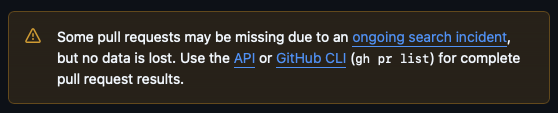
As I read all of this I find myself mostly nodding along. For the most part I'm not finding that GitHub is getting in the way and stopping me from doing the things I want to do, and for the most part it does act as a vital tool that lets me get work done, and also lets me enjoy my longest-enjoyed hobby. On the other hand I couldn't help but sigh and think "yeah, I get why this is the time that people are done" when I opened up the PR page for this blog, just now, and saw this:

A warning about my PRs

It does get me thinking about my relationship with GitHub, and how long I've been using it. As I've written before, I created my account back in 2008; I was within the first 30,000 users. While my use of it was only very occasional for quite a long time, for the last decade I've been constantly interacting with it. It is somewhere I visit constantly, not just to do work on my own projects, but to read what other people are doing. One of the first things I do every morning, when I sit down at my desk, is open my GitHub dashboard page and have a scroll through the feed to see what people I follow have been up to.

It's generally been the most fulfilling feed I've read.

But I'm also getting that feeling I got when I hung on to my Twitter account far longer than I really should have; not just because of the general vibe of "it's falling apart", but also other types of questionable behaviour. The degrading performance, the troubling business relationships, the over-emphasis on all things AI... it adds up.

There is a sense that some time ago was the time to move elsewhere as my sociable forge (probably around the time that Microsoft took over), and that not having done that, now is the second best time. But the effort of making that move is non-trivial and, quite frankly, I'd want to see where folk start to land, if they started to move away in any numbers at all. For me the real utility of GitHub isn't the "it's somewhere to store my shit" thing, it's the socially coding thing.

Then there's the follow-up problem: if some other forge was to become the next flavour of the decade, it too would probably end up suffering the same fate as GitHub.

Perhaps now is the time for me to start looking into options for collaborative code forges that offer the same sort of solution that Mastodon does for Twitter-like nattering.

BlogMore v2.18.0

1 min read; 12 GFI

After releasing the graph view yesterday I got to thinking that it might be nice if the "tooltips" for the nodes in the graph were a little richer. Since we already know how many posts are within a category, or have a specific tag, it makes sense that those counts should be shown; posts themselves have descriptions available and some even have cover images that could be turned into thumbnails. Why not make use of all of that?

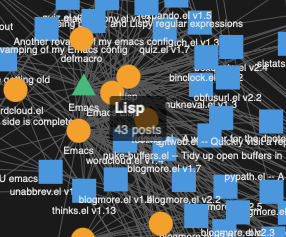
So I've made use of all of that. As mentioned, categories and tags simply show the count of posts related to them:

A tag tooltip in the graph

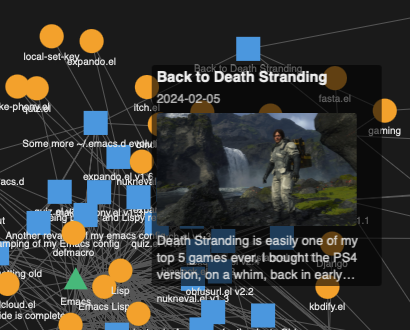
Posts will show the title, date, description and the cover image if available:

A post showing its tooltip

I'll admit that the transparency is a little distracting -- this comes from the library being used for the graph -- but I kind of like it. I'm going to roll with it now and see how I feel about it as time goes on. It's not like I expect a reader to read the post in the tooltip, it's an invitation to click through and read the actual post.

Another small change is something I've been meaning to address for a while. While BlogMore supports a modified time for a post it never shows it or uses it in any meaningful way. So now I've updated the way the time of a post is displayed so that, if there is a modified time, it's also shown:

Showing when a post was last modified

The final change came in as a request over on Mastodon. The wish being that there was an easy method, that didn't require the user spin out their own copy of a template just to do it, of changing the title of the backlinks section on a post from "References & Mentions" to something else. That seemed fair so I've introduced backlinks_title.