Posts in category "Tech"

Some documentation in Geminispace

1 min read; 8 GFI

Given that Rogallo is coming on pretty well, I feel it's about time to get some sort of documentation for it going in Geminispace. With this in mind, I've created an account over on tilde.team so I can make use of their support for the Gemini protocol.

While I don't imagine I'll be writing documentation as comprehensive as the main site for Rogallo, I do aim to provide some basic information.

The other thing I'm going to maintain there is a version of the change log. Rather than edit it by hand each time, I've added a tool to the Rogallo repository that converts the Markdown version of the ChangeLog into Gemtext.

It looks pretty good in Rogallo.

The Rogallo ChangeLog in Rogallo

Initially, I set all of this up so that I was editing the files via Tramp. This worked fine and got me going, but pretty quickly I decided that it would make more sense to create a repository, edit stuff locally, and then just rsync it when I'm good to go.

Not editing in production... I know... How boring.

Terminal bean soup

3 min read; 10 GFI

I'm sure most people reading this will be familiar with the concept of "bean soup theory". In case anyone isn't, here's how Wikipedia describes it:

A specific phenomenon described as a 'What about me' effect. An individual watches a video that doesn't pertain to them, but finds a way to make it about them anyway. Stems from a 2023 TikTok recipe for bean soup, with commenters saying "What if I don't like beans?"

I feel there's a very specific set of folk who love to "bean soup" anything relating to terminals, and it's common to have them turn up in your mentions if you happen to do anything in the terminal, or for the terminal, that isn't about their purist opinions and how everything must be a Vim clone, or worse.

I first encountered this when I started working at Textualize. Unsurprisingly, given the point, purpose and focus of Textual, some folk would turn up in the Discord server, in the issues, in the discussions, in the mentions of posts in various places, and post their very important opinions about how TUI software must work. Not... discuss their preferences, or offer suggestions (there were plenty of people who were pleasant like that, they were lovely to converse with), no: their engagement was written as if every word that was mashed into their keyboard was a well-crafted, handed-from-on-high RFC-like holy document that MUST and SHOULD be followed1.

If I was being very charitable I could cut them some slack. If you're building a framework for building applications for the terminal, there's a good reason to make it at least possible for the application authors to follow recognised best practice and to stick with hard-won conventions. Indeed, Textual has some design choices that I think are deeply questionable and misguided and I objected to them on more than one occasion. So, yeah, if I was being charitable, I could cut them some slack.

I could... if they weren't such arseholes about it.

This gets worse though if you're building an application for the terminal, especially if it's built as Free Software and the motivation is to build something for yourself and be kind enough to share. It irks the hell out of me when I build some application for myself, as a TUI, and then someone turns up and starts complaining about my choice of default key bindings, that work in my choice of terminal emulator and my configuration for that emulator.

It's even worse when they do it in a way where they have to show their very deep knowledge of terminals, and how they're very proud of just how lacking in features and progress their own choice of terminal emulator is.

Dude...2 I know. I've used physical terminals. I've written COBOL on a minicomputer using a line editor on some honking great dumb all-green all-in-one box. I've even written code on a terminal using fan-fold paper. I've used all sorts of terminal emulators. I spent well over a decade doing shit inside rxvt which was running on my GNU/Linux server while displaying on my Windows desktop machine.

I've installed and tested plenty of terminal emulators.

I'm well aware of the conventions and expectations. If Ctrl+C doesn't quit... that is my choice. It's not ignorance, it's not a lack of history with this stuff, it's a choice. For my software.

So when you turn up and feel the need to tell me that some function keys might not work in some terminal on some GNU/Linux box... I get it, you don't like beans. If that's the case, how about you either don't make my hobby all about your tastes and how I should build my application to suit you, or how about you RTFM and configure my application so it works in your choice of terminal?

I mean... we know you won't. We know you don't even care about the application I'm having tons of fun building, that I'm spending time in a joyous flow-state creating and tinkering with. You just care about making the post all about you and your purity. We know you just care about showing how smart you are.

We know you just can't resist the urge to reply-guy3.

We get it: you don't like bean soup. Nobody cares. Nobody asked.


  1. That reminds me: one day I should write a rant about the folk who obsess about the "Zen of Python"

  2. Let's be honest: it's always a dude. 

  3. Let's be honest: it's always a guy. 

Recreating my blog stats

4 min read; 13 GFI

Introduction

Having recently added the dump command to BlogMore I've been thinking I should try and learn a little more about jq. It's one of those tools that's been on my radar for ages, which I've used on very rare occasions to get something done quickly, but which I've never really used in anger.

So I thought it might be fun to see about recreating some of the stats from the stats page using jq alone. Well, I say "alone", I mean "from the JSON data that is produced by the BlogMore dump command", and of course that makes it easier given it dumps some of the key calculated values. In other words I won't be using jq to calculate the word count, or reading time, or GFI, etc.

Post count

To start with, working out the number of posts in my blog is simple enough:

jq '. | length'
371

Category count

Getting the list of categories would be:

jq '[.[] .safe_category] | unique'
[
  "ai",
  "coding",
  "creative",
  "emacs",
  "gaming",
  "life",
  "meta",
  "music",
  "python",
  "tech",
  "til"
]

and so getting the count of them is simple enough:

jq '[.[] .safe_category] | unique | length'
11

Tags count

Getting the count of tags takes a little more work, as safe_tags is a list too, so I start out with a list of lists, which I need to flatten first.

jq '[.[] .safe_tags] | flatten | unique | length'
224

This, right away, is an interesting finding. In my stats page, as of the time of writing, the number of tags is reported as 243, but here I'm getting 224. Given I'm using the safe_tags property, which ensures all similar tags end up with the same value (so Hello World, hello world, and all variations, become hello-world), that would suggest the stats page isn't taking that into account. That's an issue to address.

A date/time interlude

Here's where things get a little interesting for a moment. In the output of the dump command from BlogMore, the dates of the posts are given in ISO 8601 format; specifically the date and time with offset format. From what I can tell, while jq does have some date/time parsing support, it can't handle that format specifically.

This means that if I try:

jq '.[0] .date | fromdate'

I just get:

jq: error (at <stdin>:27293): date "2015-06-18T14:53:00+01:00" does not match format "%Y-%m-%dT%H:%M:%SZ"

After some searching around it seems the only approach I can really take is to drop the timezone offset and pretend every time is a Z time:

jq '.[0] .date[:19] + "Z" | fromdate'
1434639180

From here I can then get a fully-parsed list of date/time values using gmtime:

jq '.[0] .date[:19] + "Z" | fromdate | gmtime'
[
  2015,
  5,
  18,
  14,
  53,
  0,
  4,
  168
]

This isn't ideal for what I'd like to do, it's going to skew some of the values related to time, but it's close enough for experimenting.

Posts per year

Now that I have a way of breaking the posting time into a workable array of values, getting the number of posts per year becomes:

jq -r '[.[] .date[:19] + "Z" | fromdate | gmtime[0]] | group_by(.) | .[] | "\(.[0]): \(length)"'
2015: 32
2016: 26
2017: 7
2018: 1
2019: 15
2020: 23
2022: 11
2023: 49
2024: 19
2025: 11
2026: 177

Although, to be fair to jq, that's kind of long-winded when I could just pull the year itself out of the posting time:

jq -r '[.[] .date[:4]] | group_by(.) | .[] | "\(.[0]): \(length)"'

Posts by month

At this point getting the posts by month of year seems obvious too:

jq -r '[.[] .date[5:7]] | group_by(.) | .[] | "\(.[0]): \(length)"'
01: 14
02: 12
03: 53
04: 57
05: 76
06: 33
07: 25
08: 25
09: 13
10: 29
11: 19
12: 15

Posts by weekday

For this, I need to go back to the more involved version of the posting date handling query, where I use gmtime to break down the time. It turns out that the penultimate value is the day of the week as a number. So, while it's not quite as readable in that I don't have day names, I can get the values:

jq -r '[.[] .date[:19] + "Z" | fromdate | gmtime[-2]] | group_by(.) | .[] | "\(.[0]): \(length)"'
0: 48
1: 54
2: 51
3: 48
4: 56
5: 56
6: 58

In this case Sunday is the first day (the 0 day here).

Posts by hour

Getting the posts by the hour is really just a variation on the date-chopping query used for the posts by year and the posts by month; it's all there in the string version of the date.

jq -r '[.[] .date[11:13]] | group_by(.) | .[] | "\(.[0]): \(length)"'
00: 1
06: 1
07: 6
08: 51
09: 35
10: 32
11: 25
12: 14
13: 22
14: 24
15: 25
16: 24
17: 18
18: 9
19: 23
20: 33
21: 21
22: 6
23: 1

First and last posting dates

Getting the date of the first and latest post seems nice and easy:

jq -r '[.[] .date[0:10]] | {first: min, last: max}'
{
  "first": "2015-06-18",
  "last": "2026-06-01"
}

Although, from what I can tell, jq doesn't have anything that makes date arithmetic easy so working out the elapsed time between the two isn't so straightforward. It can be done, but it's not as easy as it might be with a bit of Python code, for example. The best I could come up with was:

jq '[ .[] | .date[:19] + "Z" | fromdate ] | ((max - min) / (365.25 * 24 * 60 * 60))'
10.95438841990519

For an approximate value of "year", of course.

Word counts

From here on in many of the stats that can be pulled out from the JSON, with jq, become easier to handle. Each post has a word_count property, so I only need to do this:

jq -r '[.[] .word_count] | {least: min, most: max, average: (add / length)}'
{
  "least": 24,
  "most": 2792,
  "average": 475.0700808625337
}

Reading times

A post's reading time can be accessed by reading_time, so it's as easy to handle as the word counts:

jq '[.[] .reading_time] | {least: min, most: max, average: (add / length)}'
{
  "least": 1,
  "most": 11,
  "average": 1.8921832884097034
}

Gunning fog index

The Gunning fog index is available as the gfi property so there's no work to do to figure it out. It is, however, a floating point value and I want counts in each integer "bucket". That can be done with round.

jq -r '[.[] .gfi | round] | group_by(.) | .[] | "\(.[0]): \(length)"'
3: 1
4: 2
5: 3
6: 7
7: 30
8: 46
9: 67
10: 70
11: 75
12: 35
13: 18
14: 11
15: 1
16: 3
17: 2

As for working out the mean, median and mode... while I worked out the above queries by reading the docs, experimenting, and using Gemini on occasion to either help me understand an error message or to explain why an approach works the way it did, I'm going to have to leave this one 100% to Gemini. Here's its approach to using jq to work out those averages:

jq '
  [ .[] | .gfi | select(. != null) ] as $raw_gfi
  | [ $raw_gfi[] | round ] as $rounded_gfi
  | ($raw_gfi | length) as $count

  # 1. Mean Calculation
  | (($raw_gfi | add) / $count) as $mean

  # 2. Median Calculation
  | ($raw_gfi | sort) as $sorted_gfi
  | (if $count % 2 == 1 then
       $sorted_gfi[($count - 1) / 2]
     else
       ($sorted_gfi[($count / 2) - 1] + $sorted_gfi[$count / 2]) / 2
     end) as $median

  # 3. Mode Calculation (using the rounded values)
  | [ $rounded_gfi
      | group_by(.)
      | map({gfi: .[0], frequency: length})
      | sort_by(.frequency)
      | reverse
      | .[]
    ] as $frequencies
  | [ $frequencies[] | select(.frequency == $frequencies[0].frequency) | .gfi ] as $modes

  # Final Object Assembly
  | {
      count: $count,
      mean: $mean,
      median: $median,
      mode: $modes
    }
'
{
  "count": 371,
  "mean": 9.908842231503396,
  "median": 9.979198312236287,
  "mode": [
    11
  ]
}

As of the time of writing: that's bang on what I get in the stats. Honestly though, by this point, I think I'd be reaching for Python or something similar to do this sort of work. For sure, I can't say if this is a good jq query, if it's in any way idiomatic, or even if it's error-free. The numbers match what BlogMore says though.

Conclusion

This has been a useful exercise in getting to know a little more about jq, and I can see myself reaching for it to do quick little jobs now that I've finally taken some time to dive into it. As it turns out, it's also been a useful little audit of the content of the stats page because I've even found a bug that needs addressing; so that's a bonus.

Wipr

1 min read; 8 GFI

While I know the subject really fires some people, ad blockers are something I've never really paid too much attention to. Back in the early days of the web, the really early days, I used to run with full-on JavaScript blocking1. The web changed and I accepted it.

More recently, as I've become a full-time Safari user in the last couple of years, I've been running with Ka-Block! installed. It's been fine. I've never really noticed it. I think it blocked some stuff, but not other stuff. I've never really noticed if it was getting updated or not; I just wasn't paying attention.

Then, this morning, I saw this post in the Fediverse and for some reason it caught my eye. I followed the link, did a bit of searching, asked Misko about his experiences with the app, and saved a bookmark.

Now, this evening, I've thrown down my fiver and I'm running with Wipr 2 installed, both on my Air and my iPhone. When I'm next on either of my Minis, or on my iPad, I'll throw it on there too.

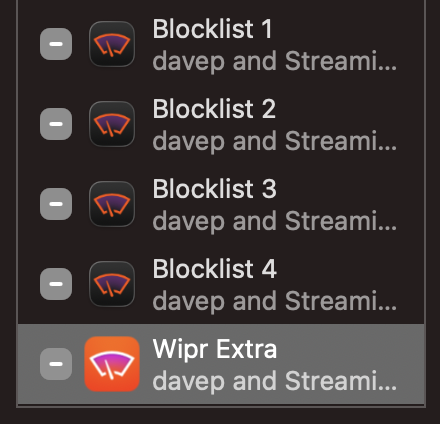
The installation process was straightforward, albeit one where you need to enable four extensions rather than just the one.

Wipr installed

As well as that, you then need to enable it in the app itself and you're good to go. I've since tried visiting a couple of locations that I know still showed adverts or consent pop-ups and... clean. So clean!

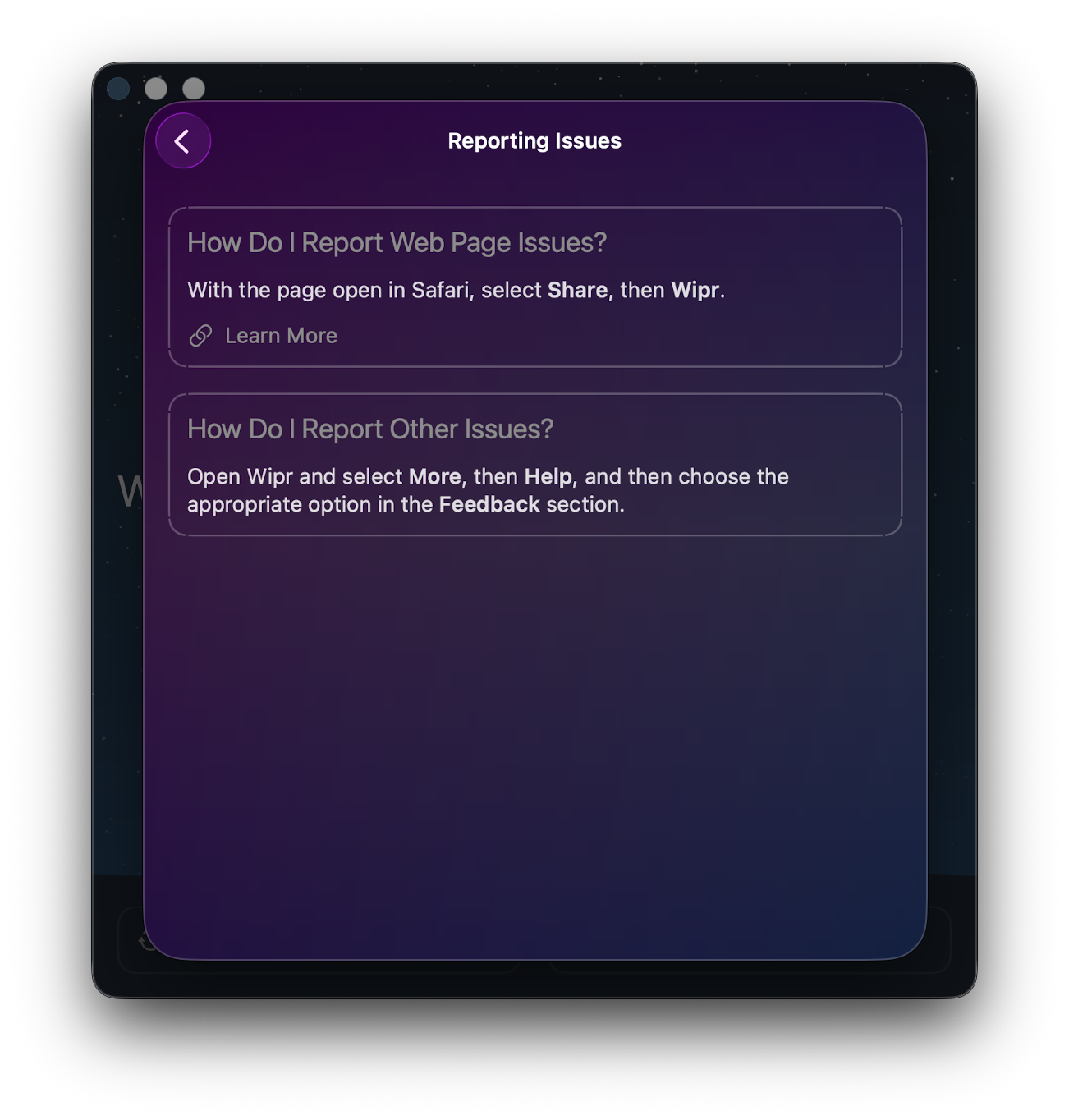
My expectation for tools like this is that they end up breaking some site in a way you least expect, so I'll be very aware of that for a while. That said, if I do run into a problem, not only is it easy enough to turn blocking off just for that one site, there's a very clear route to reporting problems too.

Encouragement to report a problem

Mostly, though, I hope I can go back to paying this app no attention whatsoever. If I can, I imagine that's high praise and a job well done for this sort of tool.


  1. I just know someone is reading that and thinking "pfft, JavaScript came along late into the web you noob"

Ghosted by Ghostty

1 min read; 5 GFI

I just grabbed and opened up the MacBook Air and met this:

Ghosted!

First time I've ever seen this and I've been using Ghostty for quite a while now.

To be fair, the MacBook did update to 26.4.1 overnight and has tried to get back to the state it was in before the restart, so I imagine that's the cause. But I've never seen this before.

I'm all good now; I -q the app and started it again and there's no sign of a problem.

Goodness knows how I get to see that log...

Discovering powRSS

1 min read; 12 GFI

This was a nice find yesterday: I think I came across it when someone I follow on Mastodon boosted a post from the account related to the site; it's a site called powRSS. The concept is pretty simple: collect links to all sorts of small blogs on all sorts of topics, and then provide a honking great discovery feed/pool. You can read more about the idea on their about page.

For sure, this sort of thing isn't exactly novel: those of us of a certain age will fondly remember the fun of webrings and other similar initiatives, not to mention feed aggregation sites where you could discover trending blogs or see what your friends were reading, and all that. But, to some degree, that fell out of favour and/or the limelight when social media got really popular.

So with this in mind it's good to see people still providing such sites. I've added this blog to it and I'll be diving in there now and again to see if there's anything new I should be following.

It'll be fun to populate OldNews with more things to read.

Hello MacBook Air (again)

2 min read; 8 GFI

As I mentioned yesterday I decided it was time to update my portable/sofa hacking setup and treat myself to a nice new MacBook Air. It's here (well, I picked it up yesterday evening after dinner).

MacBook Air M5

So far I'm very pleased with the choice. It's light but feels sturdy. The screen is very pleasing to read. The keyboard is really nice to type on (albeit I do prefer the old MacBook Pro, but on the other hand this is a bit more quiet, which matters if you're sharing a living room with someone else). It's fast. So fast! It's also so quiet! So very quiet! And cool too. The Intel-based MacBook Pro would get very warm as I worked; this just stays cold.

The really great part though is the battery life. Depending on what I was doing, with the Intel Pro, I'd get a couple of hours off the cable. On the other hand, last night, I spent a few hours setting things up on the Air and I barely noticed the battery drop at all. This, more than anything, is what I wanted.

Well, okay, I wanted the speed, the quiet, the lack of heat, and the long battery life.

Oh, and the rather lovely "Midnight" colour. It's not black, but it's close enough.

The setup itself went pretty well, although for some odd reason I ran into problems when setting up Emacs. These days I always use Emacs Plus via Homebrew and have never had issues. Weirdly though, this time, if I did the installation method that builds locally all sorts of things went wrong. I don't know if I missed a step or something but I did what I normally do when dropping Emacs on a Mac. So I started again with the pre-built approach and that worked better.

Even then though, I ran into problems with my setup downloading everything. Things mostly worked but I kept seeing all sorts of issues relating to git-gutter and git-gutter-fringe not being able to load (despite the fact they'd downloaded fine, from what I could see).

In the end I gave up trying to get it to all work from scratch and hand-removed and then hand-installed via package-list-packages instead. Not the most scientific of approaches, and one I'm sure I'll regret at some point in the future, but at least I got to a point where I could get other stuff done on the machine.

All of which is to say: if you're reading this blog post I got my Emacs and git environment to the point I can write things and push them out to the world. At which point that's the really important stuff up and going and I can call this "set up".

Once I'm happy that's working, I think it's time to revisit my Emacs setup. While I don't think it needs another complete restart, I think it might be time to at least look through what I have loading in and perhaps remove some things I don't use any more (for example, I always carry around vterm from the days when I was testing every possible terminal I could get my hands on -- that's less important to me these days.)

MacBook Air M5

2 min read; 9 GFI

It's just over a month shy of being 10 years since I bought my first MacBook. As I mentioned at the time: I'd bought my first Mac about 10 months earlier than that, had got used to it, had grown to like the OS, and had need of a small and light hacking machine to use while doing a lot of train travel (and I really did do a lot of train travel after that).

Fast forward a touch over 3 years and, by accident of a windfall due to work things, I ended up treating myself to a MacBook Pro. This was one of the last Intel models. It worked well and served as my main hack-at-home machine for quite a long time. I used it to code and edit videos and a bunch of other things. It sat there, on my desk, plugged into a couple of screens, and never really served as a portable machine.

Fast forward around 4 years and, having been using a MacBook Pro M1 for a while through where I worked then, I had a desire to get a M-chip Mac for personal use and settled on an M2 Pro Mac Mini. That thing was, and remains, a beast of a machine. It's set up here in my office right now and I'm sure will last me for some time to come.

The thing is, in the last 6 months, my home life has changed. I moved. I now share a place again. It's nice to sofa hack and hang out and all that "share a space with other people" stuff. To that end I've been using the Intel MacBook Pro again but I'm noticing that it's getting old now. It's not that it isn't coping with what I need it for -- far from it -- but having the fans kick in lots, and just the heat, and also the fact that the OS is stuck in the past because it's now a "legacy" machine... I sensed it was time for an upgrade.

A new MacBook Pro was an option, of course, but that feels like overkill for some sofa hacking. If I want to do any heavy video editing or any heavy coding the M2 Pro Mini is still the machine for the job. The new Neo looked really good too, but the entry-level storage seemed a bit stingy these days and once you bump up to the next level, while still stuck with the same memory, well the price starts to get dangerously close to...

The MacBook Air M5

So, yeah, as of today, I've kind of come full circle; a decade on from that MacBook Air purchase I have a new sofa hacking machine coming in the shape of the new M5 MacBook Air1.

So this weekend will involve me digging out my "new macOS environment" checklist and working through it, getting a hacking environment up and going again. One thing I do want to do is follow that list but also write out a fresh copy, because this time around I want to see if I can get a good Python environment up and going minus the use of pyenv. Not that pyenv is a problem, at all, but I feel like I should be able to achieve everything I need using just uv.


  1. I'm not a hardware nerd, so don't dive deep into this stuff. Despite what I said about the M2 Pro Mini still being there for heavy coding and video editing, it wouldn't surprise me to find out the Air is more than capable too. 

Astral and OpenAI

1 min read; 10 GFI

It's a couple of days now since the news hit that OpenAI are in the process of purchasing Astral. When I first saw this my initial reaction was pretty much "woah", followed by getting on with what I was doing.

Until, that is, I opened up the socials. On Mastodon, Reddit, Bluesky, Threads, etc... anywhere I followed any Python-based content, I was seeing very firm opinions posted. Plenty of folk either talking like it was the end of their tooling as they know it, or proudly boasting that they'd avoided uv and ruff (and lately ty too I guess -- not that I've really tried that yet myself) because they'd predicted this evil outcome from the start and they were untainted by this but look at all you idiots who fell for this long play!

Okay, I exaggerate slightly, but there were some pretty strong opinions kicking around, especially in the (often fairly smug) "I stayed pure and never used uv" camp.

Personally, I don't get it. The last I looked the tools I use that Astral are behind are FOSS. Also, the last I looked, plenty of FOSS tooling is written by folk who are either paid to do so (I had my moment), given some time in the day job to work on those tools, or just plain have a day job and also work on those tools. If, as plenty are speculating, the Astral purchase is an acqui-hire, the likely result is going to be one of those three scenarios.

If it isn't one of those scenarios, if work on uv and friends just ceases, well, at best some smart folk can fork the tools that are useful and keep them going (this is a major benefit of FOSS after all) and, at worst, well... we can fork them and agent the shit out of them. Right?

macOS desktop widget switching

1 min read; 12 GFI

When desktop widgets first turned up in macOS I was pretty quick to embrace them. On my personal Mac Mini I use a pair of screens, the right one mostly given over to Emacs, and there was generally room to space there. These days that screen generally looks something like this:

The usual layout of my right screen

Recently I've got into streaming while I do some coding and it's the right-hand screen that I work on and capture using OBS. When I was setting this up I realised that the widgets being there could be a problem; not because they could distract or anything, more that they could, at times, contain sensitive information (there's my reminder list and my calendar there after all).

What I needed was a quick method of hiding all the widgets, and showing them again later, without it being a lot of faff.

With a little bit of digging around on the net I finally came up with a pair of fish abbreviations that do just the job!

abbr -g widoff "defaults write com.apple.WindowManager StandardHideWidgets -int 1"
abbr -g widon "defaults write com.apple.WindowManager StandardHideWidgets -int 0"

Now, when I'm going to stream, part of my "getting stuff ready to go live" checklist is to run widoff in the terminal; once I'm finished I can then just run widon again to have them come back.

Fast, clean, handy.

I've also got a pair for when I'm using Stage Manager:

abbr -g smwidoff "defaults write com.apple.WindowManager StageManagerHideWidgets -int 1"
abbr -g smwidon "defaults write com.apple.WindowManager StageManagerHideWidgets -int 0"

Although, really, I can't remember the last time I used Stage Manager. I dabbled with it for a wee while, found it vaguely handy in a couple of situations, but it doesn't seem to have stuck as part of my workflow or work environment.