Posts in category "Tech"

Moto360 updated

2 min read

Yesterday evening I finally got the following notification on my Moto360:
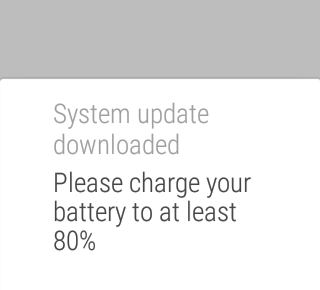
Moto360 Update Notification

Given the charge was quite a way below that I took the watch off and put it on charge and then did the update later.

From what I could tell it all went pretty smooth. After updating it even offered me a little tutorial on some of the new things it's added. So far I've used (or set up) the following:

  • The much better "launcher" Finding and running apps on the watch was always a bit of a pain, so much so that others had even written special launchers for Android Wear. This seems to be pretty much solved now. Pressing and holding the watch's side button will pop up application list, from here you can swipe right to your contacts (them letting you send messages, start calls, etc) and right again for the usual list of actions that you used to go straight into.

The way it's done now makes a lot more sense and seems far cleaner.

  • WiFi I've yet to notice the benefit of this, but I've not paid too much attention yet either. The watch now does WiFi. This is supposed to mean that it can still work with my phone when it's out of Bluetooth range. I say I don't know if it's working yet because I use an app to tell me if my phone is out of range and it still keeps tripping as normal -- but I'm unsure if that means it's simply telling me it's out of BT range but really the watch is now doing its thing over WiFi, or perhaps the phone connection really has been lost despite me having set up the WiFi connection. More testing needs to happen here.

Setting this up was curious: I had to turn it on on the watch and then select the access points I wanted to work with, again on the watch. But to actually connect I had to switch back to my phone to enter the AP passwords (which makes perfect sense of course, nobody wants to type passwords into a watch face).

  • Gestures These needed to be turned on in settings. I've being using them this morning to navigate cards on the watch and it's really well done and really natural. Simply put, you flick your wrist up, or down, to "flick" from one card to another. All it seems to be missing is some method of gesturing that I want to swipe a card out of the way.

Other than the above it's pretty much business as usual. Hopefully there's been some work to improve battery life and all that sort of stuff, and only time will tell if a difference has been made there.
ChromeOS ssh has gone! (sort of)

1 min read

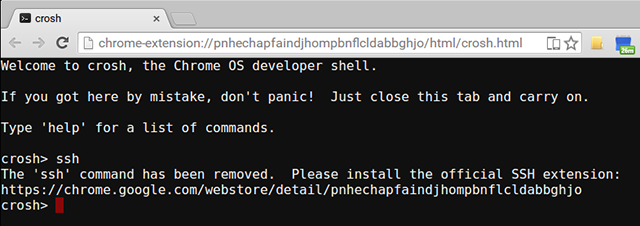
I've no idea when this happened, and I'll admit that the advice it gives is advice I've mostly being following anyway for quite a long time, but it seems that ssh in the ChromeOS terminal has been removed. This is what just happened when I tried to use it just now:

ChromeOS ssh no longer working

To be fair, Chrome Secure Shell is pretty damn good and has served me well for the past couple or so years, working well on the Chromebook and on Windows 7 and 8 (and also now on the Mac, although I'm tending to use ssh in its native terminal more).

I wonder if any other of the limited features of the ChromeOS terminal (in non-dev mode anyway) are going to go the same way?


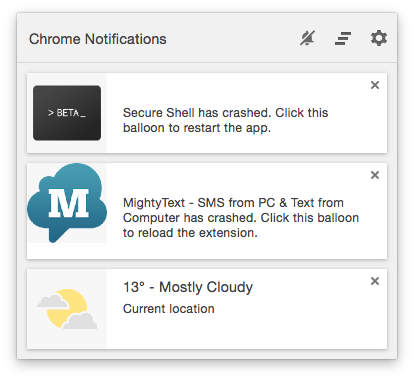
As an aside to the above, something kind of ironic happened as I was writing this. I opened Chrome so I could preview the post as I was writing it and I suffered one of Chrome's rather common extension crashes. Look what one of those extensions was (and I wasn't even using it at the time):

Chrome ssh extension crashes for no reason

Not exactly the best advert for the non-optional replacement.

A mild Chrome annoyance

1 min read

For a long time now Chrome has been my web browser of choice. It has, to some degree, become my "other emacs" (ignoring for a moment that my use of GNU emacs has sort of lapsed the last few years). By that I mean that it's a portable environment that serves me well on many operating systems and, for one of my machines, actually is the operating system. I really appreciate how Chrome's sync lets me feel right at home no matter which machine I'm on.

But I've run into one small issue that's kind of annoying.

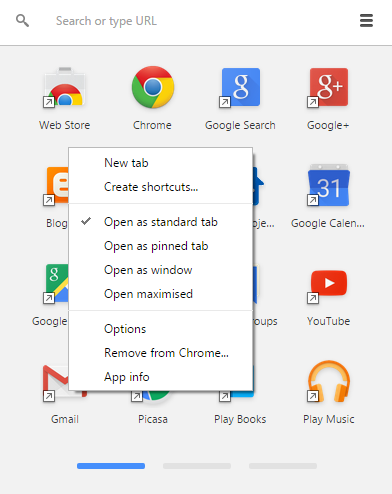
In some situations I find it pleasing, and I find it makes sense, that some web "apps" open in a window of their own rather than in a Chrome tab. On Windows and on ChromeOS this is simple enough, all I need to do is find the "app" in the Chrome app launcher, pull up the content menu, and tell it to open as a window.

Chrome app context menu on Windows 7

Nice and simple1.

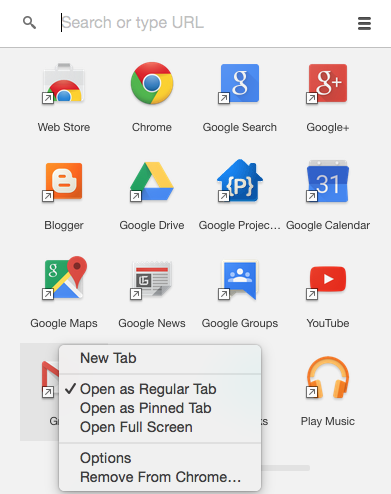
Now, the Mac, so well known for doing everything every other OS does but doing it better and being easier to use.... you'd expect it's at least the same there, right?

Nope.

Chrome app context menu on OS X

There's no option at all to open as a window!

So, on the Mac, while I'd love to be able to open Gmail as a window/app in its own right, I'm totally out of luck, it seems. I've no idea whose "fault" this is. It's not clear to me if this is a Chrome/Google decision or if it's about how things have to work on a Mac. Thing is, I find it hard to believe that it's the latter given that Google Keep runs in its own window on the Mac and I can happily pin it to the dock.


  1. It's that simple on ChromeOS too. In case you're wondering why I didn't also illustrate that, it's because you can't take a screenshot on ChromeOS while you've got a context menu open. O_o