A small update to Port79, bumping up to v1.1.0. This release adds a resolve method to the FingerURI class.
I'm currently tweaking Rogallo's rendering of some responses from finger services and being able to resolve URIs relative to the underlying page is going to be very helpful.
Earlier today I saw a comment on a post on BBS that was really quite disappointing. The post itself was announcing a new Gemini client, in this case a fully-native macOS one called MajorTom. It's early days for the project, but it looks fun. It also looks like the author is having a ton of fun building it.
I can relate. I've been obsessing over building Rogallo since June this year and it's been an absolute blast. I don't see myself getting bored of it any time soon.
The comment that irked me was this:
Got excited, then I saw the AGENTS.md :(
It’s hard to get excited about new software when everything is just AI generated. I miss the old times when you got excited that someone built something. Now it’s just someone wrote a prompt to make a computer build something.
It comes over like some messed-up Calvinist puritanical work ethic thing. Yes, I know all the arguments against the use of AI, you'll find that I agree with a good few of them; but there's something wild about this "you didn't work hard enough to produce the software I might otherwise consider using so I've dismissed it" attitude. I'd say enough with this nonsense, but it's been going on for as long as I've been writing code and I doubt it'll stop any time soon. At every step in the evolution of software development there's always been someone, sat on the sidelines, tutting and judging because someone is using a new tool that makes it easier or quicker to do a thing.
What also bothers me is how easily the author of the comment belittles and diminishes the work of the author of the application. Sure, there are some folk who will try and one-shot something with a prompt or two, and who might then pass it off as something carefully considered and designed; but it's unfair, perhaps even dishonest, to attribute that to someone when you don't know what process they've gone through.
If I look at Rogallo, for example... AI has been involved along the way. To be clear: 100% of Rogallo is hand-written code, AI has not been involved in writing any of it. I have used Antigravity as an occasional rubber duck to hash out some ideas, but there's zero chance I'd let it anywhere near the code itself1. On the other hand, some of the protocol-based support libraries I've built have heavily involved AI. Even then, I didn't just slap in a prompt and run with the result. I did research, I followed the docs, I read more and more about Gemini and Spartan and Nex, etc. I used an agent to get the code going based on my understanding of the source material and I then used that code to support the main work I actually wanted to be doing.
ℹ️ Note
Thinking about it, here's roughly how it breaks down in terms of actual code written, so far:
Rogallo: zero AI
bagofstuff: pre-existing but zero AI
gemtext: zero AI
gophermap: zero AI
html2gemtext: zero AI
md2gemtext: mostly AI
port1900: mostly AI
port70: mostly AI
port79: mostly AI
sybaritic: mostly AI
textual_enhanced: pre-existing but zero AI
textual_fspicker: pre-existing but zero AI
wasat: mostly AI
There's zero chance I could have built Rogallo and all the support code from a position of ignorance. None of it was "just a prompt". Looking at what's gone into MajorTom so far, I doubt that's the case there either.
Anyway, back to the main topic...
I also find an element of entitlement in this comment. It reminds me somewhat of the person who felt they were owed something by FOSS authors. Excitement is not something a FOSS author owes you. You are, of course, welcome to go looking for excitement, but if something you discover doesn't do it for you... it's not for you, move on, go find something else. Announcing that you didn't get excited because someone else got creative in a way you don't approve of just makes you look like you want to centre the discussion around you.
Someone made a thing. Someone shared a thing. Someone posted a thing. You turned up and made it about you. That's kind of rubbish. Don't do that.
It's totally fine to not like the use of AI. It's totally fine to want to avoid anything built with AI or which is somewhat AI-adjacent. I get it: it's good to have your own standards and to stick to them. I would suggest, however, that it starts getting problematic when you need to tell someone having fun with their own free time that they're not doing so in a way that meets your standards. Doing that is kind of weird.
Doing that makes you look like the effort police.
I've yet to see an agent write Textual code I'd consider reasonable. ↩
I've just made a small release to Rogallo, bumping the version to v2.1.0. This release mostly has some small cosmetic fixes and improvements, and one new feature.
The cosmetic improvements include:
Fixed the verification method and client certificate status icons in the viewer title bar so they don't use the "this is clickable" mouse cursor when there's nothing worth clicking.1
Adjusted the styling of tooltips so they better stand out against the background text.
Fixed the cosmetics of the viewer when the content is set to a narrowed state (some of the changes in v2.0.0 had inadvertently changed some of the styling).
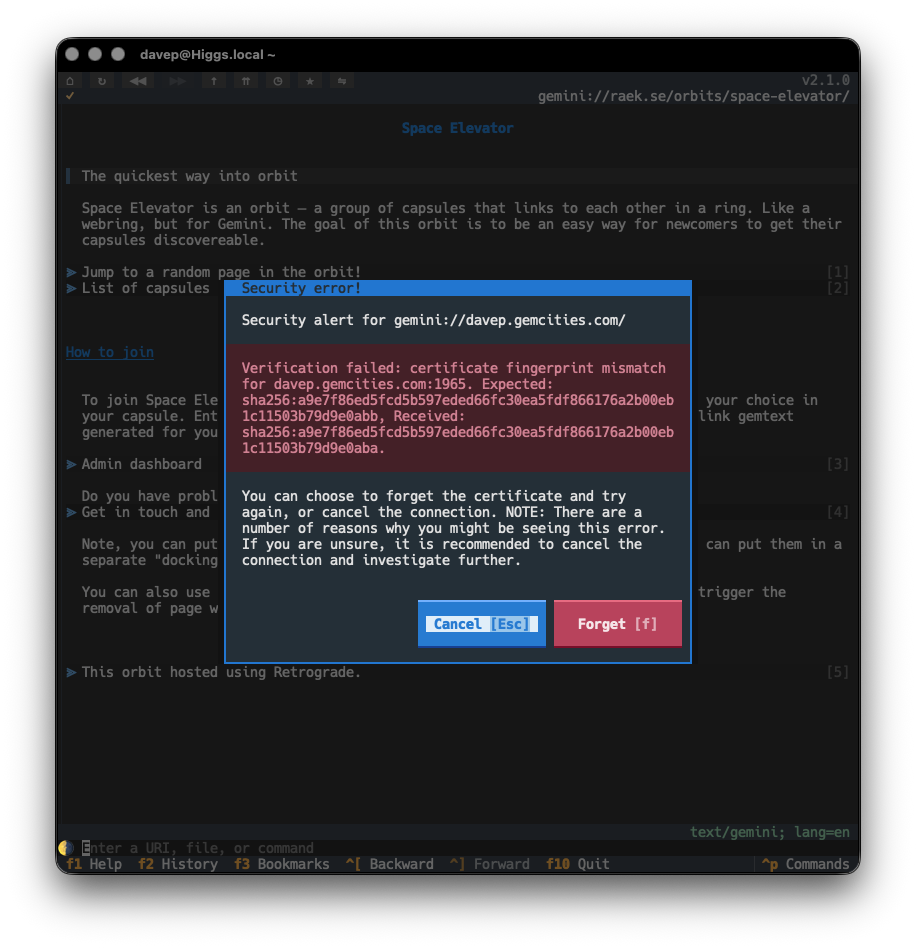
The new feature is one of the last issues I wanted to address when it came to all things related to Gemini and security: the option to "forget" the certificate fingerprint of a host when the fingerprint has changed.
Until now, if you visited a site that was using a self-signed certificate, and the fingerprint for that certificate had changed, you'd just get an error toast and the page would not be loaded. Technically this is the safest thing to do, but it's not the most pragmatic approach most of the time; capsules will change up certificates and you probably know you can still trust them.
So, from now on, rather than simply refusing to load the page, Rogallo will tell you about the issue and then offer to forget the fingerprint and try again.
This should make the issue more noticeable and also easier to handle.
A quick little update to Wasat, bumping the version to v1.7.0. In service of a feature I'm adding to Rogallo, I've added a forget method to the trust store class, so that a certificate fingerprint for a particular host/port combination can be forgotten.
This came about because, if a fingerprint does change for a Gemini capsule, I want a Rogallo user to be able to decide to either avoid it or forget it and re-establish trust. While the fingerprint mismatch should be a warning to distrust the capsule, there might be a legitimate reason why the certificate has changed, and I want to make that decision fairly frictionless.
I've enjoyed using the odd mechanical keyboard for a few years now. Nothing too fancy. Every once in a while I get the urge to really get into the mechanical keyboard world. Knowing that this shop exists might make it harder to resist falling down that hole.
Even though I use emoji-based prefixes for commits on my personal projects (mostly just for the shits and giggles of it), I detest the "Conventional Commits" thing. I sense this post captures some of why I don't like it.
There's a lot I see in this book that I like. I feel this is a good book to point folk at, either people who have never worked with Python before, or people who want to get better with it.
I use Eglot lots, every day, and have been for quite a while now (even since before it was part of Emacs itself). However, I've never really paid too much attention to its performance or how it can be improved. This is a useful read.
I've had good experiences with various tree-sitter modes in Emacs and I use the Markdown mode in Emacs a lot. So this feels like something I need to try out.
I've just released v2.0.0 of Rogallo. This release has quite a lot of changes, one or two of them "breaking changes", hence the bump to v2.0.0. I will add though that, when I say "breaking changes", nothing should actually break, it's just some features have changed in an incompatible way and some application commands have been removed or renamed (and so some default keyboard bindings have changed). The worst that might happen is a keyboard binding you set up no longer works.
While Rogallo supported the creation and use of client certificates for use with Gemini capsules, it never made it that easy to work with them. Creating and using them was pretty frictionless, but if you were someone who wanted to bring your own certificate from another application, you were on your own. Actually doing that was easy enough, if you were comfortable with diving into the certificate directory and hand-editing the JSON file to create the association. What was lacking though was a good interface to manage all of this in the application.
This version solves that problem. Rogallo now contains a client certificate manager that lets you:
Create new client certificates
Add and remove associations for client certificates
Delete client certificates
Import client certificates
Export client certificates
Also, when you encounter a capsule that demands a certificate and you don't have one associated, you can pick an existing one from your certificate library; before the only option you had was to create a new one.
Initially, when I first started work on Rogallo, I had a simple history list that could be popped in/out on the side of the display. Then, when I added bookmarks, this became a sort of toggle, with either the history showing, the bookmarks showing, or both hidden. The command to show the history would hide the bookmarks; the command to show the bookmarks would hide the history; both would toggle themselves to hide. This was... kind of messy, but it worked.
When I started work on the certificate manager it made sense that it also occupied the same space. However, the code for managing this, and the resulting user experience, started to get pretty messy. I wasn't at all happy with it so ended up going on a bit of a side-quest to clean this up.
The result is that Rogallo now has a tabbed side panel (similar to the one in Hike). This contains the bookmark manager, history manager and client certificate manager.
This is where one of the main breaking changes comes in: the ToggleHistoryManager and ToggleBookmarksManager commands have been removed from Rogallo and their default keyboard bindings have been freed up. Also, to clean up the naming of things, I've renamed JumpToSidebar to JumpToSidePanel.
I feel this side panel approach is far cleaner and far easier to work with.
It's also worth noting that it's moved over to the left side of the display. However, if you'd prefer it on the right there's a configuration option for that.
As part of the work on managing client certificates, I added a dialog that lets you view details of a certificate. As well as being available in the certificate manager, it can also be used to view any certificate that might be in use when viewing the current page. The AboutClientCertificate command (bound to Shift+F7 by default) can be used to bring up the view.
For the folk who lean more on the mouse, the key icon that appears in the title bar of the viewer can be clicked on to get the same view.
The command line in the application now tries to be a little bit smarter when it comes to understanding input. Before now, if you were to type in example.com, Rogallo would assume that you were attempting to visit a Gemini capsule on that host and process the input as if it were gemini://example.com/. This release extends this a little.
If the input doesn't appear to be anything else and it includes a @ it will be turned into a finger URI. So user@example.com becomes finger://example.com/user and @example.com becomes finger://example.com/.
If the first part of the host has a recognisable protocol name, it will be assumed that that protocol should be used. In other words:
I've overhauled the code that does emoji removal if you toggle removal on. More work is done to identify "real" emoji. This should mean that all the usual colourful image-like candidates are removed, but now things like braille and box drawing characters, etc, won't be removed.
Also, when removing an emoji, if there is a space following it, that space will also be removed. This solves the cosmetic problem of "👉 This" being turned into " This" when it would make more sense that it is turned into "This".
It's worth keeping in mind here that this isn't intended to be a 100%-correct solution. It's aimed at being a good-enough solution to clean up most of the emoji clutter if you don't like that sort of thing.
My general approach to developing anything is one of "make it right then make it fast". I've never been a fan of early optimisation, and when I've watched people obsess over such things far too early in a codebase's lifecycle I've generally watched them get into a mess. I like to try and avoid that mess.
So this was my approach with Rogallo. When it came to building the widget that displayed the content of a page, I spent my time trying to ensure it was correct, not that it was fast. Quite quickly, however, I found that once a page had quite a few links on it -- especially when you got to many 100s of links -- performance was terrible. I'd had an issue sat in TODO for this from the start, but hadn't gone back to address it.
Then the other day someone else noted this issue so I decided it was time to go back and work on it. As of this release of Rogallo you should find that a page with 1,000 links on it performs about as well as a page with a handful of links.
In doing this work I've also made a lot of optimisations to how a page is initially built; so not only should a page be more responsive as you navigate it, it should be noticeably quicker to appear in the first place.
There's a lot in this release and I'm really delighted with how it's turned out. I wasn't intending to make quite so many large changes, but each bit of work naturally caused the next bit of work and... well, here we are.
With this work out of the way I can start to look at the one remaining protocol that's currently on the TODO list, and also look at making some other quality-of-life improvements.
While it might seem that it's been pretty quiet on the Rogallo front the past few days, I've been doing some work on it every day. There are a lot of changes and improvements coming. As I got the next release ready, I realised that some of the support libraries I've built for it were stuck with 0.x versions while, at the same time, having proven to be quite stable.
So I've just made v1.0.0 updates to the following:
There are no material changes in any of these releases, the only real change being the bump to v1.0.0, and so marking them as stable and, of course, guaranteeing that semantic versioning promises are now in place.
The client certificate management PR for Rogallo is very close to completion now -- although the thing has grown arms and legs and turned into a bit of a UI overhaul1. Something I wanted to add was a quick and easy way for the user to view the details of a client certificate that's being used for the current page. Rogallo lets you do this for the server certificate, but not the client certificate.
It was at this point that I realised I'd never provided easy access to the ClientCertificate on the Response object. So v1.6.0 addresses this and provides Response.client_cert.
With this in place, I think I can finally get that Rogallo PR over the line...
Not unrelated. The UI overhaul was in support of the client certificate manager. ↩
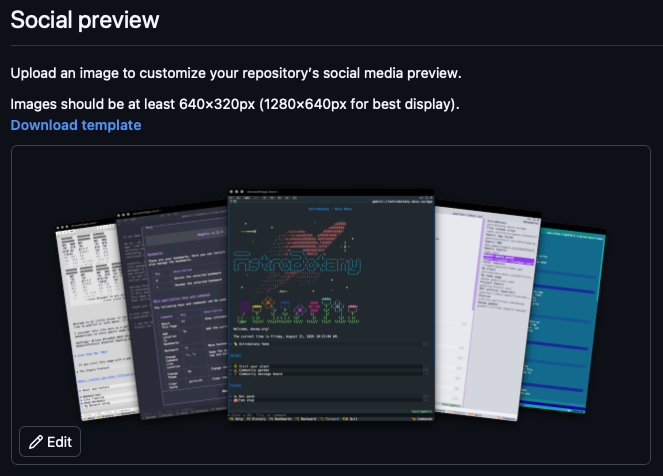
Five days after I first noticed it, the ability to upload a social preview for a repository has been fixed.
So now I can finally update the preview for Rogallo again.
From what I can see it took a couple or so threads in the community forums to get this issue noticed, and at least one person in those threads said how they'd initially raised a ticket to report it as a bug and had been brushed off and told to go to the community, as if it was something they were doing wrong rather than reporting a genuine issue.
This has been my experience in the past at least once. I forget the actual issue now, but I remember stumbling into a problem, being a good user and reporting the bug, along with details on how to reproduce, etc., and having the ticket closed and being brushed off with some vague and unhelpful reply. My recollection is that I then found a thread or two where others were talking about the problem. Eventually it was acknowledged and fixed.
It's hard not to feel like such an approach is a deliberate policy. It feels like their front-line support is now a shield that deflects problems to a place where community triage takes place.
I'm still working on the client certificate management PR for Rogallo, which, of course, heavily leans on the API of Wasat. In most cases, I've noticed that something I want to do in the PR can already be done, but the work to perform the action would seem like unnecessary detail in a client application; I want to make using Wasat as frictionless as possible.
With this in mind, v1.5.0 adds interfaces for exporting and importing client certificate data.