Posts in series "Agentic Afterthoughts"

Gemini is kind of messy

1 min read; 11 GFI

As I've mentioned a few times recently, I'm using Google's Gemini CLI more at the moment; in part because I have a Gemini Pro account so it makes sense to use it, but also in anticipation of dropping anything to do with Copilot.

While I've had some troubles with it -- as can be seen here, here and here for example -- I'm mostly having an okay time. The code it writes isn't too bad, and while it seems to need a little more direction and overseeing than I've been used to while using Copilot/Claude, it generally seems to arrive at sensible solutions for the problems I'm throwing at it1.

One difference with working with Copilot CLI that I have noticed, however, is that Gemini doesn't seem to care for cleaning up after itself. When faced with a problem it'll often write a test program or two, perhaps even create a subdirectory to hold some test data, run the tests and be sure about the outcome. This is good to see. It's not unusual for me to do this myself (or at least in the REPL anyway). But it really doesn't seem to care to actually clean up those tests. A handful of times now I've had it leave those files and directories kicking around. I've even said to it "please clean up your test files" and it's gone right ahead and done so, which suggests it "knows" what it did and what it should do.

This also feels like a new source of mess for all the people who commit their executables and the like to their repositories. That should be fun.

The thing I don't know or understand, at least at the moment, is if this is down to the CLI harness itself, or the choice of model, or a combination of both, or something else. I'm curious to know more.


  1. There is a weird thing I'm seeing, which I want to try and properly capture at some point, where it'll start tinkering with unrelated code, I'll undo the change, it'll throw it back in the next go, I'll undo, rinse, repeat... 

Gemini CLI vs GitHub Copilot (redux)

1 min read; 10 GFI

Given I'm almost certainly going to drop GitHub Copilot starting next month, I'm using Gemini CLI more and more for BlogMore. Yesterday evening, I used it to plan out an idea for a change to the application. Now that I've migrated all images to WebP, I thought it might be interesting to look at the idea of having a responsive approach to images. This is something I don't know a whole lot about (never having needed to bother with it before), but it also happens that I need to read up on this anyway for something related to the day job; given this, it felt like a good time to experiment.

Together with Gemini CLI a plan was created.

This morning, over second coffee, I've kicked off the job of implementing it and, honestly, Gemini CLI is really struggling. It "implemented" the change pretty quickly, within minutes, but it just plain didn't work. Since then I've had it iterate over the issue four times and now it's struggling to make it work at all. It's still beavering away on this as I type, and consuming daily quota at a fair rate too.

So, while I still have GitHub Copilot, this feels like a good point to play them off against each other at least one more time. Having saved the plan Gemini wrote last night as an issue, I've assigned it to Copilot (using Claude Sonnet 4.6). As I type this, I have Gemini racing to get this working in a terminal window behind Emacs, meanwhile there's Claude doing its thing in GitHub's cloud.

It'll be interesting to see if Copilot manages to one-shot this, for sure Gemini is far off a one-shot implementation.

Gemini CLI vs GitHub Copilot (the result)

4 min read; 11 GFI

Following on from this morning's initial experiment, I think I'm settling on a winner. Rather than be annoying and have you scroll to the bottom to find out: it's Gemini CLI. Here's how I found the process played out, and why I'm settling for one over the other.


Gemini CLI

Initially this was an absolute mess. After letting it initially work on the problem, the resulting code didn't even really run. The first go, and the three follow-up prompt/result cycles that followed, all resulted in code that had runtime errors. I'm pretty sure it didn't even bother to try and do any adequate testing. This is odd given I've generally seen it do an okay job when it comes to writing and running tests.

Once I had the code in a stable state, with all type checking, linting and testing passing, it still didn't work. No matter how I tried to use the new facility it just didn't make a difference. No images were optimised. In the end I dived into the code, with the help of its attempt at debugging (it added print calls to try and get to the bottom of things -- how very human!), diagnosed what I thought was the issue (it was looking in the wrong location for the files to optimise), told it my hypothesis and let it check if I was right. It concluded I was and fixed the problem.

Since then I've had a working implementation of the initial plan.

Once that was in place it's been a pretty smooth journey. I've asked it questions about the implementation, had my concerns set to rest, had some concerns addressed and fixed, improved some things here and there, added new features, etc.

All of this has left me with 18% of my daily quota used up. While I think this is the highest I've ever got while using Gemini CLI, it still feels like I got a lot of things done for not a lot of quota use.

GitHub Copilot

Initially I thought this had managed to one-shot the problem. Once it had finished its initial work the code ran without incident and produced all the optimised files. Or so I thought. Doing a little more testing, though, it became clear it was only optimising a subset of the images and it didn't seem to be producing the actual HTML to use the images.

On top of this it didn't even follow the full plan that was laid out in the issue it was assigned. For example: once I'd got it doing the main part of the work, it became apparent that it had pretty much ignored the whole idea of using a cache to speed this process up. I had to remind it to do this.

At one point I switched from the in-PR web interaction with Copilot, and used the local CLI instead. When I ran that up it warned me that I was already 50% of the way through some sort of rate limit and this wouldn't reset for another 3 hours. I think I was about 40 minutes into letting it try and do the work at this point.

After a bit more testing and follow-up prompts, I got to a point where I had something that looked like it was working; albeit in a slightly different way from how Gemini CLI did it (the Copilot approach was writing the optimised images out to the extras directory, mixing them in with my own images; Gemini opted for having a separate directory for optimised images within the static hierarchy).


At this point I will admit to not having carefully reviewed the code of either agent; that's a job still to do. But while Gemini got off to a very rocky start, with a bit of guidance it seemed to arrive at an implementation I'm happy with, and one that seems to be working as intended. While it didn't anticipate all the edge cases, when I asked about them it easily found and implemented solutions for them. Moreover, the fact that I could do all of this and confidently know the "cost" made a huge difference. Copilot seems to generally approach this like a quota or rate limit should be a lovely surprise that will destroy your flow; Gemini has it there and in front of you, all the time.

As for the general idea that I'm working on: I think I'm going to implement it. Weirdly I'm slightly nervous about building the blog such that it won't be using the images I created, but I also recognise that that's a little irrational. Meanwhile I'm very curious about the impact this might have on the PageSpeed measurement of the blog. While it's far from horrific, image size optimisation and size declaration seem to be fairly high on the things that are impacting the performance score (currently sat at 89 for the front page of the blog, as I type this).

The other thing that gives me pause for thought about merging this in, and then subsequently using it, is that I've just finished migrating all images to webp, and so saving a lot of space in the built version of the blog. Generating all the responsive sizes of the images eats that up again. With this feature off, the built version of the blog stands at about 84MB; with it on, this rises to 133MB. That extra 49MB more than eats up the 24MB saving I made earlier.

On the other hand: storage is a thing for GitHub to worry about, what I'm worrying about here, and aiming to improve, is the reader's experience.

I'm going to sit on this for a short while and play around with it, at least until I get impatient and say "what the hell" and run with it.

The highs and the lows

2 min read; 11 GFI

Over the weekend I read a comment, I think it was on Hacker News, where someone said they were having fun building things using AI. This was in response to someone saying that using AI took the fun out of programming. In their reply, the person qualified their answer with something along the lines of "the highs are higher and the lows are lower".

I think I agree.

My first ever exposure to any sort of computer was a Sinclair ZX80 that my maths teacher brought into school. After a class he plugged it in and let me and a friend take a look. To this day I still remember looking in the manual, looking at the tutorial, and at some point typing...

PRINT 1+1

When I hit NEW LINE and a 2 appeared on the screen I was thrilled, I was hooked. I'd typed something that appeared on a TV screen and then I did something that made the answer appear on the TV screen. This felt like magic.

I've been hooked on writing code ever since.

In that time the highs have been high, and the lows have been low, but I think it's fair to say that I've been doing this for long enough (it's now 45 or 46 years since I typed that first instruction) that things have settled down. I still get a thrill when writing code, and I still get fed up with it from time to time, but the distance between the two isn't what it once was.

Which brings me back to the comment I read: I think I can safely say that, while properly experimenting with agents, while building BlogMore to test this approach out, I have been through a period of higher highs and lower lows when it comes to how I feel about the code and the project itself. When I kicked off development it was genuinely thrilling to have gone from an empty repository to a comprehensively-working initial version in just a matter of hours. Likewise it was thrilling to have gone from nothing to rebuilding this blog with the tool in just a few days. It would be a lie to suggest that it wasn't fun and exciting to see the result.

But, as I wrote back then, I was also very mindful of how empty the process felt at times, how I missed the whole "flow state" connection to building out the application. There have also been many moments along the way, which I've documented at times on this blog, where I've felt the project was getting stuck down a dead-end with respect to how the code was going.

And then there's all the times Copilot and/or Gemini CLI just plain stopped getting stuff done.

Given this -- given the highs especially -- I can see why some people get totally hooked, go all in, get consumed by the illusion of how powerful these tools are. I can see why they'd buy into and embrace the mindset that trots out the AI-equivalent of the crypto-hype "stay poor" retort to those who display any level of scepticism.

It's all so vague

3 min read; 10 GFI

The recent changes to pricing and usage, in relation to AI, aren't just about agents and coding. Not only have I seen GitHub Copilot and Gemini CLI hugely restrict their offerings for the same price, it's also come to at least one "general" tool I use too.

For a while now, as part of a Google One subscription I keep, I've had a Gemini AI Pro subscription. I've generally found this useful, mainly using the Gemini app on my iPhone to research things1, and also commonly using the web application to help proofread blog posts, and sometimes explore coding problems. Another way I use it is via NotebookLM. The subscription has meant that I can do all of this without ever having to worry about hitting any usage limits. While I'm sure they were there, I was never aware of them and never hit them.

In the last 48 hours, along with the changes to the coding agent offerings, Gemini itself has moved to a compute-based usage limit approach.

Gemini will move to compute-based usage limits that will refresh every 5 hours until you reach your weekly limit. Calculation of your usage will factor in the complexity of your prompt, the features you use, and the length of your chat. Paid users have higher limits than users without a Google AI subscription.

The thing that bothers me about this -- and I've seen this with other companies in this market too -- is just how vague the wording is. Look at this table that is supposed to inform you about your usage limits, depending on your plan:

PlanLimit
Without a planStandard limits
AI Plus2x higher than standard limits
AI Pro4x higher than standard limits
AI Ultra5x or 20x higher than AI Pro depending on your subscription

Okay, great, thanks to my Pro plan I get 4x the limits. Awesome. But... 4x what exactly? What exactly are the standard limits? How do I assess which plan is better for me? How do I compare Google's product against another offering?

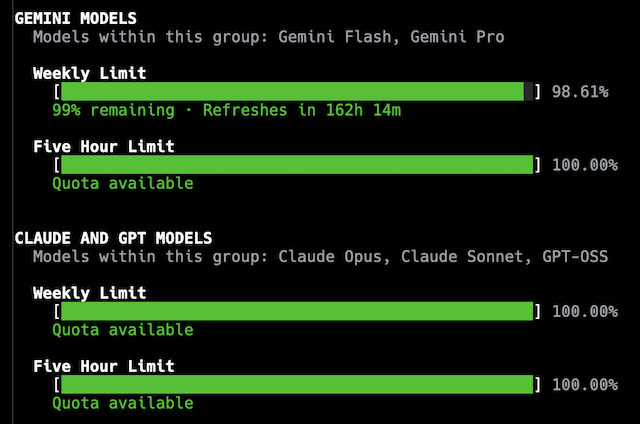
I suspect, for the most part, I'll be fine where I am. So far today I've used Gemini to proofread the previous post I wrote, there was a bit of back and forth as I edited my post, and that cost me 1% of my five hour window.

My usage limits

What impact that has on my weekly usage, I don't know, but based on this it would appear to be almost nothing.

I can appreciate that it's been a bit of a free party for a while, and now each provider has to start to have this cost them less -- if not actually make them money -- before the whole thing collapses. Fair enough. But it's annoying as hell to not be able to gauge what I'm actually getting, or easily compare products.

That's not to say that I know how this can be communicated well. There's a flip-side to all of this. If I go and look at the Anthropic website and their detailed pricing information it seems to take it to the other extreme. There's so much you need to know and understand, and you'd need to know so much about how their models work and how your needs would interact with them... it feels like you need specialised training to comprehend any of it. While I can't find it back at the moment, I seem to remember a similar issue with trying to follow such information with GitHub Copilot.

If it doesn't exist already, I suspect there's a market here for a site that makes it incredibly simple to plug in your requirements and have a product recommendation be made.


  1. In the past six months I've found it's generally a far better method of finding things than simply using a search engine; no ads, cited sources, results that are easy to revisit, etc. 

Reviewing token usage

3 min read; 7 GFI

As I've written about a few times in the last week or so, the journey with AI-based coding tools has hit an interesting time when it comes to prices, quotas, usage, availability and all that. Having come into all of this via a place where it was a flat fee, and where I didn't really need to think about input tokens and output tokens and so on, I'm pretty ignorant of what that all means in terms of scale. If I'm looking at a new tool and I see prices and/or quotas for in/out tokens, it means nothing to me. I can't relate to it. I've never had to care about it.

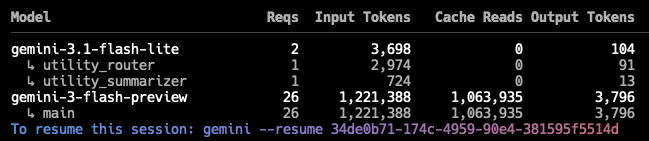
While using Gemini CLI to quickly make a change to BlogMore this morning, I was reminded that at the end of a session it does tell me this:

Session usage

Seeing that got me thinking: is there a way to get the total usage for all of my sessions, or at least the sessions that have still been retained (I'm guessing they expire after a wee while)? After a little bit of searching I found ccusage. That looked exactly like the sort of thing I was after.

Now, this is only going to be good for Gemini (it says it supports Copilot too, but it seems to be failing to find any Copilot sessions), but it should give me a feel for what my token usage looks like.

I work on BlogMore on two different machines: the MacBook Air and also a Mac Mini I have in my office. Here's all of the available token usage data I can get out of the Air:

DateInputOutputCache ReadTotal TokensCost (USD)
2026-04-29235,23820,282773,6421,032,608$0.23
2026-05-01315,0013,181447,556768,532$0.20
2026-05-022,621,62852,29018,260,59720,955,447$2.44
2026-05-033,627,84630,53811,819,27915,509,213$5.74
2026-05-04869,82949,1632,721,0743,656,649$0.77
2026-05-092,287,76050,0819,973,76412,327,819$1.84
2026-05-101,019,55034,5568,061,8979,125,838$1.05
2026-05-111,112,12335,61010,523,34811,689,576$1.24
2026-05-131,506,51341,8027,561,1689,124,651$2.88
2026-05-15123,1613,155587,248716,813$0.11
2026-05-16111,33414,836519,161646,275$0.13
2026-05-17940,48536,1717,682,3148,706,034$1.41
2026-05-1867,0331,357205,921275,707$0.05
2026-05-2160,9041,182119,055184,117$0.05
Total14,898,405374,20479,256,02494,719,279$18.13

And also the same for the Mac Mini (which gets used less frequently for this sort of thing):

DateInputOutputCache ReadTotal TokensCost (USD)
2026-05-04212,17831,6312,128,0742,389,927$0.36
2026-05-051,108,90331,9976,222,8687,374,732$1.13
2026-05-0830,8991,19464,07498,146$0.03
2026-05-111,339,33327,3998,074,9049,459,253$1.21
2026-05-12952,05753,02312,751,53913,838,943$1.52
2026-05-18166,8754,774651,417827,746$0.22
2026-05-19449,08723,9763,236,3243,721,558$0.54
2026-05-22335,15110,0121,919,8152,272,553$0.32
Total4,594,483184,00635,049,01539,982,858$5.33

In both cases I've removed a couple of columns to make the tables fit better. The first was the model name (varying between gemini-3-flash-preview and gemini-3.1-pro-preview), the second was Cache Create (which was always 0 all the way down).

From what I can see, it would appear that these two tables do cover my increasing use of Gemini CLI for doing work on BlogMore (the first intensive use being back around the 5th of this month, if I recall correctly). So this would seem to be a reasonably informative way to view things.

All of which is to say, over a roughly three week period, while getting things done, I've used getting on for 20,000,000 input tokens, and around 600,000 output tokens (presumably I do also need to be keeping the 114,300,000 cache read tokens in mind too). With this in mind I might now be able to make more sense of the pricing I see for various tools.