Posts in series "~/.emacs.d"

Starting fresh with GNU emacs

3 min read; 9 GFI

As I've mentioned elsewhere on this blog, over the past few years, my use of GNU Emacs has lapsed somewhat. There was a time when it was my only editor (except for the odd dips into vim to do some quick editing) and, back when I used to use GNU Linux as a desktop machine a lot, I'd have an Emacs session up and running pretty much non-stop (it was one of the reasons I wrote uptimes.el).

In more recent times I've been working more on Windows and often inside Visual Studio. Even for my own "for fun" programming, I've mostly being doing things that didn't involve Emacs much. In fact, most of my recent "for fun" coding has been done using Sublime Text because it was powerful, cross-platform and also had great support for the language I code in a lot when it comes to personal amusement projects.

During that time I've wanted to get back into Emacs. Quite a bit seems to have changed since I was last a very avid user and this also meant wanting and needing to catch up.

The first thing I needed to do was finally get around to killing off my old ~/.emacs file. This has followed me around since I first got into Emacs on OS/2 back in the mid 1990s. The file started out with a few setq expressions to tweak some settings and just kept growing and growing. It'd got to a point where there was old stuff in there that I had no use for and sometimes even no idea what it was for. Heck, to give some idea of how old the file was: there were items in there that handled running Emacs on MS-DOS!

So, a couple of weeks back, I dumped it. Dumped the whole lot. The plan then was to recreate it with as little hands-on coding as possible. I decided that, as much as I could, I'd tweak using customize and only hand-code (in ~/.emacs.d/init.el this time around) things when there was no obvious other way to do it.

So far this is working out really well. Gone has the ugly and monolithic .emacs, replaced with something far more modular, much more tidy and far easier to maintain. Whereas my old config was almost 1,000 lines long, the new init.el is currently just 50 lines:

;;;;;;;;;;;;;;;;;;;;;;;;;;;;;;;;;;;;;;;;;;;;;;;;;;;;;;;;;;;;;;;;;;;;;
;; Make use of the Common Lisp compatibility module.
(require 'cl)

;;;;;;;;;;;;;;;;;;;;;;;;;;;;;;;;;;;;;;;;;;;;;;;;;;;;;;;;;;;;;;;;;;;;;
;; Local config/lib directory support.

(defun davep:user-path (path)
  "Given `file', return a path for it in the local config."
  (concat user-emacs-directory path))

(defvar davep:local (davep:user-path "davep/")
  "My local config and code directory.")

(defvar davep:startup (davep:user-path "davep/startup")
  "My local startup code.")

(defvar davep:lib (davep:user-path "davep/lib")
  "My local library code.")

(defvar davep:lib-3rd-party (davep:user-path "davep/lib-3rd-party")
  "My local third party code.")

(push davep:local         load-path)
(push davep:startup       load-path)
(push davep:lib           load-path)
(push davep:lib-3rd-party load-path)

(defun have-own-package-p (package)
  "Does a package of my own exist in this environment?"
  (locate-library package nil (list davep:lib)))

;;;;;;;;;;;;;;;;;;;;;;;;;;;;;;;;;;;;;;;;;;;;;;;;;;;;;;;;;;;;;;;;;;;;;
;; Ensure custom values go in their own file.
(setq custom-file (davep:user-path "custom.el"))
(load custom-file)

;;;;;;;;;;;;;;;;;;;;;;;;;;;;;;;;;;;;;;;;;;;;;;;;;;;;;;;;;;;;;;;;;;;;;;
;; Load various startup things.
(load "env-tests")
(require 'davep-keys)
(require 'davep-languages)
(require 'davep-style)
(require 'uptimes)
(require 'csrclr)

;;;;;;;;;;;;;;;;;;;;;;;;;;;;;;;;;;;;;;;;;;;;;;;;;;;;;;;;;;;;;;;;;;;;;
;; Local autoloading.
(require 'autoloading)
(load-davep-autoloads)

All the other stuff, things to tweak language modes so they indent "just so", my own special keyboard bindings, that sort of thing, they're all farmed off into their own files:

davep@Bellerophon:~/.emacs.d/davep/startup$ v
total 40
-rw-r--r--  1 davep  staff  4211 24 May 14:38 davep-keys.el
-rw-r--r--  1 davep  staff  4078 16 May 13:51 davep-languages.el
-rw-r--r--  1 davep  staff   537 25 May 14:13 davep-style.el
-rw-r--r--  1 davep  staff  1339 16 May 09:39 env-tests.el

Another thing I'm trying to do is dump all the old third party code I had locally and, instead, use Emacs' own package manager now. Currently this is also working well for me given that I'm using both ELPA and MELPA.

I haven't managed to dump everything yet, but it's a useful exercise to slowly work through the various files I was carting around and deciding if I need them or not (like, I'm fairly sure I won't be needing a cobol-mode any time soon -- that can go).

On top of all of this, on top of starting with a "clean slate" Emacs, I've also started keeping track of what I do on GitHub. I've got a private repo for my ~/.emacs.d/ that I can now easily sync between my various machines.

One final thing that I'm starting to try and do is actually make full use of Emacs again. One example is that I'm writing this blog post in it. Until now I've been using SublimeText with a Jekyll package to compose and manage things but, this time around I'm giving Hyde and markdown-mode a go. So far they're working out pretty well too (albeit Hyde was a bit odd to set up and isn't 100% making sense to me yet).
Another revamp of my emacs config

3 min read; 8 GFI

Just under a year ago I decided to totally rewrite my GNU Emacs config. As I wrote at the time, it'd been following me around all sorts of machines since the early 1990s, starting life on an OS/2 Warp machine and travelling via MS-DOS, GNU/Linux, Windows and, these days, macOS.

The changes I made last year have served me really well, but there were two related issues with it that bothered me a little: the fact that I was maintaining a local library of Elisp code in the repository and, worse still, I was storing the packages I'd installed from Elpa and Melpa in the repository as well.

While this did mean it was pretty easy for me to start up a new installation of Emacs on a machine -- all I had to do was clone the repo and run up Emacs -- I wasn't happy with the duplication involved. I didn't like holding code in my .emacs.d repo that was already held in package archives.

The solution I saw was in two parts:

  1. Get some of my code, that might be useful to others, into Melpa.
  2. Somehow sort my own package archive for my personal code.

Over the past week or so I've worked on this approach. It initially started with me tackling item 1 above: I tidied up and submitted obfusurl.el, protocols.el, services.el, thinks.el and uptimes.el. This was a really helpful process in that it allowed me to brush up on my Elisp and Emacs knowledge. It's a good 15+ years since I last wrote any significant Elisp code and things have moved on a little in that time.

Having done that I'd managed to move a handful of my own packages out of my local library of code, and so out of my .emacs.d repo, but it left me with the problem of what to do with the rest of it.

That's when I discovered package-x and:

,----[ C-h f package-upload-buffer RET ]
| package-upload-buffer is an interactive compiled Lisp function in
| ‘package-x.el’.
|
| (package-upload-buffer)
|
| Upload the current buffer as a single-file Emacs Lisp package.
| If ‘package-archive-upload-base’ does not specify a valid upload
| destination, prompt for one.
`----

(plus package-upload-file too, of course). This meant I could, in effect, start my own personal package archive and look at tackling issue 2 above.

This did give me one small problem though: how and where would I host the archive? I did consider hosting it on a DigitalOcean droplet, but that felt a little like overkill for something so simple. And then I realised: GitHub Pages! All I needed to do was keep the package archive in its own repo (which I would have done anyway) and then make the whole repo the source for a GitHub Pages site. A quick test later and... it worked!

So, by this point, I'd farmed some of my code off to Melpa, and now had the rest of it in "Delpa" (which I'd called my personal archive). I could now use the Emacs package management system to install third party packages and also my own.

But I was still left with one issue: I was still holding the installed packages inside my .emacs.d repo by way of ensuring that all machines were in sync in terms of what was installed. Now I needed to work out how to solve that.

Around this time, as luck would have it, @tarsius had suggested I look at a package called use-package by @jwiegley. This was the bit I was missing.

With use-package I would be able to declare which packages I needed, how they'd be installed and, most important of all, it could be set to handle the fact that the package wasn't even installed. If a package is requested and there is no local install use-package is smart enough to get the Emacs package system to install it.

So, given that, all I need to do was create a startup file that would declare the packages I use and I'd have a setup that should, once I'd cloned .emacs.d, self-install.

Except... yeah, one more issue. use-package isn't part of GNU Emacs yet so I'd need a method of getting it to auto-install so it could then handle everything else. As it was that was as easy as adding this to the start of my init.el.

;;;;;;;;;;;;;;;;;;;;;;;;;;;;;;;;;;;;;;;;;;;;;;;;;;;;;;;;;;;;;;;;;;;;;
;; Make sure the package system is up and running early on.
(require 'package)
(add-to-list 'package-archives '("melpa" . "http://melpa.org/packages/"))
(add-to-list 'package-archives '("delpa" . "http://blog.davep.org/delpa/"))
(package-initialize)

;;;;;;;;;;;;;;;;;;;;;;;;;;;;;;;;;;;;;;;;;;;;;;;;;;;;;;;;;;;;;;;;;;;;;
;; Bootstrap `use-package'
(unless (package-installed-p 'use-package)
  (package-refresh-contents)
  (package-install 'use-package))

With that in place I was able to nuke all my config on a machine, clone a fresh copy of .emacs.d (having now ceased tracking and storing the installed packages in that repo), run up Emacs, wait a few moments and then find that everything was installed and ready to use.

Perfect!

My .emacs.d is now a lot smaller than it was before and, I think, even easier to maintain. Right now I think I'm very close to the ideal Emacs config that I wanted to create when I did the complete rewrite a year ago.

More revamping of my Emacs config

2 min read; 10 GFI

I've been pretty quiet on here since I last wrote about how I'd done a further revamp of my Emacs config, so I thought that subject would be a good reason to write another blog post.

It'll be a mostly short one, and one to muse over something that's been bugging me for a while now: my decision to lean heavily on customize to set all sorts of settings.

Initially, when I nuked my original config over a year ago, it seemed to make a lot of sense. Let all the tweaks and set values "hide" in a file of their own and try and keep the hand-edited config files as small and as clean as possible. Recently though I've got to thinking that this obscures too much, hides too much detail, and removes the ability to actually document what I'm doing and why. It also does make it tricky to adapt some settings to different platforms or even environments on a single platform.

Another problem I've run into is this: when I made the second round of changes and decided to lean heavily on use-package, I soon ran into the minor issue of some packages not making sense, or even being needed, on some platforms (stuff that's useful on my macOS machines isn't always useful on my Windows machines, that sort of thing). While use-package can handle this easily thanks to the :if keyword, I'm still left with the fact that package-selected-packages still gets populated.

Having package-selected-packages contain a list of installed packages likely makes sense if you're using just the Emacs package system and you're not doing the installing with use-package and :ensure. But with use-package and :ensure I feel like I've got far more control over things and can adapt what gets installed when depending on which Emacs I'm running where.

But, because I'm syncing my ~/.emacs.d/.custom.el to all my machines too, any use-package that has a :if to not bother using a package has little effect because the package still ends up being listed/loaded/seen as part of the installation.

Ideally, I think, I'd like to be able to have package-selected-packages held in its own file, or I'd only ever use ~/.emacs.d/.custom.el for local stuff (and so stop syncing it).

Starting today I'm going about a process of moving as much as I can out of ~/.emacs.d/.custom.el and into hand-edited files. In some respects I guess I am going back to how I used to manage Emacs configuration, but this time it's not a massive monolithic file-of-Lisp, it's neatly broken down into sensible sections and it's also biased towards a "grab and config this package" approach.

Meanwhile, I've not seen any good discussions online about customize vs "hand-edit", which strikes me as a little odd as it feels like the perfect "religious issue" for people to have endless disagreements over. I guess, over the next couple or so weeks, I'll find out if switching back was a good idea.

Visual evolution of ~/.emacs.d

1 min read; 11 GFI

As detailed in a blog post I wrote back in 2016, I first got into using Emacs in the mid 1990s, starting with it on OS/2 and then moving over to GNU/Linux. It's been my often-used and much-loved development environment for most of those years (I even have a couple of packages that are part of Emacs itself).

For most of that time my configuration was a single ~/.emacs file, which was around 1,000 lines in length (including comments and whitespace). It'd grown over the years, having special configuration sections for versions of Emacs I didn't use any more, and operating systems I didn't work on any more (yes, really, there were things in there specific to MS-DOS, for example). On top of that I always hand-installed packages I used -- Emacs' package management system having turned up long after I first got into using Emacs.

Then, in early 2016, I decided to nuke the whole thing and start from scratch. As mentioned above, the start of this is detailed in an older post. Another big round of changes happened round a year later -- which included the birth of Delpa to manage my personal packages. A couple or so months later there was one last big round of changes, mostly killing off my enthusiastic embracing of customize and instead going back to hand-set settings, only this time done via use-package.

The full history of this can be found over on GitHub, starting with the first "throw everything away and start again" process and all the steps between then and where my Emacs configuration is now.

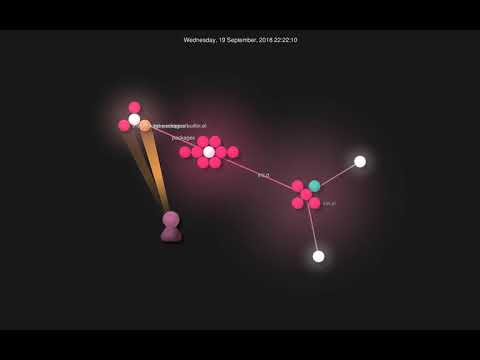
Which brings me to the fun part of this blog post. Earlier this week I stumbled on Gource. It's a tool that's primarily designed to visualise changes in repositories, although it can be used to visualise anything that has a tree structure and changes over time (this week I produced a video of the growth of my employer's electronic lab notebook by hooking up the Benchling API with Gource, for example). So I got curious. What did it look like as I reworked and tweaked and changed and tinkered with my Emacs configuration?

This is what it looked like:

Visit YouTube

Some more ~/.emacs.d evolution

3 min read; 8 GFI

When I started with this version of the blog on Hashnode1, my plan was to try and write something at least once a week. I managed to do that as far as January this year, give or take, but then things got a little busy, the world got trickier, and... Well, you don't need me to tell you about that. Anyway, I'm back to write some more and, hopefully, try and keep up with writing. I feel it'll do me good.

I have been busy since January. Work has, as far as possible, carried on as normal. The only big difference being I'm back working from home. It's an odd turn of events personally given that I'd worked from home for 21 years, then (with some trepidation) went back to working in an office. Having got used to being in an office and being around people, it took some adjusting to working alone again.

So, on to the main point of this post... During that period I've spent a lot more time at my machine than I would normally, and so it was inevitable that I'd end up tinkering with my Emacs configuration. While it's true that there's hardly a week goes by where I don't tinker with some small thing, I try not to make huge changes too often. Huge changes do happen though.

A handful of weeks back was another one of those times where I made a big change.

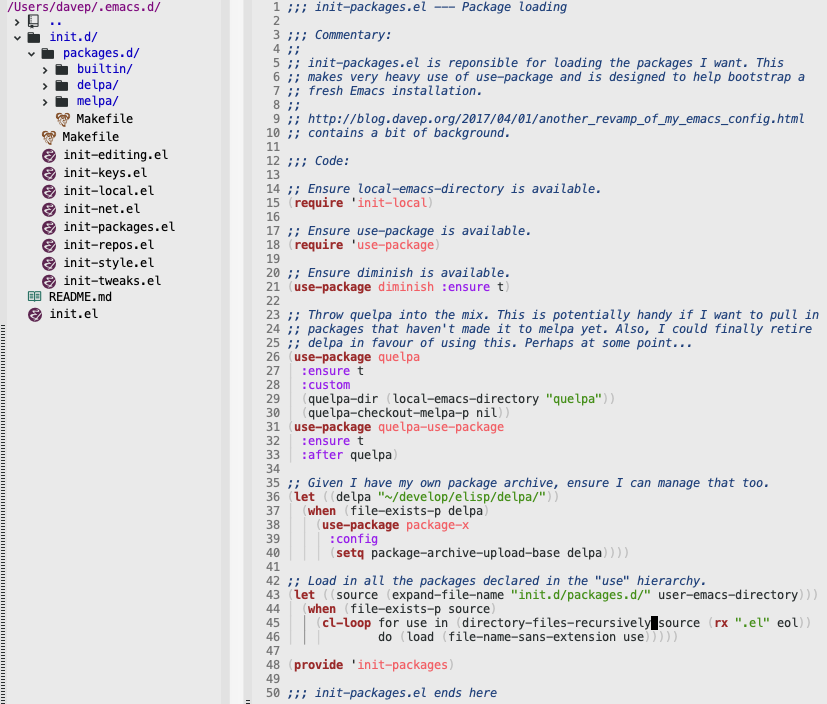
After I burnt my original ~/.emacs file back in 2016 I've had an approach where I've tried to make things as modular as possible, and as easy to clone down to a new machine as possible. The design I came up with, especially once I moved over to using use-package, has served me well. But there was always one thing that bothered me: the files that handled the loading and configuration of packages were, in effect, still three large monolithic files. While this was better than a single monolithic ~/.emacs, it still didn't feel quite right.

Giving it a bit of thought, I decided that what I really wanted was a single directory in which I could drop lots of small .el files that would handle the loading and configuration of all sorts of packages. While it didn't gain anything concrete, the idea felt tidier. Tidy is good. Feeling like the code smell is good, is good too.

First though I needed a way to load multiple files, ideally within a whole directory hierarchy, without needing to know in advance what files would be there. After a little bit of tinkering I settled on this bit of code that revolves around the use of directory-files-recursively:

(let ((source (expand-file-name "init.d/packages.d/" user-emacs-directory)))
  (when (file-exists-p source)
    (cl-loop for use in (directory-files-recursively source (rx ".el" eol))
             do (load (file-name-sans-extension use)))))

Simply put, this code finds every file in and below ~/.emacs.d/init.d/packages.d/ whose name ends in .el (note the use of a regular expression, using rx to create it), removes the extension from the name, and loads it with load (dropping the extension means load can decide if it wants to load the compiled version of the code, or the source, depending on what's available).

After writing that I could then start to populate ~/.emacs.d/init.d/packages.d/ with lots of smaller files that handled the loading of packages. In some cases there's a file just for one package, in other cases there's a file that handles a logical grouping of packages (where there are obvious direct dependencies, or where one package is designed to extend the other, etc). For now I've decided to break things down into three directories that map to the three monolithic files I had before:

Emacs

However, I'm not totally wedded to this design and I may change this as time goes on.

While I've not spent any time properly testing it out, I've also not really noticed any obvious impact on startup speed. However, this tends not to be a real concern for me. I seldom start Emacs anyway. I always have it running and use emacsclient as my editor in most places so files open instantly in the running version of Emacs.


  1. Note from future me: we're now back over on blog.davep.org of course. 

My journey to the dark side is complete

3 min read; 10 GFI

Ever since the whole business of "light mode" and "dark mode" really kicked off in the mobile OS world, I've been a fan of the dark modes. On both Android and iOS/iPadOS, when apps became available with dark modes, I'd switch to it. When the operating systems themselves adopted the switch, that's what I went for. As well as having a love for all things black (anyone who knows me personally will know that), I think it just looks better on mobile devices. I can't quite say why, but it just works best for me.

So, when macOS got a supported dark mode, I instantly switched it on, obviously. Then, within a day, I switched it back to light mode. Surprisingly it just didn't work for me, and I wasn't sure why. Since then I've tried living with it a few times and it's rarely lasted more than a few hours. There was something, something I couldn't quite put my finger on, that didn't sit right.

Last Monday I decided to give it another go. This time, however, I thought I'd figured it out. The "problem" was Emacs! As mentioned back in January, for as long as I've used it (so since the mid-1990s), my Emacs has always had a light background -- probably because that's how it came "out of the box" (I'm talking Emacs in graphical mode here; I started with it on OS/2 Warp and then moved to a GNU/Linux X-based desktop). I figured that the contrast between the colour scheme of Emacs, and the rest of the machine, was the issue here.

I spend most of my working day either in Emacs, or in iTerm2 -- often rapidly switching between the two. I've always run iTerm2 in the usual dark background mode with light text. So I figured the problem was having a dark OS desktop, dark terminal, and then a light editing environment. Eventually that'd feel wrong.

So I decided that, for the first time in about 25 years, I should give Emacs a go with a dark mode. Taking a quick look at popular dark themes I noticed sanityinc-tomorrow-night looked easy on the eye, so I gave that a go (actually, I gave each of the themes in that set a go, initially starting with sanityinc-tomorrow-eighties, but I finally settled on sanityinc-tomorrow-night).

To start with it didn't look too good; not because of a problem with the theme itself, but because, over time, I'd made changes and tweaks to my setup that assumed I'd be using my usual light theme. After some dabbling and tinkering and trying things out, I got it looking "just so".

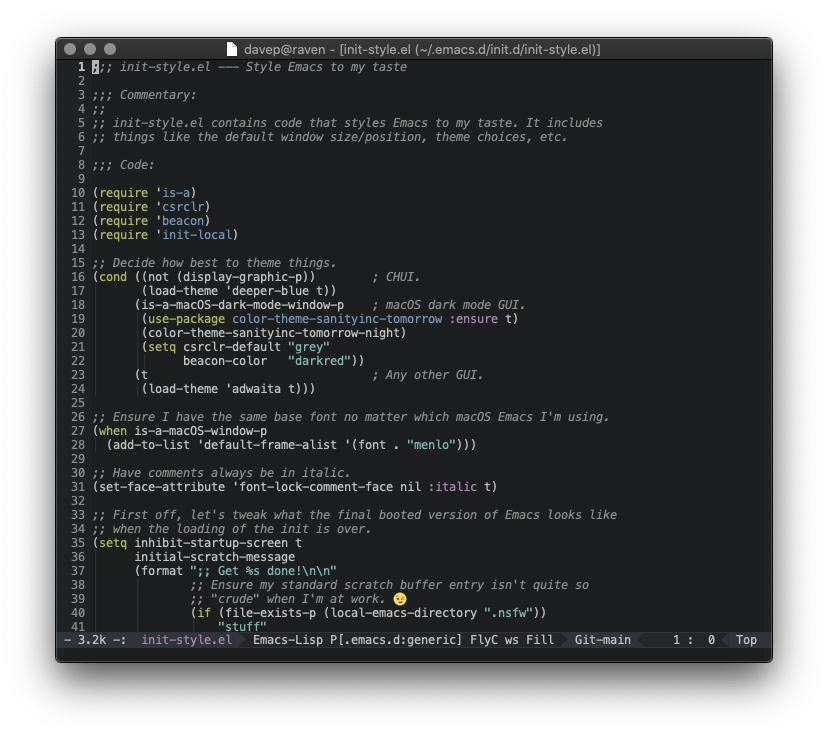
Dark Emacs

Having got that working, I then thought it would be nice to be able to have Emacs -- at least on restart -- adapt to me switching between dark and light mode on macOS. It turns out that detecting if macOS is in dark mode is easy enough, the command defaults read -g AppleInterfaceStyle will emit Dark if in dark mode. So, knowing that, I updated my personal package for checking things about the environment that Emacs is in to use that information:

(defconst is-a-macOS-dark-mode-window-p
  (and
   is-a-macOS-window-p
   (string= (shell-command-to-string "defaults read -g AppleInterfaceStyle") "Dark\n"))
  "Are we running in a macOS window in dark mode?")

So, as of now, my Emacs setup is such that, if I'm in graphical mode on macOS and I'm in dark mode, Emacs will use a dark theme, otherwise it'll do what it did before -- with a light background in a graphical mode and a more Borland-a-like blue background when in CHUI mode.

This seems to have made a difference. Almost one week on my work Macbook is still in dark mode, and I've switched both of my personal Macbooks, and my iMac, into dark mode too. I think it's sticking this time. Next up is to give some serious consideration to darkening the web in general. Only now am I noticing just how damn bright most of it is!


As a slight aside to the above, I've also made one other change to Emacs: I've finally dropped the display of scroll bars. In the themes I'm using they didn't look so great, appearing to be distracting. For the past 25 years I've had the scrollbars there, but never actually used them; all they've ever done is serve as a visual aid to where I am in a file. Thing is, I'm not sure I ever really pay that much attention to that either. So, as a test, I've also been running with them turned off and, so far, I'm really not noticing them been gone.

The habits we form that we convince ourselves make sense...

Simplifying my mode line

1 min read; 11 GFI

Every so often I get the urge to change how Emacs looks. Ever since I finally fell to the dark side, my Emacs has stayed looking pretty much the same. I like how it looks, but I do keep having this urge to find a darker theme, and to also make things just a wee bit more minimal.

At one point I was very much about, and in favour of, having as much information as possible in the mode line. Eventually I realised I didn't use that much and tried to declutter somewhat, mostly cleaning up minor mode information with diminish. Even then though, I had this feeling that there was still more information in the mode line than I really needed.

So, just now, as an experiment, I've decided to start fairly clean. I've dropped powerline and instead decided to have a play with mood-line. Rather than use one of its pre-configured formats, I've had a go at rolling my own:

(setq mood-line-format
      (mood-line-defformat
       :left
       (((mood-line-segment-buffer-status) . " ")
        ((mood-line-segment-buffer-name) . " : ")
        (mood-line-segment-major-mode))
       :right
       (((mood-line-segment-vc) . "  ")
        (mood-line-segment-cursor-position))))

So far I'm really pleased with the result.

My GNU Emacs

For any given buffer the mode line display is now:

  • The status of the buffer
  • The name of the buffer
  • The major mode of the buffer
  • The git status for what I'm working on
  • The cursor position

Honestly, I'm struggling to think of anything else I really need to see. Sure, I can imagine there's the odd minor mode I might need to know about, but generally I either have them enabled all the time anyway, or it's something so obvious that I know when it's not enabled.

I'm going to run with this for a while now and see how I feel. I can sense that I might want to tweak a couple of things (at the moment the left-hand side will move when I change the unsaved status of the buffer; on the right there's nothing that tells me that this file I'm editing right now is new to the repo and not part of it yet), but this basic configuration feels clean and right.

Meanwhile... the search for a theme that is darker and I actually prefer over the sanityinc-tomorrow themes continues. I fear this is going to be a lot harder.

It got darker

3 min read; 9 GFI

By pure coincidence, it's six years ago tomorrow that I finally, after years of running Emacs with a bright white background, moved to using a dark theme. It took a little bit of getting used to but eventually I got very comfortable with it, and since then have run everything I can in a dark mode too.

On occasion, in the last year or so, I've had this urge to move to something darker. Also, in part, it's an urge to change things up a little. I felt it was time for a refresh of how my Emacs looks. I've tried a few themes, but none have ever stuck. When trying them I've run into various issues:

  • It just didn't look nice at all
  • Too many other things I use in Emacs didn't get themed
  • It looked like there was going to be too much work to do to really theme things well
  • It caused Emacs to crash1

However, yesterday evening, after making an effort to simplify my mode line, I was determined to find a darker theme that I would be happy with. I think I finally managed!

An even darker Emacs

I've settled on modus-vivendi from modus themes. Out of the box it felt right, and from what I can see in the documentation there's an amazing amount of customisation you can do. The key point there too is the documentation; there's so much of it, it's incredibly comprehensive.

For example: the default choice for the mode line is to have an unsubtle border around it -- presumably to create a good contrast. I found that far too distracting and was wondering what I could do about it. I didn't have to wonder long, the documentation addresses exactly that situation.

Another downside I ran into is that the colours that were showing in the mode line, when I switched to mood-line yesterday, were gone. I spent a short amount of time last night, and a good hour or so this morning, trying to wrangle mood-line into something I liked, but I just couldn't get anything sensible going. Eventually I cracked, fired up Antigravity, prompted it with:

I am using mood-line for my mode line -- see init.d/packages.d/melpa/mood-line.el and https://github.com/emacsmirror/mood-line

I am using https://protesilaos.com/emacs/modus-themes as my theme

I would like to have finer control over the parts of the mode line I've configured. For example, I'd like the buffer name to stand out in an informative colour, but one that is part of the modus theme's colour scheme.

Don't make changes yet, but help me understand how I should do this in a maintainable way.

and then spent about 20 minutes going back and forth, refining what I wanted; this got me a result I'm happy with from a visual point of view. I still need to fully review the code and the approach it took, but it isn't too far removed from what I'd been trying myself.

Overall I'm pleased with the result, and this is the longest I've stuck with a new theme (at this point I'm probably about 4 or 5 hours into working in it). I think that says something significant. I can see myself still wanting to tweak some aspects of it though. For example, the left-hand fringe doesn't feel quite right, in a way I can't quite put my finger on. While I want it to stand out from the main editing area, it feels... disconnected in some way. Also the background colour of the mode line still feels like it doesn't quite blend how I'd like.

Now to see if this lasts...


  1. Seriously, just the once, but that happened. I took that as a sign from the Lisp gods that I was doing something sinful. 

More mode line tweaking

1 min read; 10 GFI

The simplification of my mode line is sticking, in that I like how it's turned out and I find it more useful to have it this simple. But I did notice something was missing: I'm a pretty constant but pretty casual user of projectile. I know it's a package that offers a wealth of tools, yet mostly I just use it as a project bookmark system. For this, though, it works well.

Given this, having a quick and easy way to check that I'm in the project I think I'm in is a good idea. While I also have neotree open all the time, which gives a fairly obvious clue, my eyes keep flitting down to the mode line.

The change I made the other day, deliberately, left the project off. I think this was a simplification too far. So now it's back.

Slightly updated mode line

The core of my mode line configuration now looks like this:

(setq mood-line-format
      (mood-line-defformat
       :left
       ((or
         (mood-line-segment-buffer-status)
         (propertize
          (mood-line--get-glyph :buffer-modified)
          'face 'my/mood-line-good-status))
        " "
        (mood-line-segment-buffer-name)
        (my/mood-line-segment-project)
        " "
        (mood-line-segment-major-mode))
       :right
       ((my/mood-line-segment-vc)
        " "
        (propertize
         (mood-line-segment-cursor-position)
         'face 'my/mood-line-cursor-position))))

A little busier than it started out, but still pretty clean. I do keep wondering about the cursor position. In most buffers I have line numbers showing to the left anyway, and it's rare (but not unknown) that I need to know what column I'm in. I'm very tempted to remove the cursor position altogether, then the right-hand side would just be the vc information, at which point it might make sense to also move the project name over to the right, given that the project and the repository information generally go hand-in-hand.

I'll stick with this for now, but I can see this happening soon.

become.el v1.4.0

2 min read; 9 GFI

In the last month or so, as I've mentioned a few times before, I've been trying to tidy up some of my older personal Emacs Lisp packages. I thought I'd updated all the ones I commonly use, but it turns out I hadn't. Somehow I'd missed become.el.

This is another one of those packages whose content started out as ad-hoc commands, added to the ~/.emacs that first started to emerge as I got to know Emacs on OS/2 and then GNU/Linux back in the mid-1990s. I think it was back in 20161, when I did a big revamp of my Emacs environment, that I moved all of those roughly-related commands out into their own file.

Honestly, I think I can dump most of them now. There's stuff in there for quickly and easily converting buffers between "DOS format" and "Unix format" (from back when I was still working a lot on Windows machines, and sometimes even in MS-DOS-based virtual machines, and often using the DJGPP-built version of Emacs).

One command I still use all the time is become-free-of-trailing-whitespace, because I have that set up as part of a before-save-hook:

(use-package become
  :ensure t
  :defer t
  :vc (:url "https://github.com/davep/become.el" :rev :newest)
  :commands become-free-of-trailing-whitespace
  :init
  (unless noninteractive
    (add-hook 'before-save-hook #'become-free-of-trailing-whitespace))
  :bind
  ("<f12> <tab>" . become-freshly-indented-no-tabs))

While I know that there are better ways of handling the trailing space issue these days, this is one I rolled for myself a couple of decades ago and it's yet to fail me. You can see just how dated it is from this:

(cl-flet ((is-sig-line ()
                       (save-excursion
                         (beginning-of-line)
                         (looking-at "^-- $")))
          (markdown-br-p ()
                         (save-excursion
                           (beginning-of-line)
                           (and (eq major-mode 'markdown-mode)
                                (looking-at "^.+[^ ]  $")))))
; ...body removed
)

If you know, you'll know why is-sig-line is there2.

I do still use become-freshly-indented-no-tabs on occasion too, and have it bound to an easy-to-remember and obvious (to me) key.

And so, despite the fact that most of the content of become.el is probably obsolete at this point, despite the fact that there are probably far better and more idiomatic ways of doing these things these days... it's my little personal package that has grown with me in the 3 (and a bit) decades I've had Emacs under my fingertips. I'm going to keep it around just a little longer.


  1. The header for become.el says 2017, but I think the header itself came a little later when I did some more work on my config

  2. And if you don't know, now you do