Posts tagged with "AI"

It got darker

3 min read; 9 GFI

By pure coincidence, it's six years ago tomorrow that I finally, after years of running Emacs with a bright white background, moved to using a dark theme. It took a little bit of getting used to but eventually I got very comfortable with it, and since then have run everything I can in a dark mode too.

On occasion, in the last year or so, I've had this urge to move to something darker. Also, in part, it's an urge to change things up a little. I felt it was time for a refresh of how my Emacs looks. I've tried a few themes, but none have ever stuck. When trying them I've run into various issues:

  • It just didn't look nice at all
  • Too many other things I use in Emacs didn't get themed
  • It looked like there was going to be too much work to do to really theme things well
  • It caused Emacs to crash1

However, yesterday evening, after making an effort to simplify my mode line, I was determined to find a darker theme that I would be happy with. I think I finally managed!

An even darker Emacs

I've settled on modus-vivendi from modus themes. Out of the box it felt right, and from what I can see in the documentation there's an amazing amount of customisation you can do. The key point there too is the documentation; there's so much of it, it's incredibly comprehensive.

For example: the default choice for the mode line is to have an unsubtle border around it -- presumably to create a good contrast. I found that far too distracting and was wondering what I could do about it. I didn't have to wonder long, the documentation addresses exactly that situation.

Another downside I ran into is that the colours that were showing in the mode line, when I switched to mood-line yesterday, were gone. I spent a short amount of time last night, and a good hour or so this morning, trying to wrangle mood-line into something I liked, but I just couldn't get anything sensible going. Eventually I cracked, fired up Antigravity, prompted it with:

I am using mood-line for my mode line -- see init.d/packages.d/melpa/mood-line.el and https://github.com/emacsmirror/mood-line

I am using https://protesilaos.com/emacs/modus-themes as my theme

I would like to have finer control over the parts of the mode line I've configured. For example, I'd like the buffer name to stand out in an informative colour, but one that is part of the modus theme's colour scheme.

Don't make changes yet, but help me understand how I should do this in a maintainable way.

and then spent about 20 minutes going back and forth, refining what I wanted; this got me a result I'm happy with from a visual point of view. I still need to fully review the code and the approach it took, but it isn't too far removed from what I'd been trying myself.

Overall I'm pleased with the result, and this is the longest I've stuck with a new theme (at this point I'm probably about 4 or 5 hours into working in it). I think that says something significant. I can see myself still wanting to tweak some aspects of it though. For example, the left-hand fringe doesn't feel quite right, in a way I can't quite put my finger on. While I want it to stand out from the main editing area, it feels... disconnected in some way. Also the background colour of the mode line still feels like it doesn't quite blend how I'd like.

Now to see if this lasts...


  1. Seriously, just the once, but that happened. I took that as a sign from the Lisp gods that I was doing something sinful. 

New GitHub Copilot billing is popular

1 min read; 8 GFI

So today is the day, today is when GitHub Copilot swaps to its new billing system. Watching the relevant subreddit suggests this might not be popular.

Some folk think it isn't the smartest move.

Not a good choice

Some don't feel too friendly towards it any more.

Friendship ended

It looks like some of those friendships have lasted a while.

2021-2026

Some saw the opportunity to create content out of the situation.

A cancellation video

Some have figured out that the thing that costs money, costs money.

It is too expensive

Someone used up half their monthly allowance on just 8 requests.

Half used after 8 requests

Although, of course, there's always someone who has to do it better.

Half after 1 request

To be fair though, at least one person loves the new system.

Love the new system

As for my subscription, which came about after I initially experimented with free access to the tool, I've not actually cancelled yet, but I can't see me making use of it much more. I might try a couple of prompts with it, along the lines of what I was doing while working on BlogMore, just to get a feel for how different the usage is now.

Meanwhile, though, I've found that I'm getting on a lot better with Antigravity and getting the bits done I want to do. I suspect this is how I'll keep tinkering with BlogMore, until Google come to their senses anyway.

BlogMore v2.35.0

1 min read; 9 GFI

Well, I wasn't expecting to release a new version of BlogMore quite so soon, given I made a release earlier today. But an issue came in that the Bluesky icon wasn't showing in the socials section on someone's blog, despite the fact that the docs suggested it should work.

Sure enough, the icon wasn't there despite the docs giving Bluesky as an example that should work. A quick check, and the reason for the problem was clear: the code was using a version of FontAwesome that didn't have that icon. An easy fix.

It's interesting to note that Copilot/Claude (which is what did this work originally) produced one thing in the code, and then made an unsupportable claim in the documentation. Furthermore, it didn't construct the tests to at least match the documentation's claims. None of this is a surprise, of course, but it is a good illustration of the fact that agent-based coding is just fancy auto-complete with no real ability to maintain a coherent view of the whole project.

Anyway, v2.35.0 is now available and I too can have a Bluesky link in my socials. Oddly, I hadn't thought to add it before now.

Reviewing token usage

3 min read; 7 GFI

As I've written about a few times in the last week or so, the journey with AI-based coding tools has hit an interesting time when it comes to prices, quotas, usage, availability and all that. Having come into all of this via a place where it was a flat fee, and where I didn't really need to think about input tokens and output tokens and so on, I'm pretty ignorant of what that all means in terms of scale. If I'm looking at a new tool and I see prices and/or quotas for in/out tokens, it means nothing to me. I can't relate to it. I've never had to care about it.

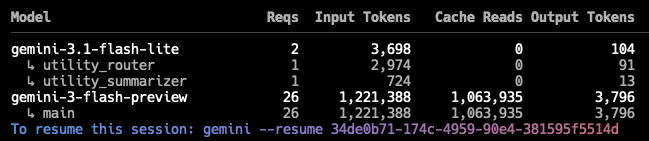
While using Gemini CLI to quickly make a change to BlogMore this morning, I was reminded that at the end of a session it does tell me this:

Session usage

Seeing that got me thinking: is there a way to get the total usage for all of my sessions, or at least the sessions that have still been retained (I'm guessing they expire after a wee while)? After a little bit of searching I found ccusage. That looked exactly like the sort of thing I was after.

Now, this is only going to be good for Gemini (it says it supports Copilot too, but it seems to be failing to find any Copilot sessions), but it should give me a feel for what my token usage looks like.

I work on BlogMore on two different machines: the MacBook Air and also a Mac Mini I have in my office. Here's all of the available token usage data I can get out of the Air:

DateInputOutputCache ReadTotal TokensCost (USD)
2026-04-29235,23820,282773,6421,032,608$0.23
2026-05-01315,0013,181447,556768,532$0.20
2026-05-022,621,62852,29018,260,59720,955,447$2.44
2026-05-033,627,84630,53811,819,27915,509,213$5.74
2026-05-04869,82949,1632,721,0743,656,649$0.77
2026-05-092,287,76050,0819,973,76412,327,819$1.84
2026-05-101,019,55034,5568,061,8979,125,838$1.05
2026-05-111,112,12335,61010,523,34811,689,576$1.24
2026-05-131,506,51341,8027,561,1689,124,651$2.88
2026-05-15123,1613,155587,248716,813$0.11
2026-05-16111,33414,836519,161646,275$0.13
2026-05-17940,48536,1717,682,3148,706,034$1.41
2026-05-1867,0331,357205,921275,707$0.05
2026-05-2160,9041,182119,055184,117$0.05
Total14,898,405374,20479,256,02494,719,279$18.13

And also the same for the Mac Mini (which gets used less frequently for this sort of thing):

DateInputOutputCache ReadTotal TokensCost (USD)
2026-05-04212,17831,6312,128,0742,389,927$0.36
2026-05-051,108,90331,9976,222,8687,374,732$1.13
2026-05-0830,8991,19464,07498,146$0.03
2026-05-111,339,33327,3998,074,9049,459,253$1.21
2026-05-12952,05753,02312,751,53913,838,943$1.52
2026-05-18166,8754,774651,417827,746$0.22
2026-05-19449,08723,9763,236,3243,721,558$0.54
2026-05-22335,15110,0121,919,8152,272,553$0.32
Total4,594,483184,00635,049,01539,982,858$5.33

In both cases I've removed a couple of columns to make the tables fit better. The first was the model name (varying between gemini-3-flash-preview and gemini-3.1-pro-preview), the second was Cache Create (which was always 0 all the way down).

From what I can see, it would appear that these two tables do cover my increasing use of Gemini CLI for doing work on BlogMore (the first intensive use being back around the 5th of this month, if I recall correctly). So this would seem to be a reasonably informative way to view things.

All of which is to say, over a roughly three week period, while getting things done, I've used getting on for 20,000,000 input tokens, and around 600,000 output tokens (presumably I do also need to be keeping the 114,300,000 cache read tokens in mind too). With this in mind I might now be able to make more sense of the pricing I see for various tools.

Reviewing the cost of BlogMore

3 min read; 8 GFI

Now that we're near the end of the free or cheap GitHub Copilot party, I thought it might be interesting to look at how much BlogMore has "cost" me to build, and what it would have cost under the proposed new pricing structure that is coming in next month. While I've looked at the comparison for last month, I've not looked at the whole period I've been seriously using it.

So, for this review, I'm looking at all the data I can pull out of GitHub for the months of February, March, April and May of this year. Development of BlogMore started back in February and, while it hasn't been 100% the cause of my use of Copilot premium requests, it's been almost all of it. For the purposes of this review I'm just going to take the approach that all I worked on was BlogMore.

Remember that, even when I had free access, I had a maximum of 300 premium requests per month. Once I lost free access I had the same number of requests for $10 a month.

Here's how those months broke down:

MonthPaidPremium Requests%agePredicted Price
February$0.0024983%$21.67
March$10.0014047%$56.38
April$10.0013244%$53.77
May$10.003411%$53.69
Total:$30.0055546%$185.51

So, give or take, something that I've actually spent $30.00 on could have, at best, cost me $185.51. That's assuming that the "cost" of the models I was using stays the same. You can see that the costs have risen already in that the predicted price from February, where I used 83% of my premium requests, is a touch under half the cost for this month, where I've used just 11%. From what I can see in the raw data, it's down to some models suddenly being considered more expensive (perhaps I was doing something that just consumed more tokens, I'm not 100% sure if I'm honest, but I don't recall anything that seemed like harder work).

Who knows what the real costs will be come June.

Now, technically, the actual cost under the new regime could or should be $156, because it would be 4 lots of the $39.00/month plan, which would better cover that use1. Again though, that's assuming the actual cost of using whatever models remains pretty stable. It also assumes that I'd want to spend that much each month, and that I would be correctly anticipating that I'd need that much.

Also, this isn't even the total cost of getting this project done. As I've written recently: I've been using Gemini CLI more this month, and while the usage there is a flat cost, until now, that's changing too.

Now, of course, these aren't the only games in town. I could "go to the source" and just get a sub for Claude Code or something, and as Tim pointed out over in the Fediverse, something like Cursor does a lot of this and is just $20/month. Which all sounds fine, but what happens when those fleeing GitHub Copilot or Gemini CLI/Antigravity head over to something like Cursor? Is it sensible to expect the pricing to stay the same2?

I guess, at this point, I'm just mulling over the same issue time and again, but from different angles. It does seem clear to me, though, that in less than 4 months, in my experiment of "what happens if I use agents to develop a Free Software tool I want?", the market has gone from being entirely reasonable to pretty much unjustifiable from a price point of view.


  1. As I understand it, the $39 gets you almost twice that value in "AI credits", so the base allotment plus the flex allotment would cover what I've used. 

  2. That's not even the main reason to be concerned about a switch to Cursor

The highs and the lows

2 min read; 11 GFI

Over the weekend I read a comment, I think it was on Hacker News, where someone said they were having fun building things using AI. This was in response to someone saying that using AI took the fun out of programming. In their reply, the person qualified their answer with something along the lines of "the highs are higher and the lows are lower".

I think I agree.

My first ever exposure to any sort of computer was a Sinclair ZX80 that my maths teacher brought into school. After a class he plugged it in and let me and a friend take a look. To this day I still remember looking in the manual, looking at the tutorial, and at some point typing...

PRINT 1+1

When I hit NEW LINE and a 2 appeared on the screen I was thrilled, I was hooked. I'd typed something that appeared on a TV screen and then I did something that made the answer appear on the TV screen. This felt like magic.

I've been hooked on writing code ever since.

In that time the highs have been high, and the lows have been low, but I think it's fair to say that I've been doing this for long enough (it's now 45 or 46 years since I typed that first instruction) that things have settled down. I still get a thrill when writing code, and I still get fed up with it from time to time, but the distance between the two isn't what it once was.

Which brings me back to the comment I read: I think I can safely say that, while properly experimenting with agents, while building BlogMore to test this approach out, I have been through a period of higher highs and lower lows when it comes to how I feel about the code and the project itself. When I kicked off development it was genuinely thrilling to have gone from an empty repository to a comprehensively-working initial version in just a matter of hours. Likewise it was thrilling to have gone from nothing to rebuilding this blog with the tool in just a few days. It would be a lie to suggest that it wasn't fun and exciting to see the result.

But, as I wrote back then, I was also very mindful of how empty the process felt at times, how I missed the whole "flow state" connection to building out the application. There have also been many moments along the way, which I've documented at times on this blog, where I've felt the project was getting stuck down a dead-end with respect to how the code was going.

And then there's all the times Copilot and/or Gemini CLI just plain stopped getting stuff done.

Given this -- given the highs especially -- I can see why some people get totally hooked, go all in, get consumed by the illusion of how powerful these tools are. I can see why they'd buy into and embrace the mindset that trots out the AI-equivalent of the crypto-hype "stay poor" retort to those who display any level of scepticism.

Busy doing nothing

3 min read; 10 GFI

The first company I worked for full-time had two offices. One in the south of England, another in the north. Despite being a northern lad, I'd somehow found myself working in the southern office. While the company used a few languages, there was a split between the two offices, mostly driven by the fact that the northern office was more minicomputer-based (lots of DEC stuff as I recall), whereas at our office it was more PC-based (we were an Apricot dealership, amongst other things). At our office, the predominant language was Clipper (later to be called CA-Clipper).

At one point, at the other office, they hired someone to start doing Clipper coding up there too, and he was handed his first project, to add a new report to an existing system. After around three weeks, he just didn't turn up for work one day, called in to say he'd quit (or so I was told). Meanwhile, the work he had done didn't seem to be working. If someone took the newly-compiled system and ran the new report, nothing happened.

When the code was looked at, it became clear why. The new module had one line of code. Well, not one line of code exactly: it had a one-line comment.

* This is too hard. I can't do this.

That was it. He'd spent those weeks appearing to work on the requirement, but never produced a single line of actual code.

I felt really bad for the guy. He'd somehow managed to make it through the interview, somehow managed to convince others, and himself, that he was capable of working with Clipper and writing code (probably made easier by the fact that the office in question wasn't a "Clipper shop"). But when it came to actually getting on with a job, he'd been unable to get it done (and, apparently, had felt unable to ask anyone around him for help, which probably says a lot about that office and the industry at the time1).

I bring this up because I was reminded of this story when I was tinkering with Gemini last night. While working on the optimised images PR, towards the end of the session, I asked it to make a particular change. It then started "thinking", and after a couple of minutes appeared to get to work on the problem. It kept printing, scrubbing out and printing again, lines of text of what it was apparently doing. This went on for something like five minutes. Eventually it announced that the work had been done, explained what it had changed, and how it had implemented the requirement.

I flipped to another terminal to test out the work and... no changes. Zero changes. Nothing to diff, nothing to commit.

I flipped back to the CLI app, mentioned that nothing had changed, and it then very quickly made some edits; nothing spectacular, a 14-line diff affecting five lines (to start with).

This is the first time I've seen this, and I guess yet another thing I need to keep an eye out for. Of course I would notice if I asked for some work to be done and it wasn't done (I did), but it feels like another method via which this "productivity tool" can make you less productive.

If you give me the under-qualified, solution-paralysed, entry-level developer who doesn't know how to proceed, I can help them. Their current inability to actually bash on the keyboard and make code appear isn't the problem here. Giving them a tool that will busy-work for five minutes and produce nothing isn't going to help them, neither will things improve if they're given a tool that does emit all the code. Removing the human element is going to remove safety, growth and also domain knowledge. I feel it's going to rot software engineering departments from within, if handled badly.

Watching people talk about agents as if they're the solution, and that writing code is now a solved problem, really troubles me. I won't question the idea that it can be a very useful tool -- goodness knows I've found it useful recently -- but I do question the common assertion that it finally is a silver bullet. I find this to be lazy, dangerous and harmful thinking.


  1. Because of course we're so much better as an industry these days. 

Gemini CLI vs GitHub Copilot (the result)

4 min read; 11 GFI

Following on from this morning's initial experiment, I think I'm settling on a winner. Rather than be annoying and have you scroll to the bottom to find out: it's Gemini CLI. Here's how I found the process played out, and why I'm settling for one over the other.


Gemini CLI

Initially this was an absolute mess. After letting it initially work on the problem, the resulting code didn't even really run. The first go, and the three follow-up prompt/result cycles that followed, all resulted in code that had runtime errors. I'm pretty sure it didn't even bother to try and do any adequate testing. This is odd given I've generally seen it do an okay job when it comes to writing and running tests.

Once I had the code in a stable state, with all type checking, linting and testing passing, it still didn't work. No matter how I tried to use the new facility it just didn't make a difference. No images were optimised. In the end I dived into the code, with the help of its attempt at debugging (it added print calls to try and get to the bottom of things -- how very human!), diagnosed what I thought was the issue (it was looking in the wrong location for the files to optimise), told it my hypothesis and let it check if I was right. It concluded I was and fixed the problem.

Since then I've had a working implementation of the initial plan.

Once that was in place it's been a pretty smooth journey. I've asked it questions about the implementation, had my concerns set to rest, had some concerns addressed and fixed, improved some things here and there, added new features, etc.

All of this has left me with 18% of my daily quota used up. While I think this is the highest I've ever got while using Gemini CLI, it still feels like I got a lot of things done for not a lot of quota use.

GitHub Copilot

Initially I thought this had managed to one-shot the problem. Once it had finished its initial work the code ran without incident and produced all the optimised files. Or so I thought. Doing a little more testing, though, it became clear it was only optimising a subset of the images and it didn't seem to be producing the actual HTML to use the images.

On top of this it didn't even follow the full plan that was laid out in the issue it was assigned. For example: once I'd got it doing the main part of the work, it became apparent that it had pretty much ignored the whole idea of using a cache to speed this process up. I had to remind it to do this.

At one point I switched from the in-PR web interaction with Copilot, and used the local CLI instead. When I ran that up it warned me that I was already 50% of the way through some sort of rate limit and this wouldn't reset for another 3 hours. I think I was about 40 minutes into letting it try and do the work at this point.

After a bit more testing and follow-up prompts, I got to a point where I had something that looked like it was working; albeit in a slightly different way from how Gemini CLI did it (the Copilot approach was writing the optimised images out to the extras directory, mixing them in with my own images; Gemini opted for having a separate directory for optimised images within the static hierarchy).


At this point I will admit to not having carefully reviewed the code of either agent; that's a job still to do. But while Gemini got off to a very rocky start, with a bit of guidance it seemed to arrive at an implementation I'm happy with, and one that seems to be working as intended. While it didn't anticipate all the edge cases, when I asked about them it easily found and implemented solutions for them. Moreover, the fact that I could do all of this and confidently know the "cost" made a huge difference. Copilot seems to generally approach this like a quota or rate limit should be a lovely surprise that will destroy your flow; Gemini has it there and in front of you, all the time.

As for the general idea that I'm working on: I think I'm going to implement it. Weirdly I'm slightly nervous about building the blog such that it won't be using the images I created, but I also recognise that that's a little irrational. Meanwhile I'm very curious about the impact this might have on the PageSpeed measurement of the blog. While it's far from horrific, image size optimisation and size declaration seem to be fairly high on the things that are impacting the performance score (currently sat at 89 for the front page of the blog, as I type this).

The other thing that gives me pause for thought about merging this in, and then subsequently using it, is that I've just finished migrating all images to webp, and so saving a lot of space in the built version of the blog. Generating all the responsive sizes of the images eats that up again. With this feature off, the built version of the blog stands at about 84MB; with it on, this rises to 133MB. That extra 49MB more than eats up the 24MB saving I made earlier.

On the other hand: storage is a thing for GitHub to worry about, what I'm worrying about here, and aiming to improve, is the reader's experience.

I'm going to sit on this for a short while and play around with it, at least until I get impatient and say "what the hell" and run with it.

Gemini is kind of messy

1 min read; 11 GFI

As I've mentioned a few times recently, I'm using Google's Gemini CLI more at the moment; in part because I have a Gemini Pro account so it makes sense to use it, but also in anticipation of dropping anything to do with Copilot.

While I've had some troubles with it -- as can be seen here, here and here for example -- I'm mostly having an okay time. The code it writes isn't too bad, and while it seems to need a little more direction and overseeing than I've been used to while using Copilot/Claude, it generally seems to arrive at sensible solutions for the problems I'm throwing at it1.

One difference with working with Copilot CLI that I have noticed, however, is that Gemini doesn't seem to care for cleaning up after itself. When faced with a problem it'll often write a test program or two, perhaps even create a subdirectory to hold some test data, run the tests and be sure about the outcome. This is good to see. It's not unusual for me to do this myself (or at least in the REPL anyway). But it really doesn't seem to care to actually clean up those tests. A handful of times now I've had it leave those files and directories kicking around. I've even said to it "please clean up your test files" and it's gone right ahead and done so, which suggests it "knows" what it did and what it should do.

This also feels like a new source of mess for all the people who commit their executables and the like to their repositories. That should be fun.

The thing I don't know or understand, at least at the moment, is if this is down to the CLI harness itself, or the choice of model, or a combination of both, or something else. I'm curious to know more.


  1. There is a weird thing I'm seeing, which I want to try and properly capture at some point, where it'll start tinkering with unrelated code, I'll undo the change, it'll throw it back in the next go, I'll undo, rinse, repeat... 

When Gemini CLI gets stuck

1 min read; 7 GFI

Another evening, and another period of Gemini CLI getting stuck thinking. So this time I thought I'd try something: cancel it while it was thinking and change the model.

Gemini Thinking...

I was working on something new for BlogMore and, sure enough, after a wee while, we got stuck in "Thinking..." mode. So I hit Escape and asked to pick a different model. I chose to pick manually, and went with gemini-3.1-pro-preview.

Picking the model

I then literally asked that it carry on where it left off...

Carry on

...and it did! It worked. No more sitting around thinking for ages.

Watching the quota after doing this, it looks like the model I was using ate quota faster, but that was worth it given I've never come close to hitting full quota with Gemini CLI.

Once the immediate job was done, I went back to auto and it worked for a bit, only to get stuck thinking again. I repeated this process and it did the trick a second time. From now on I'm going to use this approach.

It does, again, highlight how unreliable these tools are, but at least I've found a workaround that works for now.