I've just made a very small update to blogmore.el to fix a small bug, and also to update some deprecated code.
The blogmore-new command inserts the result of expanding a template into the buffer when making a new post, and I've not touched that template since I started writing blogmore.el. This includes not updating it when I switched much of the frontmatter-handling code over to proper YAML parsing. The problem here was that the title didn't get quotes around it, which became an issue if there was something like a : in the title; any subsequent attempt to modify frontmatter properties would throw an error.
So this release ensures that the title and the date get quoted right away. I guess, at some point, I should rework this code so that it uses the frontmatter-handling code to set up those properties and, instead, just uses the template for the main body.
I've also changed all uses of things like when-let and if-let to use when-let* and if-let*. It seems that, as of Emacs 31.1, the former are deprecated.
I've just done a quick update to BlogMore, bumping the version to v2.44.1. This release fixes an issue with auto-cover generation where, if you changed some properties relating to a post (or the blog as a whole), the auto-covers weren't being updated to reflect those changes.
A good example is the description of a post. In the editorial-style cover, the description is shown; this is taken either from the first paragraph of the post or, if you've provided a description front matter value, it's taken from that property. The problem was that if you changed the post such that the text of the description changed, after a cover had been generated, it wasn't regenerated because it was already in the cache.
So this release is a bit more aggressive about when it will ignore the cached cover and generate a new one. The result is that the cover will reflect the changes.
There is, of course, a small downside to all of this (which was also an issue for v2.44.0 too): if you're working on a new post in serve mode, any time you change something that causes the cover to be recreated, the older versions of the cover will be left in the cache; in other words, there's a storage overhead to all of this.
For now, I'm just going to live with this downside (BlogMore has a cache clearing command anyway, so if it becomes an issue you can always use that). In the near future, though, I think I'm going to add a smart-clear sub-command to the cache command (or perhaps a --smart switch to the clear sub-command). This will go through the cache and find all the files that aren't currently "valid" and remove them, leaving all the "good" cache entries intact. That should be useful for occasional housekeeping without needing to wipe out the whole cache, and so greatly slowing the next build of a site because every single cover needs creating again, and every single optimised image needs generating again (if you have image optimisation turned on).
It's been a short while since I last made a release of BlogMore; in fact, the time since the last update might be the longest I've gone between versions since the first release. I think this might mean it is actually more or less feature complete!
More or less.
Except... I did have to spend a bit of time (and some Antigravity quota) this morning adding something I've been wanting to add: automatic generation of cover images aimed at social media sites (so the kinds of images that show up when you post to Mastodon, Bluesky, or that other terrible site some people still seem intent on using for some perverse reason).
BlogMore has supported the declaration of a cover from the very first release. This was done in a way that it was up to the author of the post to create and include the image. Personally, in my posts, I've tended to set the cover to point at the most relevant image in the post, if a post has any images. I've also had BlogMore always work such that a post without a cover has the social image set to the site's logo image (if it has one).
This works, but it does mean that all of the posts I make that have no cover (feels like that's roughly half of them -- I could probably do something fun with the dump of posts to know for sure) simply show my masked face when I share them. That's by design, but not ideal.
So v2.44.0 adds support for an "auto covers" feature. I've tried to do this in a way that is fully backward-compatible. The feature itself is off by default, won't override any covers you have specifically set for posts, and can also be used and controlled on a per-post basis.
The core of the feature is controlled by a new auto_covers section in the configuration file. In here you can control if the feature is on or off by default, what layout to use for the cover images, what colours to use, and so on. There's plenty to experiment with and it should be fairly straightforward to create covers that look unique to your blog.
There are three styles of cover that can be generated. The minimalist does as the name suggests: it tries to keep things as minimal as possible (and will generally result in the smallest file).
The split type is a little richer, including the site logo if you've set one. Generally the image size will be bigger than minimalist.
Finally there is editorial, which includes the title, logo, the description for the post, the category and the tags. Because this is the busiest style it will generally result in the biggest file.
As you might imagine, generating these images for every post that doesn't have a cover set can be very time-consuming. Because of this the generated images are cached, so subsequent site generations should hardly ever be affected (unless you change any of the parameters relating to cover generation).
ℹ️ Note
As with image optimisation, this does mean that more storage is going to be used between blog builds. If you use this cover feature, not only will more images be created in your static site output, but the BlogMore cache related to the blog will also grow. Keep this in mind when deciding to use this feature.
It might also be the case that you don't want to generate cover images for all of your historical posts, but you do want them for all future posts. That approach is possible. All you need to do is set everything as you want it in the configuration file but set enabled under auto_covers to false. Then, for any post where you do want an auto-generated cover, simply set auto_cover in its frontmatter to an appropriate value. To go with the default settings, set it to default, or if you want to control the layout per-post, set it to the desired layout for that post.
To try and summarise, the rules for selecting a cover for a given post are something like:
If it has a cover set in its frontmatter, that is used.
If it has an auto_cover set to anything other than none in its frontmatter, the desired type of auto-cover will be used.
If it has neither cover nor auto_cover set, a cover will be generated if auto_covers.enabled is set to true.
Hopefully that's clear.
Despite this post having images in it, I've not set a cover for it and I have the following setup in my configuration file:
This should mean that, if I've got this all working correctly, this post, and all historical posts without a cover, get auto-generated covers. This should also be very evident as you hover over posts in the graph.
I've released blogmore.el v5.3.0. This is a pretty small release but adds a command I realised I'd forgotten to add a couple of releases ago.
Now that BlogMore has the concept of a post series, and now that blogmore.el lets you add and remove a series from a post, it makes sense that I'd want to link to a series in a post from time to time, like I can and do with categories and tags.
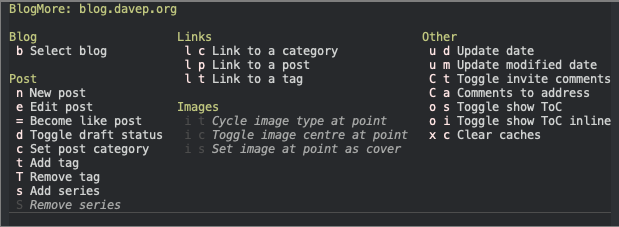
So v5.3.0 adds a blogmore-link-series command. It can also be found in the transient menu.
Another quick update to blogmore.el, again to fix an issue I've run into with the new frontmatter-handling code. This time it's to address an actual crash that could happen if a property was available but empty. For example, if a post had frontmatter that looked like this:
And I then went to use blogmore-add-tag, I'd get a crash saying:
Wrong type argument: sequencep, :null
The reason being that tags was being parsed with a value of :null, rather than (as before) having a value of nil (which of course meant I had a nice empty list to do things with). It was an easy enough fix.
At this point I think I've managed to shake out any serious issues with the proper YAML-parsing approach to frontmatter, as I've used it to write a handful of posts now.
A quick little update to blogmore.el to fix a couple of issues introduced by the new YAML-parsing approach to reading frontmatter; both pretty much stemming from how falsy values are handled.
Simply put, both boolean false values, and also empty values (something that could commonly happen with tags and series) would end up showing up in the frontmatter as null. This release handles that situation.
Also, under the hood, I cleaned up some repeated boilerplate related to how the cached dump calls to BlogMore took place. The code for categories, tags and series data was almost exactly the same, save for the actual name of the thing being dumped. So I turned it all into a macro:
(defmacroblogmore--cache-dump(dump-name)"Generate a function to get DUMP-NAME from BlogMore, with caching."(let((cache-name(intern(format"blogmore--current-%s-cache"dump-name)))(getter-name(intern(format"blogmore--current-%s"dump-name))))`(progn(defvar,cache-namenil,(format"Cache for the list of %s from existing posts."dump-name))(defun,getter-name(),(format"Get a list of %s from existing posts."dump-name)(or,cache-name(setq,cache-name(blogmore--list-of,(symbol-namedump-name))))))))
and now the defvar that creates the variable that holds the cache, and the defun that creates the getter function for the data, are reduced to this for all three collections of values:
Sure, I probably could have done all of this in a single global, a central getter function, and a hash table, but the macro approach feels so much more elegant, and more... lispy.
After recently adding Mermaid and maths support to BlogMore, I got to thinking that it now has connections with a handful of third-party resources. While almost all of them are optional (only FontAwesome comes close to being a hard requirement), it does mean that there are resources the user doesn't directly supply or control, and for which the URLs are hard-coded in the source for BlogMore.
Of course, it's not an all-or-nothing setting; you can just set one of the values. So if you wanted to override the force_graph value it's enough to do:
Hopefully this adds some useful flexibility. As well as giving the option to use a different version of a resource, it also allows you to host your own copy and refer to that instead. Heck, it would even allow totally replacing a library with a different one that has the same API, should you ever find yourself in that situation.
When I released blogmore.el v4.7.0 yesterday I finished off by saying that it was my intention, at some point, to rework the frontmatter-handling code so that it did proper YAML parsing. As often happens with these sorts of things, "some point" ended up being that evening.
I've rewritten everything to do with handling properties in the frontmatter so that it now uses yaml.el. This has a number of knock-on effects. The first and most obvious effect is that anything that is a list/array in the frontmatter is actually properly treated as a list. A good example here is tags. Now you can have your tags look like:
and blogmore.el will still handle things fine. The same holds for series too.
It should be noted, however, that because I'm now using actual YAML serialisation code, most other forms of a list will all end up being transformed into this kind:
and you make an edit to the tags via blogmore.el, it will end up as the version enclosed in []. BlogMore itself supports all three versions so this works fine.
There is a breaking change here too, which in part explains the reason I bumped the version to 5.0.0: because series can now be treated as a list I've removed the blogmore-set-series command and instead replaced it with blogmore-add-series and blogmore-remove-series. Both can of course be found in the transient menu.
Another big change in this release is the way that existing values are loaded up from your blog. Previously, when you went to add a category, tag or series, blogmore.el would use ripgrep (or a combination of find and grep if rg wasn't available) to pull out values to help populate a completion list. This worked fine as long as a) the frontmatter property was all on one line and b) the body of a post didn't contain something that looked like a frontmatter property. With this release of blogmore.el I've dropped this approach in favour of calling blogmore itself and using the dump command to get the actual lists of categories, tags and series.
This does mean that BlogMore needs to be installed in a location where blogmore.el can see it, and to help with this I've added a new defcustom called blogmore-command. By default this is set to call whatever version of blogmore can be found in your exec-path; if this results in unexpected behaviour you can set blogmore-command to point to a specific copy of blogmore.
There is, however, a small downside to this beneficial1 approach: calling on blogmore and parsing all posts to get the values is generally going to be slower. With this in mind I've built in a cache for these values. The first time you load up the categories, tags or series, the values are held on to so that subsequent prompts are instantaneous (meaning there is no further call to blogmore). To ensure this doesn't confuse things, when you switch blog (blogmore-work-on) the caches are cleared. In the unlikely event that there is a problem with this approach, I've also added a blogmore-clear-caches command to force the clearing of the caches.
There are some other small QoL changes under the hood and also to the interface. I've moved some things around in the transient menu, and also ensured that a couple of options are better-disabled depending on the context.
All of this makes the package even more robust. Something that started as a quick hack back in March has turned into a tool I heavily lean on. Hopefully, for anyone who might happen to use BlogMore and GNU Emacs, it'll be a useful daily-driver for them too.
The benefits being: only values in frontmatter appear, inconsistent casing is cleaned up, etc. ↩
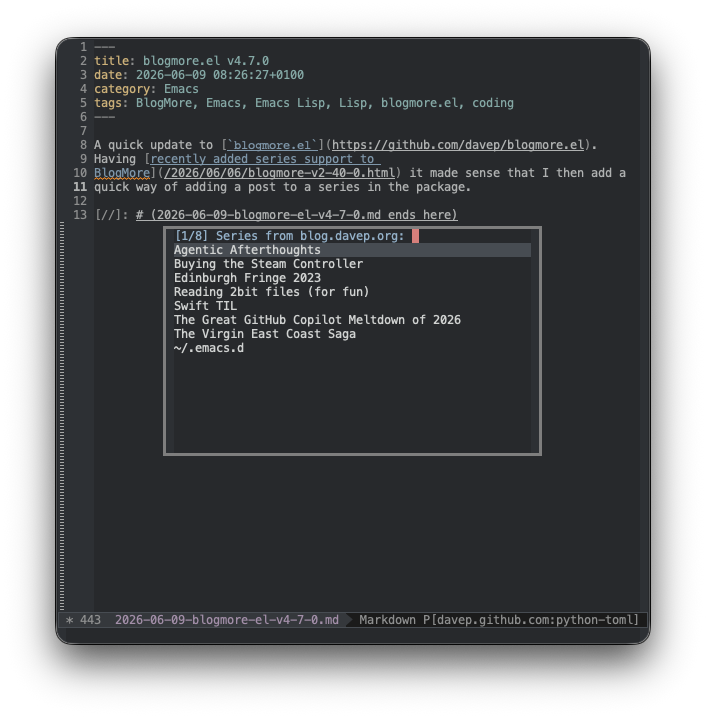
You can, of course, set a new one too, but the idea here (as with categories and tags) is that you can quickly find back an existing series and add the current post to it.
Also, as with tags, the expectation is that either a single series is being used, or if more than one series is in play for a post they'll be listed as a comma-separated list. The issue here is that while BlogMore supports this:
series:-Some series of posts-Some other series of posts-Yet another series of posts
the frontmatter-handling code in blogmore.el isn't very sophisticated at all; it doesn't actually handle it as actual YAML, instead just treating it as a set of key/value pairs separated by a colon.
At some point soon I want to give blogmore.el a revamp and base all of the frontmatter-handling code on something like yaml.el. I did do some experimenting last night to drop it in and handle proper lists. It worked well enough, but I abandoned the work as I realised I really wanted to start again from scratch and build blogmore.el from the bottom up using that package.