Posts tagged with "BlogMore"

A full month of blogging

1 min read; 11 GFI

I've just realised that, somehow, I've managed to post something on this blog, every single day this month.

May 2026

A large part of this is, of course, because I've been doing a lot of stuff on BlogMore, but there's no getting away from the fact that BlogMore exists and I feel compelled to make use of it, and also that blogmore.el helps make it a lot easier to kick off and edit a post.

Thinking back to other blogs I've maintained over the past couple of decades, I don't think I've ever come close to this. Last month did come close, broken only by the couple of days I was chilling in Whitby. The month before also came close, minus 2 days where I just didn't have something to write.

I don't imagine this will last; in fact, I know for sure that there will be fewer posts next month (I have a trip coming up). What I do know is that I feel more compelled to jot something down when an idea turns up, and I'm enjoying the habit of blogging more frequently. While I expect this run to calm down, I hope I don't fall back to leaving it months at a time before opening a fresh Emacs buffer and kicking off some new Markdown.

BlogMore v2.34.0

1 min read; 12 GFI

I've released BlogMore v2.34.0. This is a small update to make some changes to the newly-added dump command.

The first change is a small fix to the url_path property, which wasn't being populated; now it is.

The second change adds two new properties to the output which relate to links that can be found inside posts: internal_links and external_links. As the names suggest, the first gives you a list of all the internal links that can be found in a given post, with the values given being the same format as the id used for every post in the dump. For example:

"internal_links": [
  "posts/2026/05/2026-05-20-blogmore-v2-25-0.md",
  "posts/2026/05/2026-05-22-blogmore-v2-26-0.md"
]

This should give everything needed to write tools that do things similar to the back-links system in BlogMore itself.

The list of external links is, obviously, a list of all the links in the post that are external to the blog. It looks like this:

"external_links": [
  "https://blogmore.davep.dev/",
  "https://validator.w3.org",
  "https://json-ld.org/",
  "https://microformats.org/wiki/microformats2",
  "https://microformats.org/wiki/rel-me"
]

There is, of course, some overlap with the link dumping command, but given that the information is available it seemed to make sense to provide it here; it also means that it's available in a more structured form.

Also providing this sort of information in the JSON output means there's a lot of flexibility when it comes to analysing all the posts in my blog. For example, I can now easily satisfy my curiosity if I want to know exactly which posts in my blog have no links whatsoever.

blogmore dump | jq -r '.[] | select((.internal_links | length) == 0 and (.external_links | length) == 0) | .id'

posts/2015/2015-06-18-a-mild-chrome-annoyance.md
posts/2015/2015-06-23-and-now-for-some-ios.md
posts/2015/2015-07-01-odd-ipod-update.md
posts/2015/2015-08-03-best-update-ever.md
posts/2015/2015-09-04-unknown-promo.md
posts/2015/2015-10-19-microsoft-accounts.md
posts/2015/2015-11-11-voice-search-failing-on-nexus-6.md
posts/2015/2015-11-12-i-miss-until-next-alarm.md
posts/2016/2016-04-28-i-now-own-a-macbook.md
posts/2017/2017-12-12-on_to_something_new.md
posts/2020/2020-06-24-swift-til-3.md
posts/2020/2020-06-26-switch-til-5.md
posts/2020/2020-06-28-swift-til-7.md
posts/2020/2020-07-05-swift-til-10.md
posts/2022/2022-06-03-failed-successfully.md
posts/2023/2023-07-21-encouragement-i-guess.md
posts/2023/2023-07-29-home-pod-stuck-installing.md
posts/2023/2023-10-20-constant-siri-voice-loss.md
posts/2026/05/2026-05-04-my-new-favourite-game-on-steam.md
posts/2026/05/2026-05-11-steam-controller-is-close.md
posts/2026/05/2026-05-25-this-is-not-fun.md

Sure, I don't know what I'd do with this information, but at least I can easily ask the question.

BlogMore v2.33.0

1 min read; 11 GFI

I've released v2.33.0 of BlogMore, which extends the stats page some more, and also adds a tool so a user can do all sorts of fun things with the raw data of their posts.

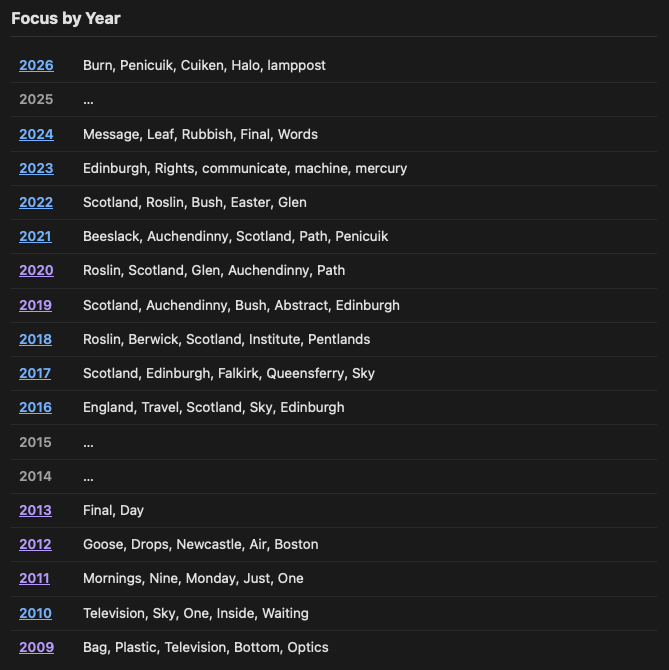
The addition to the stats page is a list of years along with the top five words that characterise the focused subject for those years. This is done using TF-IDF. While the results for my blog don't come as a surprise, I am pleased to see that it does turn out pretty much how I would have expected:

Blogging focus per year

This feels like another fun way to learn something about the post history for your own blog.

Which got me thinking: there's probably any number of other niche and bizarre things that could be done with the content of a blog to gain some insight as to its history, and I really shouldn't just keep adding more and more things to the stats page. But what if I wanted a way to run some code over all the posts? Wouldn't it be useful if I could get all of the parsed post data in JSON format so I can play with it?

With that idea in mind, I added the dump command. When run, it will print to stdout a full dump of all of your posts, as JSON, so you can then write your own nifty tool to read it back in and do any number of interesting checks, tests, reformats or manipulations. For example, if I wanted to use jq to pull out the metadata for this particular post I could:

blogmore dump | jq '.[] | select(.id == "posts/2026/05/2026-05-29-blogmore-v2-33-0.md") | .metadata'

which gives me this result:

{
  "title": "BlogMore v2.33.0",
  "date": "2026-05-29 14:14:10+0100",
  "category": "Coding",
  "tags": "BlogMore, Coding, PyPI, Python",
  "cover": "/attachments/2026/05/29/focus.webp"
}

I can see this being pretty useful to blogmore.el at some point, if I want to add some better querying tools or similar (not that I'd want to run a dump every time, it does require that a full parse and render has to happen).

Hopefully this will be useful to someone else. I know I'll be toying with it to find out other things about my posting history.

BlogMore v2.32.0

1 min read; 11 GFI

Now that BlogMore is so obviously feature-complete and there's nothing else I could possibly need to add to it... here's v2.32.0 with a quick new feature.

The work to add the relatedness of posts got me wondering about other things that could be measured about the content of posts, and a bit of reading and looking for ideas resulted in my (re)discovering the Gunning fog index. That got me thinking it might be interesting to see what the highest and lowest values were for my blog, and perhaps what the average is, perhaps even get a feel for the distribution.

So now BlogMore has a with_gfi configuration setting (and a matching command line switch). When enabled, it adds the score for a post next to the reading time (if that's enabled, if not it's in the same location as the reading time would be). It also adds a load of stats to the stats page.

The GFI stats for my blog

As well as this change, I've also tweaked the stats page so it's easier to get a link to a particular section. As with headings in posts, when you hover over a section heading you'll get a little anchor you can click on that will result in you visiting that particular heading. That should make it easier to highlight a particular statistic, if you need to.

BlogMore v2.31.0

1 min read; 11 GFI

A quick update to BlogMore, with a small accessibility improvement, and also a whole new set of data for the graph.

The accessibility update follows on from a change published yesterday. In that release I did a little bit of work to disambiguate links to categories and tags that had the same link text; this time I've given the same aria-label treatment to the post dates where they link to the year, month, and day archives. While we're never really going to get ambiguous year links (unless there are also links in the body of a post that are four digit numbers), it's highly likely we're going to get the occasional month and day that are ambiguous.

So now those links make it clear, with aria-label, what's being linked to.

The other main change in v2.31.0 comes from a thought I had last night about the new "related posts" feature I added yesterday. Currently the graph shows the relationships the posts have based around their common categories and tags:

The graph based on links

But now I've got this code that can work out how posts might be related based on their text content. What might that look like? It might be cool to be able to switch the graph view between the two sets of data, if the blog owner is building with related posts turned on.

The graph based on related posts

While I'm not sure it really tells me anything, I like that I have yet another method of (re)discovering posts.

BlogMore v2.30.0

2 min read; 9 GFI

BlogMore has been bumped to v2.30.0. This release is pretty heavy on new features, but it does also include one small accessibility tweak too. While looking through some of the neutral feedback from PageSpeed Insights I noticed it mentioned that in some cases I had a category and a tag linked on the same page, where the text of the link was the same. That's pretty common on my blog. For many of the categories (especially things like AI, Coding, Emacs, Python, etc.) I'll also have a corresponding tag. The idea is that categories are essentially sub-blogs within the blog, whereas tags characterise a post.

Given that the same text for different purposes doesn't give much context from an accessibility point of view I've added appropriate aria-label attributes to differentiate these links.

Now for the new features.

The first is another "discover other posts" type feature, that might encourage a reader to venture further into a blog. While BlogMore does support backlinks (as was added back in v2.16.0), I have been thinking that a "related posts" feature would be interesting to add. So now it's added. This is enabled with the with_related configuration option (or the --with-related command line switch) and provides control over how many related posts are shown; the default is three.

Example related posts

Because calculating the best related posts, for every post, will cost in time and memory, some control over how "accurate" the hits are is given. You're also not stuck with "Related Posts" as the title either.

Using a different title

The rest of the new features are more admin-based and are all commands on the BlogMore command line. The first is the drafts command which simply lists the filename of all the posts that are in a draft state.

The second new command is links dump. This is a utility command for dumping a CSV list of all the external links that can be found in your posts, along with the filename of the post the link was found in. This could be useful for all sorts of things; for example writing your own external link statistics tool, or perhaps writing your own external link checker.

Talking of external link checkers: I've also added links check. This is a bit experimental, but is intended to be a simple checker of all the external links, seeing if they're still out there. By default, when run, it'll check every link it finds and, if there's a problem with it, it'll report the issue. There's a --verbose mode as well if you want feedback on all the links that are working.

It seems like every time I think I'm done adding features, something else is either suggested or pops into my head. I feel like I'm near the end of adding stuff now and should be getting back to refining the code.

I'm fairly sure I've said that before.

BlogMore v2.29.0

1 min read; 10 GFI

A quick update to BlogMore that stems from a couple of accessibility concerns raised when using PageSpeed Insights. While the accessibility score on pages generated by BlogMore is pretty excellent (96/100), a couple of things were highlighted that seemed worth tackling in some way.

The first was that the title bar of code blocks is rather low in contrast, especially the name of the language. This was a deliberate choice on my part; when I'd prompted Copilot to do this work some time back I'd expressly asked it to make the text "subtle". While I could have undone that, I do like how it looks and would like to retain it if possible. So, as an experiment, I've used prefers-contrast as a signal that I shouldn't do that. So now there's a bit of extra CSS under prefers-contrast: more which just uses the normal text colour for those headers.

I imagine this won't boost the score on PageSpeed Insights -- presumably it won't simulate that being used -- but I would hope it's an improvement for those who do need the extra contrast.

The other issue that was flagged up was the lack of an underline on the email address link in the comment-via-email invitation box (the optional feature I added back in v2.17.0). That one was an easy fix. There was no reason to avoid an underline on the link, so I added one.

BlogMore v2.28.0

1 min read; 8 GFI

I've just released BlogMore v2.28.0. This release has some small improvements to the JSON-LD structured data that was added in the last release, and also adds support for actually showing author names on posts.

On the latter point first: I only ever really created BlogMore for myself, thinking that perhaps some other folk might use it at some point. All along, though, I had it in mind that it would only ever be used to create a site where there was a single author. Despite this, though, I'd added support for setting the author per-post, and this was reflected in the RSS and Atom feeds.

But I'd never added support for showing the author in posts.

So this release adds that feature. I've tried to add full control, with settings that let you turn on/off showing the author blog-wide, as well as providing control per-post. Also, as well as setting the default author for a blog, and being able to set the author for a specific post, you can do the same for an author's URL (setting it blog-wide and per post).

Obviously, when the author is shown, if a URL can be worked out (the one local to the post is chosen first, then the blog-wide default if one isn't set for the post), the author's name links to their URL.

The JSON-LD changes are a couple of small improvements to the content. The author data adds a url property (following the same rules mentioned above) and the image property for a post will fall back to the site logo (if one is set) when there is no cover.

BlogMore v2.27.0

1 min read; 13 GFI

Much like the last two releases of BlogMore, this is another that has ended up being on the theme of improving or adorning the generated HTML.

One change in the last release resulted in another HTML validator warning, and so that's cleaned up here (the removal of the h2 elements from the sidebar meant it no longer made sense for it to be a section, so I've turned it into a div).

On top of that, I've also decided to dip my toe into adding more "microformat" type things to the generated code. This release adds things like JSON-LD structured data and Microformats2 semantic markup, where appropriate. I've also updated all of the "socials" links that appear in the sidebar to ensure they're marked up as rel="me".

Given that this is a bit of an experiment, expect to see some tweaks and changes as I roll this out on this blog and then check and test the result. This is a useful learning exercise for me.

BlogMore v2.26.0

1 min read; 11 GFI

The previous release of BlogMore had some work that improved the HTML, ensuring that the HTML validator was happy with the generated code. Yesterday evening I ran it over more of the pages, and found a couple more things that made sense to address.

So v2.26.0 takes this a little further and tries to clean more things up. Changes include:

  • The comment email invitation box is now created with a div rather than a section, resolving a validation error about there being no h2 or similar inside the section (because we don't need any kind of heading in there).
  • Cleaned up an error relating to the misuse of an aria-label in the graph page.
  • Cleaned up an error relating to the misuse of an aria-label in the stats page.
  • Removed the h2 elements from the sidebar, making them into divs with the same style. This leaves headings as something that will only appear in the main body of any page or post.
  • Added some heading-demoting to the rendering of posts so that the heading structure of any given post is retained when it's part of any of the archive-style pages (date archives, category archives, tag archives, etc).

While not all of the above were being reported as validation errors, all of them should result in HTML that better fits what I'd want in the first place.