I've just made a small update to BlogMore. This fixes a minor cosmetic issue that's been bugging me for a while, but one that I kept forgetting to address. I noticed it again on a recent post. The issue is that if there are enough tags on a post that the collection of tags runs to a second line, there was no space between those lines.
Now, as of v2.15.0, there's a little bit of breathing room between those lines.
Another wee update to blogmore.el, with a bump to v4.2.
After adding the webp helper command the other day, something about it has been bothering me. While the command is there as a simple helper if I want to change an individual image to webp -- so it's not intended to be a general-purpose tool -- it felt "wrong" that it did this one specific thing.
So I've changed it up and now, rather than being a command that changes an image's filename so that it has a webp extension, it now cycles through a small range of different image formats. Specifically it goes jpeg to png to gif to webp.
With this change in place I can position point on an image in the Markdown of a post and keep running the command to cycle the extension through the different options. I suppose at some point it might make sense to turn this into something that actually converts the image itself, but this is about going back and editing key posts when I change their image formats.
Another change is to the code that slugs the title of a post to make the Markdown file name. I ran into the motivating issue yesterday when posting some images on my photoblog. I had a title with an apostrophe in it, which meant that it went from something like Dave's Test (as the title) to dave-s-test (as the slug). While the slug doesn't really matter, this felt sort of messy; I would prefer that it came out as daves-test.
Given that wish, I modified blogmore-slug so that it strips ' and " before doing the conversion of non-alphanumeric characters to -. While doing this, for the sake of completeness, I did a simple attempt at removing accents from some characters too. So now the slugs come out a little tidier still.
The slug function has been the perfect use for an Emacs Lisp function I've never used before: thread-last. It's not like I've been avoiding it, it's just more a case of I've never quite felt it was worthwhile using until now. Thanks to it the body of blogmore-slug looks like this:
Following on from yesterday's experiment with webp I got to thinking that it might be handy to add a wee command to blogmore.el that can quickly swap an image's extension from whatever it is to webp.
So v4.1 has happened. The new command is simple enough, called blogmore-webpify-image-at-point; it just looks to see if there's a Markdown image on the current line and, if there is, replaces the file's extension with webp no matter what it was before.
If/when I decide to convert all the png files in the blog to webp I'll obviously use something very batch-oriented, but for now I'm still experimenting, so going back and quickly changing the odd image here and there is a nicely cautious approach.
I have, of course, added the command to the transient menu that is brought up by the blogmore command.
One other small change in v4.1 is that a newly created post is saved right away. This doesn't make a huge difference, but it does mean I start out with a saved post that will be seen by BlogMore when generating the site.
For a good while now I've been pretty happy with the PageSpeed measurements of this blog, which in turn means I've been happy with the state of what's generated by BlogMore. I have pretty much everything that can be minified nice and minimal. At this point, the main thing that causes the speed measurement to fluctuate is image sizes.
I use a lot of PNGs on this blog. When I'm using images, they're almost always in posts that include screenshots, which in turn pretty much demand that I use a lossless format. When I take these screenshots I don't worry too much about the dimensions (within reason), and of course I don't really do anything to optimise how they'll work and appear on different display sizes. If I was to get too into that, it would add friction to writing something, and the whole point of this is to feel less friction when it comes to sitting at the keyboard.
So I've been living with the fact that some images can be pretty big. While I do make a point of using pngcrush on every image, it generally doesn't make a huge saving.
In my case, at least in the initial experiment, I decided to keep it all lossless. So far the results have been really good, cutting the image sizes down by a significant amount. For example, if I look at the images for yesterday's posts:
So far all I've done is convert the few latest posts that make up the front page of my blog, just so I can see what impact it has. I'm getting improved load times on mobile, for sure.
There are a couple of downsides to this, of course.
Now I want to do the whole blog, so while I can easily go through and convert all the png files to webp, converting all the image markup in the Markdown files isn't quite so simple, and even if I do write something to automate it, I'm then going to want to review it to make 100% sure nothing has broken.
I can't just then remove all the png files to cut back on the space used by the generated site. The front page of the site has a feed, and all the categories have a feed each too. This means that there could be HTML out there from some of my oldest posts, referring to the png files, and just removing them will result in broken images.
Overall though, it might be worth doing at some point soon. Meanwhile, from now on, I think I'm going to replace my pngcrush step with a mkwebp step and just use webp instead of png now.
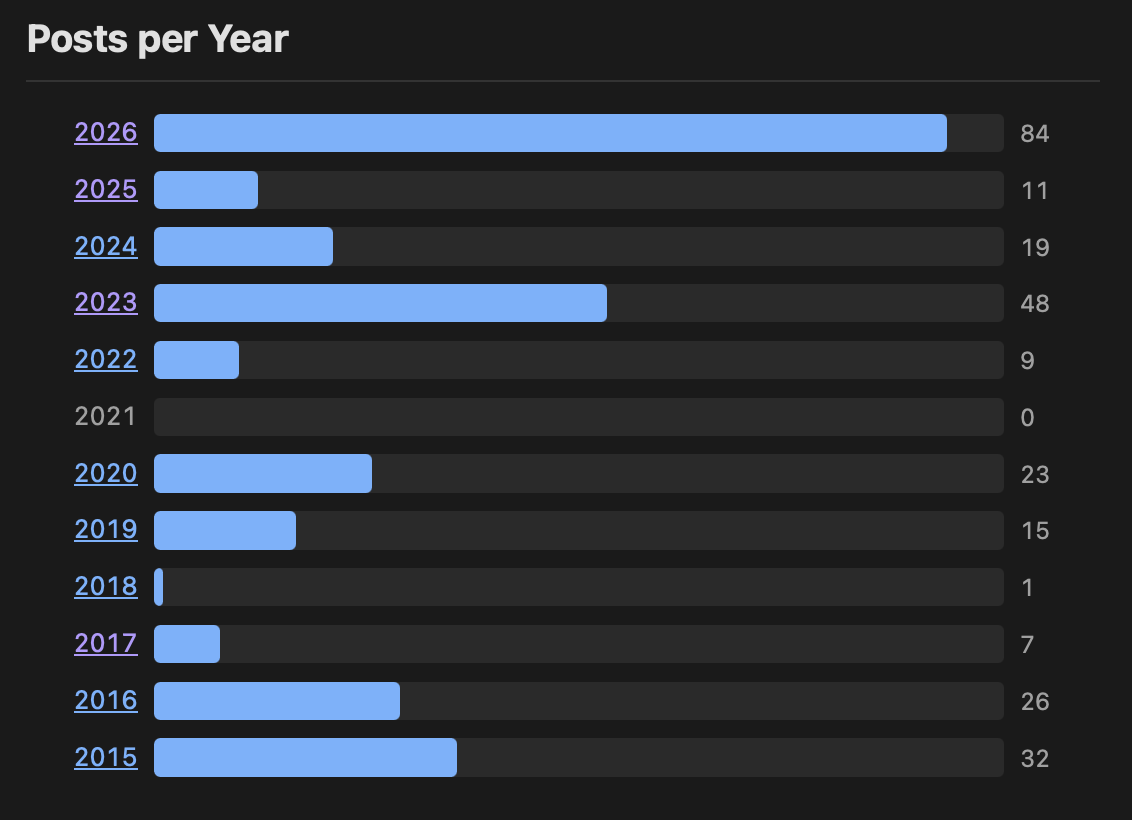
Quick little update for BlogMore, with a bump up to v2.14.0. This release comes from another feature request from Andy1, where he asked if it would be possible to have a year-based bar chart in the stats page.
Funnily enough I'd been thinking about the same thing just yesterday. I'd been wondering if it was worth adding, or if it would be overkill given the numbers can be seen in the archive. Having been asked by someone else... that was all the prompting I needed to kick that off.
Now I'm glad I did this. I like the result, it's a different way to visualise the values, and it's yet another way for people to discover past posts on the blog.
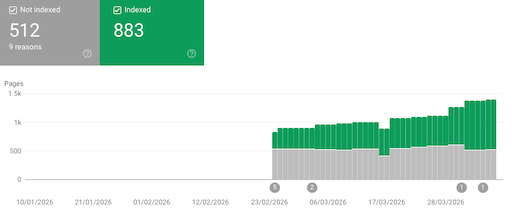
Following on from yesterday's release of BlogMore, I've been looking at some more information in the Google Search Console, which helped me uncover a couple more bugs in relation to URL generation.
This time I noticed a couple of issues, both related to the clean_urls setting. The first was that, in the recently added calendar page, all of the URLs for the links into the date-based archive weren't taking clean_urls into account. That's now fixed.
The second problem was the canonical<link> tag in the headers of the various archive pages (categories, tags, date-based): none of the URLs used in the tag were being cleaned up if clean_urls was true. That's now also fixed.
The main "problem" those two issues were causing was Google was seeing the sitemap for my blog declare one URL, but discovering different versions of the URL elsewhere; the main offending part here being the canonical URL declaration that disagreed with the sitemap.
To the best of my understanding the above fixes should clean a lot of that up.
Also in this new release is a small new feature. After cleaning up the sitemap generation in v2.12.0 I got to thinking that, perhaps, there would be occasions where a user would want to be able to add extra items to the sitemap. With this in mind I've added the sitemap_extras configuration property. With this you can declare extra URLs to drop into the sitemap, if one is being generated.
sitemap_extras:-/some/path/-/some/file.html
I don't think I have a use for this right now, I'm not sure I'll ever have a use for it, but it feels like a low-cost feature to add that could be useful to someone at some point.
There are two motivations for this: the first is that, when it comes to my day job, I have cause to interact with people who do use the search console a lot, and so it's worth understanding what they work with and why it matters to them. The second reason is it's a reasonable measure of how good a site BlogMore generates.
So far the results have been pretty good, and the console has helped me find oddities and things that need tidying up.
So this release of BlogMore includes a couple of changes that stem from looking at the latest updates in the console.
The first is that I've cleaned up how the sitemap.xml gets generated. I noticed that if I had any HTML inside my extras directory it was turning up in the sitemap; something I didn't intend and didn't want. So that's now fixed: only pages generated by BlogMore will appear in sitemap.xml1.
The second is that the stats page, despite being in the sitemap, had a noindex header for some reason. That's now been fixed. The only generated page I've intentionally set up so that it isn't indexed is the search page.
Finally, there's one change unrelated to the above: I realised that if you have with_read_time set to false, the reading time stats still appeared on the stats page; that seems unnecessary and unwanted on a site that doesn't show reading times. So, as of v2.12.0, that section of the stats won't show if reading times are turned off.
Now I think about it, I suppose there might be occasion where someone wants extra HTML to appear in the sitemap. I might consider the idea of allowing extra entries to be declared via the configuration file. ↩
After adding the streak display to the stats a couple of days back, I got a little more obsessed with knowing what sort of runs of days of posting to the blog I had. I even said in that post:
It almost makes me want to do a whole-blog-lifetime version of it, or perhaps some sort of more calendar-oriented version of the archive.
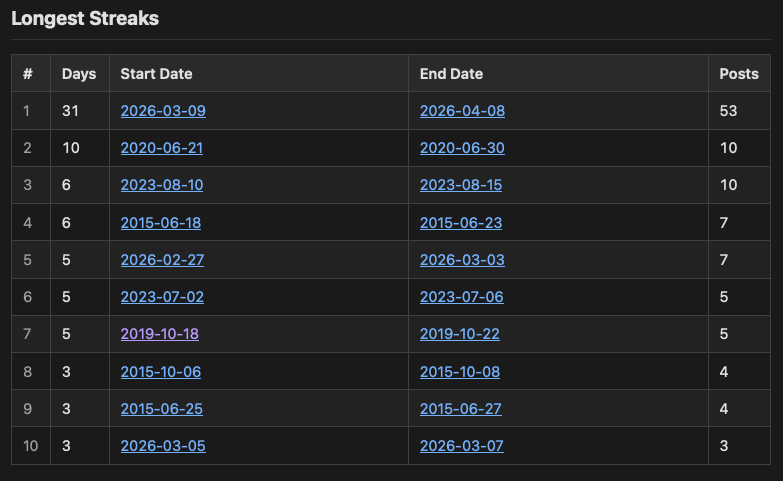
Despite saying that I fancied the idea of that calendar-type view, first off I got to thinking it would be interesting to see a table of my 10 longest streaks. So that got added and can now be found in the stats page.
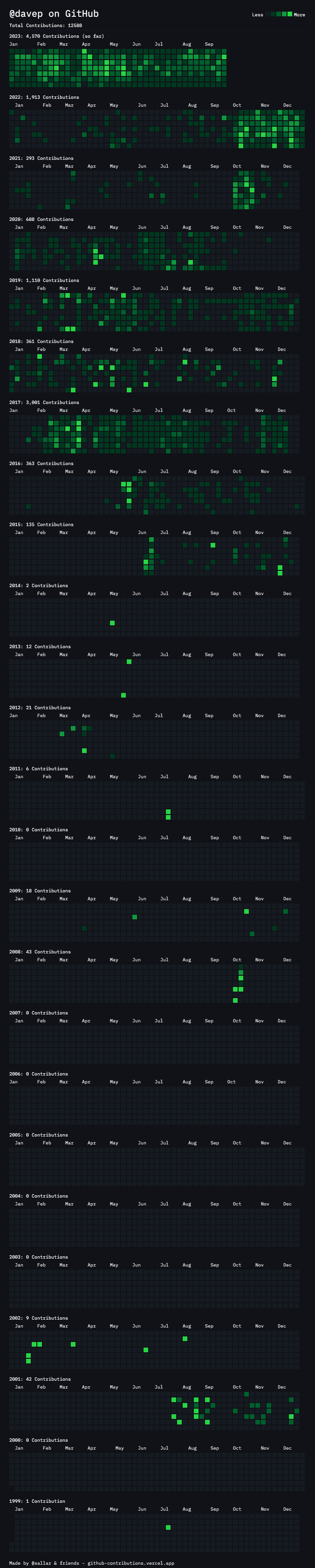
Having added that, I kept thinking about the whole-blog visual view of "here's the whole time of the blog, and here are the days you posted". I did think it might be interesting to use the same style and layout as the streak display -- perhaps something that would look like my whole contribution history on GitHub that I wrote about back in 2023 -- but the problem with that is it's tricky to make it work well on all display types. I needed something that would collapse better on smaller displays.
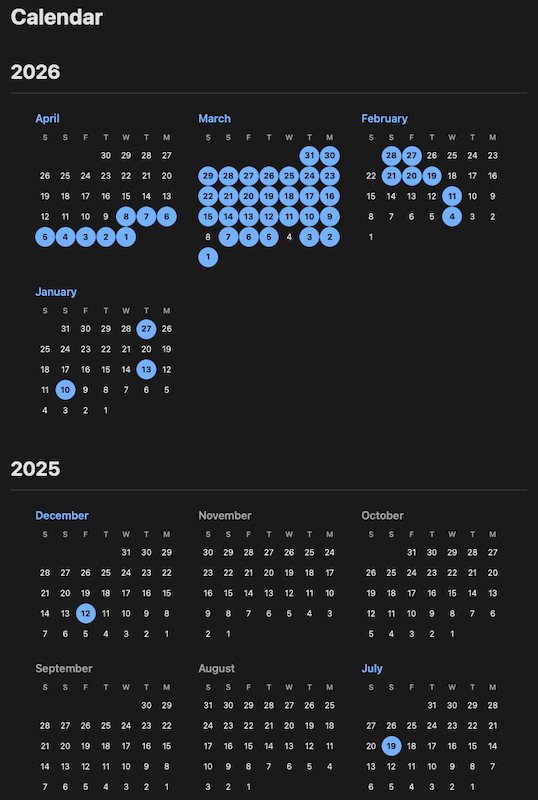
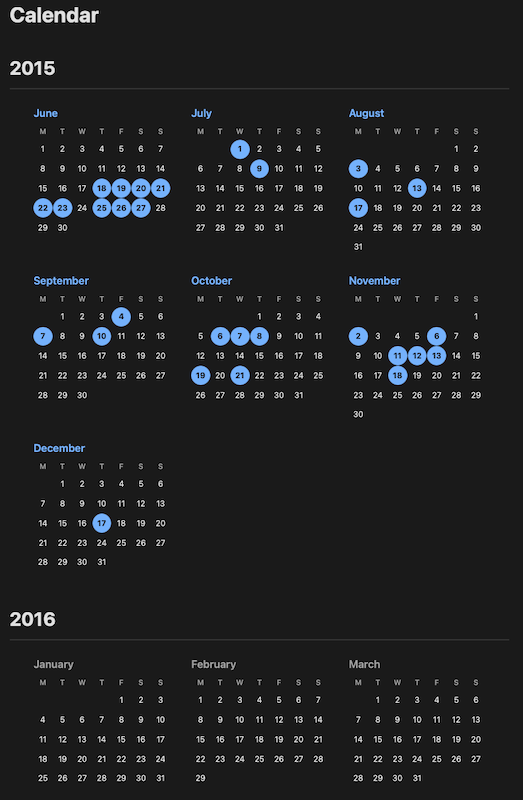
So now there is a with_calendar configuration option that, if set to true, will add a calendar link at the top of the site. By default it looks like this:
If it looks a little unconventional at first glance, that's because it is. I wanted something that started with the most recent month in which there's a post, and which then worked backwards. This way I can see things as a proper history. But I can also see that this might seem odd to some people. Given this, I've also added a forward_calendar configuration option that can be used (when set to true), to flip the calendar into a more normal flow.
As you might expect, the calendar links to other parts of the site: clicking on a day with a post takes you to the archive for that day, clicking on a month name where there are posts in a month takes you to the archive for that month, and the same again for a year title.
I'm pretty pleased with the result. In testing it seems nicely responsive to different display types and I'm also finding it to be yet another interesting way to discover older posts (and get a sense of when I was encouraged to post going back over the last 11 years of this particular blog1).
One final little feature I've added is a small enhancement to the read time that can appear on each post. While it's long since been possible to decide if you want it there or not, the calculation itself has been hard-wired to the assumption that 200 wpm is the reading speed of the reader. I've now added read_time_wpm as a configuration option so you can set it to suit your own taste.
I have other, much older, blogs out there on the net. One day I might merge them with this one and back-fill the whole thing. ↩
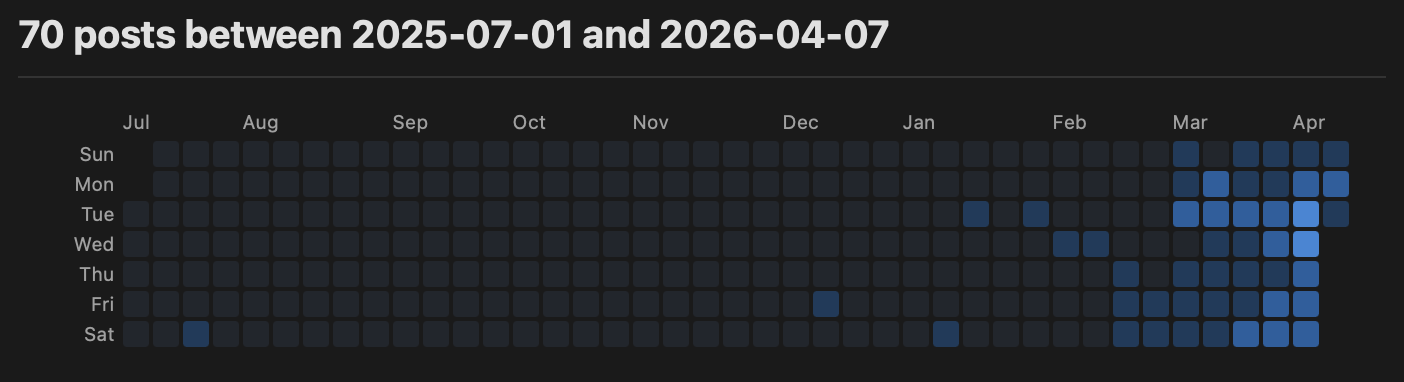
I've released an update to BlogMore, with another little straightforward addition. This time I'm revisiting the statistics page and adding a streak tracker, of sorts.
Modelled after the GitHub contribution tracker, or indeed any number of other streak trackers, it shows which days in the recent past I've blogged on, and also an indication of how many posts I've made that day.
Of course, it's not quite a full streak tracker. It's only going to show the days up to the day the site was last generated; so when a reader visits and looks, if you've not generated the site for a month, it's not going to show that you've not blogged for a month1. The point is that if you last blog in January, come March or so the reader isn't going to see 2 months of empty days, until you regenerate the site.
So, not perfect, but good enough I think. Also it gives the reader another method of discovering posts (each cell will take them to the archive for that day, so they can read the post or posts for that day).
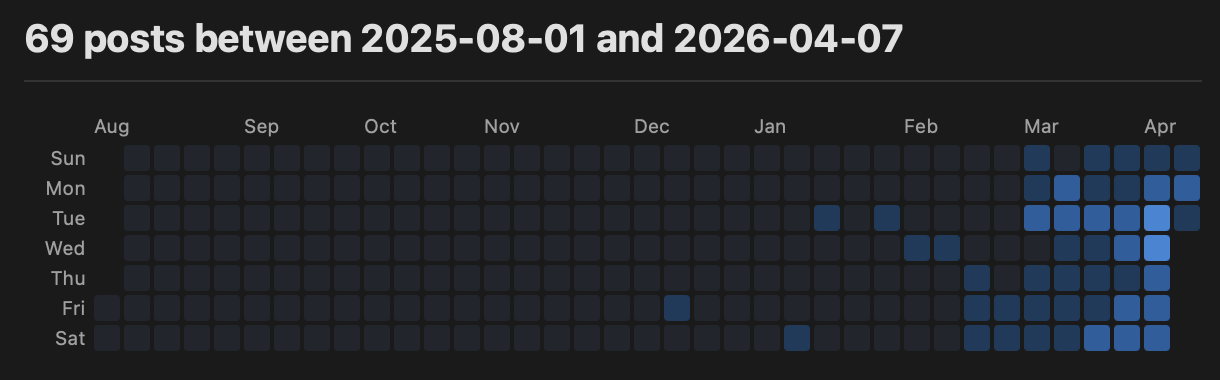
I've also tried to make it vaguely responsive. There are narrower date ranges as the display gets narrower. We start out at 10 months (as you can see above), then drop to 9 months:
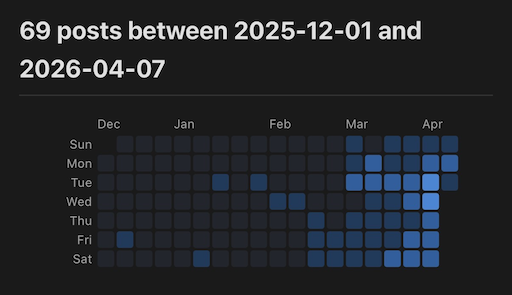
and then dropping to 5 months once we get to mobile-type screens:
For all its flaws, I feel it's kind of fun and I like it as a new discovery tool. It almost makes me want to do a whole-blog-lifetime version of it, or perhaps some sort of more calendar-oriented version of the archive. For now though I'm going to settle with this and see if it encourages me to keep up a blogging streak.
While it isn't my intention to write posts for the sake of it, I am enjoying writing something more frequently, so this might just help keep me doing that.
I could solve this problem by having the whole thing generated on the fly with some JavaScript, but that felt like it wasn't in the spirit of a static site generator. ↩
Despite having bumped it from 2.x to 3.x yesterday, I'm calling v4.0 on blogmore.el today. There's a good reason for this though. While tinkering with some of the configuration yesterday, and also answering a configuration question last night, I realised that it made sense to make some of the internals into public utility functions.
Now, sure, Emacs Lisp doesn't really have internals in the private function sense, but I've always liked the approach that a package-- prefix communicates "internal, might go away" vs package- which tells me "this is a stable part of the API of this package". With this in mind I've always tried to write my code using this convention. I did this with blogmore.el too and a lot of the code had the blogmore-- prefix.
There's plenty of code in there that someone might want to make use of, if they wanted to add their own commands, or do fun things with the configuration. So with this in mind I've "promoted" a bunch of code to being "public" and, in that case, I feel this deserves another major version bump1.
Things that are now part of the "public" interface include:
blogmore-clean-time-string
blogmore-get-frontmatter
blogmore-remove-frontmatter
blogmore-set-frontmatter
blogmore-slug
blogmore-toggle-frontmatter
blogmore-with-post
Each one is documented via its docstring (just a quick Ctrl+hffunction-nameRET away) and hopefully is pretty self-explanatory.
blogmore-with-post is especially handy as it provides a quick and easy way of pulling information from a post file. So something like this:
Not massively different, but it reads better and now all the calls are to the "public API" of the package.
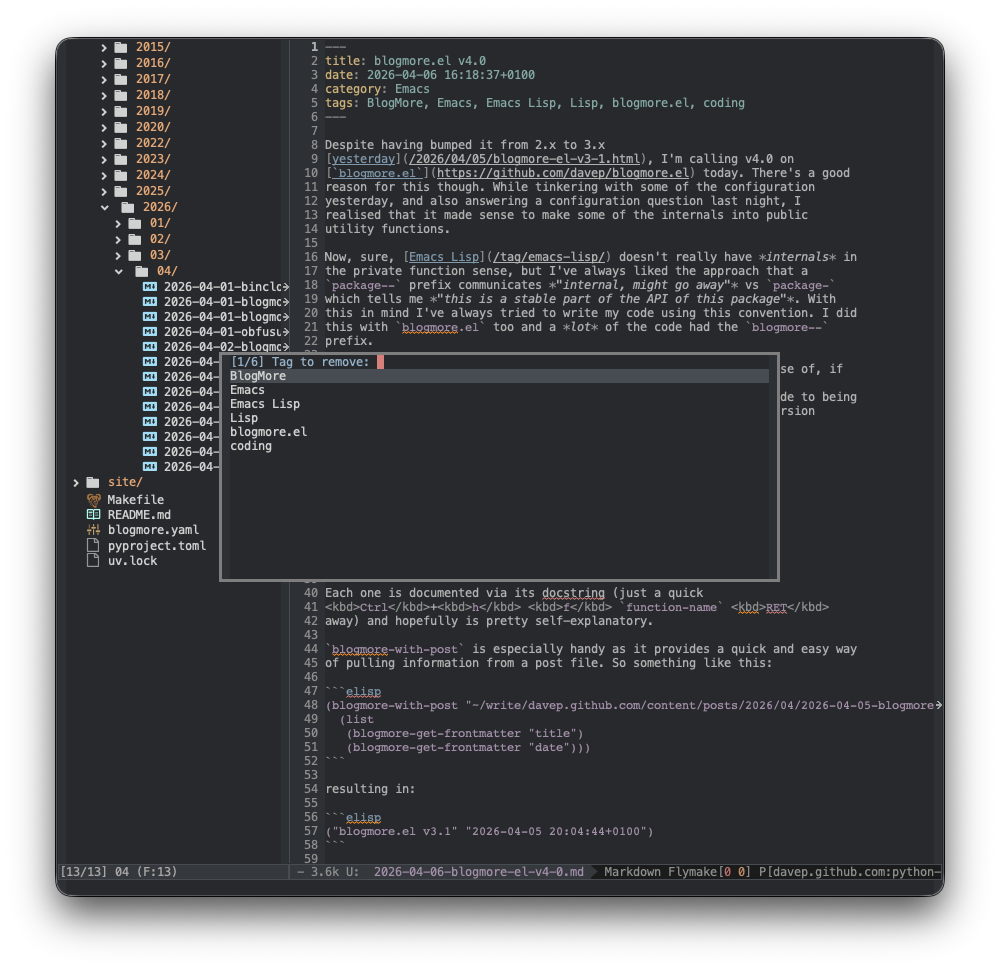
Not all the changes are "promoted internals". I've also added a blogmore-remove-tag command (and also added it to the transient menu).
I've also changed the way that blogmore-add-tag works so that, now, if it's called from the transient, it immediately goes back to the tag input prompt, allowing for another tag to be immediately selected (you can quit out of this with Ctrl+g). Removal of a tag works in a similar way, making things a lot quicker.
I've also added some extra tests too, which makes it even easier for me to make future changes with confidence. The more I work with it the more I appreciate that ERT is available.
Ordinarily it shouldn't matter as the public interface isn't changing, but some of the "internal" functions had been mentioned as options for configuration. ↩