A quick little update to next-gh-pr.el. Since writing the first version I've found it to be really useful, but I've also bumped into one small issue. Sometimes I'll create a draft PR before I remember to start the changelog entry, and so then I want to insert the current PR link rather than the next one.
Now, sure, I can just go and copy the URL and create the link in the changelog, but where's the fun in that when I can solve the problem in Emacs Lisp? So, with this in mind, I've just updated the package so that, with a prefix argument to the command, it will include a link for the latest PR rather than for the next one.
This does, of course, make the name a little less correct, but I'm not going to rename the package or the command for this one minor difference in intent.
Rogallov2.2.0 is available. This release contains a handful of small new features and also a very minor cosmetic change.
First to the small cosmetic change: the overall design behind the UI of Rogallo is that it's split into a couple of key panels -- the side-panel and the main viewer. The styling of a panel when focus is within it, and when it is outwith it, is different; the idea being that your eye should be drawn to the active panel. This is an approach I take with all my Textual applications.
Part of this styling is to have a thin border to the left of the active panel, which also helps signify that the panel is the one you should be paying attention to. In applications where there's always two or more panels on the screen all the time, this makes sense -- you want the line between the panels anyway to help break up the content. In Rogallo, however, it's going to be normal to only ever have the one panel in view (the viewer).
The other day I realised that, when it's just the viewer available, I should remove that left-hand border. So that's how Rogallo works now. If the viewer is the only panel visible: no border. If the side-panel is also visible: borders. I think it makes the display look a little cleaner; for what it's worth it also saves one column of the display for something more useful.
I've also added a couple of useful features to the active link in the viewer. Now, when a link is selected, you can press c to copy the URI of that link to the clipboard. You can also press o to open the URI by passing it to the operating system. Both these changes should make it easier to take a link out of a document and go and do something else with it.
The last couple of changes are around visiting finger:// URIs. The first is a quick and simple change: any finger content now makes use of Rogallo's document cache, so if you find yourself navigating back and forth between finger responses, there should be fewer requests made in a short period of time.
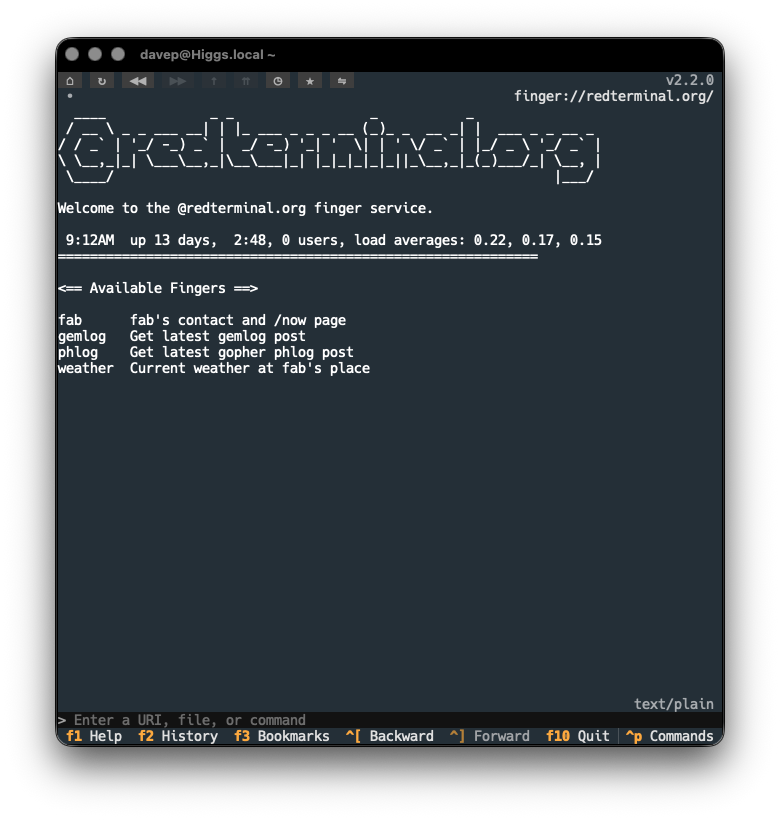
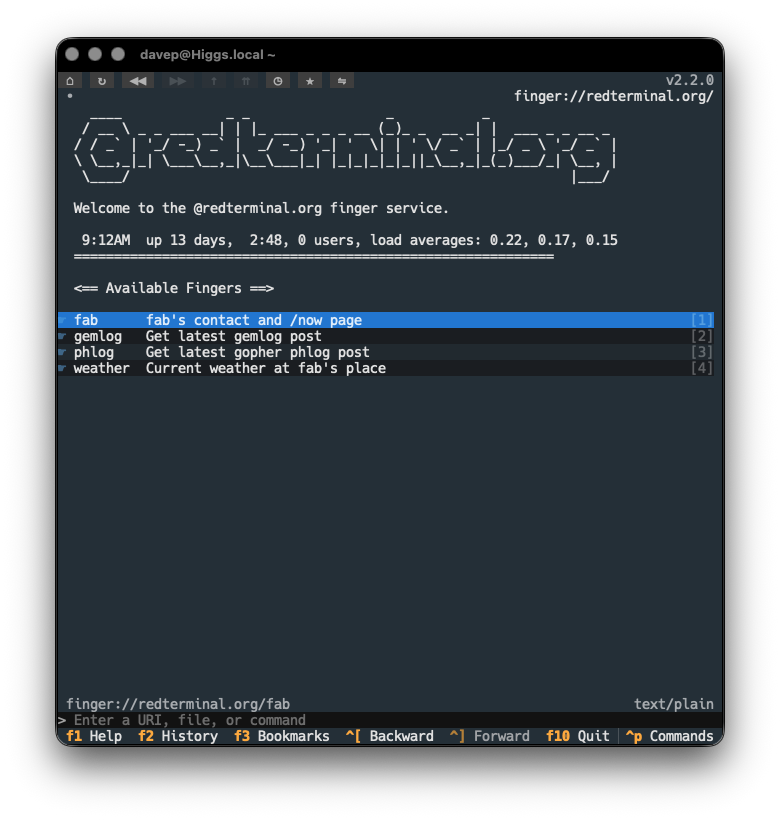
I added caching partly in anticipation of another change to finger responses: making them interactive where possible. Having created finger2gemtext, I've updated Rogallo so that, where possible, the response is turned into Gemtext and anything that can be turned into a link is now interactive. This means that some finger services should be easier to navigate, no longer requiring that you copy/edit/paste text to get a fresh finger:// URI to follow.
Now you get a version that lets you follow the implied links in the response:
This is, of course, going to be reasonably brittle. If any of the services change their output format such that the "links" can't be detected any more, the output won't be turned into Gemtext. Likewise, it's not impossible that false positives might turn up. I'm going to run with this for a while and see how it works out. I also have a vague plan for how the detection and smarter rendering of finger responses could be made configurable by the user.
Anyway, that's it for this release of Rogallo. Now I can return to the main change I was making a start on this week: Titansupport. I've not so much been putting it off as I have been allowing myself to get distracted by the above changes -- mostly because I don't quite get Titan support yet and I don't have a good location to play around with it. Time to solve that problem...
I've just released the first version of another library in the collection of libraries that support the development of Rogallo: specifically, another one that helps convert text in other formats into Gemtext so Rogallo's display can be a little richer. In effect, this is a sibling to md2gemtext and html2gemtext.
This time it's a library to convert finger responses into Gemtext, where it makes sense. For the most part, finger responses are free-form plain text, but there are times when there's information in the response that would be of most use if you could interact with it. For example, if you get a user list from plan.cat1, that's a lot of data that could be turned into finger:// URIs that can be subsequently followed.
With this in mind, finger2gemtext can take a body of text, look at it to see if it might be possible to convert it to useful Gemtext, and will convert it if that's the case. Given that there's no standard to be had here, and given that any given response could be of any form the author desires, I'm making the conversion pretty conservative.
What I have done, though, is make it so that the conversion process can be extended. The finger_to_gemtext function can be given a collection of additional filtering classes; if the built-in classes can't find anything to convert, the additional classes get a go. There is a base class to inherit from.
I've not fully planned it out yet, but the vague idea I have here is that Rogallo could, at some point, have "finger plugins" which will handle various special cases and site-specific formats.
For now, though, this gives me the basics that let me turn this:
into something where I can follow finger:// links without the need to copy/paste/edit:
Now I need to find a few more online finger resources that respond with things worth making linkable...
A small update to Port79, bumping up to v1.1.0. This release adds a resolve method to the FingerURI class.
I'm currently tweaking Rogallo's rendering of some responses from finger services and being able to resolve URIs relative to the underlying page is going to be very helpful.
Earlier today I saw a comment on a post on BBS that was really quite disappointing. The post itself was announcing a new Gemini client, in this case a fully-native macOS one called MajorTom. It's early days for the project, but it looks fun. It also looks like the author is having a ton of fun building it.
I can relate. I've been obsessing over building Rogallo since June this year and it's been an absolute blast. I don't see myself getting bored of it any time soon.
The comment that irked me was this:
Got excited, then I saw the AGENTS.md :(
It’s hard to get excited about new software when everything is just AI generated. I miss the old times when you got excited that someone built something. Now it’s just someone wrote a prompt to make a computer build something.
It comes over like some messed-up Calvinist puritanical work ethic thing. Yes, I know all the arguments against the use of AI, you'll find that I agree with a good few of them; but there's something wild about this "you didn't work hard enough to produce the software I might otherwise consider using so I've dismissed it" attitude. I'd say enough with this nonsense, but it's been going on for as long as I've been writing code and I doubt it'll stop any time soon. At every step in the evolution of software development there's always been someone, sat on the sidelines, tutting and judging because someone is using a new tool that makes it easier or quicker to do a thing.
What also bothers me is how easily the author of the comment belittles and diminishes the work of the author of the application. Sure, there are some folk who will try and one-shot something with a prompt or two, and who might then pass it off as something carefully considered and designed; but it's unfair, perhaps even dishonest, to attribute that to someone when you don't know what process they've gone through.
If I look at Rogallo, for example... AI has been involved along the way. To be clear: 100% of Rogallo is hand-written code, AI has not been involved in writing any of it. I have used Antigravity as an occasional rubber duck to hash out some ideas, but there's zero chance I'd let it anywhere near the code itself1. On the other hand, some of the protocol-based support libraries I've built have heavily involved AI. Even then, I didn't just slap in a prompt and run with the result. I did research, I followed the docs, I read more and more about Gemini and Spartan and Nex, etc. I used an agent to get the code going based on my understanding of the source material and I then used that code to support the main work I actually wanted to be doing.
ℹ️ Note
Thinking about it, here's roughly how it breaks down in terms of actual code written, so far:
Rogallo: zero AI
bagofstuff: pre-existing but zero AI
gemtext: zero AI
gophermap: zero AI
html2gemtext: zero AI
md2gemtext: mostly AI
port1900: mostly AI
port70: mostly AI
port79: mostly AI
sybaritic: mostly AI
textual_enhanced: pre-existing but zero AI
textual_fspicker: pre-existing but zero AI
wasat: mostly AI
There's zero chance I could have built Rogallo and all the support code from a position of ignorance. None of it was "just a prompt". Looking at what's gone into MajorTom so far, I doubt that's the case there either.
Anyway, back to the main topic...
I also find an element of entitlement in this comment. It reminds me somewhat of the person who felt they were owed something by FOSS authors. Excitement is not something a FOSS author owes you. You are, of course, welcome to go looking for excitement, but if something you discover doesn't do it for you... it's not for you, move on, go find something else. Announcing that you didn't get excited because someone else got creative in a way you don't approve of just makes you look like you want to centre the discussion around you.
Someone made a thing. Someone shared a thing. Someone posted a thing. You turned up and made it about you. That's kind of rubbish. Don't do that.
It's totally fine to not like the use of AI. It's totally fine to want to avoid anything built with AI or which is somewhat AI-adjacent. I get it: it's good to have your own standards and to stick to them. I would suggest, however, that it starts getting problematic when you need to tell someone having fun with their own free time that they're not doing so in a way that meets your standards. Doing that is kind of weird.
Doing that makes you look like the effort police.
I've yet to see an agent write Textual code I'd consider reasonable. ↩
I've just made a small release to Rogallo, bumping the version to v2.1.0. This release mostly has some small cosmetic fixes and improvements, and one new feature.
The cosmetic improvements include:
Fixed the verification method and client certificate status icons in the viewer title bar so they don't use the "this is clickable" mouse cursor when there's nothing worth clicking.1
Adjusted the styling of tooltips so they better stand out against the background text.
Fixed the cosmetics of the viewer when the content is set to a narrowed state (some of the changes in v2.0.0 had inadvertently changed some of the styling).
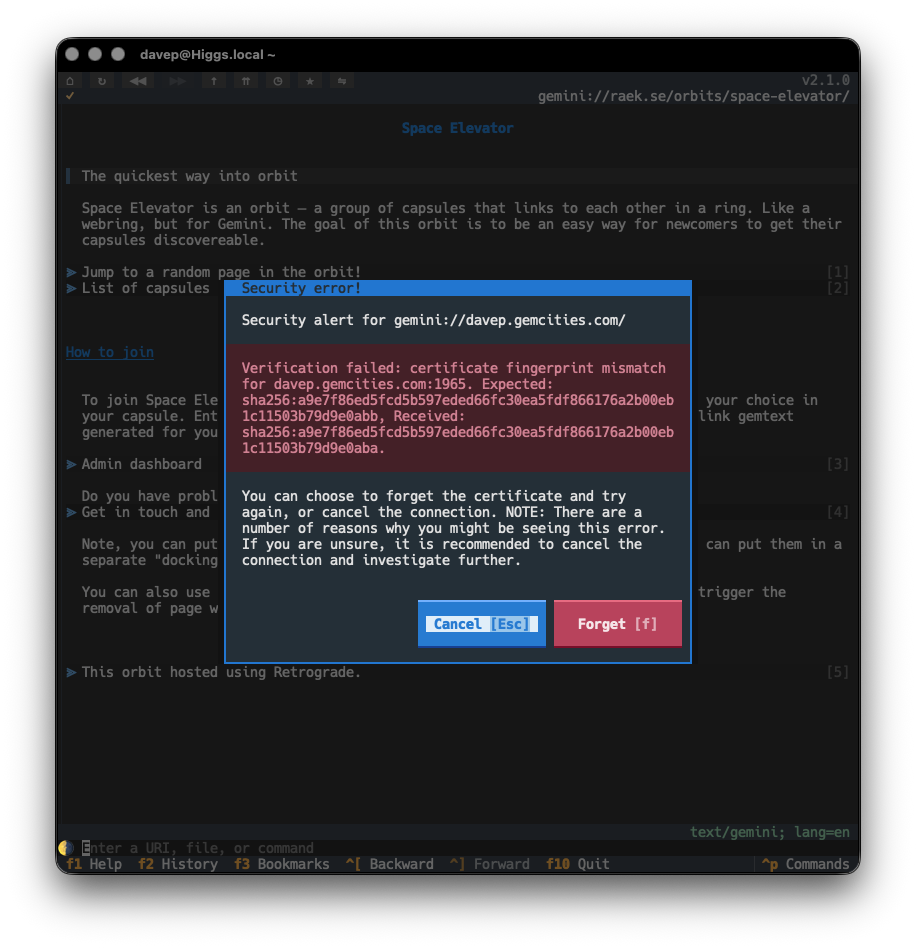
The new feature is one of the last issues I wanted to address when it came to all things related to Gemini and security: the option to "forget" the certificate fingerprint of a host when the fingerprint has changed.
Until now, if you visited a site that was using a self-signed certificate, and the fingerprint for that certificate had changed, you'd just get an error toast and the page would not be loaded. Technically this is the safest thing to do, but it's not the most pragmatic approach most of the time; capsules will change up certificates and you probably know you can still trust them.
So, from now on, rather than simply refusing to load the page, Rogallo will tell you about the issue and then offer to forget the fingerprint and try again.
This should make the issue more noticeable and also easier to handle.
A quick little update to Wasat, bumping the version to v1.7.0. In service of a feature I'm adding to Rogallo, I've added a forget method to the trust store class, so that a certificate fingerprint for a particular host/port combination can be forgotten.
This came about because, if a fingerprint does change for a Gemini capsule, I want a Rogallo user to be able to decide to either avoid it or forget it and re-establish trust. While the fingerprint mismatch should be a warning to distrust the capsule, there might be a legitimate reason why the certificate has changed, and I want to make that decision fairly frictionless.
I've enjoyed using the odd mechanical keyboard for a few years now. Nothing too fancy. Every once in a while I get the urge to really get into the mechanical keyboard world. Knowing that this shop exists might make it harder to resist falling down that hole.
Even though I use emoji-based prefixes for commits on my personal projects (mostly just for the shits and giggles of it), I detest the "Conventional Commits" thing. I sense this post captures some of why I don't like it.
There's a lot I see in this book that I like. I feel this is a good book to point folk at, either people who have never worked with Python before, or people who want to get better with it.
I use Eglot lots, every day, and have been for quite a while now (even since before it was part of Emacs itself). However, I've never really paid too much attention to its performance or how it can be improved. This is a useful read.
I've had good experiences with various tree-sitter modes in Emacs and I use the Markdown mode in Emacs a lot. So this feels like something I need to try out.
I've just released v2.0.0 of Rogallo. This release has quite a lot of changes, one or two of them "breaking changes", hence the bump to v2.0.0. I will add though that, when I say "breaking changes", nothing should actually break, it's just some features have changed in an incompatible way and some application commands have been removed or renamed (and so some default keyboard bindings have changed). The worst that might happen is a keyboard binding you set up no longer works.
While Rogallo supported the creation and use of client certificates for use with Gemini capsules, it never made it that easy to work with them. Creating and using them was pretty frictionless, but if you were someone who wanted to bring your own certificate from another application, you were on your own. Actually doing that was easy enough, if you were comfortable with diving into the certificate directory and hand-editing the JSON file to create the association. What was lacking though was a good interface to manage all of this in the application.
This version solves that problem. Rogallo now contains a client certificate manager that lets you:
Create new client certificates
Add and remove associations for client certificates
Delete client certificates
Import client certificates
Export client certificates
Also, when you encounter a capsule that demands a certificate and you don't have one associated, you can pick an existing one from your certificate library; before the only option you had was to create a new one.
Initially, when I first started work on Rogallo, I had a simple history list that could be popped in/out on the side of the display. Then, when I added bookmarks, this became a sort of toggle, with either the history showing, the bookmarks showing, or both hidden. The command to show the history would hide the bookmarks; the command to show the bookmarks would hide the history; both would toggle themselves to hide. This was... kind of messy, but it worked.
When I started work on the certificate manager it made sense that it also occupied the same space. However, the code for managing this, and the resulting user experience, started to get pretty messy. I wasn't at all happy with it so ended up going on a bit of a side-quest to clean this up.
The result is that Rogallo now has a tabbed side panel (similar to the one in Hike). This contains the bookmark manager, history manager and client certificate manager.
This is where one of the main breaking changes comes in: the ToggleHistoryManager and ToggleBookmarksManager commands have been removed from Rogallo and their default keyboard bindings have been freed up. Also, to clean up the naming of things, I've renamed JumpToSidebar to JumpToSidePanel.
I feel this side panel approach is far cleaner and far easier to work with.
It's also worth noting that it's moved over to the left side of the display. However, if you'd prefer it on the right there's a configuration option for that.
As part of the work on managing client certificates, I added a dialog that lets you view details of a certificate. As well as being available in the certificate manager, it can also be used to view any certificate that might be in use when viewing the current page. The AboutClientCertificate command (bound to Shift+F7 by default) can be used to bring up the view.
For the folk who lean more on the mouse, the key icon that appears in the title bar of the viewer can be clicked on to get the same view.
The command line in the application now tries to be a little bit smarter when it comes to understanding input. Before now, if you were to type in example.com, Rogallo would assume that you were attempting to visit a Gemini capsule on that host and process the input as if it were gemini://example.com/. This release extends this a little.
If the input doesn't appear to be anything else and it includes a @ it will be turned into a finger URI. So user@example.com becomes finger://example.com/user and @example.com becomes finger://example.com/.
If the first part of the host has a recognisable protocol name, it will be assumed that that protocol should be used. In other words:
I've overhauled the code that does emoji removal if you toggle removal on. More work is done to identify "real" emoji. This should mean that all the usual colourful image-like candidates are removed, but now things like braille and box drawing characters, etc, won't be removed.
Also, when removing an emoji, if there is a space following it, that space will also be removed. This solves the cosmetic problem of "👉 This" being turned into " This" when it would make more sense that it is turned into "This".
It's worth keeping in mind here that this isn't intended to be a 100%-correct solution. It's aimed at being a good-enough solution to clean up most of the emoji clutter if you don't like that sort of thing.
My general approach to developing anything is one of "make it right then make it fast". I've never been a fan of early optimisation, and when I've watched people obsess over such things far too early in a codebase's lifecycle I've generally watched them get into a mess. I like to try and avoid that mess.
So this was my approach with Rogallo. When it came to building the widget that displayed the content of a page, I spent my time trying to ensure it was correct, not that it was fast. Quite quickly, however, I found that once a page had quite a few links on it -- especially when you got to many 100s of links -- performance was terrible. I'd had an issue sat in TODO for this from the start, but hadn't gone back to address it.
Then the other day someone else noted this issue so I decided it was time to go back and work on it. As of this release of Rogallo you should find that a page with 1,000 links on it performs about as well as a page with a handful of links.
In doing this work I've also made a lot of optimisations to how a page is initially built; so not only should a page be more responsive as you navigate it, it should be noticeably quicker to appear in the first place.
There's a lot in this release and I'm really delighted with how it's turned out. I wasn't intending to make quite so many large changes, but each bit of work naturally caused the next bit of work and... well, here we are.
With this work out of the way I can start to look at the one remaining protocol that's currently on the TODO list, and also look at making some other quality-of-life improvements.
While it might seem that it's been pretty quiet on the Rogallo front the past few days, I've been doing some work on it every day. There are a lot of changes and improvements coming. As I got the next release ready, I realised that some of the support libraries I've built for it were stuck with 0.x versions while, at the same time, having proven to be quite stable.
So I've just made v1.0.0 updates to the following:
There are no material changes in any of these releases, the only real change being the bump to v1.0.0, and so marking them as stable and, of course, guaranteeing that semantic versioning promises are now in place.