Another bump to Wasat, this being v1.4.0. This release is in support of some work I want to do on Rogallo, where I intend to add proper client certificate management.
While Wasat provided good support for the generation, storage, and use of client certificates, there was no real public API that would allow for the management of those certificates. This version addresses that.
Now there are methods for doing things like:
Listing all client certificates
Getting a specific certificate's details
Creating a certificate
Associating and disassociating a certificate with a URI
Deleting a certificate
This should give me everything I need to implement a simple client certificate user interface in Rogallo.
For a wee while now I've been wanting to tweak the way the navigation history works. Up until this release, this was simply a backward/forward affair with no attempt to restore the actual context of a page you've gone back to. This could best be felt if you're a fan of AstroBotany. If you were to visit the flowering plants in your community garden, with a view to visiting each one and picking petals, the natural thing to do would be to visit a specific plant, pick a petal, then go Backward twice to get back to the list of flowering plants. The problem at that point is that the link for the just-visited plant would no longer be focused. This made it just a bit more faff to go to the next plant on the list.
From this release, when going backward and forward through navigation history, Rogallo attempts to ensure that the link you had followed on that page is focused again.
Internally, this caused a fairly big overhaul of how history navigation information is recorded. I've done a fair bit of testing and all seems good; but do let me know if you experience any oddness.
This is a small fix. If you were to visit a URI that resulted in an empty document being received, the viewer would disappear. The viewer is supposed to disappear if you are visiting nowhere, but it shouldn't disappear if you're visiting somewhere that has nothing to show. This is now fixed.
Rogallo has a couple of commands that make it easier to navigate to the parent directory of a visited location, and also to the root. However, I'd only implemented this for Gemini and Spartan URIs and sort of forgotten to finish this off. With this release Gopher and Nex get to join in on the parent/root navigation party.
This one came up because, as of the time of writing, the server where my wee capsule lives is dead1. This meant that if I checked if it was there, and got impatient and went to navigate somewhere else, the somewhere else would load and then, after the defined timeout, the error about the previous request would pop up.
Rogallo now ensures that, if you have an in-flight request running, and then navigate elsewhere, that pre-existing request is cancelled.
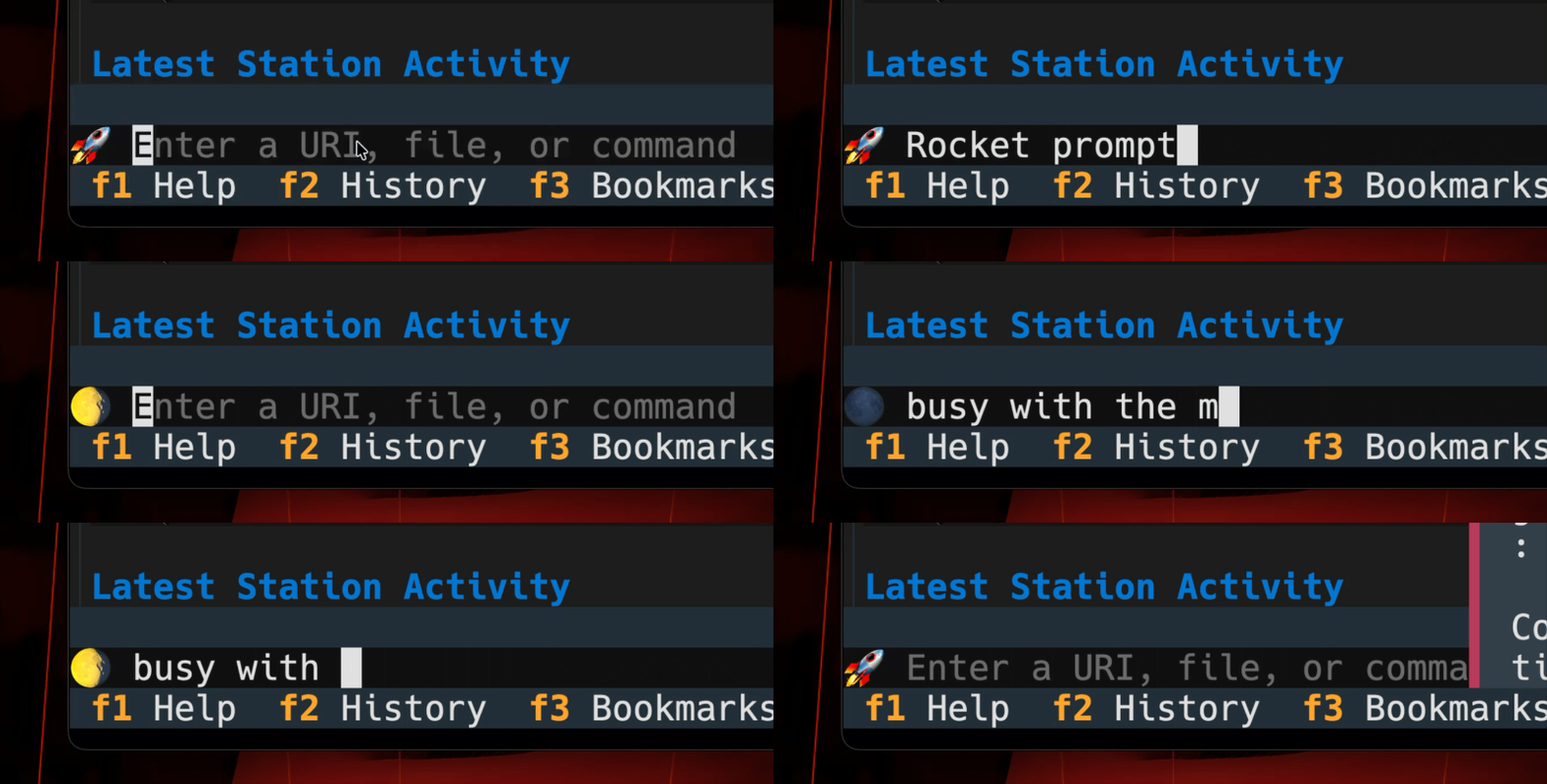
The in-application command line of Rogallo has two styles of prompt. The normal input prompt (shown as >), and the busy prompt (shown as a series of braille characters that animate as dots snaking around). I realised that some folk might enjoy setting their own prompts. While I think the defaults are nice and clean, if you wanted something more colourful and on-theme (in a Gemini sense anyway, which tends to be space-oriented), you could update your configuration file with:
I'm currently running with this for my own installation of Rogallo and it's rather growing on me.
From what I've seen, someone managed to break in and pretty much rm -rf / the thing. The restore of the server is being used as a good moment to change the architecture of the services it offers. This does mean it'll be a wee while before I get my capsule back. ↩
I've just made a small update to BagOfStuff, my little support library for my personal Python-based FOSS projects. This release makes some more changes to the history classes, adding an add_or_replace method, and also making some improvements to the type hinting by basing the classes on MutableSequence rather than Sequence.
While the history classes were originally intended to feel immutable, it's obvious that they're really not. The idea was that stuff gets added to them, stuff falls off the other end, and stuff might disappear depending on the context and when stuff gets added. The general idea was that direct manipulation was something that wouldn't happen. So I'd started out with them inheriting from Sequence, and so implying they were a read-only interface.
Given this acknowledgement, they now inherit from MutableSequence. This means that some extra (dunder) methods are added, and it also means that some extra exceptions can be raised. For example: setting slices to iterables isn't supported and will raise a NotImplementedError. Some other slice-based operations aren't supported either.
While this is close to a breaking change, it's fine for my use of this code. However, I had to make one big breaking change: I'd written clear so that it returned Self1. The interface expected by MutableSequence is one that returns None. So to strictly comply with that interface, I've changed the return type.
With this being a breaking change, I've bumped the library version to v2.0.0. While it's really a small change, and only one I'd notice, there's no getting away from the fact that the API has changed. That deserves a major version bump.
I tend to prefer that a method that might return None actually return Self; it allows for chaining. I recognise that there are other schools of thought about this in the Python world; I'm not a member of those schools. ↩
A quick little update to Rogallo, bumping to v1.11.0. This release is mainly in support of people who like to use the mouse as much as, if not more than, the keyboard; and also in support of people who might wish to reclaim a couple of lines of display for actual content.
The main change in this release is that I've swapped out the header line that Rogallo used to have (which used the stock Textual Header widget) and replaced it with a mouse-friendly toolbar.
The thinking behind this was twofold: first, the current header wasn't really very useful, showing just the name of the application and the version number. I would hope, really, that most people know what application it is they're running, so having the name there wasn't super useful. Secondly, while Rogallo aims to be keyboard-friendly -- ideally keyboard-first -- it also aims to be mouse-friendly where possible. The problem with the mouse-friendly approach is that a lot of application commands were, for the mouse user, locked behind the command palette. While not impossible to navigate and use, it wasn't the smoothest experience.
So I've swapped that header out for a configurable toolbar of command buttons. The content of the toolbar is set using the toolbar_contents setting in the configuration file. The default set looks like this:
The value in the first position for each button is the name of a bindable command. The second value is the text to place on the button itself. If you simply want to use the command's name, rather than a pair of values, you can just use the command name. So suppose you wanted to use Reload, Backward and Forward as-is, you could set things like this:
In addition to this setting, I've also added some other toolbar-related settings. There is:
"toolbar_visible":true
which controls if the toolbar is visible at all. So if you're a keyboard-only kind of user and you want that extra line back, just set that to false.
There is also:
"toolbar_tooltips":true,
which controls the tooltips that will appear when you hover over a button in the toolbar. These are there to explain what each button does, and to also show you what keyboard binding is associated with each one. If the tooltips get irritating, set this to false so they don't appear.
Lastly, there is:
"toolbar_can_get_focus":false
As I've said: the toolbar is added in support of people who use the mouse a fair bit. This means that, by default, it can't be interacted with using the keyboard. This makes sense in that each of the commands will have a keyboard binding, so it makes more sense to simply use that. However, if you really must use the toolbar with the keyboard, you can set this setting to true to enable it. When set this way, you can navigate into the toolbar and switch focus to each of those buttons using the normal Tab and Shift+Tab navigation keys.
One other little configuration feature can also be used to reclaim an extra line in the display. If you have no need for the footer of the application (where some important keys are shown), you can turn it off with:
"footer_visible":true
Set it to false and you get one more line of content.
Rogallov1.10.0 has been released. This is a pretty small release, with a bug fix to navigation, and an improvement to how navigable Markdown documents are if viewed in the application.
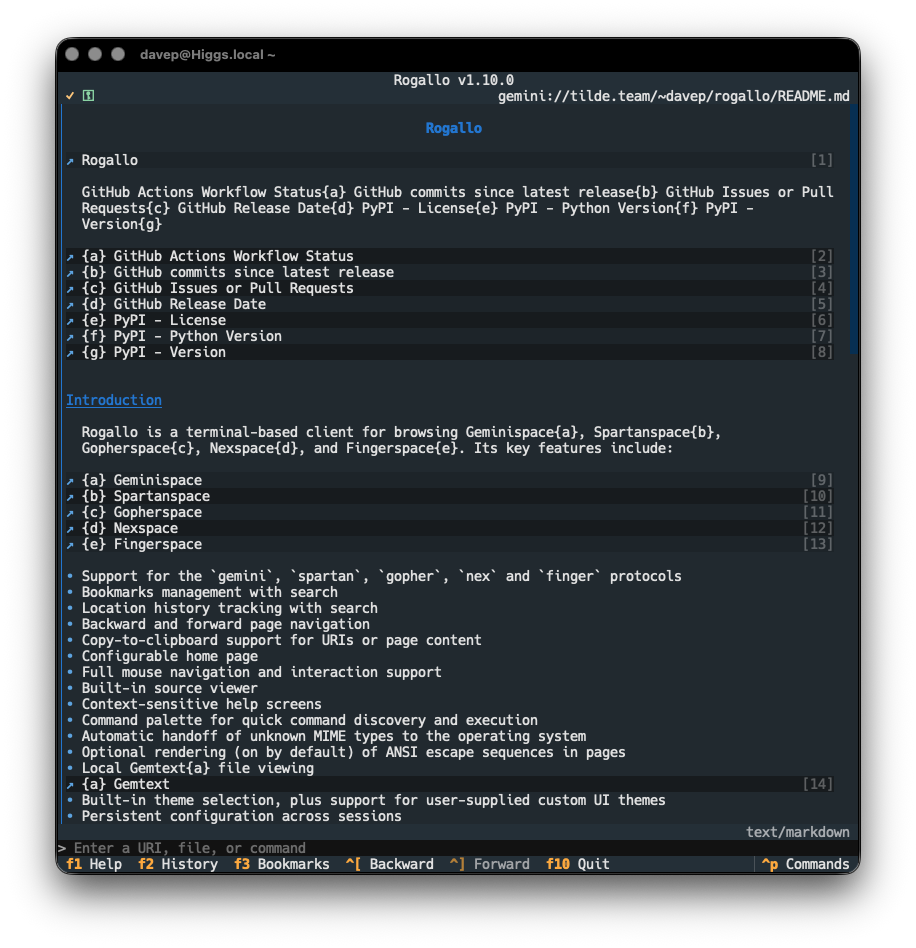
In Rogallo v1.8.0 I made some changes to how Markdown documents are shown, if they're encountered and detected in Geminispace (or any of the other protocol spaces that might let you know the content type of a document). Whereas originally the document was shown in its raw form (marked up with syntax highlighting), v1.8.0 moved to using a fully-rendered form thanks to the internal Markdown widget.
But, as I've mentioned elsewhere in this blog, I wasn't 100% happy with this. The main problem is that the Markdown widget supplied by Textual is pretty unfriendly to keyboard navigation, and I want as much of Rogallo to be navigable with the keyboard as is possible.
To solve this I've created md2gemtext and started using it here in Rogallo. This means that, by default, from now on, any time a Markdown document is received by Rogallo, the content is converted into Gemtext before being displayed. The big advantage here is that links are far easier to see and follow and the document as a whole looks more in keeping with most other pages you'll visit.
I'm sensitive to the fact that some folk might prefer the previous method of viewing Markdown, so this feature is configurable. If you'd prefer the widget-based rendering instead, set this value:
"convert_markdown_to_gemtext":true
to false.
The other change in this release is a fix to how navigation history is saved and restored. For a couple or so weeks now, on occasion, I was finding that when I ran up Rogallo again, navigated from the restored page, and then used Backward, I would end up somewhere else. It was intermittent and, for a while, hard to pin down. Mostly I'd notice this while rapidly closing and opening Rogallo while working on some other feature. Eventually I figured out the sequence of events causing the problem and it was an easy enough fix.
Following on from html2gemtext, the inevitable has happened: I couldn't let the Markdown side of things remain unaddressed. While Rogallov1.8.0 added some extra rendering of Markdown to make it look more "pretty", I felt it really needed to be handled so it had more utility. Being fully navigable, even by keyboard, seems more important than pretty tables.
So md2gemtext now exists as a library on PyPI. I have two plans for this. While I fully intend to shake up the Markdown support in Rogallo -- either replacing the use of the Textual Markdown widget to display it, or at least giving the user a configuration option to decide how Markdown is displayed -- I also want to pay some attention to my (currently rather simple) Gemini-based log and use this library to build a tool that will convert this blog's Markdown content into Gemtext that looks just how I want it.
As with html2gemtext, this is an early version of this library, and I'm sure there will be edge cases I'll have missed and will want to tidy up. But at the moment the results are looking promising.
I'm once again in a place where I'm actually half-seriously thinking that much of what Hike does could be built into Rogallo, if I were to simply add http(s) support there.
For a wee while now I've been trying to nail down a weirdness with the navigation history in Rogallo. I never felt it was a difficult issue to deal with, but it was also one of those issues that I could never obviously recreate at will, and it only seemed to happen while I was busy working on something else.
Yesterday evening I finally managed to come up with a way to always recreate it and, having done so, the solution seems pretty straightforward1. In order to implement the tweak I want, I need to be able to truncate the navigation history, and of course do so in a non-destructive way.
So the history classes in BagOfStuff v1.3.0 have grown clone and truncate methods. This will allow me to duplicate a history, truncate it at its current location, then save it, without affecting the working copy.
Another update to Rogallo, another new protocol! The main change in v1.9.0 is the addition of support for the Nex protocol.
As with any other supported protocol, entering a nex:// URI into the command line will cause Rogallo to load up the response in the viewer and render it. Nex is kind of fun in that it's almost a plain text system, by default, but the expectation is that any text/plain document that has => at the start of a line will have those lines be treated just like Gemtext links. So, in Rogallo, when you visit a page, and that page is text/plain, the result will be rendered like it's very simplistic Gemtext that only supports links.
Also, as per the Nex specification, the MIME type of a document is worked out from the extension of the file it points at; so if you happen to get a Gemtext or Markdown file back from a nex:// URI, this will be suitably rendered.
Another addition is a SaveSource command (bound to Ctrl+s by default). As you can probably work out from the name, this will save the source of the document you're currently viewing.
A small housekeeping addition in this release is the cleaning of the content cache. When you start up Rogallo, in the background, any cache entries that have exceeded their time-to-live (something you can set in the configuration file) will be removed. If this results in any cache directories being left empty, they will also be removed. This should result in a nice clean cache directory that's easier to navigate and manage, if you want to go diving into it.
I've also added a small experimental development tool, mostly for myself but it might be something someone else wants to play with. I realised a few days ago that it could be fun to include screenshots of Rogallo in action in my Gemini capsule. The thing is: Gemtext doesn't allow for inline images. What it does allow for, and many clients support, is ANSI escape sequences. Meanwhile, Rogallo is a terminal-based application; its whole method of display is ANSI escape sequences. As such, it should be trivial to capture the sequences for any given screen and just include them in a Gemtext page.
I tried it out and it works a treat! So, if you happen to have ROGALLO_SCREENSHOTS in your environment and it's set to any non-empty value, pressing Ctrl+Shift+F12 writes the current screen to ~/rogallo-screenshot.ansi.
Yes, it's all horribly hard-coded: the key combination is hard-coded (and probably only good for more modern terminal emulators), and the name of the file is hard-coded. As I said: it's a development tool that's there for my own use. I might make it a little more generic in the future.
One final tweak to this release is a fix to the ToggleView command, which stopped letting you view the source of a Gopher map. That ability is now back.
So I've dropped v1.1.0 on PyPI, which adds support for running up a simple just-good-enough Nex server (although, to be fair, Nex is so simple this is probably a fully capable one just by the very nature of how trivial the protocol is).
It's that time again. Time to add another small web protocol to Rogallo. This time it's one I stumbled across a few days ago: the Nex protocol. This one is very simple and straightforward and it seemed like a shame not to support it.
So, as I have with Gemini, Spartan, Gopher and Finger, I've added a dedicated library for dealing with the associated URI, and to provide a client for talking to the server.