Posts tagged with "Coding"

html2gemtext - A simple library for converting HTML to Gemtext

3 min read; 10 GFI

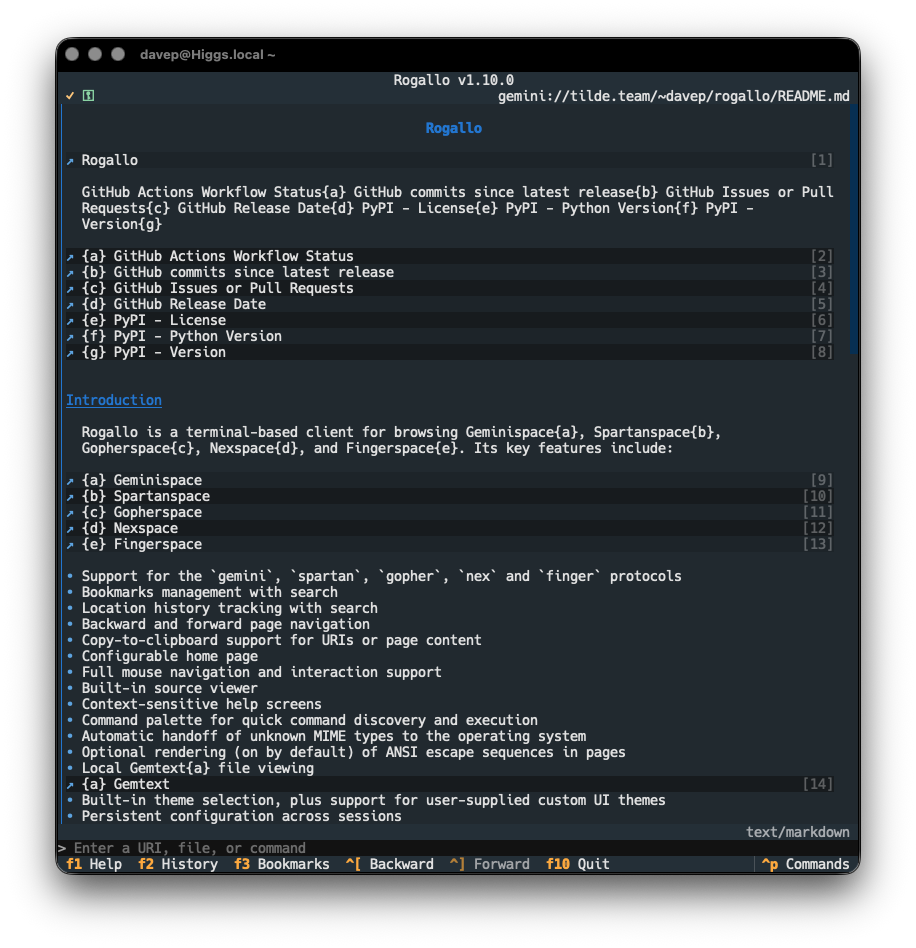
Yesterday evening, while tinkering with Rogallo, I managed to nerd-snipe myself pretty well. I was playing around with the idea of better presentation of some forms of text/* content. While, of course, Rogallo handles text/gemtext just fine, there are lots of other MIME types that it will show too (pretty much all within text/*). Already, if it can work out an appropriate language, the viewer will do syntax highlighting, and this includes Markdown files. However, Rogallo has a full Markdown widget built right in so I was experimenting with using that as the way to show Markdown content.

Nothing that clever really, all pretty obvious.

But then I got to thinking... In OldNews I heavily rely on html-to-markdown. Given I have a Markdown viewer to hand, if the user ends up trying to look at some text/html, why not convert it over to Markdown and render it that way? That's... doable.

There are, however, some problems with this idea:

  • As useful as html-to-markdown has been for OldNews, I've found it quite unreliable at times, with the occasional breaking change. I don't mention this as a negative about the project, but I don't want another one of my projects sitting on top of a moving target like that.
  • Dragging in a reasonably large dependency for what's likely to be a niche requirement doesn't quite feel right.
  • Textual's Markdown viewer has, to this day, one massive design flaw: links can't be navigated with the keyboard1. I'm doing my absolute best to ensure that Rogallo is keyboard-first. Leaning on this widget for viewing Markdown is one thing, but leaning on the widget for other content types starts to erode that aim.

I did consider the idea of having this feature as an install option, so you'd be able to install rogallo and have it work as normal, or install rogallo[html] (or similar) and it would drag in the ability to render some HTML using this pipeline.

Then I realised: why target Markdown at all? I already have the code for rendering Gemtext, and that solves the keyboard navigation of links problem. How hard could it be to write something to convert HTML to Gemtext?

Turns out, at least for the requirements I have right now, not that hard!

html2gemtext is still in its infancy, but it's doing a passable job of turning most of the HTML I throw at it into reasonable Gemtext. I don't doubt for a moment that there are lots of pages out there that won't turn out right -- for varied values of right -- but so far the results are readable and navigable. The plan now is to keep improving as I run into new cases that could be handled better.

While I've not built this into Rogallo just yet, I think I will make use of it. I'm also giving serious thought to using it for my capsule. Over there I'm adding some posts from this blog and html2gemtext could form the basis of a tool to help automate some of that.

Right now I'm using a script I've written that wraps lowdown to do the Markdown to Gemtext conversion, but the result -- as good as it is -- isn't quite what I'd like. I'm thinking I could tailor the results exactly as I want if I go from this blog's HTML via html2gemtext.

Or, of course, given my blog is written in Markdown, I could next tackle my own just-how-I-need-it Markdown to Gemtext converter...

As for how this new library will go into Rogallo... Using it to render HTML that might be found kicking about in Geminispace or Gopherspace makes sense, I think. That should be enough. It's not like I really need to turn it into an http(s) browser too. Right? Right?!?


  1. This mouse-only problem is a recurring theme in Textual. 

Rogallo v1.7.0

1 min read; 10 GFI

I've just made a small release of Rogallo, bumping the version to v1.7.0. Most of the changes in this version aren't very visible, but quite a few things have changed under the hood.

One change that might show up on occasion is the addition of an encoding fallback if you encounter an ISO-8859-1 file out in the wild (oh how that takes me back). Before, Rogallo would pop up an error and refuse to show the file; now it will show it just fine.

I've also made some improvements to how Rogallo navigates Gemtext files being browsed locally in the filesystem. Before now, when viewing local files, if a link was for another local file, it would show an external link icon rather than a Gemini link icon. This is now fixed. The other change is that, if you're browsing local files that have links to a directory rather than a file -- thereby implying that an index.gmi should be looked for -- Rogallo will take a peek at the directory, see if there is an index file available, and take this into account.

This should make it a smoother experience if you're using Rogallo to locally preview some Gemtext files before you upload them to a capsule.

The final noticeable change is the addition of a ViewChangeLog command (AKA !view_change_log in the internal command line). Bound to Ctrl+Shift+l by default, this navigates you to the Gemtext version of the Rogallo ChangeLog.

In addition to this, I've made a lot of changes to some of the internals. The class that handles the main screen of Rogallo was getting pretty large, with a lot of detail of how to handle different protocols sitting in the code. While not causing any runtime issues, it made the code increasingly bloated and untidy (and I really hate large Python files). So I've moved the handling of each of the protocols into their own files. This also has the benefit of making it a little easier and a little more maintainable if/when I add another protocol or two. It should also make the code more readable for anyone else looking over it.

SmolServe - A lightweight multi-protocol small web server

2 min read; 10 GFI

As Rogallo got close to being "stable", I did a fair bit of work on its documentation. Something that I wanted to include in the site was a good collection of up-to-date screenshots. These are all created on the fly. To do this, of course, requires something that looks like a Gemini server.

Initially, this was simple: Rogallo only supported Gemini capsules, so I could illustrate most things just using Gemtext files in the local filesystem (with an admonition in the documentation to point out that Rogallo was for more than viewing local files). This, of course, wasn't going to scale when I added Finger support, and neither was it going to work well for Gopher support.

The solution seemed obvious: use a lightweight local server for these protocols. With this need in place SmolServe was born. As mentioned when I released Rogallo v1.5.0, this isn't a project to build a comprehensive smolweb server. The aim is to build myself a minimal just-good-enough server that helps me with local testing and documentation.

As it stands, SmolServe supports Gemini, Gopher, Finger and Spartan. Or, rather, it supports a just-enough-to-get-by version of each of those protocols. None are implemented in a way that would serve as a "production" server; they're implemented to allow me to generate screenshots for the Rogallo documentation, involving any of the supported protocols, without the need to rely on services I don't control and which aren't local.

The big benefit of SmolServe is the exec support. With this, you can run up the server and then have it run another command. Once that command finishes its work, SmolServe will close down too. This means that, when it comes to producing the Rogallo documentation, I can just have the server running when I need it. Pulling some snippets from the Rogallo Makefile:

run      := uv run
smol     := $(run) smolserve --config $(docs)server/smolserve.toml
smolexec := $(smol) exec --
mkdocs   := $(smolexec) mkdocs

##############################################################################
# Documentation.
.PHONY: docs
docs:
    $(mkdocs) build

.PHONY: rtfm
rtfm:
    $(mkdocs) serve --livereload

.PHONY: publishdocs
publishdocs: clean-docs
    $(mkdocs) gh-deploy

The idea is that, when I build the documentation, I actually run smolserve, which in turn runs mkdocs, which then produces the documentation while the local server is available.

I also use this sort of approach for local testing of the content of my capsule that lives over on tilde.team.

.PHONY: view
view:
    uv run smolserve --config smolserve.toml exec rogallo open gemini://localhost/

My aim now is that, if I add any other protocols to Rogallo, I'll add a just-good-enough version of them to SmolServe to help me with testing and documentation. For the moment, though, I think it's in a stable and usable state.

Rogallo v1.6.0

1 min read; 11 GFI

Rogallo v1.6.0 is now available. This release concentrates on the addition of a newly-supported protocol, and improving what can be displayed in the viewer and how it looks.

The headline change is the addition of support for the Spartan protocol. Having run into a couple of sites that either offered this as an alternative access method to their content, or the only access method, and noticing its vague similarity to Gemini (and also its reliance on Gemtext as the main hypertext language), it seemed like an obvious feature to add. So, having built a library to handle the low-level details, I got to adding support for this to Rogallo.

Showing the Spartan home page

Anyone using Rogallo should find that spartan:// URIs are handled in just the same way as gemini:// URIs are, so following them from within documents, or entering them into the command line all works. On top of this, Rogallo now supports Spartan's =: line type in documents served from a Spartan server. This means that this form of input is now supported.

Entering text to upload to a Spartan server

So, just to recap, at this point, Rogallo supports 4 different protocols.

I suspect this won't be the last of them, but I sense I'm close to adding the most useful ones.

The two other changes in this release are closely related. Rogallo has always handed off any MIME types that it can't directly handle, and the types it could handle were set to a very narrow collection -- Gemtext, Gopher maps and plain text, pretty much. With this release the list has been expanded to anything text/*. Working on the (pretty safe) assumption that any text/ MIME type can be displayed as text, this seemed like a sensible switch to make.

Working in conjunction with this, Rogallo will now also attempt to infer what kind of text is being shown, and apply some syntax highlighting where appropriate. So, for example, if you visit a text file that is Python code, it will be highlighted as Python code (if the server tells us that we're looking at Python code).

Viewing some Python code

One final change in this release is a small fix to Gopher support. Rogallo lets you configure a connection timeout value, but this wasn't being used for Gopher support. This is now fixed.

Sybaritic - A Spartan protocol library for Python

1 min read; 9 GFI

Now that Rogallo supports multiple protocols, it's tempting to add one or two more. As of the time of writing, alongside Gemini, both Gopher and Finger are supported. While wandering the small web, I stumbled on the Spartan protocol. Given its similarity to Gemini and the fact it uses Gemtext as its main document type, adding it to Rogallo seemed like an obvious thing to do.

In aid of this, I've created Sybaritic. It is, in effect, a sibling library to Wasat, Port70 and Port79. As with the others, it is async-all-the-way and is designed to have a similar API.

With this in place, I can now extend Rogallo to handle spartan:// URIs as first-class citizens.

Gemtext v1.1.0

1 min read; 12 GFI

I've released a small update to Gemtext. At the moment, I'm working on adding Spartan protocol support to Rogallo, and to do this I need to handle a small extension it makes to Gemtext.

While Spartan is quite different from Gemini in the underlying protocol, it uses Gemtext as the default/standard markup language, but with one small difference. To allow uploaded data that is initiated by the markup, rather than by the server, there is a =: line type. In some respects, this is similar to type 7 items in Gopher maps.

Rather than spin up a whole new library just to support this one small difference, and rather than do some special-case nonsense in Rogallo itself, I've added optional (and turned on by default) support for =:. When encountered, this results in a SpartanPrompt object, which simply inherits from a Link.

Any code that doesn't require this feature can turn it off with the with_spartan_support parameter.

Rogallo v1.5.0

2 min read; 9 GFI

After a short break to do some fossil hunting, I'm back tinkering with Rogallo. The main change in v1.5.0 is the addition of support for custom themes.

Before I get to that though, there's a small number of other fixes, additions and tweaks. The first is a small change to the Gopher support. As of this version, if there's a type 8 item in a Gopher menu, it will now be turned into a telnet:// URI rather than being left as a gopher:// URI. This should help in handing off such an item to the correct application in your environment.

I've also added a new command: PipeDocument. This is bound to Ctrl+Shift+p by default. If you're viewing a document and run this command, you'll be prompted for a shell command that the source of the document will be piped through. This could be useful for transforming the source and passing it on elsewhere. For example:

Piping a document

One small fix in this release is the correction of a typo in the code that resulted in a misspelled item in the configuration file. The bookmarks_visble configuration setting has been changed to bookmarks_visible (the spelling of visible was wrong). Technically this is a breaking change but, because the impact is almost zero, I'm running with it. The worst possible outcome after installing v1.5.0 is that the bookmarks aren't showing in the sidebar when they were before; calling them back up will fix the issue.

Now on to the main change: custom themes. Rogallo has always had theme support, and the themes that were made available were most of the themes built into Textual. There was a request to be able to create additional themes, and so, here's that feature. Using this, if you want to have Rogallo look just so, you can now follow the documentation, or look over the examples, and have a play. So if you fancied a version of Rogallo that looked like it was running on a good old green terminal:

Green example theme

Or perhaps an amber terminal is more your thing?

Amber example theme

Maybe you hanker after the days of MS-DOS and those Turbo IDEs?

Something more Turbo

Even better: perhaps the CBM64 was your thing back in the day?

A theme that evokes the CBM64

Note that none of these themes are part of Rogallo itself, and don't ship with it; they're just examples of what you could do if you wished. I don't even offer them as good examples of what you could do (for example: I can see that I've managed to end up with the jump labels being far too dim to be readable). I'm sure other people with more talent for design than I have will be able to do far better. If anyone wants to make their own themes and share them, I've created a spot just for that.

One last thing: while it's not a feature of this version of Rogallo, I've also done some work on the site to try and add a little more detail about using Rogallo. This process will be ongoing. The main additions here are some background on the supported protocols and some help on the key UI elements.

The documentation is also greatly improved with better examples thanks to smolserve -- this is a little helper project I've been tinkering with. Note that this is not and will never be intended to be an actual small web server; it is and always will be a tool to help development and to support the production of Rogallo's documentation.

Grid Bike revived

2 min read; 9 GFI

If you've ever visited my main web site you might have stumbled on Grid Bike. This was a game that teenage me wrote on my VIC-20. I was bold enough to submit it to Personal Computer News, and ended up having it published in the December 21st 1983 edition.

I still have my copy of that magazine. I've also kept a copy of scans of that page on most versions of my website. What I haven't done, since the early 1980s, is play the game.

I suppose, at some point, I could have grabbed a VIC-20 emulator and typed it in. Or, if I didn't want to type it in (and I don't), I suppose I could have tried to OCR it and get it into an emulator1. But of course I never did.

Then, a week or so back, I got to thinking: if I threw the two images at an agent, asked it to OCR the code, and then build me a web-based version of the game... could it manage it?

So, on a whim, yesterday evening, sat on a bed in a hotel in Whitby, I threw a prompt at Antigravity:

In this directory you will find grid-bike-page-1.jpg and grid-bike-page-2.jpg -- these are two scans from a magazine from the early 1980s, that contain a game I wrote for the VIC-20. I want you to OCR the images to pull out the code, understand the code, and then create a faithful recreation of the game as a standalone webpage, with the game written in JavaScript, so that I can play the game once again.

Initially it wanted to install PIL globally and kick off the work that way; I wasn't allowing that so I had to tell it to use uv instead and make a virtual environment in which to work. After that it didn't take too long to OCR the code, comprehend it, and write the website. The first version ended up looking far better than I was expecting.

What followed was about an hour of refinement as I got it to fix some visual problems (the characters it used for the lines didn't quite line up on the corners, for example), some audio problems (trying to get it to recreate the sound of the bike I had going on the VIC proved tricky, and it's still not how I remember it), and also a handful of playability issues when it came to mobile devices.

The desktop version

Eventually though it got to a point where, without question, I had a version of the original game, as I played it on my VIC, running in my browser -- both on desktop and on my iPhone.

The mobile version

I suspect it still needs some more refinement. The placement and layout of the opening text isn't quite right, I don't think, and the audio could still be better. Also, I'm finding the sound toggle button doesn't quite work as I think it should (depending on when you turn it off, it seems like it might or might not actually turn off the sound). I'm also not convinced the "Keyboard Controls" panel is as readable as it could be.

Without question though, it's playable and it's my original game, brought back off the page.

If you fancy having a muck about yourself, it's at grid-bike.davep.dev.


  1. And given how well this has gone, I might try that. 

Rogallo v1.4.0

2 min read; 10 GFI

I've updated Rogallo to v1.4.0. The main change in this release is to how server certificates are handled, which in turn should solve a bit of friction Rogallo had when using some popular Gemini capsules.

Until now, Rogallo simply used a TOFU approach for all capsules it encountered. In part, this was because that's all I'd really read about until that point, and also in part because, as Rogallo became more capable and I started to use it as my daily-driver, it just worked. Then, within the space of about a week, I had two popular capsules apparently change their fingerprint. I wasn't expecting that so soon (hence one issue about dealing with this still needing to be worked on).

With this in mind, I made a note about this, and carried on. When someone else also noticed the fingerprint change for AstroBotany, this made me want to try and actually sort this out. And so here's v1.4.0, which I think will (if I've understood things correctly) address the problem and make the journey a lot smoother.

From this version, Rogallo uses a kind of "hybrid" approach to validating the certificate of a capsule. Simply put, here's how it goes:

  • Can we check with a certificate authority? If so, perform that check and raise an error if there's a problem.
  • If, on the other hand, the certificate is self-signed, use the TOFU route.

To help keep an eye on this approach, and because it's just generally handy to know, I've added a small new element to the UI of Rogallo: a verification badge. This can be seen up in the top-left corner of the viewer. It has three states:

  • It will show if we're visiting a capsule that was validated using a CA
  • It will show if we're visiting a capsule that was validated using TOFU
  • It will show no icon if we're visiting a location where this isn't applicable

This is alongside the already-existing icon that is shown if we're making use of a client certificate.

While I've not documented them yet (I need to do a round of website updates), each of these icons can be changed if you prefer something different. Just take a look in the configuration.json file for Rogallo.

    "client_certificate_used_icon": "\u26bf",
    "verified_ca_icon": "\u26c9",
    "verified_tofu_icon": "\u2713",
    "verified_off_icon": "\u2717",
    "verified_none_icon": " ",

Note that under normal circumstances the off icon there should never be needed or seen. That's just more for testing.

All of this ends up looking something like this:

Showing the new icons

To help test and keep an eye on this, I've also added a new command to Rogallo: AboutThisPage, bound to F7 by default. With it you can check on some information about the current page, and also the certificate that was checked when acquiring it.

Showing info on a CA-certified page

Showing info on a self-signed page

Note that if a page is loaded from cache you won't see certificate information in this dialog, as that isn't (currently) recorded in the metadata in the cache. I might do that at some point in the future, but it didn't seem necessary for now.

Wasat v1.3.0

1 min read; 11 GFI

A quick bump of Wasat to v1.3.0. This follows on from the work started in v1.2.0, improving how hybrid mode works and also making host certificate verification information available in the response object.

The main improvement to hybrid mode is that it's now a little more discerning about when to fall back on TOFU mode. Only if the CA route fails due to an untrusted root or a self-signed certificate does it then fall back to TOFU; otherwise, an exception is raised.

I've also added verification information -- such as the method used and the fingerprint -- to the response object. This will be useful in Rogallo if I want to show in the display how the current server was verified.

As a handy diagnostic tool, I've also added the verification method and the fingerprint to the verbose output of the library's CLI command.

$ wasat --verify-mode=hybrid -v gemini://astrobotany.mozz.us/ | head -7
--- Gemini Response ---
URI: gemini://astrobotany.mozz.us/
Verification Method: ca
Certificate Fingerprint: sha256:dafe13d51b1aff133dd153c6d66a1a15761020017daa69378aef6e0eefb75474
Status: 20 (SUCCESS)
Meta: text/gemini
-----------------------

$ wasat --verify-mode=hybrid -v gemini://tilde.team/~davep/ | head -7
--- Gemini Response ---
URI: gemini://tilde.team/~davep/
Verification Method: tofu
Certificate Fingerprint: sha256:239f2642895698fbd16bd6fc59f2361caf6b7449a37d861d86936978c175bf78
Status: 20 (SUCCESS)
Meta: text/gemini; lang=en
-----------------------

With these changes in place, I think I'm set for making some improvements to Rogallo relating to host certificates.