Posts tagged with "Coding"

Braindrop

4 min read

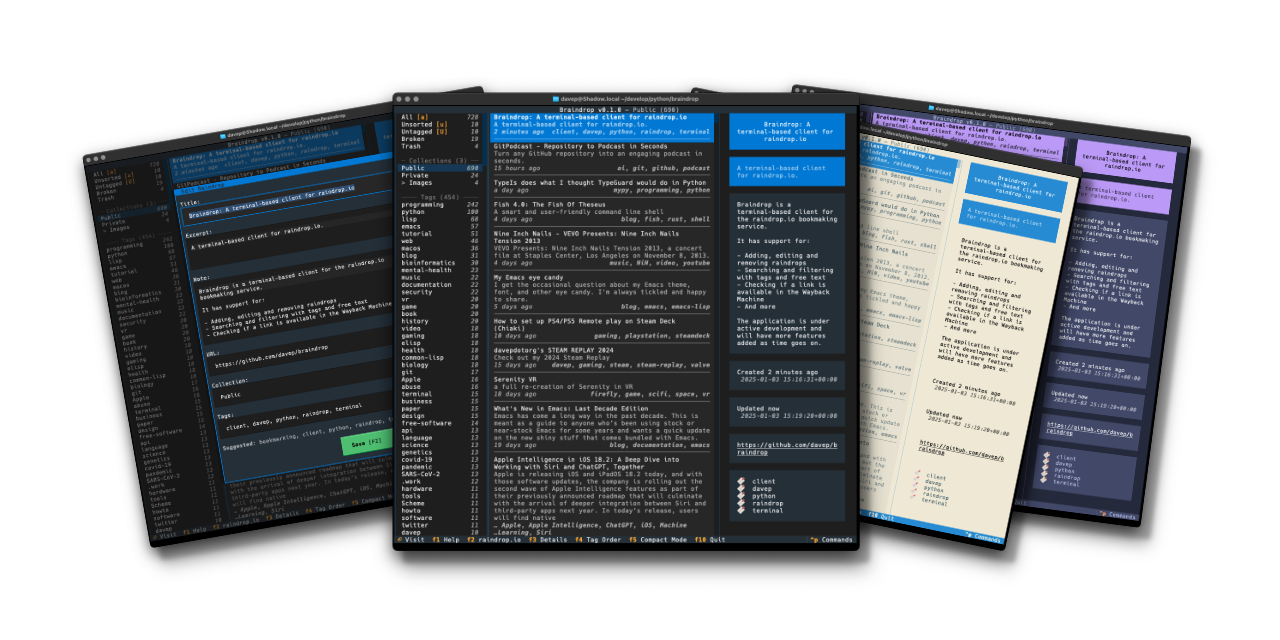
Braindrop

A touch over a year ago I did the initial work on an application called Tinboard, a terminal-based client for the Pinboard bookmarking service. I had a lot of fun building it and it was an application that I used on a near-daily basis. However, around August last year I realised it was time for me to move on from Pinboard and try something new; based on various recommendations I settled on Raindrop.

As mentioned in the other blog post, Raindrop offered more or less everything I had with Pinboard and so the move was fairly straightforward. The one thing that was missing though was an application similar to Tinboard.

So, late on last year, with my winter break approaching, I decided to start from scratch and build a "Tinboard for Raindrop", which I'm calling Braindrop.

This was going to be a bit of an adventure too. Since being laid off from Textualize earlier in 2024 I'd not been following its development quite as closely as I used to, and had also run into some issues and bugs with it since that time; moreover, as well as various bugs appearing, some breaking changes had also been made. As such this was going to be a process where I'd wrap my head around what's happened with the framework over the prior six months or so.

Given all this, over the past couple of weeks I've been spending a few hours a day doing some for-pleasure coding and v0.1.0 of Braindrop is the result.

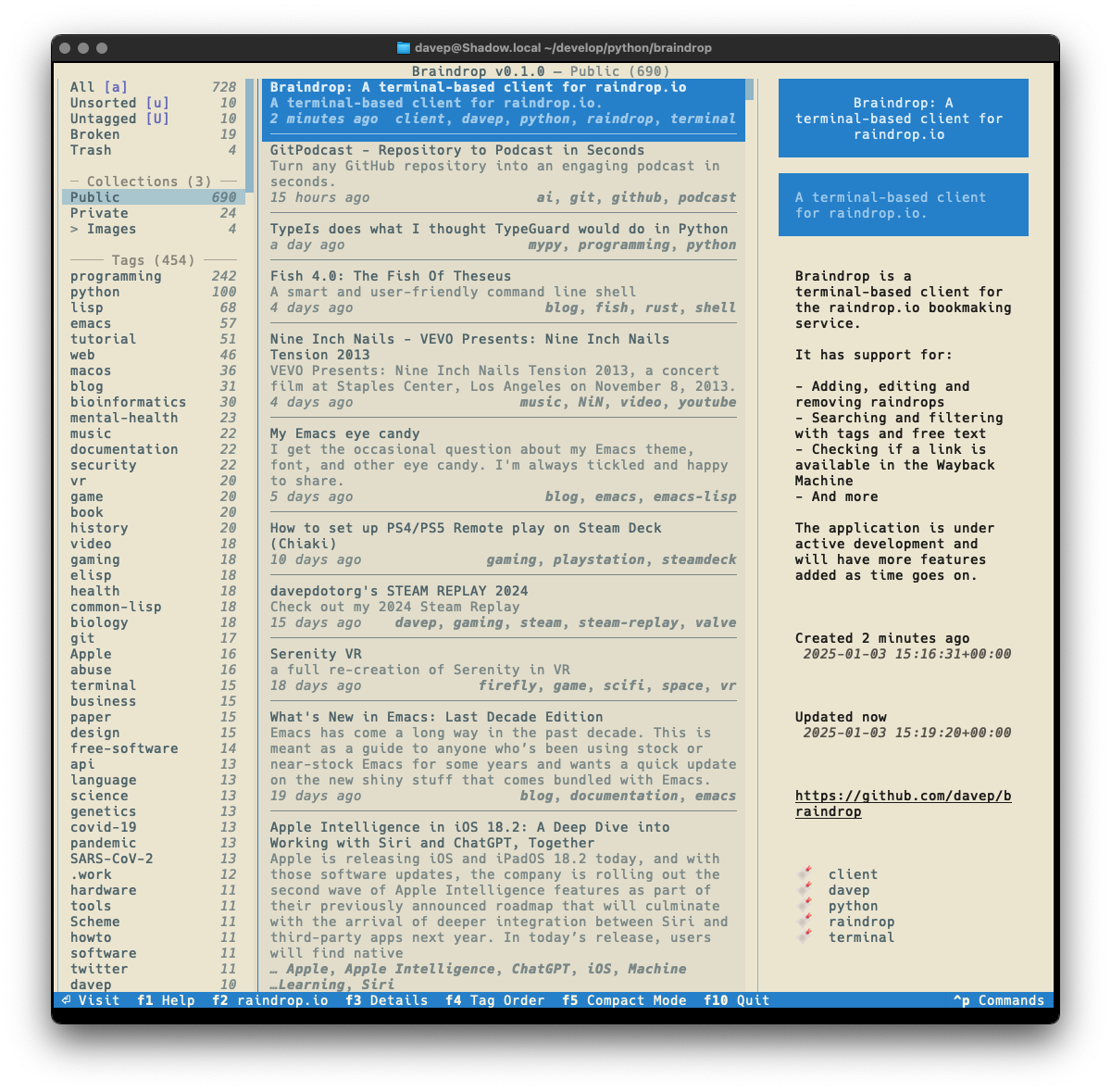
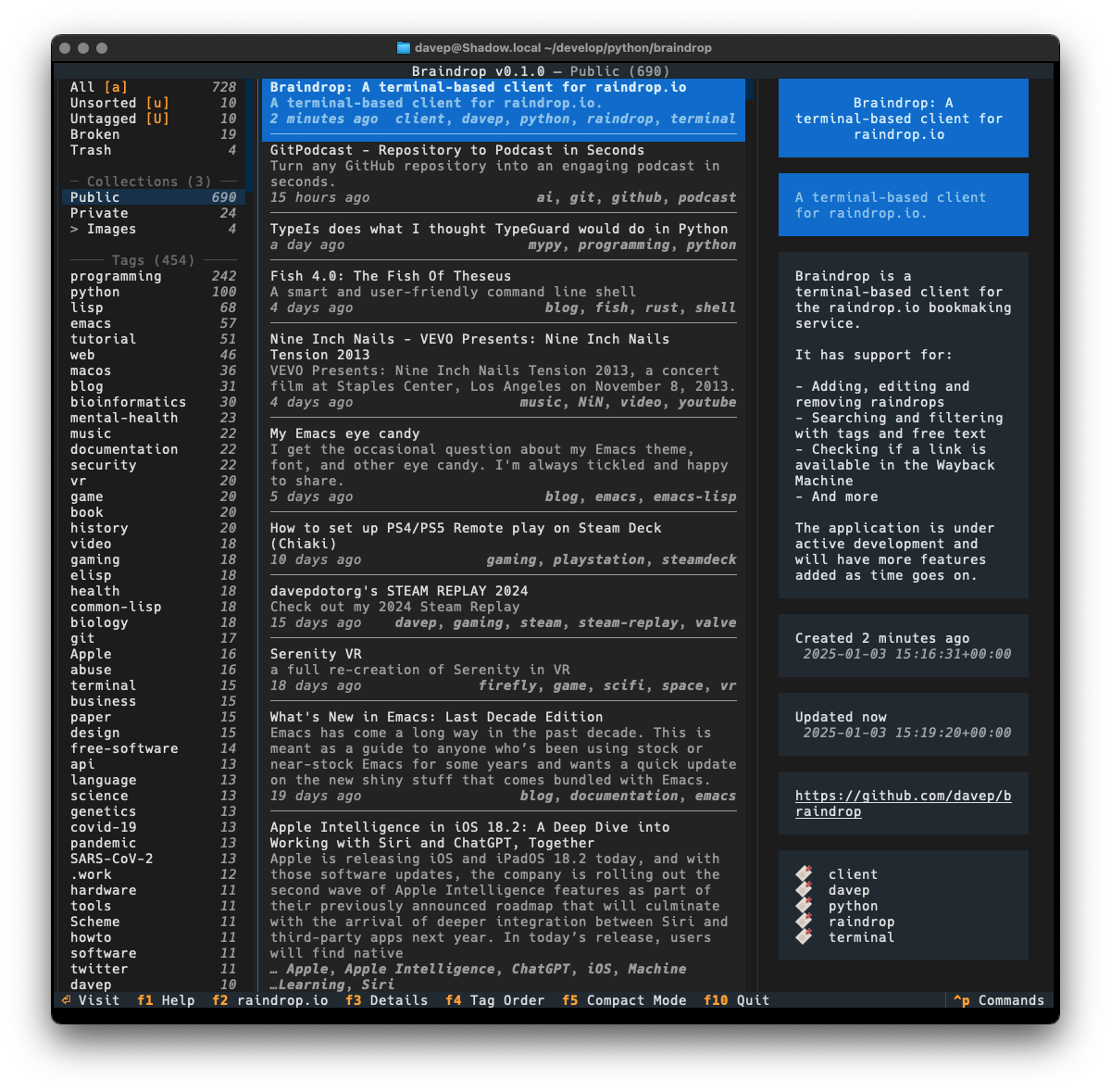
Main display

As much as possible I've tried to keep the look and feel similar to that of Tinboard, while also doing my best to avoid some of the "ah, I wish I hadn't done it this way" design decisions I'd made. As of the time of writing I'm very pleased with the result.

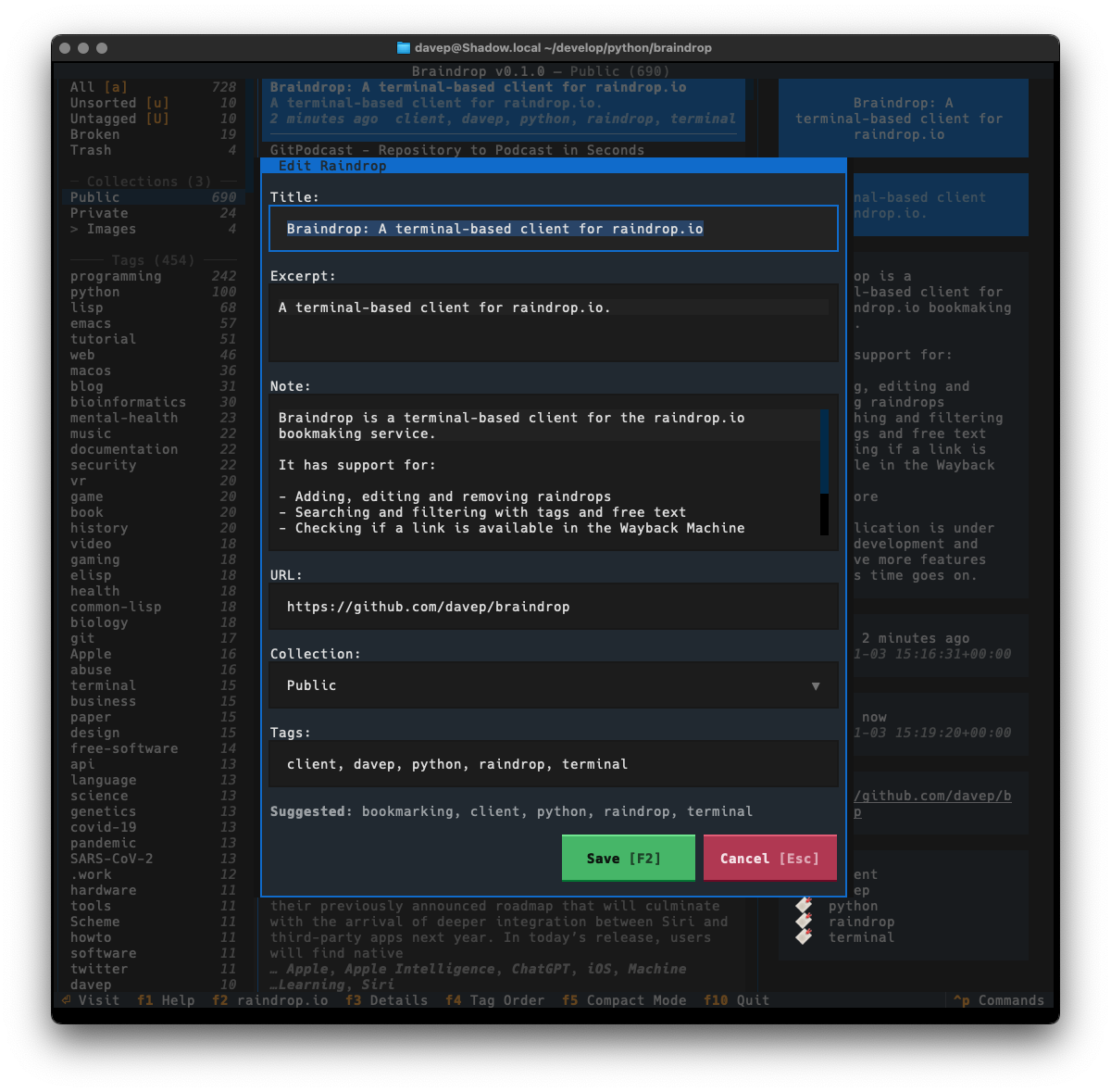
The edit dialog

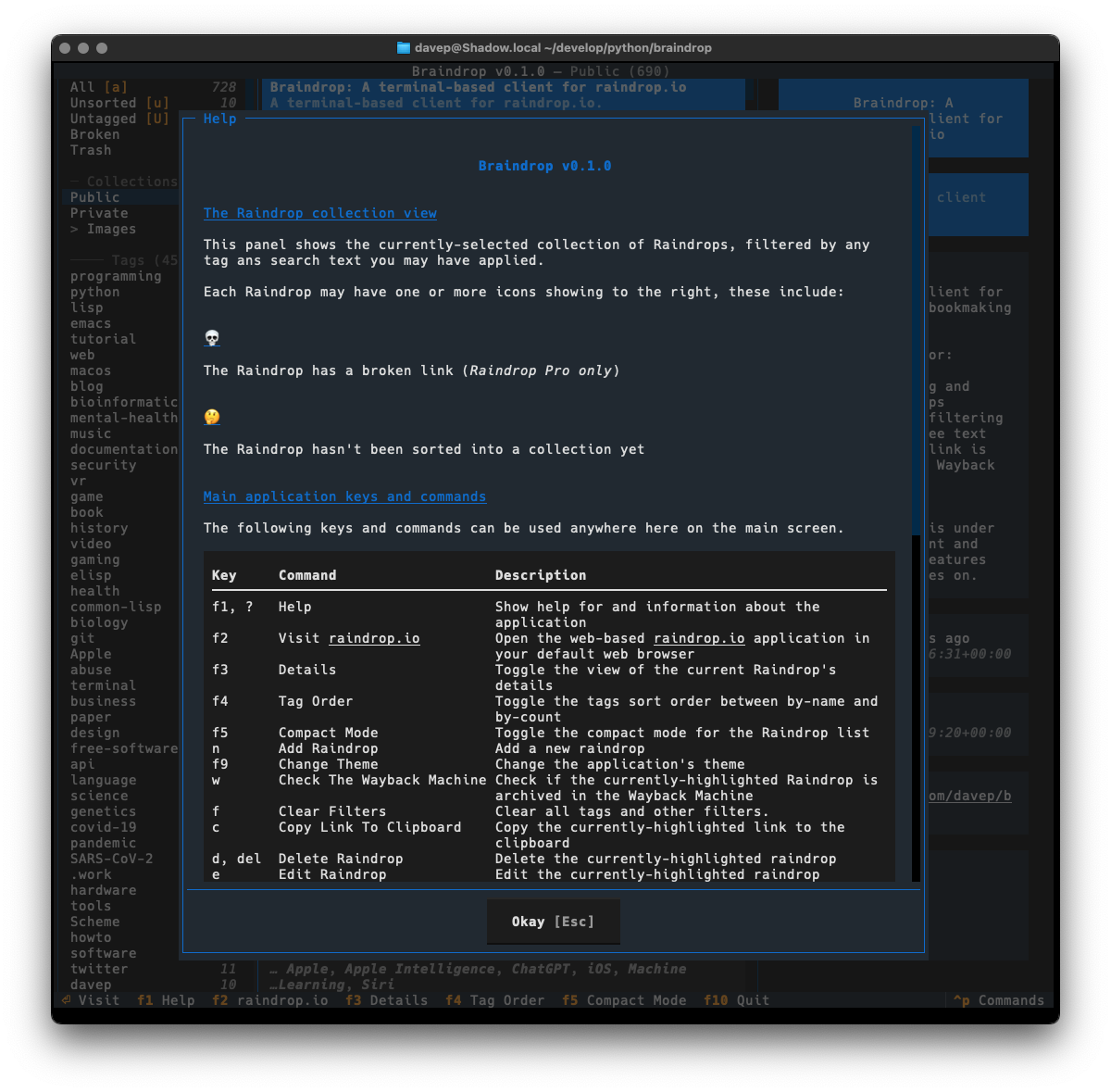
One thing I did want to do is ensure that the application was as keyboard-friendly as possible, while also still allowing use of the mouse. Textual can sometimes get that wrong and I ran into an example of this while trying to ensure that there's good in-application help. Somewhat recently Textual added a built-in help system which, sadly, can't easily be used by and navigated by someone using the keyboard. So instead I've recreated the help system I built into Tinboard, while adopting the documentation standard that Textual had settled on (which, coincidentally, was kind of similar to what I did in Tinboard to start with).

The help dialog

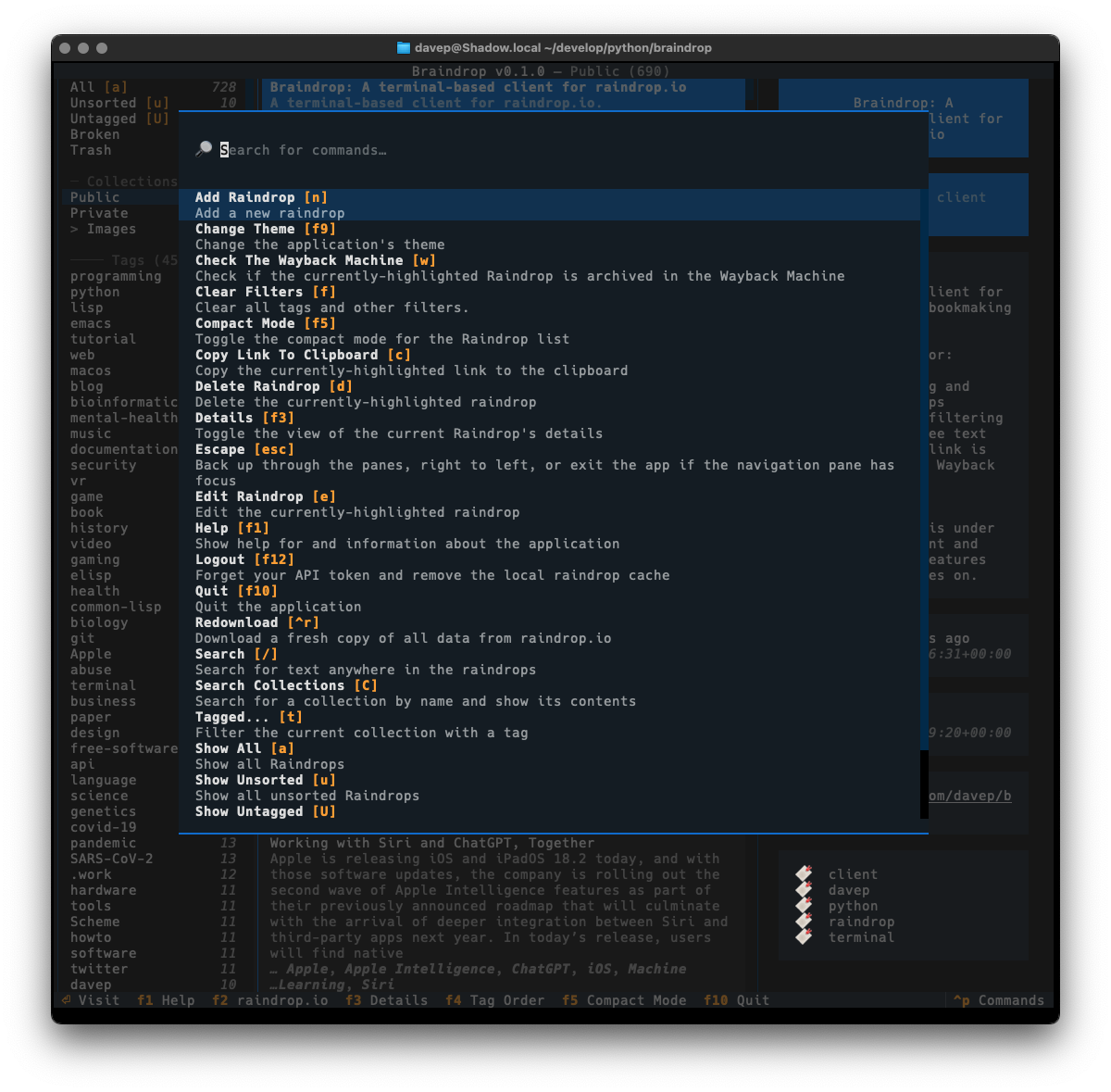
As with Tinboard, I've also made sure to make full use of the command palette, with every action that makes sense having a keyboard hotkey as well as a command in the palette. I also took things a little further and made sure that the hotkeys are shown in the command palette for easier discovery.

The command palette

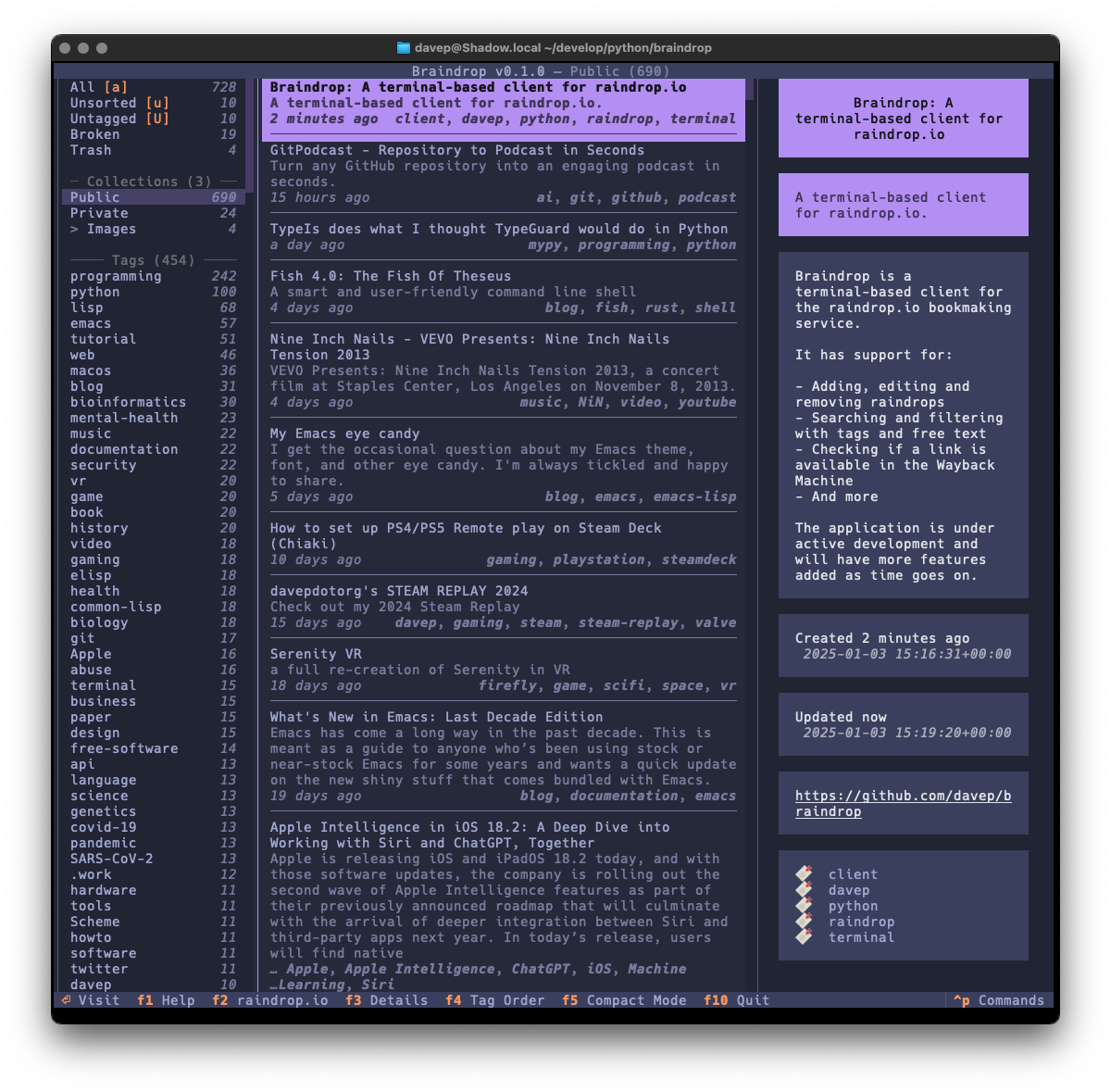
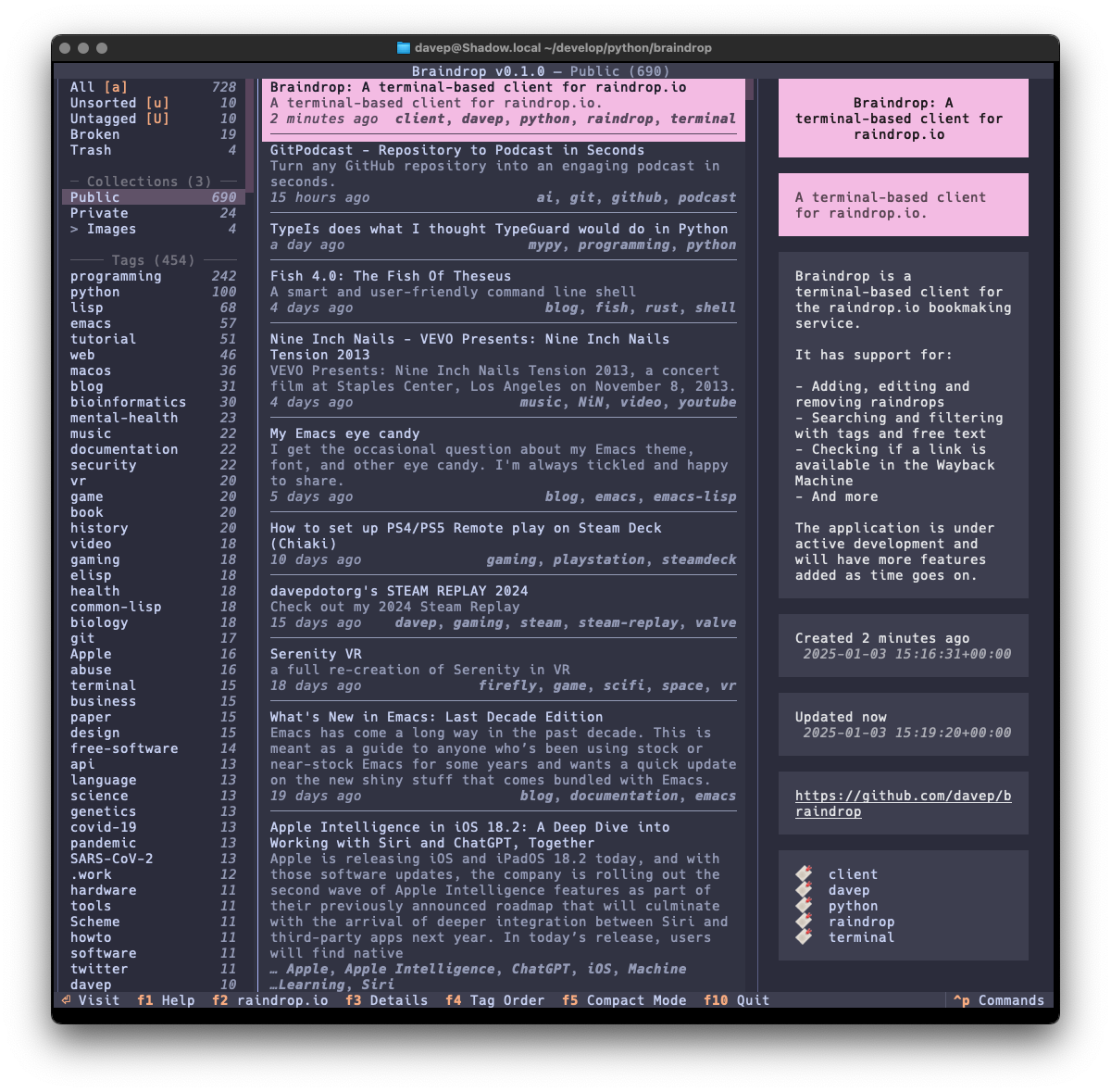
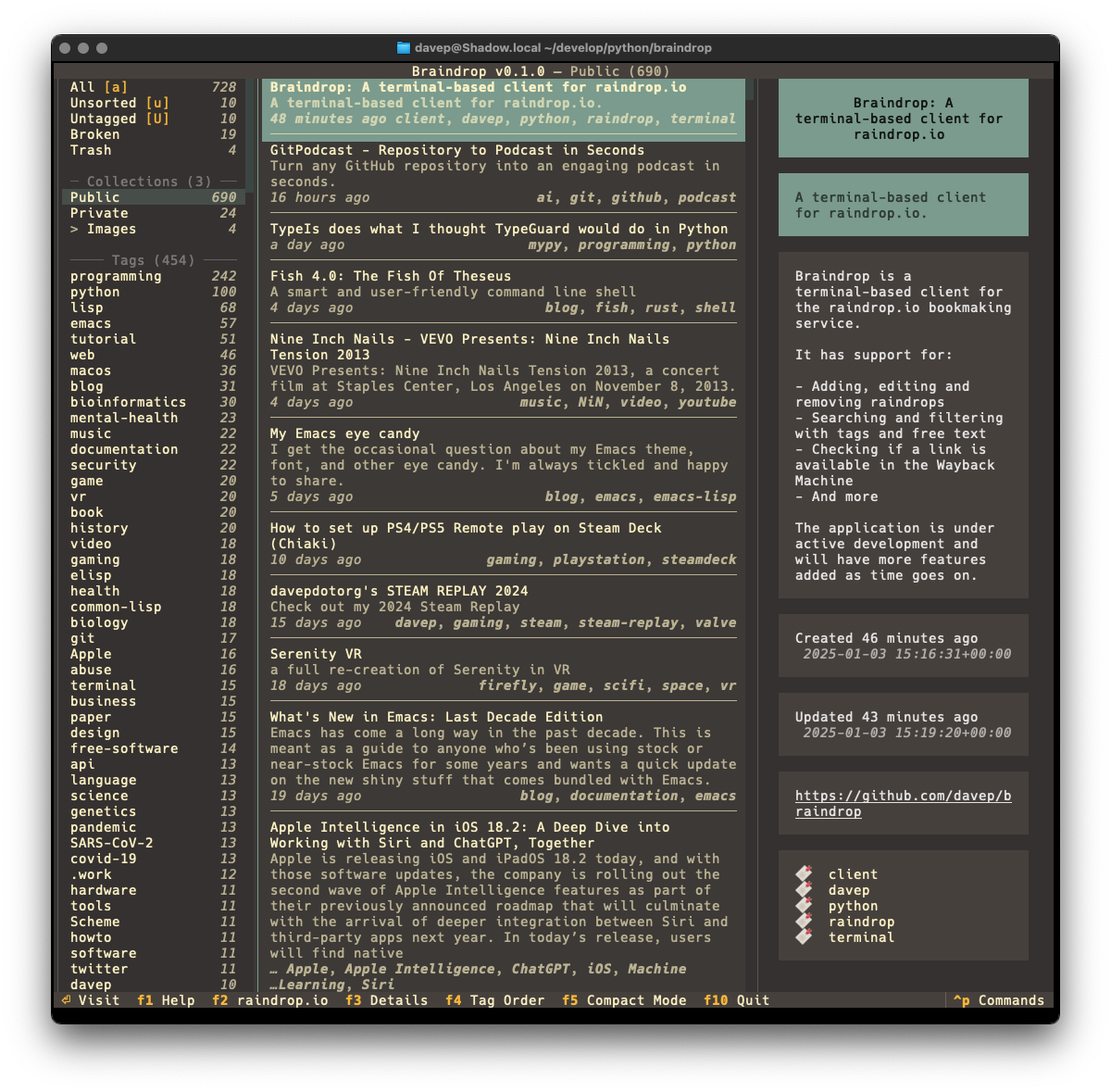
I've also made sure that Textual's new theme system is available for easy use; so out goes dark/light mode toggling and in comes a collection of different themes. Here's a wee selection as an example:

Example theme 1 Example theme 2 Example theme 3 Example theme 4

That's a small selection of the themes, with more to explore.

There's a few more things I want to do before I consider the application v1.0-ready, but it's already in use by me and working well. As I decide what else I want to add to it I'm building up a list of TODO items.

Given that my day job these days is quite varied, isn't quite so coding-intensive, and isn't always related to all things Python, it's actually been fun to sit down and hack up a pure Python application from scratch again. It's also helped me discover a couple or so fresh bugs in Textual (which I've reported, of course) and given me the opportunity to PR some trivial fixes as I've noticed typos and stuff as I go.

Anyway; that's v0.1.0 out in the wild. I'm pleased with how it's turned out and there's more to come. It's licensed GPL-3.0 and available via GitHub and also via PyPi. If you have an environment that has pipx installed you should be able to get up and going with:

$ pipx install braindrop

It can also be installed with Homebrew by tapping davep/homebrew and then installing braindrop:

$ brew tap davep/homebrew
$ brew install braindrop

I hope this is useful to someone else. :-)

Tinboard v0.14.0

1 min read

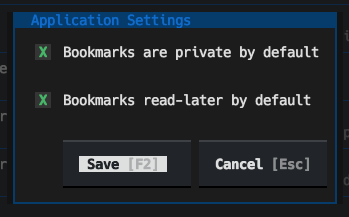
I've just released Tinboard v0.14.0. This release adds a feature that a user requested, where you can set the default values for the privacy and read-later status of a new bookmark:

The application settings dialog

So, any time you create a new bookmark, the edit dialog will use those values by default. It's a feature that makes perfect sense but I didn't think to add it early on because... well, I set the defaults to my preference.

Tinboard can be installed with pip or (ideally) pipx from PyPi. It can also be installed with Homebrew by tapping davep/homebrew and then installing tinboard:

brew tap davep/homebrew
brew install tinboard

The source is available on GitHub.

Tinboard v0.12.0

2 min read

Tinboard has turned into a tool I use pretty much every day; it's probably my most-used Textual/Python-developed application at this point. This is causing me to think more and more about how I can add things to it that are related to the core purpose, but are also outside of the main "interface with Pinboard" thing.

A thing with keeping bookmarks for a long time is that some of them go stale, go away. Some will just plain 404, others the whole site will disappear. If I find myself going back to a bookmark and seeing this is the case, I'll hit the Wayback Machine and see if there's an archive there.

So I got to thinking: what if I add the ability to perform this check into Tinboard itself? So I did just that.

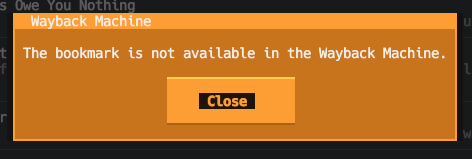
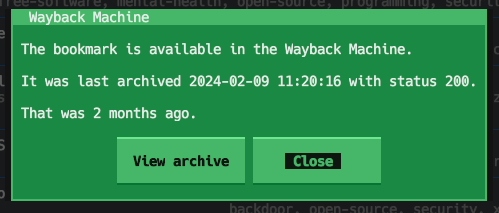
Now, in the application, if you press w with a bookmark highlighted, it will check with the Wayback Machine to see if the bookmark is in the archive. If it isn't you see this:

No archive result

On the other hand, if it is in the archive, you'll see something like this:

Is in the archive result

I sense this is going to be the first step in a couple of features related to this. I'm thinking that I may go on to add a "swap the URL for this bookmark with the Wayback Machine archive URL" feature, which will be handy for those bookmarks that have one away, and it would also be useful to look at the options for a "please archive a copy of this bookmark" feature.

But, for now, v0.12.0 is available and has this handy (for me anyway) first step.

Tinboard can be installed with pip or (ideally) pipx from PyPi. It can also be installed with Homebrew by tapping davep/homebrew and then installing tinboard:

brew tap davep/homebrew
brew install tinboard

The source is available on GitHub.

PISpy v0.6.0

1 min read

Back in the very early days of the Textual adventure, within the first month or so of working on the framework, we had a period of dogfooding. One of the projects I wrote during that time was a little tool I called PISpy.

The initial version was pretty much a quick hack; during that dogfooding period I did my best to try and develop a new project every couple of days. Since then I've let PISpy descend into bit rot.

In the last week or so I've turned my attention back to it and made an effort to tidy up the code, tidy it some more, and some more, and even some more.

This morning I put the finishing touches to these changes and released v0.6.0.

PISpy in action

PISpy can be installed with pip or (ideallty) pipx from PyPI. It can also be installed with Homebrew by tapping davep/homebrew and then installing pispy:

$ brew tap davep/homebrew
$ brew install pispy

The source is available on GitHub.

Tinboard v0.11.0

1 min read

While my time working on Textual might have come to an end, my time working with Textual hasn't. Three days back I experimented with Textual's newly-added "inline mode":

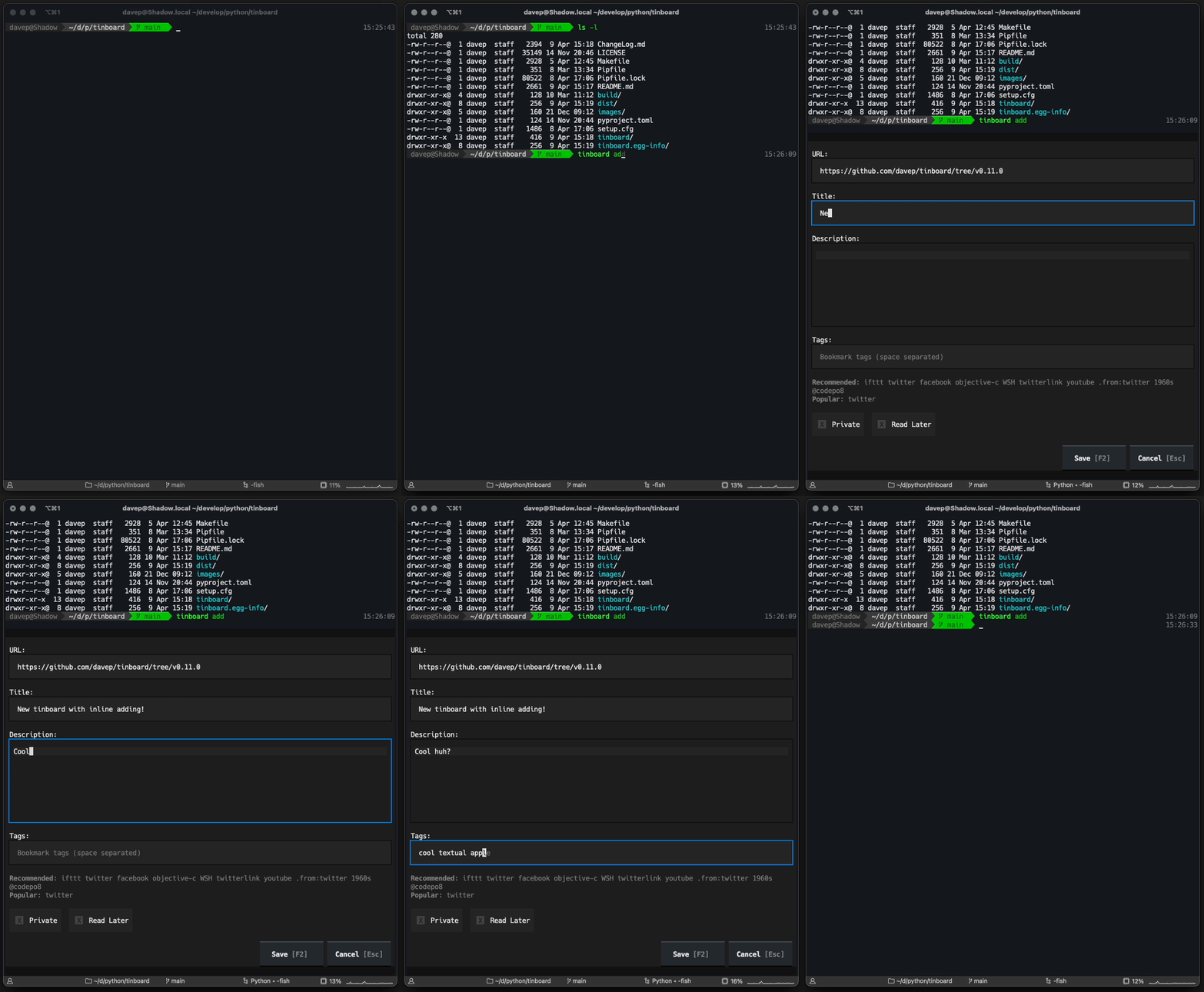
In doing so I extended the application so that it's possible to run tinboard add and quickly enter a new bookmark and then carry on in the terminal, without needing to "go fullscreen". I'll admit it's of limited use, but it seemed like a good shakedown of the feature and in working on it I was able to discover a couple of bugs (#4385, #4403).

The effect of this is this:

Tinboard inline addition in action

Tinboard can be installed with pip or (ideally) pipx from PyPi. It can also be installed with Homebrew by tapping davep/homebrew and then installing tinboard:

brew tap davep/homebrew
brew install tinboard

The source is available on GitHub.

Tinboard v0.10.0

2 min read

I just realised that it's been a while since I last posted an update about tinboard. This is probably my most-used Textual-based application, and one I'm constantly tinkering with, and just this morning I published v0.10.0.

Often the changes are small tweaks or fixes to how it works, sometimes they're simply updates to the version of Textual used, making use of some new feature or other; I've yet to add another "major" feature so far. They will come, but so far the ideas I have for the application haven't actually felt that necessary. Although I say so myself it does what I need it to do and it does it really well.

So, as a quick catch-up of what's changed since v0.4.0 (which was the last version I posted about):

  • v0.5.0 was released 2024-01-04; this included all the tags of a bookmark when doing full-text searching.
  • v0.6.0 was released 2024-01-10; it fixed a small bug where the tag suggestion facility got confused by trailing spaces in the input field.
  • v0.7.0 was released 2024-02-02; this updated the minimum Textual version to v0.48.2 and removed all the custom changes to the Textual TextArea widget, making use of the updates to TextArea that version of Textual made available.
  • v0.8.0 was released 2024-02-18; this fixed a crash on startup caused by a newer release of Textual (the fault was in tinboard; the update to Textual helped reveal the problem).
  • v0.9.0 was released 2024-02-29; it simply added support for using Esc at the top level of the application to quit (I like to camp on Esc to GTFO).

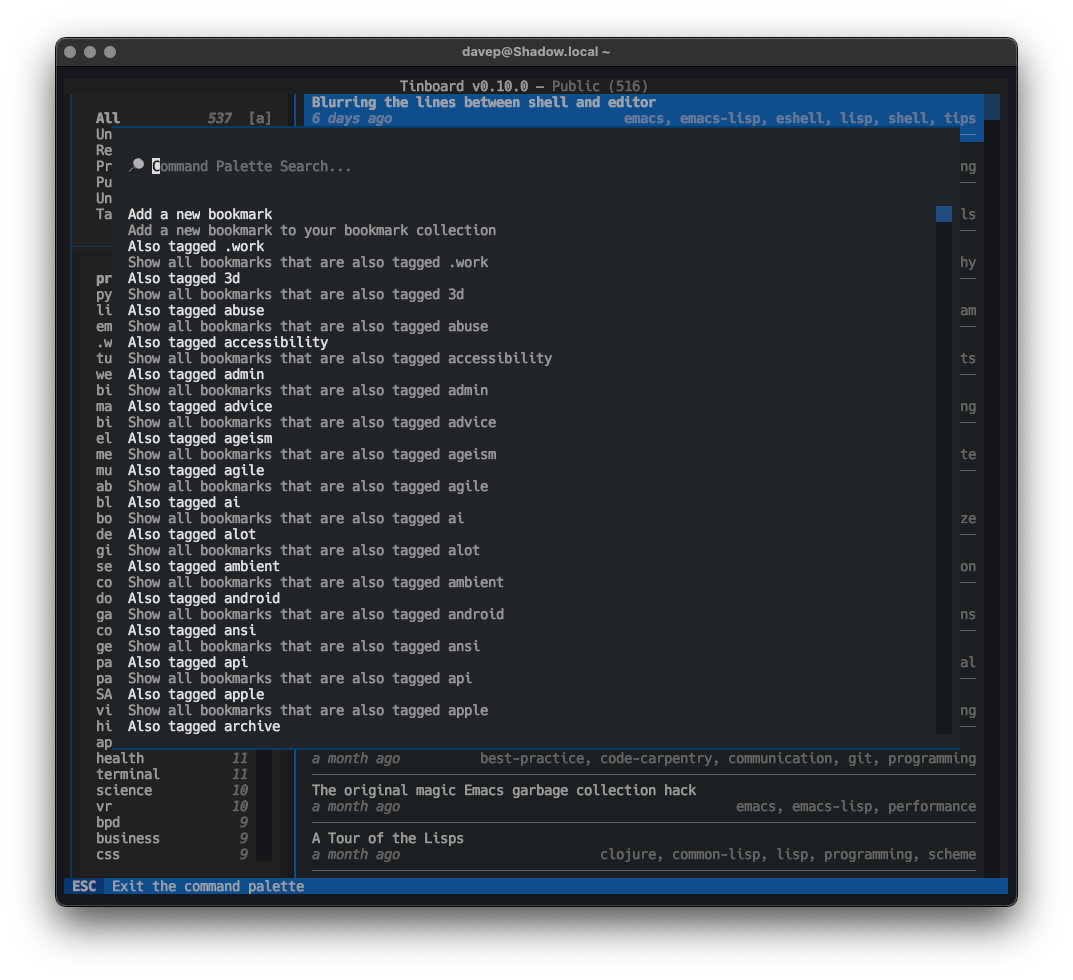
Then, just now, I released v0.10.0. This release makes full use of some work I recently did to enhance Textual's CommandPalette widget, which added a "discover" system. The change in tinboard is that all of the command palette providers now have discover methods too. The result of this change is that when you open the command palette in tinboard (ctrl+p) you can see every possible command right away.

The command palette in discovery mode

Tinboard can be installed with pip or (ideally) pipx from PyPi. The source is available on GitHub.

How not to ask for help

10 min read

My association with Textual works on two levels: on the one hand, sure, it's currently my day job; on the other hand it's a FOSS project that I'm keen to support so "free time me" tries to work with it and support others working with it too. For this reason you'll often see me being terminally1 online in the Textual Discord, trying to answer questions as they come up, every waking free moment.

Almost without exception the people who ask for help are appreciative and ask in the spirit of wanting help and wanting to work together with whoever is helping them to get an answer. That... that's actually quite a cool thing to be part of. I like the sense of community that comes from someone going "bah I'm trying to do this thing and it isn't working PLEASE HELP!".

And then... well, let's just say that sometimes the odd question will crop up that seems to be asked from a less collaborative position.

Without wanting to appear to dunk on an individual (I don't wish to), I want to break down an example that happened yesterday. For some background, I'd been AFK all day, having a wonderful time in town with a friend, shopping, lunch, a movie, that sort of thing. A nicely-chilled day where I didn't even look at the Discord notifications that had popped up on my watch and phone.

However, later on that evening, finally home and flopped on the sofa, I saw a question pop up that, while lacking any useful detail and possibly suffering a wee bit from being an XY problem, the immediate answer was clear:

BadIdentifier: 'test.udp_json_client-input' is an invalid id; identifiers must contain only letters, numbers, underscores, or hyphens, and must not begin with a number.

????????????????? a dot isn't allowed?

Like I say: it lacks context and detail, and the number of question marks doesn't really clarify much, but the core question that seems to be at play here is "is it true that a full stop can't be used as part of the ID of a widget?".

The answer is: no, it can't. There's a reason for that too, and if someone were to take a step back for a moment and think about how IDs play a part in queries and how they'd be used in a stylesheet, the reason for that might pop out. So, to help the person asking the question walk in the direction of the answer, I reply:

When you come to query that how would the parser know it’s not ID “test” combined with a class, if dot was allowed?

Before we go on, to illustrate my point, consider this ID: foo.bar. When you come to query that back, or use it in a stylesheet, how would #foo.bar look? Is it a widget with the ID foo.bar; or is it a widget with the id foo and the class bar?

As far as Textual's CSS is concerned, it would be the latter.

But at this point it didn't seem necessary to get into all that detail; I like to try and assume knowledge on the part of the person asking the question, sans any other evidence, so for the moment I'll assume a "oh, right, yeah, that's a damn good point" kind of reply. Or if not, perhaps a "I don't quite follow, could you explain?" reply, in which case I'm happy to go into all the detail.

The reply was neither:

why are element ID and classes co-mingled?

this was previously allowed so your question doesn't really make sense to me

Now I'm confused. Asking why element IDs and classes are co-mingled seems odd; but I'm used to chatting with people who don't have English as a first language so I'm going to assume it's just a wording choice; but the latter part is very odd: this has never been allowed. Or, more to the point... without any proper context I can't really appreciate what claim is being made here.

You see... I did notice a bug in Textual recently, when it came to widget IDs. Long story short: when you set your ID for the widget in your code, no actual validation of the ID was being done. This was an oversight that was fixed in the latest release.

But knowing that that's the case would be guesswork on my part; I'm also fresh at my desk after a day out; I'm probably not quite in the coding/Textual zone yet, so rather than try and guess half of the conversation, it's easier to just ask the person who is asking. So I ask them to restate the question, and give some more background.

The reply is:

the objective is to put a string like test.udp_json_client-input as the label of a tab, which previously just used the ID property. from skimming release notes, is it better to explicitly set the label, and then assign something compliant for the ID separately?

Wait... what? I thought we were talking about valid widget IDs, now we're talking about tabs and labels? Do we mean TabbeContent and the labels of a TabPane? This is a bit different. So I'm sat there trying to figure out this person's thought process so I can offer the help they're after and this follows:

okay @davep, you have a real bug. --content-tab- prefix is not ephemeral. if I create a tab and grab .id, that prefix comes with it, so if you save it for later and try to set .active, assigning .active doesn't agree that there is a tab --content-tab-thing

so I need to de-mangle the name manually before assigning .active I guess?

Wut? Like... wut? Okay, we do seem to be talking about TabbedContent, I recognise the values being mentioned here; we did some work late on last year that added some namespacing to parts of the TabbedContent widget in an effort to reduce some foot-gun situations.

But... there's no . being used in the IDs as part of that; why are we now proclaiming a bug in an unrelated PR? That's quite the leap with zero evidence. Like... sure, I'm all for being alerted to bugs and fixing them, but this doesn't seem like that.

And then there's the "so I need to..." conclusion that also seems to have no connection to the original question.

Anyone who has ever done support will recognise this situation, I'm sure. Someone has seen a problem, they've dug around a little and reached a conclusion about what the cause is, and turns up looking for help with the conclusion they've reached (very much a variant of a XY problem).

That almost never gets us where we want to go, so I do the obvious thing; I try and reboot the question; I try and get us back to the start and try and get some clarity; I try and encourage asking the question with zero assumptions:

I'm afraid I'm still not really understanding your question, as it now no longer seems to relate to what you very first asked. Perhaps you could start again, ideally with an MRE of what you're looking at and trying to do, for clarity?

I figure, whatever the problem is, it can be illustrated with like a dozen lines of code. Also, when asking people to do this, it often actually helps them rubber-duck their own problem. There's been plenty of times on Discord where someone's "found a bug" in Textual, they're asked to make an MRE of it, and they come back and go "oh, shoot, right, I did that and realised the bug was in my code". It's cool when they happens; everyone learns something.

So... no MRE comes back, but this is the reply:

I'm trying to fix multiple breakages in my application from some recent changes. Right now I can't wrap my head around what to assign a tabbed_content.active for it to work how it did before (where if you have a tab with ID sample, you can assign tabbed_content.active = "sample", but you can't do that anymore)

While not an MRE, I can work with this. It seems clear that they have a TabbedContent where they have a TabPane with the ID "sample" and they are struggling to make it the active tab by setting active to "sample". That seems hugely unlikely, this is what TabbedContent is all about, I think we'd have noticed (I'm petty sure we've got unit tests that cover this), but I'm game. I can test this. And the MRE I write will illustrate there isn't a problem.

So I reply:

Again, I can only suggest that you make an MRE of the issue you're seeing. For example, here's me making a set of tabs, the last of which has the ID "four", and I set the active to "four":

and provide the code:

from textual.app import App, ComposeResult
from textual.widgets import TabbedContent, TabPane, Label

class TabbedContentApp(App[None]):

    def compose(self) -> ComposeResult:
        with TabbedContent():
            with TabPane("One", id="one"):
                yield Label("One")
            with TabPane("Two", id="two"):
                yield Label("Two")
            with TabPane("Three", id="three"):
                yield Label("Three")
            with TabPane("Four", id="four"):
                yield Label("Four")

    def on_mount(self) -> None:
        self.query_one(TabbedContent).active = "four"

if __name__ == "__main__":
    TabbedContentApp().run()

Based on what they've most-recently said is the problem, I'm confident they'll see that this MRE is their situation in a nutshell, and we can work out from there and figure out what the problem is they're seeing and where this . in their IDs is coming from (because I'm very confident it isn't coming from the work that was done on TabbedContent).

This is good. We're getting close to heading down a good path; I can feel it!

I was wrong.

https://github.com/Textualize/textual/blob/main/src/textual/widgets/_tabbed_content.py#L513

there's no way you can deny you just added a metric ton of shenanigans with the tab ID stuff. I can't get it to work at all anymore (assigning .active), but yes I will either come up with an MRE or find the bug and let you know

So, rather than back up a wee bit, work with the MRE I wrote for them so we can take a walk through the problem, they instead decide to tell me that the PR I did last year (which still isn't implicated in any of this outwith of them seemingly assuming it's the cause of all the issues, presented with zero evidence that it is) was simply "a metric ton of shenanigans".

No!

Stop!

This is not how you ask for help.

This isn't how you ask for help from a product or service you pay for. This really isn't how you ask for help from a Free Software project, where the people who are offering you help are doing so in their free time because they want people to be able to build cool things with it.

It really isn't hard at all to show just a wee bit of respect for people's time and willingness to try and help you.

Now... I get it. I can imagine a scenario where someone has just updated Textual and their application suddenly starts throwing all sorts of weird and new errors. That happens. That happened to me on Thursday evening just gone. But that's no reason for approaching getting help like this.

The way to approach it is this: pin the problem dependency, perhaps publish a new version of your application so there's no accidental update of the dependency, then head to any of the help resources for the dependency has and work with people who want to help you to find the cause of the problem. Trust me, it'll go a lot faster if you work with them, take on board suggestions (no matter how odd they might first appear), and really don't call their code "a metric ton of shenanigans".

The conclusion to all of this? The person asking the question eventually found they were setting some widget's ID to an invalid ID; one with a . in it. So as I suspected and wanted to walk them to: they had invalid IDs all along and they only found out about this because ID validation was fixed.

Perhaps one day they'll retract the claim that my actually-unrelated code that wasn't "just" released but was from last year is "a metric ton of shenanigans". ¯\_(ツ)_/¯
  1. Geddit? GEDDIT? 

Quizzical

2 min read

I feel like I'm on a bit of a roll when it comes to building applications for the terminal at the moment; while I'm still tinkering and improving tinboard and OSHit, I had the urge to tackle another idea that's been on my TODO list for a while.

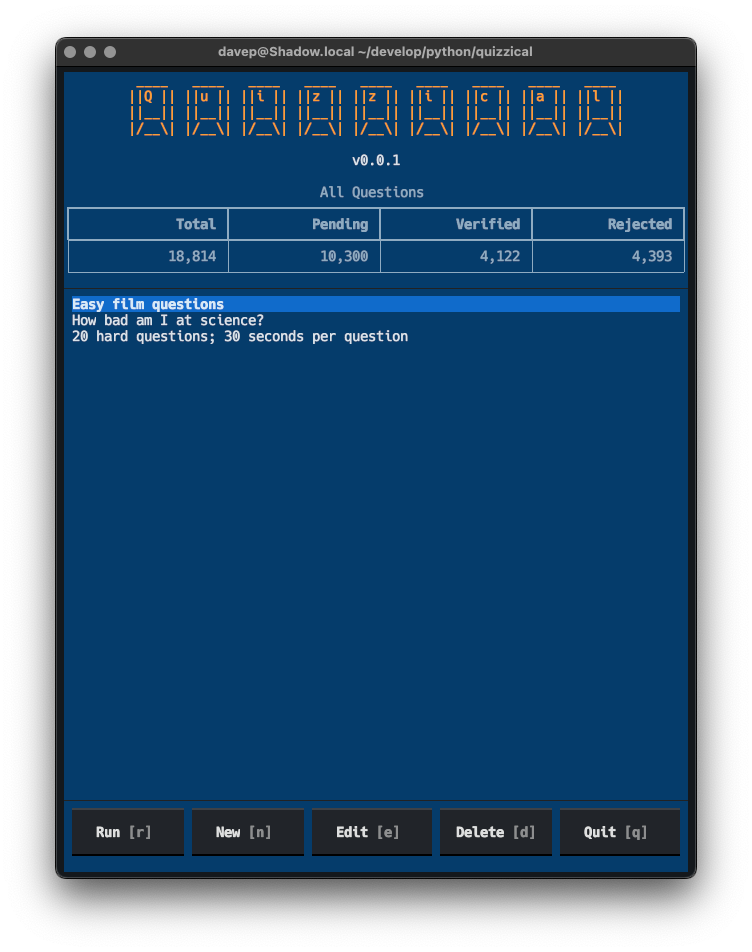
This is something I did for Emacs back in 2017 and I felt it was a perfect candidate for a Textual-based project. It's a terminal-based trivia quiz game, using the Open Trivia Database as the source of questions.

Quizzical

I've just published an early version to PyPI; it still needs some polish and I have a few other ideas for it, but as it stands I feel it's a fun little game to mess around with.

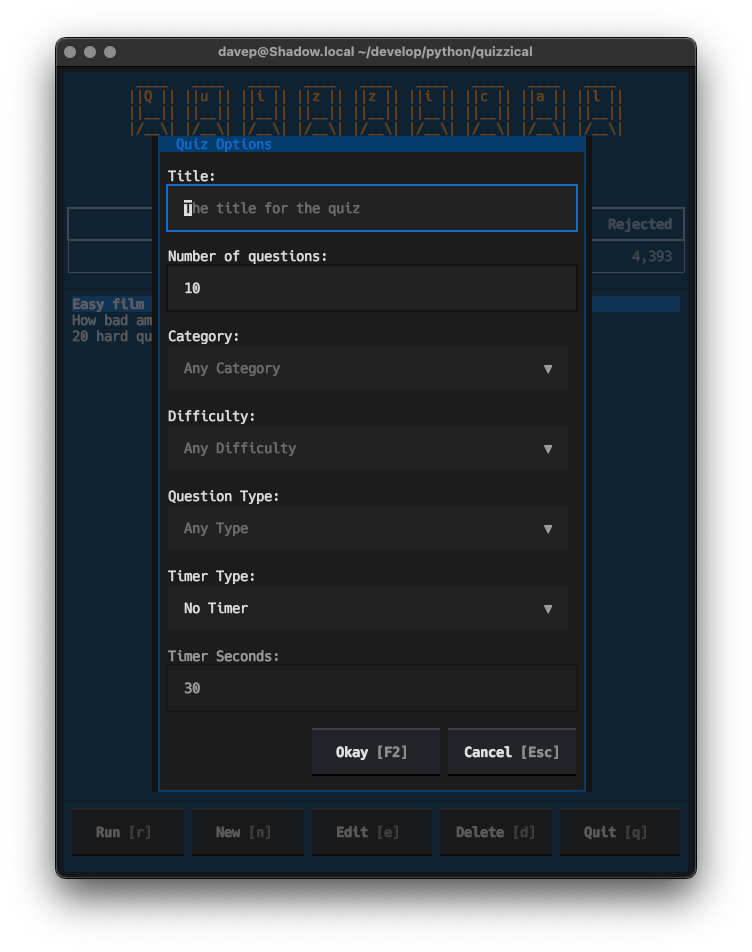
The idea is pretty straightforward: you can run it up and create lots of different quizzes, there are various parameters you can use to create lots of different kinds of challenges:

Building a new quiz

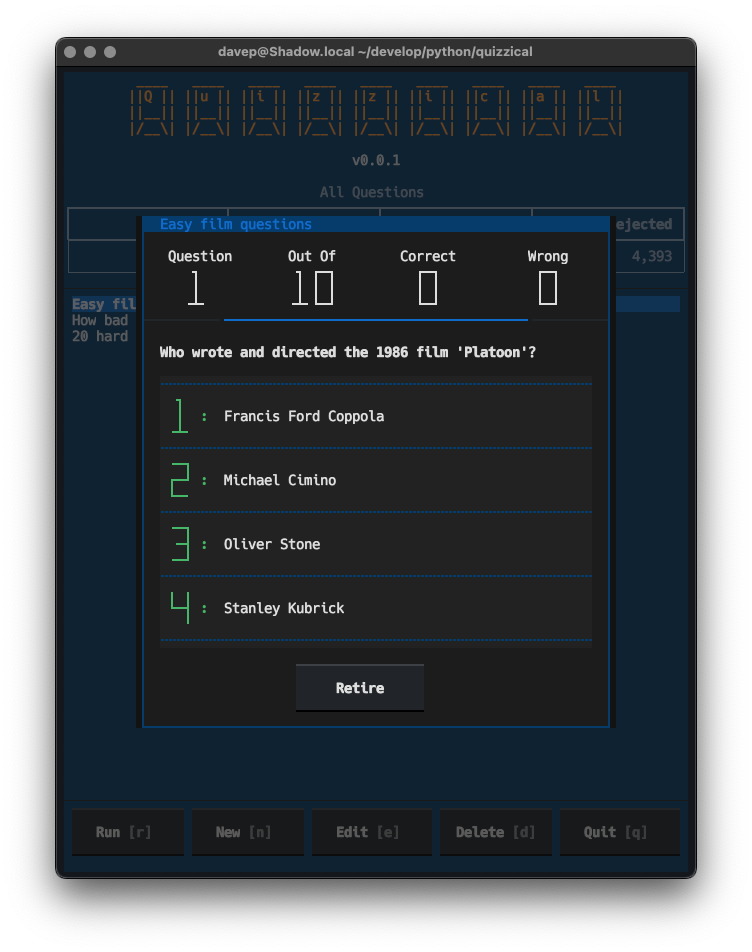
Once you're created a quiz, you can run it and answer away:

An example question

Right now the idea is that you answer by pressing either 1, 2, 3 or 4 (or just 1 or 2 for true/false questions); when I get a moment I'll also enable mouse support for selecting an answer too (honestly I feel keyboard-answering feels far more natural).

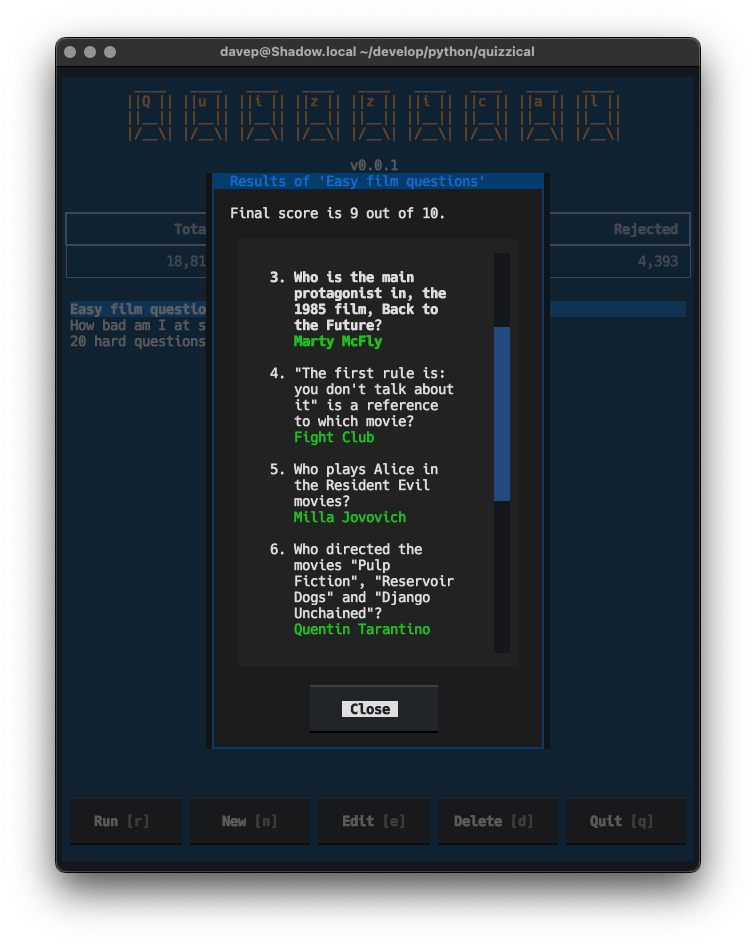
Once the quiz is done you can review your answers and see which were right and which were wrong:

Viewing results

As I say: there's a bunch of other things I want to add to this (keeping track of scores, adding session token support to reduce the chances of repeat questions, etc), but this felt like a good spot to make a v0.1.0 available if anyone else wanted to have a play.

Anyway, if this sounds like your sort of thing, it can be installed with pip or (ideally) pipx from PyPi. The source is available over on GitHub.

PS: Now you can see why I made textual-countdown.

Orange Site Hit v0.5.0

1 min read

Just a wee catch-up post about OSHit, my terminal-based HackerNews browser. Over the past couple of weeks I've made some small changes, so I thought I'd make mention of what I've done.

As of v0.5.0, which I released earlier today, I've:

  • Added a quick way of following links while viewing a comment. While a comment is highlighted you can press l to follow a link; if there's more than one link in the comment a menu will be shown and you can select which one to follow.
  • Added support for viewing polls. Polls seem to be few and far between on HackerNews, so when I published the first version of OSHit I didn't have one to hand to test any code against. Eventually one turned up and broke OSHit (on purpose; I wanted to see when that happened) so I could then add the code to load polls and show them. Right now it just shows scores; I might do actual charts at some point.
  • Added optional item numbers in the lists; turned on/off with F4.

So far all small things, but handy little improvements. There's still a nice TODO list in the README and I will slowly work through it. Along with tinboard these are two applications that have absolutely turned into "daily drivers", so they're going to get a lot of tweaking over the next few weeks, probably even months.

textual-dominfo

3 min read

Last week I was wrestling with some Textual code, trying to get something to lay out on the screen "just so". On the whole this isn't too tricky at all, and for those times where it might feel tricky there's some advice available on how to go about it. But in this case I was trying to do a couple of "on the edge" things and one thing I really needed to know was what particular part of the display was being "caused" by what container or widget1.

Now, at the moment anyway, Textual doesn't have a full-blown devtools with all the bells and whistles; not like in your average web browser. It does have a devtools, but not with all the fancy DOM-diving stuff the above would have needed.

What I needed was the equivalent of print-debugging but with a point-and-ask interface. Now, I actually do often do print-debugging with Textual apps only I use notify; this time though notify wasn't going to cut it.

I needed something that would let me point at a widget and say "show me stuff about this". Something that happens when the mouse hovers over a widget. Something like... a tooltip!

So that was easy:

def on_mount(self) -> None:
    for widget in [self, *self.query("*")]:
        widget.tooltip = "\n".join(
            f"{node!r}" for node in widget.ancestors_with_self
        )

Suddenly I could hover my mouse over a bit of space on the screen and get a "traceback" of sorts for what "caused" it.

I posted this little hack to #show-and-tell on the Discord server and someone mentioned it would be handy if it also showed the CSS for the widget too. That was simple enough because every widget has a styles.css property that is the CSS for the widget, as a string.

After that I didn't think much more about it; until today.

Looking back, one thing I realised is that adding the CSS information on_mount wasn't quite good enough, as it would only show me the state of CSS when the mount happened, not at the moment I inspect the widget. I needed the tooltip to be dynamic.

Thing is... Textual tooltips can't be functions (which would be the obvious approach to make it dynamic); so there was no way to get this on-the-fly behaviour I wanted.

Except there was! The type of tooltip is RenderableType. So that means I could assign it an object that is a Rich renderable; that in turn means I could write a __rich__ method for a class that wraps a widget and then reports back what it can see every time it's called.

In other words, via one step of indirection, I could get the "call a function each time" approach I was after!

It works a treat too.

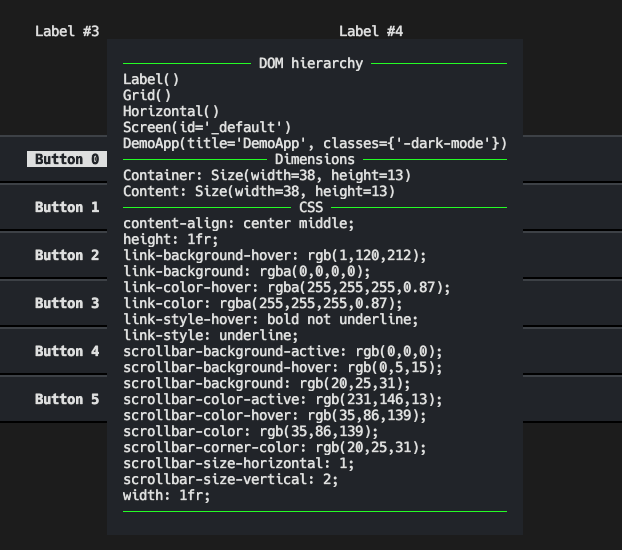
All of which is a long-winded way of saying I now have a print-debug-level DOM inspector tool for when I'm building applications with Textual:

textual-dominfo in action

If this sounds handy to you, you can grab the code too. Install it into your development environment with pip:

$ pip install textual-dominfo

and then attach it to your app or screen or some top-level widget you're interested in via on_mount; for example:

def on_mount(self) -> None:
    from textual_dominfo import DOMInfo
    DOMInfo.attach_to(self)

and then hover away with that mouse cursor and inspect all the things! Whatever you do though, don't make it part of your runtime, and don't keep it installed; just make it a development dependency.

The source can be found over on GitHub and the package is, as mentioned above, over on PyPi.


  1. ObPedant: Containers are widgets, but it's often helpful to make a distinction between widgets that exist just to control the layout of the widgets inside them, and widgets that exist to actually do or show stuff.