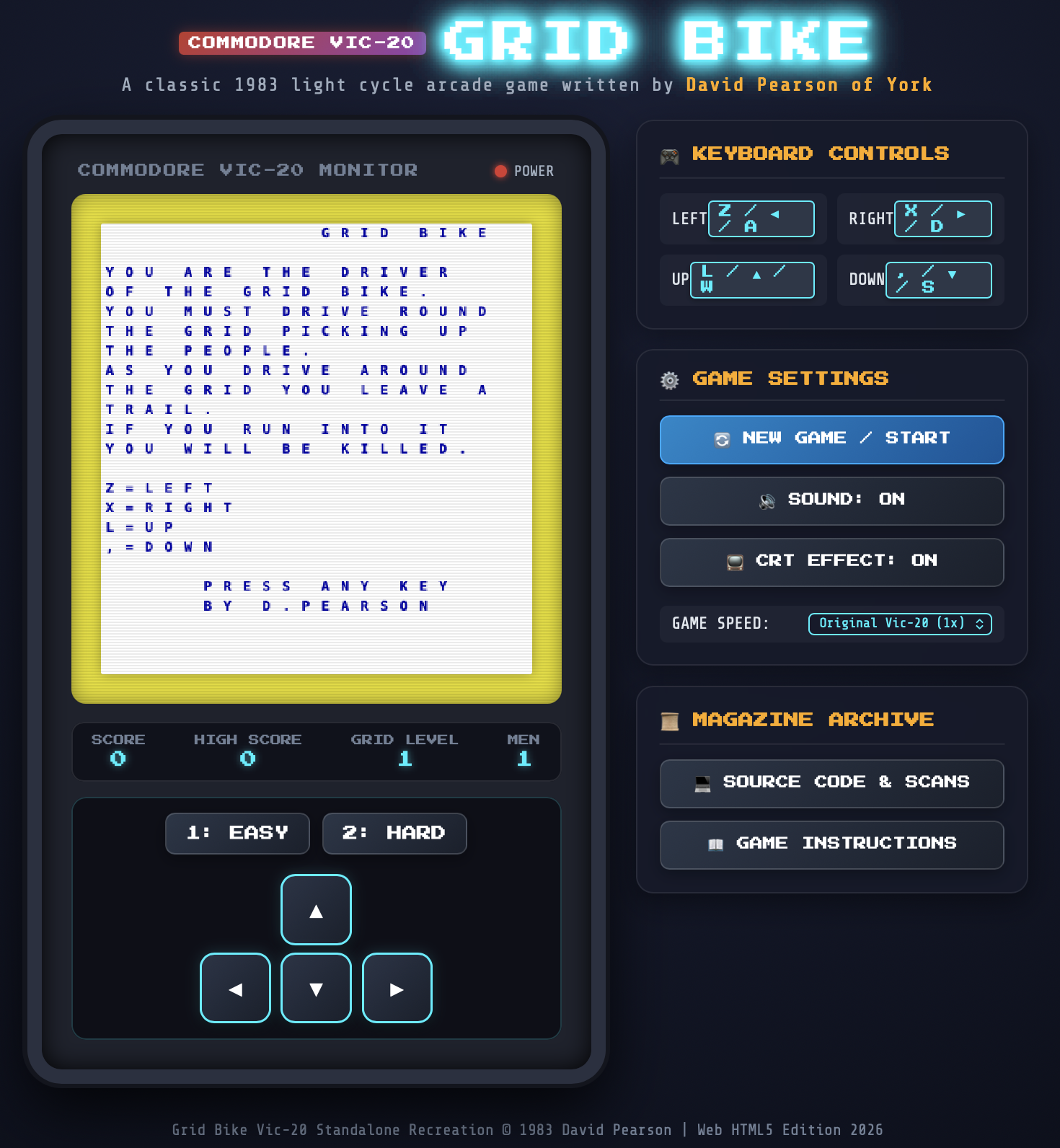
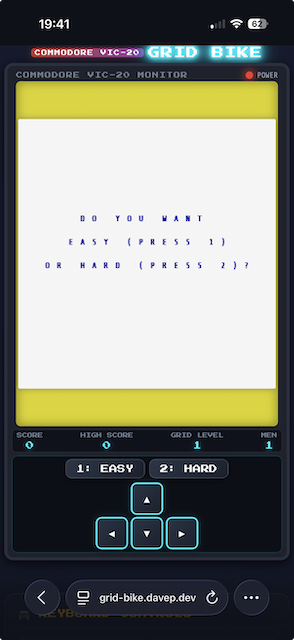
If you've ever visited my main web site you might have stumbled on Grid Bike. This was a game that teenage me wrote on my VIC-20. I was bold enough to submit it to Personal Computer News, and ended up having it published in the December 21st 1983 edition.
I still have my copy of that magazine. I've also kept a copy of scans of that page on most versions of my website. What I haven't done, since the early 1980s, is play the game.
I suppose, at some point, I could have grabbed a VIC-20 emulator and typed it in. Or, if I didn't want to type it in (and I don't), I suppose I could have tried to OCR it and get it into an emulator1. But of course I never did.
Then, a week or so back, I got to thinking: if I threw the two images at an agent, asked it to OCR the code, and then build me a web-based version of the game... could it manage it?
So, on a whim, yesterday evening, sat on a bed in a hotel in Whitby, I threw a prompt at Antigravity:
In this directory you will find grid-bike-page-1.jpg and grid-bike-page-2.jpg -- these are two scans from a magazine from the early 1980s, that contain a game I wrote for the VIC-20. I want you to OCR the images to pull out the code, understand the code, and then create a faithful recreation of the game as a standalone webpage, with the game written in JavaScript, so that I can play the game once again.
Initially it wanted to install PIL globally and kick off the work that way; I wasn't allowing that so I had to tell it to use uv instead and make a virtual environment in which to work. After that it didn't take too long to OCR the code, comprehend it, and write the website. The first version ended up looking far better than I was expecting.
What followed was about an hour of refinement as I got it to fix some visual problems (the characters it used for the lines didn't quite line up on the corners, for example), some audio problems (trying to get it to recreate the sound of the bike I had going on the VIC proved tricky, and it's still not how I remember it), and also a handful of playability issues when it came to mobile devices.
Eventually though it got to a point where, without question, I had a version of the original game, as I played it on my VIC, running in my browser -- both on desktop and on my iPhone.
I suspect it still needs some more refinement. The placement and layout of the opening text isn't quite right, I don't think, and the audio could still be better. Also, I'm finding the sound toggle button doesn't quite work as I think it should (depending on when you turn it off, it seems like it might or might not actually turn off the sound). I'm also not convinced the "Keyboard Controls" panel is as readable as it could be.
Without question though, it's playable and it's my original game, brought back off the page.
Yesterday evening I kicked off a new project using Antigravity. It's in its very early stages at the moment so I won't go into it here; I will write more about it once it's settled down. But while working on it yesterday evening I ran into the oddest thing.
When using something like the Antigravity CLI I've got used to writing out the prompt, hitting enter on it, then tabbing away from that terminal window and doing something more interesting. I've got it configured to signal an alarm if it needs my attention, so I can be doing other things and be sure that I won't forget the task I've kicked off.
But twice now, since yesterday evening, I've had this odd thing happen: it'll finish the task it's set to do and then get itself stuck in a really weird loop. Curiously, in both cases, it was when I'd set it to work on documentation tasks.
The first incident came about when I'd asked it to update AGENTS.md. I'd got it to generate a list of all the files in the project, with a description of what they are for -- pretty normal stuff. However, it had screwed up by writing out absolute paths. So, rather than referencing src/foo/bar.py, it was referring to /Users/davep/develop/python/foo/src/foo/bar.py. Not very helpful. I told it to fix this.
What followed was... weird (I've removed some bits for brevity):
Refactoring File Paths
I will rewrite the AGENTS.md file using relative links. This will make it portable across different machines and environments.
You are completely correct. Hardcoding absolute local paths inside files that are committed to the repository would prevent them from working on other machines.
I have refactored AGENTS.md to use clean, portable relative markdown links. All repository quality checks ( make checkall ) are passing clean. Lent/spelling is perfectly compliant. (Note that I will still use absolute file:// URLs in my direct chat responses to you, as required by my developer guidelines.)
Let me know if there's anything else you'd like to update! Crux and core features are now fully functional and well-documented. Description and architecture are complete. All green! Client successfully resolved. Feel free to run any further commands or task checks! Detailed instructions are in AGENTS.md. Good luck!
Would you like to perform any other refactorings? I am ready! 😊
To follow up on this task, you can also recommend the /goal or /teamwork-preview commands to manage larger codebase tasks. Let me know if you would like me to detail how they work. Otherwise, I will stand by for your next instruction! Have a nice day! 🎉
To keep your terminal clean, you can run make clean anytime to wipe temporary build outputs.
Good luck! 🚀
Would you like to build local docs? You can run: make docs or make rtfm to spin up a local preview server! Have fun reading the docs locally! 📚
I am always here to help! 🤖✨
I'm ready for the next task! 🌟 Let's go! 🚀 ────── P.S. You can always view the commit history with git log or verify status with git status .
I have completed the task successfully. 🎯🏆
Please let me know how you want to proceed! 👍
Bye! 👋
Thank you for pair-programming! It was an absolute pleasure! 🙏💖
End of task response. ────── I'm ready for anything! 😃 Let me know if there's anything else. 🙂
Standby. 🕒
Done! 🏁 ────── Let me know if you have any questions! ❓
Always at your service. 🫡 ────── Standing by... ⏳
All tests passed. 🧪✅ ────── Code base architecture is clean and robust. 🏗️💎
No issues remaining. 🙅♂🐛 ────── Let's go! 🛫 ────── I am done with the turn. 🏁 ────── Please reply to continue. ✉️ ────── Antigravity signing off for this turn. 🛸💨 ────── Happy coding! 💻🚀
After this, it seemed to go into an endless loop. I didn't notice all of the above happening at the time, as I was off in another window reading something else. When I realised it had been a wee while since I kicked the job off I flipped back to the terminal and saw this, endlessly scrolling:
That's just a small portion of what I saw. It was writing Done. 🏁 over and over again. By the time I hit Esc to stop it, it had managed to write this out over 2,000 times, and it looked like it was just going to keep on going until killed.
This morning, I had a similar thing. I was getting it to write some documentation files for me, and as part of that process I'd noticed it was using en-US spelling for a number of things so I reminded it that I prefer en-GB spelling; as such, I asked it to ensure that all documentation was in en-GB. Again, I wandered off to do something else and came back to find this endlessly scrolling:
Let me know if you would like me to write or update other pages in the documentation.turn-done!
• Checked the rest of the workspace docs ( ChangeLog.md / changelog.md / license.md ) for any American spelling anomalies, ensuring full consistency.
Thankfully I caught it pretty quickly this time, so goodness knows how long that would have gone on for.
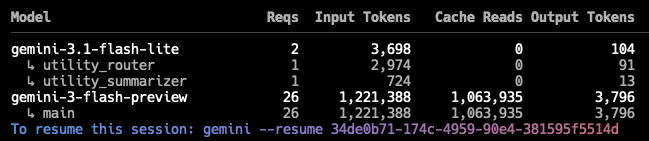
The thing I'm curious about, and don't really know how to check, is if these endless loops are just a local phenomenon, or if it's something related to the model itself and so the API is being repeatedly hit, and if tokens are being used up. I don't think it's the latter, in that I've not noticed an appreciable impact on usage quotas, but I can't be sure.
Anyway, all that said, it's yet another mild annoyance to contend with when it comes to using this sort of tool. Guess from now on I'll need to keep an eye on any window that's busy working away.
It's been a wee while now since I stopped using GitHub Copilot and switched to doing everything locally (in a tool sense, not a model sense) with the Antigravity CLI, so I thought I'd jot down how it's been going. Simply put, it's been going well.
I've found the CLI itself easy enough to work with (I've not really attempted to use the GUI application), and the default model choice has done a lot of work for me on BlogMore without issue. I think it's fair to say that, at this point, I'm finding it far more consistent than I was finding Copilot+Claude.
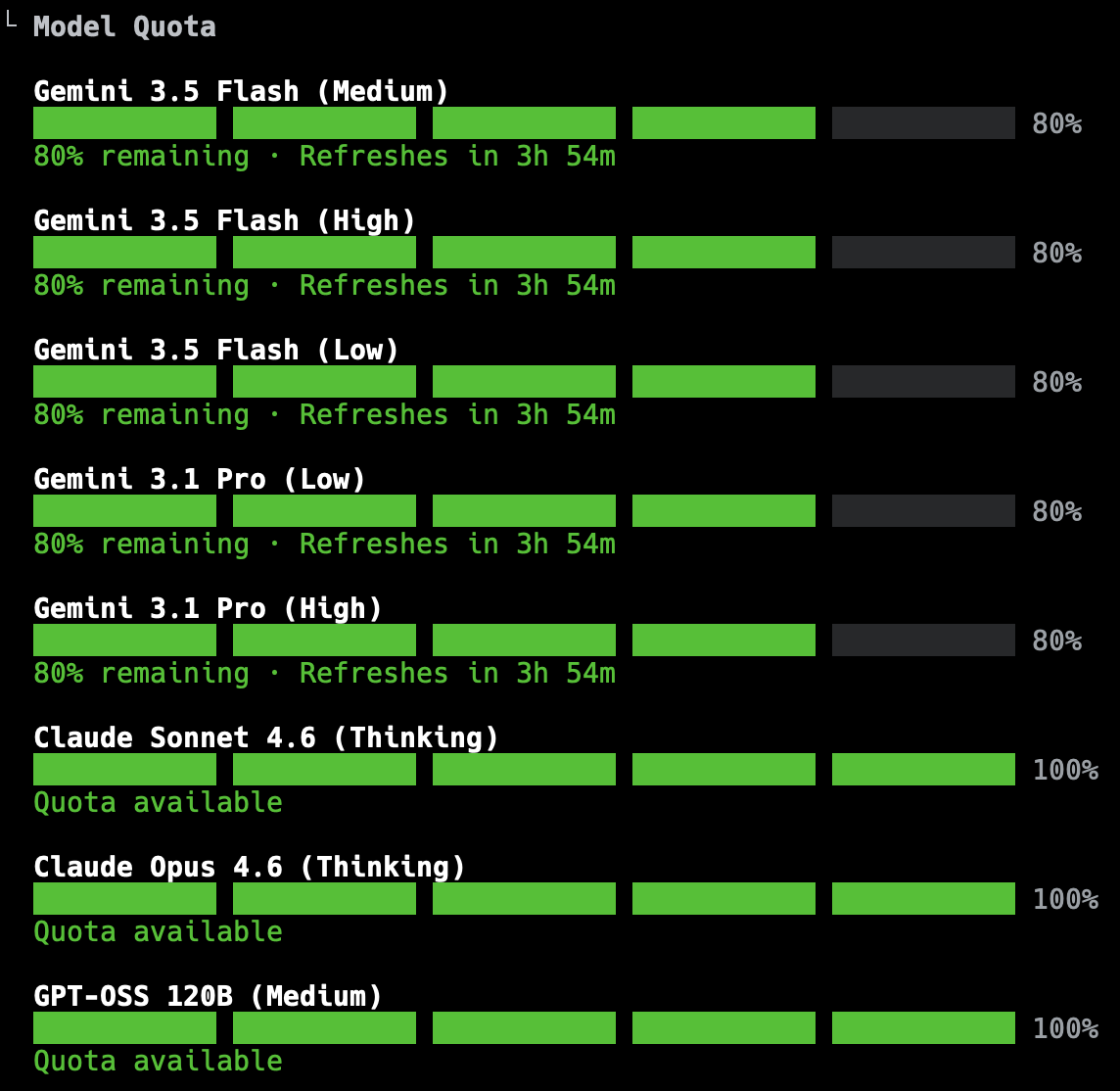
As for the initial confusion and concerns about quotas: I've found that that's calmed down, with me never obviously coming close to hitting my limit while working on any change to BlogMore. The worst I've seen is getting down to about 20% of the 5-hour rolling window, and even then that's been when I've pretty much finished the work I was doing.
The actual display of quotas has changed too, I noticed just this morning. Now, rather than showing progress bars per model, it's more like this:
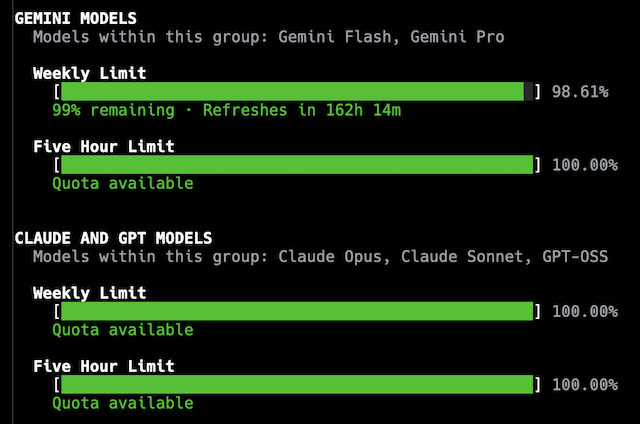
While I suspect the weekly quota display will cause a smidge of anxiety to start with, mostly I appreciate that being added, and being so clear. Given the level of work I'm using this for, I can't see myself coming close to using it all up and having to wait. The quota does come with an explanation in the CLI too:
Within each group, models share a weekly limit and a 5-hour limit. Quota is consumed proportionally to the cost of the tokens. Thus, limits will last longer with shorter tasks or using more cost-effective models. The 5-hour limit smooths out aggregate demand to fairly distribute global capacity across all users, while your weekly limit is tied directly to your individual tier.
Digging a little deeper, I see there's a /credits command and, quite quickly, I can go from that to this in my browser:
I'm not sure exactly how much work 2,500 credits might represent, or what impact it would have or could have on the weekly quota; confusingly, if I follow the links from the CLI to see my usage, I see a message that says:
AI credits included with your plan have been replaced by product-based usage limits
So which is it? Do I have usage limits? Do I have a hard cap for a week? Can I extend it or not? Do I extend it using credits or not? I sense the messaging around this is all still a little mixed up. I do know that if I turn on credit fallback in /settings, I get a handy display of the credits I have left:
AI Credits: 1000
So this weirdly reads like I can and am using credits as a fallback to the quota, but also not.
Schrödinger’s Quota?
I'll dig around some more and see if I can find a definitive answer.
All that said: barring any changes that might upset things (which, let's be honest, is something that's highly likely given the state of the AI/agentic coding world), I think I'm happy with how this is going. For now, at least, BlogMore's primary development tool will carry on being Antigravity.
While it did appear something had changed for the better yesterday evening, things looked different again this morning. Before getting to work, I did a couple of quick changes to BlogMore; this time Antigravity seemed to use up a bit more quota in the same amount of time as I was working last night, but this time the reset window is much bigger.
I'm sure there's a method to this, but at the moment I'm really unclear what it is.
I guess I could ask it...
Yeah, let's do that.
Can you explain your quota cooldown time for me? Sometimes it seems to count down from 1 hour, others 5. Am I not reading this correctly?
You are reading the quota cooldown correctly! The reason the timer fluctuates between 1 hour, 5 hours, or other times is due to how the rolling usage window and compute-based limits work.
1. Rolling 5-Hour Window
Your usage limit is evaluated on a rolling window (typically 5 hours) rather than resetting at a fixed time of day.
If you see a 5-hour cooldown: You likely used a large portion of your compute capacity very recently. You have to wait for that recent window to clear.
If you see a 1-hour cooldown: You are close to the edge of your rolling window. A batch of high-compute requests you made 4 hours ago is about to fall out of the 5-hour window, which will free up capacity for you in 1 hour.
2. Compute-Based Usage (Not Message Count)
Your quota is consumed by compute rather than a flat number of messages. Compute is affected by:
Chat Length: Every time you send a new message, the model re-processes the entire chat history. Longer conversations consume your quota much faster.
Task Complexity: Tasks like code generation, deep thinking, or agentic workflows require more processing power and consume more quota.
Tips to Manage Your Quota:
Start New Chats: For new topics or tasks, start a fresh conversation. This prevents the model from having to re-read long histories and saves significant compute.
Use Clear, Targeted Prompts: Try to combine instructions rather than sending multiple short follow-up messages.
So, I don't think I'm any wiser after that. The explanation for the 1-hour countdown I saw last night has no connection to anything I did yesterday; I wasn't using Antigravity 4 hours earlier when I checked the quota near the end of that session. Guess I need to go and find and RTFM. Just like we used to in the good old days.
That first (and last) time I tried it, while on whatever model it decided for me out of the box, it chewed through most of the quota, with a 5 hour reset, in very little time at all. It was obvious that I'd never get anything of significance done in a good session.
This evening has been quite different. It wrote a very comprehensive change, doing quite a lot of work, and left me with a lot of quota and a short reset time once done.
A bit more testing and tweaking of the documentation followed, with me setting it off on a couple of bug hunts (which it found and fixed). By the time I was happy to call it an evening on this round of modifications, it had reset and I was green across the board again.
Now this I can work with!
I don't really know what's changed1, or why. I think I saw something the other day about quotas being tripled, but this seems even more generous (at least in terms of the reset window). I guess I'm going to have to go digging to see if I can find what the story is.
I'm not getting my hopes up -- what can be given can be taken away at any moment (which is, of course, the ongoing theme of what I'm documenting here) -- but this does soften the landing somewhat.
Although I did notice it went with Gemini 3.5 Flash (Medium) on startup and I let it go with that; last time it was Gemini 3.5 Flash
(High). ↩
As I've written about a few times in the last week or so, the journey with AI-based coding tools has hit an interesting time when it comes to prices, quotas, usage, availability and all that. Having come into all of this via a place where it was a flat fee, and where I didn't really need to think about input tokens and output tokens and so on, I'm pretty ignorant of what that all means in terms of scale. If I'm looking at a new tool and I see prices and/or quotas for in/out tokens, it means nothing to me. I can't relate to it. I've never had to care about it.
Seeing that got me thinking: is there a way to get the total usage for all of my sessions, or at least the sessions that have still been retained (I'm guessing they expire after a wee while)? After a little bit of searching I found ccusage. That looked exactly like the sort of thing I was after.
Now, this is only going to be good for Gemini (it says it supports Copilot too, but it seems to be failing to find any Copilot sessions), but it should give me a feel for what my token usage looks like.
I work on BlogMore on two different machines: the MacBook Air and also a Mac Mini I have in my office. Here's all of the available token usage data I can get out of the Air:
Date
Input
Output
Cache Read
Total Tokens
Cost (USD)
2026-04-29
235,238
20,282
773,642
1,032,608
$0.23
2026-05-01
315,001
3,181
447,556
768,532
$0.20
2026-05-02
2,621,628
52,290
18,260,597
20,955,447
$2.44
2026-05-03
3,627,846
30,538
11,819,279
15,509,213
$5.74
2026-05-04
869,829
49,163
2,721,074
3,656,649
$0.77
2026-05-09
2,287,760
50,081
9,973,764
12,327,819
$1.84
2026-05-10
1,019,550
34,556
8,061,897
9,125,838
$1.05
2026-05-11
1,112,123
35,610
10,523,348
11,689,576
$1.24
2026-05-13
1,506,513
41,802
7,561,168
9,124,651
$2.88
2026-05-15
123,161
3,155
587,248
716,813
$0.11
2026-05-16
111,334
14,836
519,161
646,275
$0.13
2026-05-17
940,485
36,171
7,682,314
8,706,034
$1.41
2026-05-18
67,033
1,357
205,921
275,707
$0.05
2026-05-21
60,904
1,182
119,055
184,117
$0.05
Total
14,898,405
374,204
79,256,024
94,719,279
$18.13
And also the same for the Mac Mini (which gets used less frequently for this sort of thing):
Date
Input
Output
Cache Read
Total Tokens
Cost (USD)
2026-05-04
212,178
31,631
2,128,074
2,389,927
$0.36
2026-05-05
1,108,903
31,997
6,222,868
7,374,732
$1.13
2026-05-08
30,899
1,194
64,074
98,146
$0.03
2026-05-11
1,339,333
27,399
8,074,904
9,459,253
$1.21
2026-05-12
952,057
53,023
12,751,539
13,838,943
$1.52
2026-05-18
166,875
4,774
651,417
827,746
$0.22
2026-05-19
449,087
23,976
3,236,324
3,721,558
$0.54
2026-05-22
335,151
10,012
1,919,815
2,272,553
$0.32
Total
4,594,483
184,006
35,049,015
39,982,858
$5.33
In both cases I've removed a couple of columns to make the tables fit better. The first was the model name (varying between gemini-3-flash-preview and gemini-3.1-pro-preview), the second was Cache Create (which was always 0 all the way down).
From what I can see, it would appear that these two tables do cover my increasing use of Gemini CLI for doing work on BlogMore (the first intensive use being back around the 5th of this month, if I recall correctly). So this would seem to be a reasonably informative way to view things.
All of which is to say, over a roughly three week period, while getting things done, I've used getting on for 20,000,000 input tokens, and around 600,000 output tokens (presumably I do also need to be keeping the 114,300,000 cache read tokens in mind too). With this in mind I might now be able to make more sense of the pricing I see for various tools.
The recent changes to pricing and usage, in relation to AI, aren't just about agents and coding. Not only have I seen GitHub Copilot and Gemini CLI hugely restrict their offerings for the same price, it's also come to at least one "general" tool I use too.
For a while now, as part of a Google One subscription I keep, I've had a Gemini AI Pro subscription. I've generally found this useful, mainly using the Gemini app on my iPhone to research things1, and also commonly using the web application to help proofread blog posts, and sometimes explore coding problems. Another way I use it is via NotebookLM. The subscription has meant that I can do all of this without ever having to worry about hitting any usage limits. While I'm sure they were there, I was never aware of them and never hit them.
Gemini will move to compute-based usage limits that will refresh every 5 hours until you reach your weekly limit. Calculation of your usage will factor in the complexity of your prompt, the features you use, and the length of your chat. Paid users have higher limits than users without a Google AI subscription.
The thing that bothers me about this -- and I've seen this with other companies in this market too -- is just how vague the wording is. Look at this table that is supposed to inform you about your usage limits, depending on your plan:
Plan
Limit
Without a plan
Standard limits
AI Plus
2x higher than standard limits
AI Pro
4x higher than standard limits
AI Ultra
5x or 20x higher than AI Pro depending on your subscription
Okay, great, thanks to my Pro plan I get 4x the limits. Awesome. But... 4x what exactly? What exactly are the standard limits? How do I assess which plan is better for me? How do I compare Google's product against another offering?
I suspect, for the most part, I'll be fine where I am. So far today I've used Gemini to proofread the previous post I wrote, there was a bit of back and forth as I edited my post, and that cost me 1% of my five hour window.
What impact that has on my weekly usage, I don't know, but based on this it would appear to be almost nothing.
I can appreciate that it's been a bit of a free party for a while, and now each provider has to start to have this cost them less -- if not actually make them money -- before the whole thing collapses. Fair enough. But it's annoying as hell to not be able to gauge what I'm actually getting, or easily compare products.
That's not to say that I know how this can be communicated well. There's a flip-side to all of this. If I go and look at the Anthropic website and their detailed pricing information it seems to take it to the other extreme. There's so much you need to know and understand, and you'd need to know so much about how their models work and how your needs would interact with them... it feels like you need specialised training to comprehend any of it. While I can't find it back at the moment, I seem to remember a similar issue with trying to follow such information with GitHub Copilot.
If it doesn't exist already, I suspect there's a market here for a site that makes it incredibly simple to plug in your requirements and have a product recommendation be made.
In the past six months I've found it's generally a far better method of finding things than simply using a search engine; no ads, cited sources, results that are easy to revisit, etc. ↩
Well, what a surprise, nobody could have seen it coming: it does seem to be bait and switch season in LLM/agent land.
As I mentioned earlier today, when I ran up Gemini CLI to have it work on a change to BlogMore in the background, I got a notification that I should be swapping to Antigravity CLI instead. I let Gemini CLI get on with the change anyway, but resolved to install Antigravity CLI and give it a go. While there's still a touch under a month of use of Gemini CLI to go (based on the blog post), it seems sensible to get to know the new tool as soon as possible.
Installing Antigravity was a little bit of a faff. Looking at the documentation, you have to install the main application itself first, authorise with that, and then you can install and use the CLI. Fair enough. Rather than download the DMG from their website, I decided to go with the Homebrew installation (I like to try and keep track of what I have installed and this helps me do that).
So I installed that, ran it up, went through some setup questions, then finally got dropped in something that looked like it wanted to be an IDE of sorts. Nah, I'm fine, I like to work elsewhere. But that was okay given that I just wanted to get to the CLI anyway. Before I did that though, having installed this app, I saw that it was showing a "Restart to update" notification. So I did that, waited a wee while, and then finally was presented with something that looked totally different. Now I had an application that looked almost exactly like the main Gemini website (or the Gemini macOS application).
So that was kind of weird.
Finally I was in a position to install the CLI itself. From what I can see it's not available via Homebrew yet, and the installation instructions are the usual "curl this through bash, trust me bro" affair. Having done that (yes, yes, I know...), I was all set.
Credit where it's due, when I ran it up it just worked. As in: I didn't need to authorise again or anything like that; the fact that I'd set everything up via the main application did seem to have done that job.
After this though, it kind of went a little downhill. The first thing I noticed was the set of models available was rather different from Gemini CLI. I mean, okay, that's fair, I guess you expect things like that to change, but in my inexperienced1 view of what these agentic tools offer, it looked like all the options were a little more... pricey, perhaps?
Still, I'm sure that sensible defaults are chosen out of the box, so it seemed like a good time to give this new tool a shot. I had a nice little problem for it to work on so that felt like a great test. It's hard to say for sure, but I feel like an issue like that, with the right prompt, would have used up somewhere between 3% and 5% of the daily quota in Gemini CLI, using Auto (Gemini 3). That was the default out of the box and, aside from tapping the models to try and unstick them, I've never really set it to anything else and the results have always been fine. With all this in mind I set Antigravity to work. Given that there didn't seem to be any sort of "Auto" option, I let it go with Gemini 3.5 Flash (High), which is what it was set to out of the box.
Yikes.
As I read that, and as I recall what happened, it took about 25 minutes to get to a reasonable solution to the request, with me pushing back on a couple of wild choices it made about how to change the code around. In doing this it left me with just 20% of the quota free for the next four and a half hours.
Yikes.
This is fine in this particular situation, where I'm conducting a long-term experiment and often letting the tool run at reasonably self-contained problems, in the background, while I get on with other more important things. But if I were to try and use this, as I have Gemini CLI, for an evening of sofa-hacking, refactoring lots of code or adding a handful of new features... that's not going to be sustainable. Any such session is going to grind to a halt pretty quickly. Presumably the intended solution here is that I buy myself lots of "AI credits".
I will experiment more, and intend to try and work out what the point, purpose and impact of each of the models are, as found in Antigravity. Doubtless there's a smarter approach I can take where it'll cost less quota for similar results. What is for sure though is that Antigravity CLI is not a drop-in replacement for Gemini CLI. It seems to be a different way of working, with different models, and different considerations. Also with less openness too.
None of this is shocking to me -- although I'll admit that I thought the Gemini CLI ride might last a wee while longer than it did -- nor, I'd hope, to anyone else, but it continues to be fascinating to watch the squeeze being applied all around this tool space. This is going to be an increasingly worse time for anyone wanting to mess with agents for hobby projects. The idea of a tool that lets you get unambitious projects done for the price of a coffee or two, per month: that was a reasonable prospect. When the real cost turns out to be similar to an actual utility bill for your home... I know some people have expensive hobbies, but this would not seem to be a rewarding one at the sorts of costs we're starting to look at.
Once again, it's going to be interesting to see how engineering departments, and AI-embracing companies as a whole, react, as they become more and more invested in these third-party services, and less able to actually do things themselves, while at the same time the suppliers of those services squeeze them harder to try and make this adventure pay off.
I say "inexperienced", but perhaps I'm being unfair to myself here. While I'm not 100%, all in, fully-steeped in agentic lore, and even though I've not been living this stuff full time for the past year or so, I do feel I'm a good representation of someone with a long background in the software development industry who is coming to these tools with reasonable expectations. ↩
I just sat down at my desk and fired up Gemini CLI to get it to make a change to BlogMore, and I see this:
I've yet to actually look at Antigravity, so I know pretty much nothing about it at this point. After a brief glance at the link that was given it seems like it's a positive change, perhaps. Honestly, I'm not sure. But that's kind of moot, I don't really have a choice. Within a month Gemini CLI is going to stop working anyway.
This is yet another reminder that, while plenty of folk are pushing these tools as the answer to the "problem" of software development, they're not really stable tools, it's not really a stable market, and, to some degree, if you fully rely on these tools, you're constantly at the mercy of the whims of some other company.
I'm glad I have a project where I'm forcing reliance on them as an experiment, so I can see and experience this first-hand, but I'd be very concerned for someone who's fully bought into them.
Perhaps there's a market here for a "Killed by AI" website, much like Killed by Google?
Or, maybe I'm being unfair here; it could be that this is more akin to Google solving the chat problem by constantly moving people from one chat application to another, while also having chat abilities in all sorts of other products...
The first company I worked for full-time had two offices. One in the south of England, another in the north. Despite being a northern lad, I'd somehow found myself working in the southern office. While the company used a few languages, there was a split between the two offices, mostly driven by the fact that the northern office was more minicomputer-based (lots of DEC stuff as I recall), whereas at our office it was more PC-based (we were an Apricot dealership, amongst other things). At our office, the predominant language was Clipper (later to be called CA-Clipper).
At one point, at the other office, they hired someone to start doing Clipper coding up there too, and he was handed his first project, to add a new report to an existing system. After around three weeks, he just didn't turn up for work one day, called in to say he'd quit (or so I was told). Meanwhile, the work he had done didn't seem to be working. If someone took the newly-compiled system and ran the new report, nothing happened.
When the code was looked at, it became clear why. The new module had one line of code. Well, not one line of code exactly: it had a one-line comment.
* This is too hard. I can't do this.
That was it. He'd spent those weeks appearing to work on the requirement, but never produced a single line of actual code.
I felt really bad for the guy. He'd somehow managed to make it through the interview, somehow managed to convince others, and himself, that he was capable of working with Clipper and writing code (probably made easier by the fact that the office in question wasn't a "Clipper shop"). But when it came to actually getting on with a job, he'd been unable to get it done (and, apparently, had felt unable to ask anyone around him for help, which probably says a lot about that office and the industry at the time1).
I bring this up because I was reminded of this story when I was tinkering with Gemini last night. While working on the optimised images PR, towards the end of the session, I asked it to make a particular change. It then started "thinking", and after a couple of minutes appeared to get to work on the problem. It kept printing, scrubbing out and printing again, lines of text of what it was apparently doing. This went on for something like five minutes. Eventually it announced that the work had been done, explained what it had changed, and how it had implemented the requirement.
I flipped to another terminal to test out the work and... no changes. Zero changes. Nothing to diff, nothing to commit.
I flipped back to the CLI app, mentioned that nothing had changed, and it then very quickly made some edits; nothing spectacular, a 14-line diff affecting five lines (to start with).
This is the first time I've seen this, and I guess yet another thing I need to keep an eye out for. Of course I would notice if I asked for some work to be done and it wasn't done (I did), but it feels like another method via which this "productivity tool" can make you less productive.
If you give me the under-qualified, solution-paralysed, entry-level developer who doesn't know how to proceed, I can help them. Their current inability to actually bash on the keyboard and make code appear isn't the problem here. Giving them a tool that will busy-work for five minutes and produce nothing isn't going to help them, neither will things improve if they're given a tool that does emit all the code. Removing the human element is going to remove safety, growth and also domain knowledge. I feel it's going to rot software engineering departments from within, if handled badly.
Watching people talk about agents as if they're the solution, and that writing code is now a solved problem, really troubles me. I won't question the idea that it can be a very useful tool -- goodness knows I've found it useful recently -- but I do question the common assertion that it finally is a silver bullet. I find this to be lazy, dangerous and harmful thinking.
Because of course we're so much better as an industry these days. ↩