Posts tagged with "gemtext"

Rogallo v0.12.0

2 min read; 9 GFI

I've bumped Rogallo to v0.12.0.

The first change is a simple addition of a !theme command to the command line. As much as possible, I've tried to make sure that every command that's in the command palette can also be run from the in-app command line, but I'd managed to leave this one out. Now you can type !theme and get the theme picker.

Next is the addition of an OpenFile command, bound to Ctrl+o by default. This opens a dialog for browsing the filesystem, allowing for easy access to local gemtext files.

The file opening dialog

Related to this, if you now enter the name of a directory in the command line, the same dialog will open, starting at that directory. Both these changes should make finding local gemtext files a smoother experience.

Another change is to the way that the recently added emoji removal works. I decided that it was a little too aggressive, in that it shouldn't remove them from the content of pre-formatted text. In my experience in Geminispace, so far, pre-formatted text is where the more creative displays happen. Indeed, I had a go at this myself for my new page:

My page, with my image

Here I've used ANSI escape sequences and half-block characters to recreate my usual avatar. The problem is: the emoji-removal approach I've used sees the half-blocks as something to remove. The result isn't great.

My page, with emoji removed

Given that the unwanted emojis will generally be those in body text, links, quotes and headers, I've tweaked the way that pre-formatted text is shown, with it not having emojis removed. I feel this is a sensible approach.

I guess, if anyone really objects to this, I could add a configuration switch that dictates how aggressive the removal is.

The final change is something I wasn't really ever planning on doing, and I felt I'd removed the need for it when I added link stripes. But I got a request to do it and, really, the cost of doing it is nothing. The request? An option to move the link jump labels over to the left.

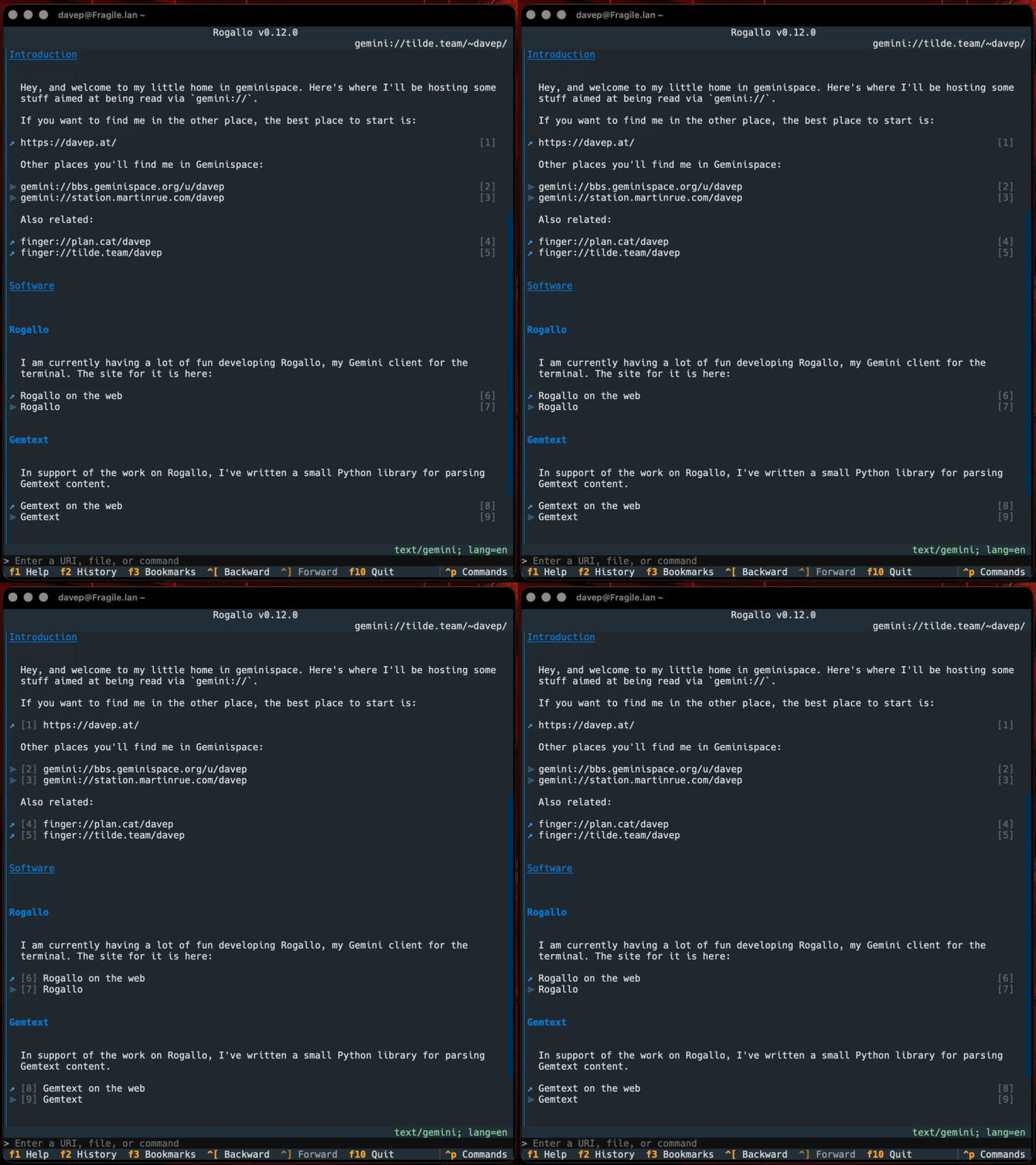
So now there's a ToggleCosyLinkNumbers command (bound to Super+F8 by default1) which does what it says:

Toggling the jump labels

Personally, I prefer them on the right, where they don't disrupt the left-aligned margin for all the text, but I can see why this would be far more comfortable for others, so... why the heck not?


  1. One day I'll write a post about why I'm giving every command a default binding, even if it's not so accessible in less-advanced terminal emulators. Mostly it's down to one of my least favourite design decisions in Textual mixed with my wish to have a command-based interface that works via the palette first and bindings second. 

Some documentation in Geminispace

1 min read; 8 GFI

Given that Rogallo is coming on pretty well, I feel it's about time to get some sort of documentation for it going in Geminispace. With this in mind, I've created an account over on tilde.team so I can make use of their support for the Gemini protocol.

While I don't imagine I'll be writing documentation as comprehensive as the main site for Rogallo, I do aim to provide some basic information.

The other thing I'm going to maintain there is a version of the change log. Rather than edit it by hand each time, I've added a tool to the Rogallo repository that converts the Markdown version of the ChangeLog into Gemtext.

It looks pretty good in Rogallo.

The Rogallo ChangeLog in Rogallo

Initially, I set all of this up so that I was editing the files via Tramp. This worked fine and got me going, but pretty quickly I decided that it would make more sense to create a repository, edit stuff locally, and then just rsync it when I'm good to go.

Not editing in production... I know... How boring.

Rogallo v0.11.0

1 min read; 11 GFI

A quick update to Rogallo, with changes concentrating on giving the user more control over the content of a rendered page.

Despite the fact that the Gemini Protocol and gemtext are all about things being minimal, some capsules can deliver pretty busy content. Personally, I rather like it, and I'm generally impressed at how creative some people are with these tools. On the other hand, I've noticed that some people don't always appreciate the use of emojis or ANSI escape sequences to provide colour. So, with this in mind, I've added a couple of features to help control the content.

The first is a command to toggle emoji removal. If you're finding the emojis in a page too distracting, use the command to toggle them off and on (bound to F6 by default).

AstroBotany without emojis

The setting is sticky too, so if you're so inclined, you can turn emojis off and they'll stay off.

There's a similar command related to the handling of ANSI escape sequences. While some applications let you toggle this at the capsule level (AstroBotany is one example where it's part of the game's settings), not all do. So I've added a command to toggle this (bound to Shift+F6 by default).

ANSI colour off

With both these commands, if this sort of view isn't to your taste:

AstroBotany and its rich display

You can quickly and easily turn it into this:

Colour and emojis off

I think I prefer the richer view, but I can see the utility of the more austere view.

Somewhat related to the above, I've also added the ability to configure the main "icons" that get used inside the rendered content. So if you don't like the choice of for links within a capsule, for links outwith a capsule, or for a list item bullet, you can change them in the configuration file.

Rogallo v0.10.0

4 min read; 11 GFI

Rogallo v0.10.0 is now available. This release has a number of changes, including some new features, some changes to the user interface, and a couple of quality-of-life improvements.

Maximum document width

Amongst some feedback someone left on a slightly unrelated post over on station there was mention of how a document "should" wrap at around 72 characters. While no rationale was given for the "should" part, I was happy enough to accept that this could be a preference for some people. With this in mind, I've added a configuration option to set a maximum width for documents.

While, personally, I prefer Rogallo's default behaviour (I work in an environment where I can resize a window, and I'm capable of doing it), I can appreciate that someone might want to cap it. So for folk who prefer this, they can now make Rogallo look like this (with maximum_document_width set to 80):

Max document width in action

For the moment this can only be set via the configuration file. At some point I might make this more of a dynamic thing. I can imagine this being something handy, or at least fun, to change up as you're viewing different content.

The same feedback "suggested" that the link jumping facility that Rogallo has should have a timeout that clears the buildup of the number being looked for. This seemed like a reasonable thing to ask for. So, before, if you typed 1, a link with a label of 1 would be selected. If you did nothing for a while, and then typed 2, a link with the label of 12 would be highlighted. With the new timeout (set to 1 second by default, configurable in the configuration file), if you type 1 and then 2 more than a second later, first link 1 will be selected, then link 2 will be selected. On the other hand, if you type 1 then 2 within a second, 12 will be selected.

Setting the timeout to 0 disables this and Rogallo's link jumping facility will work as it did before.

Failed input recovery

With this new feature, if you send input text to a capsule and it rejects it for some reason, the input will be held on to. If you then visit the same URI again, the input dialog will be pre-populated with what you attempted to send a moment ago. This gives you the opportunity to edit anything wrong with the submission and try again.

Added all application commands to the command line

If you prefer to use Rogallo's command line more than the command palette, I've now ensured that all bindable application commands can be accessed via the command line. There's a difference in their form, to stay in keeping with the command line. So whereas in the command palette you'd run GoHome by typing go home, in the command line it becomes a !-prefixed snake-case command: !go_home.

All possible commands are listed in the help screen if it's brought up while the command line has focus.

Help showing commands

Capsule navigation commands

Rogallo now has two new commands for quickly navigating within the current capsule path. GoToParent will navigate up a level in the path of the current URI, and GoToRoot will go to the root of the capsule.

The icon for links is now used to show if a link is already in the location history (and so has been visited before), or not:

Visited and non-visited links

Here you can see that Account settings isn't in the visit history, but the other two links are. I was going to do the whole link, but I've never been a fan of how web browsers do this, so I've gone with just the icon. I've also made it subtle but still noticeable. So far, I'm much preferring this; I don't need it blasting out the difference, I just need it to be enough for me to notice1.

Swapped around history and bookmark tools

Until now the "history" and "bookmarks" shortcut keys advertised in the footer brought up the sidebar-based management widgets. This made sense when that's all I had in Rogallo. For a while now though I've had palette-based search tools for both history and bookmarks. Normally I want to search for and select a bookmark or history item way more than I want to manage those lists. So I've relegated the sidebar-based tools to a secondary position and placed the palette-based search tools up front.

This also means that the default bindings have changed a bit. As always, you can discover the bindings with rogallo bindings.

Conclusion

I know I've nodded towards this before, but I think I'm getting close to making a v1.0.0 release. I want to daily-drive for a few more days, and I'd also like to expand the website. I'd also like to build a Gemini/Gemtext-based site for Rogallo -- it'd be pretty weird if I only documented it in http(s)space. I won't let those wishes become blockers for moving to calling Rogallo "stable", but it would be nice to have.


  1. I do recognise that there's an a11y issue here with the subtle difference; there's some work to be done at some point to allow for a high-contrast theme that will resolve this sort of issue. 

Rogallo v0.9.0

1 min read; 9 GFI

I've released v0.9.0 of Rogallo. The first big change in this release is the addition of syntax highlighting to pre-formatted text.

Much like in Markdown, Gemtext also supports pre-formatted text bounded by code fences. Gemtext supports the concept of "alt-text" for such text, like this:

```python
def hello(name: str = "World") -> str:
    return f"Hello, {name}!"
```

Until now Rogallo would simply show the text as-is (with some styling to make it stand out from normal paragraphs). From this release, if there is alt-text for the pre-formatted block, and if it's the name of a supported language, the content will have syntax highlighting applied.

Pre-text with syntax highlighting

If you're curious which languages are supported, it should be anything that Pygments supports.

Another significant change is to the user input dialog. As mentioned in an earlier post, the Gemini protocol imposes limits on how much text can be submitted to a capsule. As documented, the limit is for a resulting URI of 1024 bytes1. To save someone typing out a long entry, only to have it lost2, I've added a count of how much input is left available (calculated from the size of the URI that would result):

The input count

To help ensure that the user doesn't submit too much, I've also added an error display if you go over the limit, which also refuses to submit the input.

Too much input

With these in place it should be a lot harder to run into an unexpected loss of input.

One final tweak is a small change to the optional link stripe system I recently added. While playing around with some other themes, I noticed that the styling didn't show up well, or at all, in many of them. So I've changed it a little so it now shows in all available themes. I'm still not convinced it's quite right -- I'll play some more. But at least now it's visible in all cases.


  1. Although I've already encountered one capsule that limits to 1022, from what I can tell

  2. Right away I'm now thinking it might be a good idea to re-populate the input dialog in such a situation. I'll have to remember to make that a TODO issue. 

Gemtext v1.0.0

1 min read; 7 GFI

I've bumped Gemtext to v1.0.0. I've gone from "this is test code" to "this is stable code" mostly because the library is so simple and I'm unlikely to add any radically new features to it1.

This bump also has one small addition: I've added an alt_text property to the PreFormatted class. This exists to capture and make available any text that comes after the pre-formatted text marker. For example, this text:

```python
print("Hello, World!")
```

will now result in:

PreFormatted(content='print("Hello, World!")', alt_text='python')

If/when I add syntax highlighting of pre-formatted text blocks to Rogallo, this new property will make that possible.


  1. I was thinking about adding a Gemtext builder class at some point, but I can't see a use for it any time soon. Perhaps v2.0.0. 

Rogallo v0.8.0

3 min read; 10 GFI

Rogallo v0.8.0 is now available. This release includes a small bug fix, a big change to how external links and unhandled MIME types are dealt with, and a further improvement to link navigation.

First the big change: hand-off of unhandled content and trust. Until now, if Rogallo was met with a URI it didn't know how to handle, or met with a MIME type it isn't designed to deal with, it would simply hand it off to the browser in your environment. This is generally handy as it means that, when you're browsing gemtext content, if you meet a link that takes you to a conventional website, the link will (normally) be opened in your browser.

There are, of course, any number of schemes that form part of a URI. While Rogallo might commonly be handing off http and https URIs, there's no reason why it can't be handing off a finger or a mailto or whatever. Or, potentially, something a wee bit more dodgy like a javascript URI. While some web browsers don't allow that sort of thing by default (Safari, for example, blocks it unless configured otherwise), others might, and this could result in a nasty surprise.

So now Rogallo has a confirmation step that lets you allow a scheme this once, this and every subsequent time, or just cancel out.

Confirm a scheme

By default the trusted schemes (the ones you say "always" on) are saved in a trusted_schemes file in the data directory.

Similar to the above: if, via a URI that Rogallo can handle, it meets a MIME type it can't handle, it will also pass it off to your operating system. I've added similar protection there too.

Confirm MIME type

In this case any MIME types marked as trusted are dropped into a trusted_mime_types file in the data directory.

ℹ️ Note

If such a MIME type is allowed, it is passed off to your operating system to handle. If you'd like to tell Rogallo to try and internally handle a MIME type, you can set that by configuring the displayable content types.

I feel these changes help remove any possible footguns previously caused by unquestionably handing off URIs to the wider environment.

Another change I've made is to add even more link navigation. This sort of follows on from yesterday's release where I added labelled jumps to links. Again, the usual method of moving between links is to use Tab and Shift+Tab. The problem with those keys is they navigate you through all widgets in the UI that can receive focus. So, if you keep tapping Tab, you'll navigate out of the viewer and into the next available widget, once you reach the last link.

With this release I've added some extra keys which can be used to constantly cycle around the links while you're inside the viewer. These are:

  • Left, Shift+Up, L to go backwards through the links.
  • Right, Shift+Down, l to go forwards through the links.

While these might not be to everyone's taste (I'm already getting very used to using Left and Right), they do add another set of options for link navigation.

The final change is a simple bug fix, where the command line history simply wasn't being saved and loaded correctly. From now on it should save correctly and allow navigation of the history using the cursor keys.

With these changes in place, I feel I'm actually getting close to bumping up to a v1.0.0 release. While there are still things I want to add (there are currently a handful of TODO items in the issues), I see these as nice-to-have items that I want to do later on, rather than as must-have items that preclude considering Rogallo a viable daily-driver.

I'll see how the next day or so goes.

Rogallo v0.7.0

2 min read; 10 GFI

Rogallo v0.7.0 is now available. The main changes in this release revolve around the display and navigation of links.

The aim of Rogallo, as a "TUI" application, is that it is usable purely with the keyboard, and also very usable with the mouse too. So far I think I've managed to hit that mark, but I felt that things weren't quite as smooth as they could be when it came to navigating links.

Links, like any other UI element in the application that can receive "focus", can be navigated to using Tab and Shift+Tab. This is fine if there's just a handful of links in a page, but more than that and having to repeatedly press tab gets a bit boring. Meanwhile, if you have a mouse or other pointing device to hand, it's easy to scroll and click. I wanted to try and have a similar keyboard-based speedup available.

So now, by default, all links on a page get a numeric label:

Links with numeric labels

To jump to a link, while the viewer has focus, simply type the number. When you do so, the corresponding link will be focused, then you just need to hit Enter to follow the link.

The input system is written to "wrap around", as it were. So if you type 1 the link with a label of 1 will be focused. If you then type 2, and if there's a link with a label of 12, it will be focused. If there are fewer than 12 links, the input chain resets, and 2 will be focused. The idea being: as you keep typing numbers, they concatenate until there's no matching link and then it starts fresh.

I was quite keen on having the labels over to the right, so they didn't disturb the layout of the main body of text, but there's a small downside with this: if you have a lot of links next to each other it's not always obvious which link and which label go together. While getting close to your desired link should be good enough (you can then still hit Tab to get to your chosen link), I felt something else could be done to give some help. So I added an option to turn on alternating background stripes for links.

Links with stripes

If all of this seems a bit too cluttered, especially if you're the sort of person who is mouse-first or mouse-heavy with the terminal, there's still the option to turn off both the labels and the stripes and have Rogallo look like it did before.

Links how they used to look

I think this covers pretty much all the possible link navigation needs I can imagine anyone having.

As well as the above, other small changes in v0.7.0 include:

  • Fixed a cosmetic issue with the truncation of the current location shown in the viewer panel, if the location is longer than the available space is wide.
  • The suggestions provided in the command line now include hosts found in the "known hosts" trust store. So if you are trying to remember a location you visited long ago, and you never bookmarked it and it's fallen out of the location history, it's still there as a reminder/hint/completion.
  • Also added the same to the history search palette.

I've also done more work on the website. The configuration section now covers pretty much everything you can modify that changes how Rogallo works. I still want to add more to the site -- mostly concentrating on explaining some key features -- but I felt that anyone using Rogallo right now would be most interested in how they can tailor it to their own taste.

Rogallo v0.6.0

3 min read; 11 GFI

I've just released Rogallo v0.6.0, which contains the last big feature that was missing to make it a viable daily-driver Gemini Protocol client. That feature? Client certificates.

From now on, if you visit a capsule that requests a client certificate, rather than an error being shown, a dialog will pop up:

Simple dialog

When you select the Create button, the certificate will be created and then, from then on, when you visit the capsule, that client certificate will be used.

As you might have noticed, there are "advanced options" available too. Most are just optional values that go into the certificate itself:

The advanced options

The two advanced options that mostly affect how all of this works are the scope and the transient option. The transient option means that the certificate is only good for the lifetime of this run of Rogallo. If you close Rogallo, the certificate will be discarded. In almost all cases, you'll want to leave this turned off.

The scope toggle affects the scoping of the certificate. As I've been able to understand, the strict reading of the Gemini Protocol says that a certificate should be scoped to the host, port, and path where it was first requested and generated for. However, out in the real world, it seems there are applications built for the protocol that don't work well with that approach. With this in mind, I've built Rogallo to always scope to just the domain and port, by default. If you want a particular certificate to follow the strict letter of the specification, turn the "Scope to domain/port" option off.

With all that in place, it should now be possible to use Rogallo with any Gemini application that needs client-side authentication. For the last couple of days, I've been using it to successfully play AstroBotany, for example.

Logged in to AstroBotany

As I said: with this in place, I believe Rogallo has all of the basic requirements of a Gemini protocol client covered. I'm not quite ready to call it v1.0.0 just yet -- there's a fair bit of testing and tweaking I still want to do, and I can see that, when it comes to certificates for example, there's some extra error handling I need to throw in. Additionally, the "advanced" version of the certificate create dialog is kind of tall for many terminals; I think I might need to play with the layout a bit.

Also, as I've mentioned a few times: I want to get proper documentation written and hosted on a dedicated site.

Back to this release: there's also a handful of other QoL changes and fixes. These include:

  • Any page that is opened from an in-page link is now always retrieved from the remote location, bypassing any cached copy. The idea being that, if someone is actively navigating documents, they will want the freshest version of the new page.
  • Fixed the layout of list items. Before now, the text wasn't wrapping, while, at the same time, space was being made for the text as if it was being wrapped.
  • The bookmark search palette is no longer available if there are no bookmarks to search (the idea being that not being available is less confusing than being available but empty).
  • The connection timeout, read timeout, and maximum number of redirects can now be set in the configuration file.
  • The title area of the viewer now has a key icon that appears if a page is using a client certificate.
  • Pages that require a client-side certificate are never added to the cache (the idea being that such pages are more likely to have dynamic content, and so the freshest version should always be loaded).
  • Reworked what is recorded in navigation and location history to ensure that what is saved is the landing URI, not the URI that was first visited. This solves the problem of what happens during redirections, and so also solves the issue of what happens with 10/11 response inputs (having the resulting query appear in history could result in duplicated "submissions" to whatever app was in use).

With these enhancements and fixes in place, I'm going to keep tending my plant, and posting away on Station, as a way of continuing to shake down the application. With that in mind, if anyone knows of any other sites and apps I should be testing against out in Geminispace, do let me know!

Rogallo v0.5.0

4 min read; 11 GFI

As mentioned in the last release, I've been afk for a week and a bit, enjoying some downtime over in the Netherlands. Although... it wasn't exactly all afk. I did take a keyboard with me and, while time permitted, I did tinker on Rogallo. That's resulted in quite a few TODO items being ticked off, and quite a few changes and improvements being made.

Visible MIME type

It's a small tweak, but I found it useful. The status bar of the main viewer panel now shows the MIME type of the document currently being viewed. Normally it will be showing text/gemini:

text/gemini

but Rogallo can show some other text/ types too, so this will also make it obvious what you're looking at:

text/plain

You might also notice that, depending on the theme being used, the "correct" MIME type gets a "this is fine" colour whereas anything else is in a more "neutral" colour.

Better handling of text/plain and friends

Now, if a document comes in that isn't text/gemini, there is no attempt to parse and render it as Gemtext; it's just shown as a simple block of plain text.

MIME type handling of local files

Given the above changes, Rogallo now makes an effort to guess the MIME type of any local file you view. This should help ensure that only Gemtext files get parsed and rendered as such.

OS hand-off for other MIME types

Where possible, when confronted with a MIME type that Rogallo can't handle, it will attempt to hand it off to your environment's main web browser. While not ideal, I have no wish to turn Rogallo into a terminal-based general content browser/viewer; this is all about Gemini and Gemtext.

History enhancements

The history list has been updated to allow the removal of individual items, and also clearing down the whole history.

Added home page support

It's now possible to set a home page with either a SetHome (which prompts for a URI) or a SetHomeToCurrentLocation (it does what it says) command. There is also a GoHome command that takes you to the home page you've set. The default bindings for all of these can be found by either running rogallo bindings, or by viewing the help screen; pulling up the command palette is also an option.

Added support for bookmarks

Bookmarks are now supported. The ToggleBookmarks will show/hide the bookmarks list. AddLocationToBookmarks will add the current location to the bookmarks. SearchBookmarks lets you search the bookmarks.

More command line suggestions

The completion suggestion facility in the application's command line (where you enter URIs or commands) has been enhanced to include suggestions from the navigation history, the location visit history and the bookmarks. This should make it a little easier to enter a URI you're trying to remember.

Having added the SearchBookmarks command, it made sense to also add a SearchHistory command too. So with that you can quickly search all the locations you've visited (within the limits of the history) and head back to one.

Optimised Gemtext rendering

While not something that should generally be obvious to the user, the Gemtext rendering engine has been optimised a little to reduce the number of Textual widgets used to display a document by consolidating all adjacent plain paragraphs.

Cleaned up quoted paragraphs

I've cleaned up an issue with adjacent quoted paragraphs. Until now there was an empty line between each quote; this spoiled the layout.

View source and ANSI escape sequences

Some Gemini sites use ANSI escape sequences to add colour to pages. While this isn't, as far as I can tell, part of the standard for Gemtext, it's a simple thing to support and so Rogallo has supported rendering this for a while; if a page has colours, they'll be used.

This meant that if you asked to view the source of a page, you'd also see that rendered in colour. I felt that wasn't in the spirit of viewing the source.

So now, if viewing a page like this:

My glower

When you go to view the source, instead of all of the colours still being rendered, you now get to see which ANSI escape codes were used where:

ANSI source

Viewer auto-focus

One small change is that, any time a document is loaded (from bookmarks, history, the command line, etc), the viewer now gains focus. Something I kept forgetting to do and finally I got fed up with having to tab over to the viewer each time.

Content cache

Rogallo now has a content cache for pages loaded from capsules (the aim is to never bother caching content loaded from the filesystem). Any page that is loaded with a success status code (20) gets cached, and when you go back to it, if it's within the TTL of the cache entry (by default set to one hour), the content of the page will be loaded from the cache rather than making a fresh request.

Using the Reload command always bypasses the cache.

There is also a ClearCache command which will delete all cached data.

The TTL of the cache can be changed in the configuration file by updating the value for cache_ttl. Also, if you don't wish to ever use a cache, you can set with_cache to false to disable it.

What's next

With all of the above, I feel this gets Rogallo close to being v1.0.0-ready. Not quite, but very close. The main addition that still needs to be tackled is client-side certificates. I don't anticipate this being too tricky, it's just more a case of needing to play around with the code I've got so far, and needing to think about how to implement it in a TUI-friendly way (if, indeed, there are any considerations there at all).

For now though, as long as you don't need a client-side certificate, there's plenty to play with and try out.