Given I'm almost certainly going to drop GitHub Copilot starting next month, I'm using Gemini CLI more and more for BlogMore. Yesterday evening, I used it to plan out an idea for a change to the application. Now that I've migrated all images to WebP, I thought it might be interesting to look at the idea of having a responsive approach to images. This is something I don't know a whole lot about (never having needed to bother with it before), but it also happens that I need to read up on this anyway for something related to the day job; given this, it felt like a good time to experiment.
This morning, over second coffee, I've kicked off the job of implementing it and, honestly, Gemini CLI is really struggling. It "implemented" the change pretty quickly, within minutes, but it just plain didn't work. Since then I've had it iterate over the issue four times and now it's struggling to make it work at all. It's still beavering away on this as I type, and consuming daily quota at a fair rate too.
So, while I still have GitHub Copilot, this feels like a good point to play them off against each other at least one more time. Having saved the plan Gemini wrote last night as an issue, I've assigned it to Copilot (using Claude Sonnet 4.6). As I type this, I have Gemini racing to get this working in a terminal window behind Emacs, meanwhile there's Claude doing its thing in GitHub's cloud.
It'll be interesting to see if Copilot manages to one-shot this, for sure Gemini is far off a one-shot implementation.
While I've had some troubles with it -- as can be seen here, here and here for example -- I'm mostly having an okay time. The code it writes isn't too bad, and while it seems to need a little more direction and overseeing than I've been used to while using Copilot/Claude, it generally seems to arrive at sensible solutions for the problems I'm throwing at it1.
One difference with working with Copilot CLI that I have noticed, however, is that Gemini doesn't seem to care for cleaning up after itself. When faced with a problem it'll often write a test program or two, perhaps even create a subdirectory to hold some test data, run the tests and be sure about the outcome. This is good to see. It's not unusual for me to do this myself (or at least in the REPL anyway). But it really doesn't seem to care to actually clean up those tests. A handful of times now I've had it leave those files and directories kicking around. I've even said to it "please clean up your test files" and it's gone right ahead and done so, which suggests it "knows" what it did and what it should do.
This also feels like a new source of mess for all the people who commit their executables and the like to their repositories. That should be fun.
The thing I don't know or understand, at least at the moment, is if this is down to the CLI harness itself, or the choice of model, or a combination of both, or something else. I'm curious to know more.
There is a weird thing I'm seeing, which I want to try and properly capture at some point, where it'll start tinkering with unrelated code, I'll undo the change, it'll throw it back in the next go, I'll undo, rinse, repeat... ↩
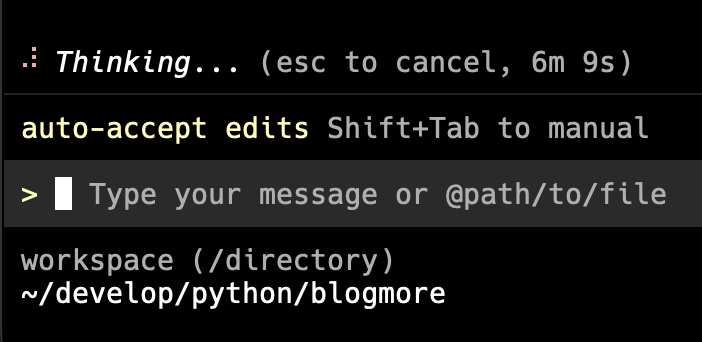
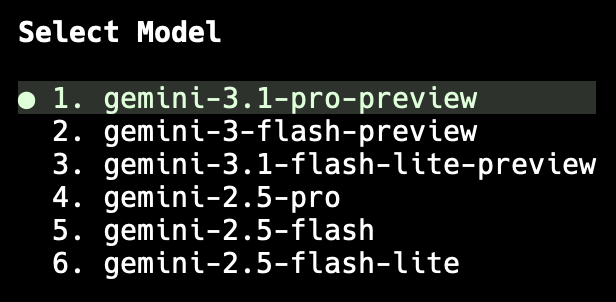
I was working on something new for BlogMore and, sure enough, after a wee while, we got stuck in "Thinking..." mode. So I hit Escape and asked to pick a different model. I chose to pick manually, and went with gemini-3.1-pro-preview.
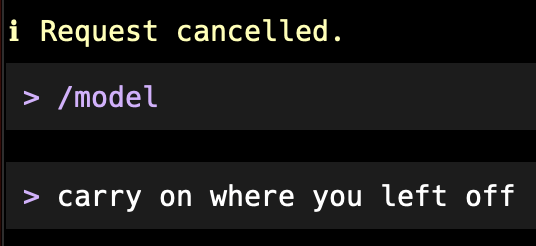
I then literally asked that it carry on where it left off...
...and it did! It worked. No more sitting around thinking for ages.
Watching the quota after doing this, it looks like the model I was using ate quota faster, but that was worth it given I've never come close to hitting full quota with Gemini CLI.
Once the immediate job was done, I went back to auto and it worked for a bit, only to get stuck thinking again. I repeated this process and it did the trick a second time. From now on I'm going to use this approach.
It does, again, highlight how unreliable these tools are, but at least I've found a workaround that works for now.
When I first tried it out, a week back, I found it worked fairly well but could be rather slow at times. On the whole though, I found it easy enough to work with; the results weren't too bad, even if it could throw out some mildly annoying code at times.
Yesterday evening though, because of the failure of Copilot, I decided to go just with Gemini and work on the problem of speeding up BlogMore. This worked really well. I found that it followed instructions well1 when given them, and also did a good job of applying what it was told, constantly, without needing to be told again. I actually found I had a bit of a flow going (in the minimal way that you can get any sort of flow going when you're not hand-coding).
Using it, I tackled all the main bottlenecks in BlogMore and got things working a lot faster (at this point it's generating a site in about 1/4 of the time it used to take). By the time that work was done, I wanted to do some last tidying up.
This was where it suddenly got unreliable. I asked it a simple question, not even tasking it with something to do, and it went into "Thinking..." mode and never came back out of it. I seem to remember I gave it 10 minutes and then cancelled the request.
After that I tried again with a different question, having quit the program and started it again with --resume. This time I asked it a different question and the same thing happened. I hit cancel again and then, a moment later, finally got an answer to the previous question.
From this point onwards I could barely ever get a reply out of it. I even tried quitting and starting up again without --resume, only for the same result.
A quick search turns up reports similar to this issue on Reddit, Google's support forums and on GitHub. It looks like I'm not alone in running into this.
This here is one of the things that concerns me about the idea of ever adopting agents as the primary tool for getting code written: the unreliability of their availability, and so the resulting inconsistency of the output. It feels like any perceived win in terms of getting the code written is going to be lost in the frustration of either waiting and trying again when it just gives up playing along, or in running from one agent to another, hoping you find the one that is capable of working with you at that given moment.
Meanwhile folk talk like it's the solution to the problem of software development. It's especially concerning when those folk are in "engineering leadership" or a position with a similar name. When they talk like this they are either displaying a lack of foresight, or betraying a lack of care for the craft they are supposed to represent (amongst other reasons).
It's very timely that this post from Rob Pike popped up in my feed this morning:
Although trained in physics, I worked in the computing industry with pride and purpose for over 40 years. And now I can do nothing but sit back and watch it destroy itself for no valid reason beyond hubris (if I'm being charitable).
Ineffable sadness watching something I once loved deliberately lose its soul.
Yup.
Albeit I sense it pays little to no attention to AGENTS.md↩
At the moment I'm working on a linting command for BlogMore. Having given up on Copilot/Claude for this, I've been having quite a bit of success with Gemini CLI. But while doing this, I've noticed some odd things with it. It does have this habit of cargo-culting some changes, or just rewriting code that doesn't need it.
For example, the tests for the new linting tool: it keeps adding import
pytest near the top of the test file despite the fact that pytest doesn't get used anywhere in the code. Every time, I'll remove it, every time it adds more tests, it'll add it back.
Another thing I've noticed is it seems to be obsessed with adding indentation to empty lines. So, if you've got a line of code indented 8 spaces, then an empty line, then another line of code indented 8 spaces, it'll add 8 spaces on that empty line. That sort of thing annoys the hell out of me1.
But the worst thing I just ran into was this. It had written this bit of code:
deflint_site(site_config:SiteConfig)->int:"""Convenience function to run the linter. Args: site_config: The site configuration. Returns: 0 if no errors, 1 if errors were found. """linter=Linter(site_config)returnlinter.lint()
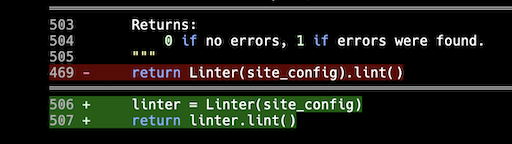
On the surface this seems fine: a function that hides just a little bit of detail while providing a simple function interface to a feature. But that use of a variable to essentially "discard" it the next line... nah. I dislike that sort of thing. The code can be just a little more elegant. So seeing this I edited it to be (removing the docstring for the purposes of this post):
I then had Gemini work on something else in the linting code. What did I see towards the end of the diff? This!
Sneaky little shit!
Now, sure, the idea is you review all changes before you run with them, but knowing that it's likely that any given change might rewrite parts of the code that aren't related to the problem at hand adds a lot more overhead, and I wonder how often people using these tools even bother.
I've seen some IDEs do that on purpose too; I've got Emacs configured to strip that out on save. ↩
At some point this morning I was looking for something on this blog and stumbled on a post that had a broken link. Not an external link, but an internal link. This got me thinking: perhaps I should add some sort of linting tool to BlogMore? I figured this should be doable using much of the existing code: pretty much work out the list of internal links, run through all pages and posts, see what links get generated, look for internal links1, and see if they're all amongst those that are expected.
Later on in the day I prompted Copilot to have a go. Now, sure, I didn't tell it how to do it, instead I told it what I wanted it to achieve. I hoped it would (going via Claude, as I've normally let it) decide on what I felt was the most sensible solution (use the existing configuration-reading, page/post-finding and post-parsing code) and run with that.
It didn't.
Once again, as I've seen before, it seemed to understand and take into account the existing codebase and then copy bits from it and drop it in a new file. Worse, rather than tackle this using the relevant parts of the existing build engine, it concocted a whole new approach, again obsessing over throwing a regex or three at the problem.
I then spent the next 90 minutes or so, testing the results, finding false reports, finding things it missed, and telling it what I found and getting it to fix them. It did, but on occasion it seemed to special-case the fix rather than understand the general case of what was going on and address that.
Eventually, probably too late really, I gave up trying to nudge it in the right direction and, instead, decided it was time to be more explicit about how it should handle this2. The first thing that bothered me was that it seemed to ignore the configuration object. Where BlogMore has a method of loading the configuration into an object, which can be passed around the code, but with the linter it loaded it up, pulled it all apart, and then passed some of the values as a huge parameter list. Because... reasons?
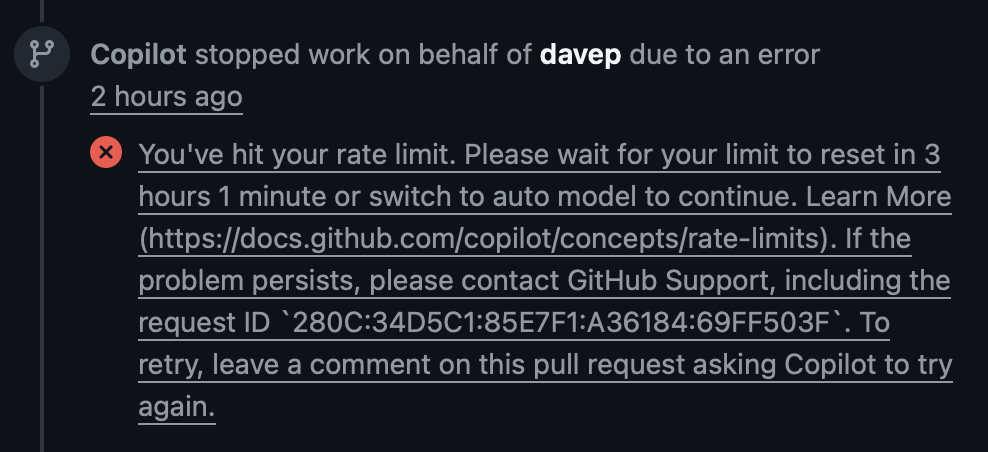
Anyway, I told it to cut that shit out and prompted it about a few other things that looked pretty bad too. Copilot/Claude went off and worked away on this for a while, using up my 6th premium request of the session, and then eventually came back with an error telling me I'd hit a rate limit and to come back in a few hours.
Could I have got it to where I wanted to be a bit earlier, with more careful prompting? No doubt. Will a lot of people? I suspect that's rather unlikely. This is one of the many things that make me pretty sceptical about this as the tool some sell it as, at least for the moment. I see often that it's written about or talked about as if it's a really useful coding buddy. It can be, at times, but it's hugely unreliable. Here I'm testing it by building something as a hobby, and I'm doing so knowing that there's no real consequence if it craps out on me. I'm also doing it safe in the knowledge that I could write the code myself, albeit at a far slower pace and with less available time. Not everyone this is aimed at has that going for them.
But these tools are still sold like they're the most reliable coding buddies going.
All that said: having hit the rate limit, and having squandered six premium requests on the problem with no real progress, I decided to use my Google Gemini coding allowance instead (which, in my experience so far, seems pretty generous). I threw more or less the same initial prompt at it, but this time I stressed that I really wanted it to use the existing engine where possible. It managed to pretty much one-shot the problem in about 9 minutes and used up just 2% of my daily quota3.
I've done a little more tidying up since, and I still need to properly review the result, but from what I can see of the initial results it's found all of the issues I wanted it to find, first time (something Claude didn't manage) and hasn't found any issues that don't exist (also something Claude didn't manage).
So I guess this time Gemini was the reliable buddy. But not knowing which buddy you can rely on makes for a pretty unreliable group of buddies.
This process could, of course, work for external links too, but I'm not really too keen on having a tool that visits every single external link to see if it's still there. ↩
Which is mostly fine; I'm doing this as an experiment in what it's capable of, and also I was sofa-hacking while having a conversation about naming Easter eggs in Minecraft. ↩
Imagine that too! Imagine knowing exactly how much of your quota you've used at any given moment! Presumably GitHub don't show you where you are in respect to the rate limits on top of your monthly quota because grinding to a halt with no warning is more... fun? ↩
Given the concerns I wrote about yesterday, in regard to the core generation code in BlogMore, I've been thinking some more about how I would probably have the code look. First thing this morning, over breakfast and coffee, I concluded that I'd probably have gone with something that was a single orchestration function/method, into which would be composed some modular support code. Back when I started the process of breaking up the generator I seem to recall that Gemini sort of went along those lines, but the code it created seemed pretty messy and the main site generation class was still a lot bigger than I would have liked. This is why, at the time, I went with Copilot/Claude's mixin-based approach; it felt a bit more hacky but the code felt tidier.
I wanted a similar separation of concerns as the mixin approach was aiming for.
I wanted to move away from mixins.
I wanted to favour something closer to composition.
I wanted to favour simple functions over classes where possible.
I then set it off working and left it to get on with things. Overall I think it took around an hour, with the need for me to approve things now and again (so probably could have been faster, I wasn't there to answer right away every time), but it got there in the end. This has resulted in a third PR to clean up the generator typing issues. In doing so I feel I've also addressed most of the unease I was feeling yesterday evening, and might actually have got closer to where I'd rather the code was.
Glancing over the result, I can still see things I'd want cleaned up, and done in a slightly different way, but overall I have a better feeling about this third approach. I sense this is a better place to move on from.
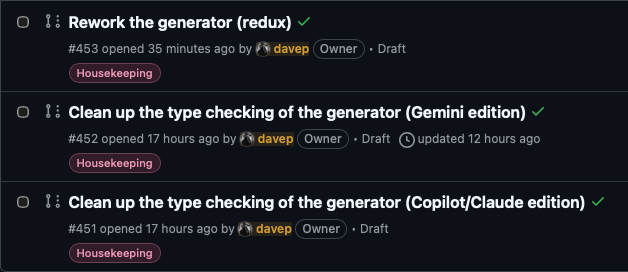
So that's three PRs I have lined up to address the code smell that's been bugging me for a couple of days. One fixes it with an ABC; one fixes it with a protocol; and now one fixes it by reworking the submodularisation of the generator to use a different approach entirely. On the one hand, this seems like a lot of work and a lot of faff (and, as I said yesterday, I wouldn't start here to get where I want to be), but on the other hand I do kind of understand the appeal of being able to get hours of work done in a relatively short period of time, so you can experiment with the results.
Would I recommend someone work this way? No, of course not. Does it make for an interesting side-quest when I'm in "it is still my hobby too" mode? Yeah, it does.
The tidying of the BlogMore source carries on; sometimes by hand, but also sometimes by using either Copilot/Claude or Gemini to decide how best to nudge the codebase in a desired direction. When I do the latter, if I like the suggestions the agents make, but it looks like a bunch of work and I can't be faffed with all that typing, I get them to do the work; otherwise, I'll do it myself.
I am, however, seeing lots of evidence of what I expected to happen, and anticipated happening: to get to where I would like the code to be, I wouldn't have started here.
I'll stress again, for anyone who hasn't been following along, for anyone who might have landed into the middle of this long thread of AI experimenting, that this was the point and purpose. I wanted to use this tool to build something relatively inconsequential, and which I could likely build myself given the time and the inclination, and also something I would actively use.
So where am I at? My main distaste at the moment is the core generation code. Just a few days ago this was a couple of thousand lines of repetitive code that did the job, but which was a bit messy. There's no question that I would not have written it anything like this. Because of this I've been on a push to try and break it up and tidy it up. While doing this I've been playing Copilot/Claude and Gemini off against each other, to see who does what.
As of the time of writing, the generator is split up, but in a way I wouldn't have done myself either. It's pretty much half a dozen mixin classes in a trench coat, all pretending to be one cohesive class. I feel that's a reasonable solution given where I started, but honestly I wouldn't have started there had I been coding this by hand.
Right at the moment I'm working out the best way forward to tidy up an outcome of this approach that I really don't like. The generator code is littered with lots of # type: ignore[attr-defined] to keep mypy happy, because that's what Claude did when it built all those little mixins. To borrow from the explanation in AGENTS.md, the current makeup looks like this:
The issue is (for example) that MinifyMixin defines a method _write_html. Meanwhile OptionalPagesMixin and ListingMixin and so on make use of self._write_html. But because there's no direct connection between those two classes and MinifyMixin, mypy complains that _write_html isn't defined. Of course, it isn't defined, because it only becomes available when all those classes climb into the SiteGenerator trench coat and pretend to be a real class.
The ignore direction solves the problem, but it's ugly and it's cheating.
So I then set the two different agents on the path of proposing a solution to this. Both were quite different. Claude (via Copilot) decided that an abstract base class was the solution. Gemini decided that a protocol was the solution. I think I'm siding with Gemini on this one because this is a provides/needs problem, not a "kind of" problem. Even then though, while I sense Gemini has the right approach, I'm not always happy with its implementation of it1, and once again: it's a cleanup of something I'd sooner not be cleaning up in the first place.
So here's the thing, and this harks back to wondering if the code is that bad: it isn't... but it's also generating work if you look at the code and decide that you want it clean and maintainable.
To get to where I want to go, I wouldn't start from here.
I get why I'm seeing the odd report here and there of people abandoning their code bases, or deciding to rebuild them from scratch by hand. Part of me wants to start a fresh branch, remove almost everything, and rewrite the code so it has feature-parity but in a way where I feel the code is tidy and elegant.
One of the things I noticed when I started on the BlogMore experiment was the fact that Copilot/Claude seemed to love to write monolithic code. Pretty early on most of the code was landing in just a couple of files. Once I noticed this I instructed it to break things up and always try and be more modular. This started out in the instructions for Copilot but eventually I migrated the instruction to AGENTS.md (as seems to be the fashion these days).
While this rule seems to have held, one file that always remained pretty large was generator.py. This is, as you might guess from the name, the main site generation code. While it does sort of make sense that it is the pivotal body of code for the application, it doesn't follow that it has to contain so much code.
So, yesterday evening, I decided to experiment by asking Gemini CLI to look over the code and tell me what it thinks. The prompt was:
Quite a bit of work has been done on @src/blogmore/generator.py to try and reduce duplication of effort and boilerplate. I wonder if we can do a little more? Please take a look over the code there and see if there is any more repetitive code that can be cleaned up, to make the codebase more maintainable.
Also, the file is getting quite long. I prefer Python files to be no more than 1000 lines at most. Please also look at the code with a view to it being broken up into more logical sub-modules. Perhaps @src/blogmore/generator.py could turn into a generator directory with smaller modules inside it.
Look over this and report back with any findings. Also, don't look for anything, look for and report back changes that will make cleaner code and will be impactful.
I then left it to come up with an assessment while I got on with other things.
Its headline finding was:
Status: The file is currently 2,146 lines long, significantly exceeding the 1,000-line maintainability threshold. It has become a "God Object" that handles everything from low-level byte-copying and regex-based minification to high-level site orchestration.
This seemed reasonable, so I told it to get on with the job of doing this. I've also saved the plan it made as a gist.
What is notable in the plan is the validation strategy at the end. While there is a full suite of tests available, and while this is documented in AGENTS.md:
-Run the test suite after every change: `make test`.
-Any new functionality **must** have associated tests.
-If a change in behaviour makes existing tests incorrect, update those tests.
Do not change tests purely to make them pass without a genuine reason.
-Do not delete or comment out failing tests; fix the underlying code instead.
the plan that Gemini arrived at seemed to concentrate only on test_generator.py and test_integration.py.
Once the work to break up generator.py was done I could see it had run those tests and it was happy with the outcome. So I did the obvious thing and ran make test and, sure enough, there was a failed test (I think there was just the one). So I said to Gemini:
you should have run all the tests. Did you read @AGENTS.md at all?
It replied with:
Verifying Refactor Quality: Running comprehensive quality checks as mandated by AGENTS.md.
and then got on with the work of fixing what had been broken.
At this point it should be noted that another instruction I have in AGENTS.md is:
Use full, descriptive names for variables, functions, and classes. Do not use abbreviations when the full word is readable.
I've found that Copilot/Claude has done an excellent job of sticking to this wish. If anything I'd say at times it's got a little too carried away. But, I'm not typing this code, I'm only reading it; making the code very readable from a symbol point of view makes a lot of sense.
I swear, I can see why people sometimes fall into the trap of thinking agents have personalities, because the next thing I see, after telling it off for obviously not reading the rules of messing in my repo, is this:
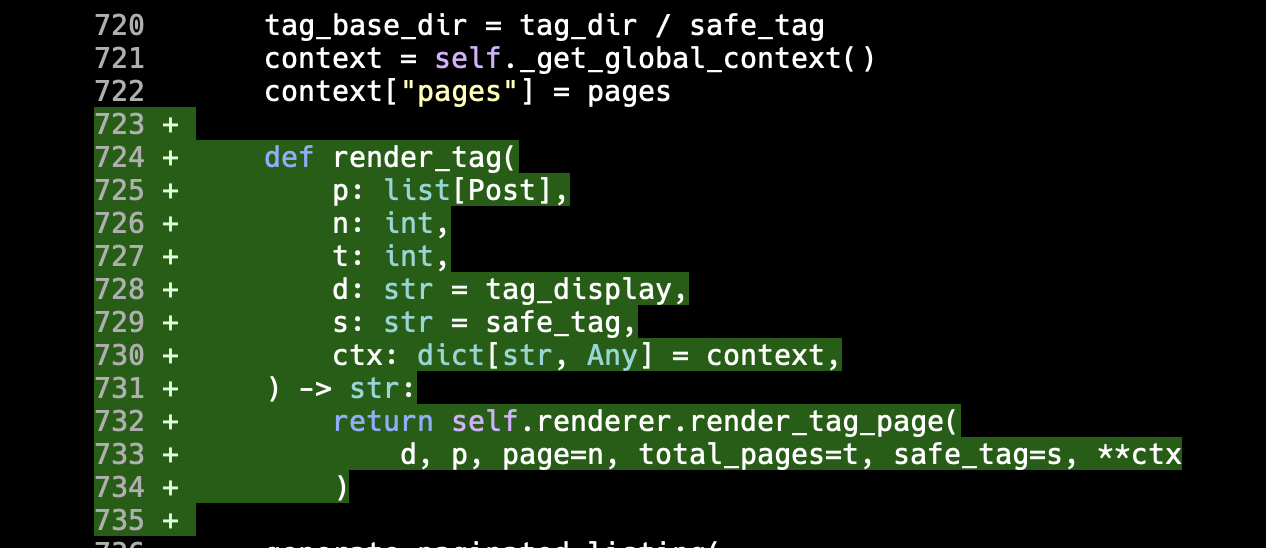
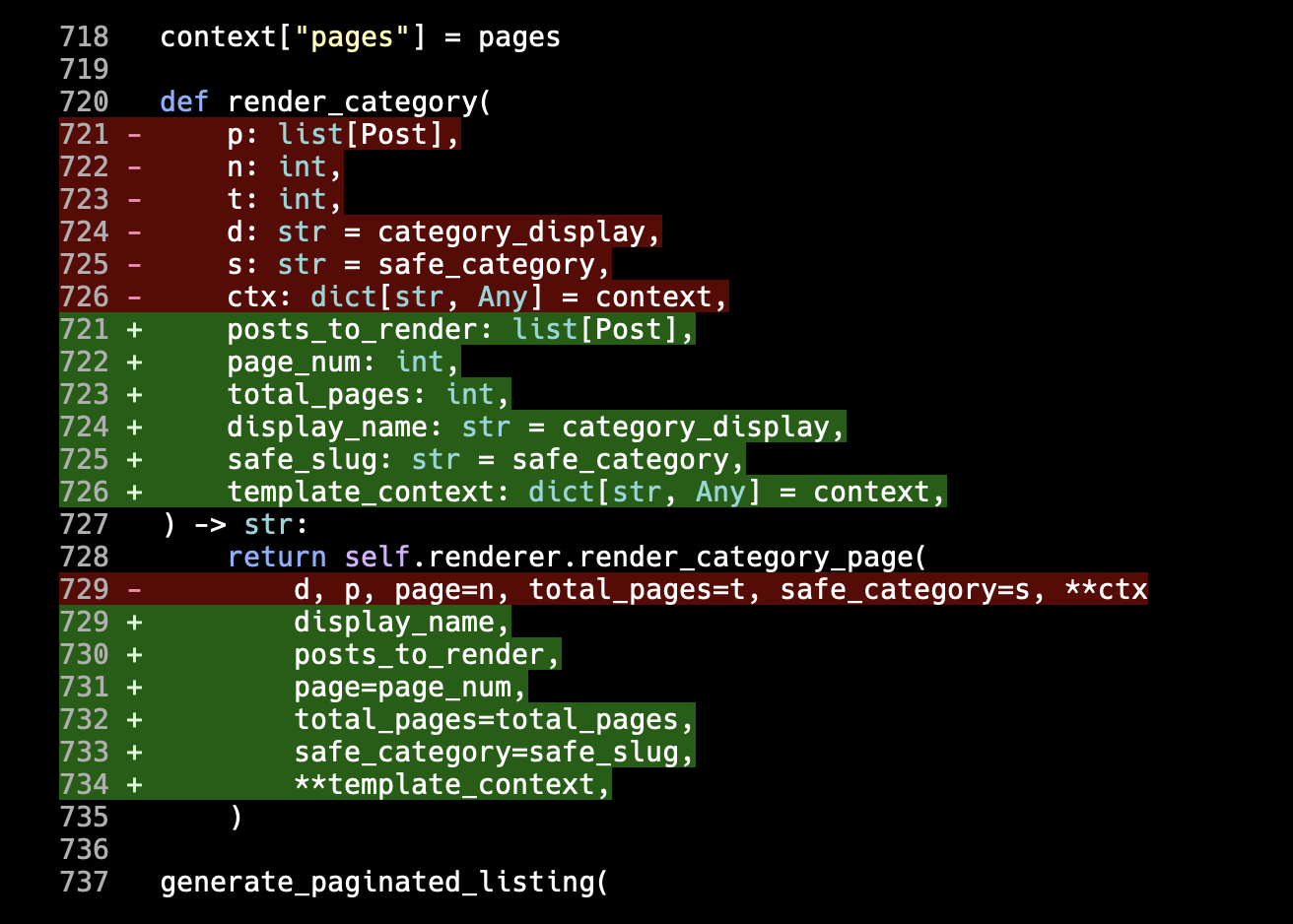
Now, to be fair, my instruction does mention variables, functions, and classes. It doesn't explicitly say "parameters", I guess. But... come on!
In all other respects though it got things fixed and I ended up with a cleaned-up generation engine that was more modular. In review, I did find a couple of things in its plan that I wasn't super keen on (and which I could have pushed back on right at the planning stage, so I'd say that's on me, not on the agent), but overall it was a workable solution.
I prompted it once more to fix the things I didn't like, which it did and did a fine job of. As part of that prompt I did say:
I'm seeing functions in there with single letter parameter names. Please keep in mind the instruction about naming things in @AGENTS.md
And it did do as it was told.
As amusing as this was (really, it's so tempting to think it decided to be stroppy after I told it to go read AGENTS.md), it has left me wondering though: just how widespread is the convention of looking for and reading the agents file? While I get that each of the command-line tools seem to have a preference for their self-named instructions file first, it was my understanding that in the absence of such a file AGENTS.md is looked for.
During the session I'm talking about here, either Gemini CLI didn't do that, or it did and just didn't take on board the conventions I wanted it to follow.
As for the great breakup of generator.py... I grabbed the assessment and the plan that Gemini came up with, turned it into an issue, and set Copilot to work on it too. Despite working off the same prompt, as it were, it came up with a very different approach. So my next job is to decide which of the two I like most.
As of the time of writing, the Gemini approach to cleaning this up results in the main site.py file inside the new generator subdirectory being 996 lines; that's just under the 1,000 line limit I tend to set myself1, so close enough, but not ideal. Copilot/Claude, on the other hand, is sat at 278 lines! While the idea of Gemini was to make site.py a small descriptive top-to-bottom and start-to-finish description of how a site is generated, it's somehow managed to make a more verbose version; the Copilot/Claude version looks to do a far better job of fulfilling that intention.
Then again the Gemini version has broken the work up across 9 files, the Copilot/Claude version across 13. Also the Copilot/Claude version has taken a really fun and interesting approach to solving the problem that I'm kind of digging2.
So now I have to decide which, if either, I'm going with.
That's probably another post.
Although in my own projects I try and keep Python files much smaller than that if I can help it. ↩
As mentioned a couple of times in the last couple of days, aside from one particular issue I found and fixed, I'm in more of a "let's review some of the code and tidy things up" phase with the codebase. This process is at times me hand-making changes, and also in part me directing the agent to make a very specific improvement that I want.
Yesterday evening I did a little experiment of getting Gemini CLI to look for code that really needed some cleaning up, and then I had it write the issue text which I fed directly to Copilot/Claude and had it do the work. Finally, when that was done, I had Gemini review the work that Copilot had done (it was "happy" with the changes).
So, this morning, I thought I'd tackle another little thing I'd noticed in the code that rubbed me up the wrong way. Early on in the development lifecycle of BlogMore I added the optional minification of CSS and JS files (HTML too eventually, but that's not involved here). Because it's often been a convention I also prompted Copilot to ensure that if a file called whatever.css was minified, it be called whatever.min.css.
The resulting code did something that made sense, but which I wouldn't ever have done. The constants that held the filenames looked like this:
Like... sure, 10/10 for not hard-coding these all throughout the codebase as magic strings1, but this feels a little redundant. Personally I think I'd have just mentioned the non-minified name and then I'd have a function that generates the minified name from it. While technically, it would add the smallest amount of runtime overhead to the code, I think the single-source-of-truth pay-off is worth it.
For a good while though I left this alone. I was having fun playing with other things in the application, and adding all sorts of other amusing toys. But now that I'm more into a "how can this code be improved and what issues does the code have" mode, it felt like time to tackle this.
Given that a change here would touch so much of the code, and given I wasn't massively keen on spending ages walking through all the code and making the changes related to this, I decided to prompt Copilot to get on with this. It felt like something it couldn't get that wrong.
While it didn't get it wrong, as such, it made some questionable choices along the way. It did do the main thing I would have done: make a function to turn a filename into a minified filename. The initial version looked like this:
defminified_filename(source:str)->str:"""Compute the minified output filename for a given source filename. Transforms the file extension: ``.css`` becomes ``.min.css`` and ``.js`` becomes ``.min.js``. For example, ``theme.js`` becomes ``theme.min.js`` and ``style.css`` becomes ``style.min.css``. Args: source: Source filename ending in ``.css`` or ``.js``. Returns: The corresponding minified filename. Raises: ValueError: If *source* does not end with ``.css`` or ``.js``. """ifsource.endswith(".css"):returnsource[:-len(".css")]+".min.css"ifsource.endswith(".js"):returnsource[:-len(".js")]+".min.js"raiseValueError(f"Unsupported file extension for minification: {source!r}")
That string-slicing with len and so on is nails on a chalkboard to me. When something like removesuffix exists, why on earth would "you" elect to do this? Of course the answer is obvious, but still... ugh.
Now, I will have to give credit to the process though. So the above was the initial version of the code. Once the PR had been created by Copilot, and I'd pulled it down for review and testing, it kicked off a review of its own. Reviewing its own code, it pushed back on itself:
In src/blogmore/generator.py, lines 90-93: The slice syntax source[:
-len(\".css\")] is less readable than using source.removesuffix(\".css\"), which is available in Python 3.9+. Since this codebase targets Python 3.12+, consider using removesuffix() for clarity.
It then went on to do a further commit to tidy this up. I approve. Bonus point to Copilot here.
So now we have this:
defminified_filename(source:str)->str:"""Compute the minified output filename for a given source filename. Transforms the file extension: ``.css`` becomes ``.min.css`` and ``.js`` becomes ``.min.js``. For example, ``theme.js`` becomes ``theme.min.js`` and ``style.css`` becomes ``style.min.css``. Args: source: Source filename ending in ``.css`` or ``.js``. Returns: The corresponding minified filename. Raises: ValueError: If *source* does not end with ``.css`` or ``.js``. """ifsource.endswith(".css"):returnsource.removesuffix(".css")+".min.css"ifsource.endswith(".js"):returnsource.removesuffix(".js")+".min.js"raiseValueError(f"Unsupported file extension for minification: {source!r}")
At this point the code is less worse. I don't think it's great, but it's less worse. Honestly, I think I'd be more inclined to do something with PurePath.suffixes and PurePath.suffix, leaning into the fact that we're dealing with filenames here, and so making it less about pure string slicing.
I also have other issues with the code, which I might still fix by hand:
The fact that it makes a point of only handling .css and .js files, and throws an error otherwise, is an odd choice. I mean, in context, that's what it's here to serve, but it seems oddly-specific and an attention to detail that wasn't really necessary.
The hard-coding of .min a couple of times grates a little.
The hard-coding of both .css and .js a couple of times, with the doubled-up if feels unnecessary.
It's a small function. It works in context. It does the job. But it also could be more elegant in the way it does it.
I'd also like to go on a small aside for a moment, because there's something else in the above that bothers me: yesterday evening I spent some time directing Copilot to tidy up all the docstrings in the code. While any agent I've thrown at it does seem to have taken note of the AGENTS.md file, and the instructions on how to write the docstrings (Google style please), it seems to have decided it was aiming more at Sphinx when it came to the content. That's fine, I hadn't been explicit.
So last night I made it clear that I wanted something more like I use in all my Python code, that aims to work with mkdocstrings. It should use the inline code and cross-reference styles that are more common when using that tool. I even made a point of telling Copilot to update AGENTS.md to make it clear that this is the preference:
-All inline code and cross-references in docstrings **must** use mkdocstrings-compatible Markdown style:
-Inline code: use single backticks (\`like_this\`).
-Cross-references: use mkdocstrings reference-style Markdown links (e.g., [`ClassName`][module.ClassName] or [module.ClassName][]).
-Do **not** use Sphinx roles (e.g., :class:`ClassName`) or double-backtick code (``ClassName``).
Now go back and look at the docstring for minified_filename. So much for agents making a point of following the instructions from AGENTS.md.
Anyway, back to the main flow here: given that I was thinking that I might rewrite minified_filename by hand so that it works "just so", I made a point of checking that it had written tests for this; something I couldn't take for granted.
Again, to the credit of the agent, it had written some tests:
classTestMinifiedFilename:"""Test the minified_filename utility function."""deftest_css_extension_becomes_min_css(self)->None:"""Test that a .css extension is replaced with .min.css."""assertminified_filename("style.css")=="style.min.css"deftest_js_extension_becomes_min_js(self)->None:"""Test that a .js extension is replaced with .min.js."""assertminified_filename("theme.js")=="theme.min.js"deftest_hyphenated_css_filename(self)->None:"""Test that a hyphenated CSS filename is handled correctly."""assertminified_filename("tag-cloud.css")=="tag-cloud.min.css"deftest_hyphenated_js_filename(self)->None:"""Test that a hyphenated JS filename is handled correctly."""assertminified_filename("search.js")=="search.min.js"deftest_unsupported_extension_raises(self)->None:"""Test that an unsupported extension raises ValueError."""withpytest.raises(ValueError,match="Unsupported file extension"):minified_filename("style.txt")
It's a start, but I think it could be done better. There's the test of the intended outcomes, and the test of the ValueError for passing something that isn't a .js or a .css file. Meanwhile, that business of testing "hyphenated" seems oddly specific for no good reason. But it's even worse: the test for a "hyphenated" JS file doesn't use a hyphenated file name.
Hilarious.
That's not all. What about the more obvious things like testing what happens if you pass a filename that has no extension, or a filename that already has two extensions, or a filename that already ends in .min.js, or a filename that has .min.css somewhere in its path that isn't at the end of the name, or an empty string, or...
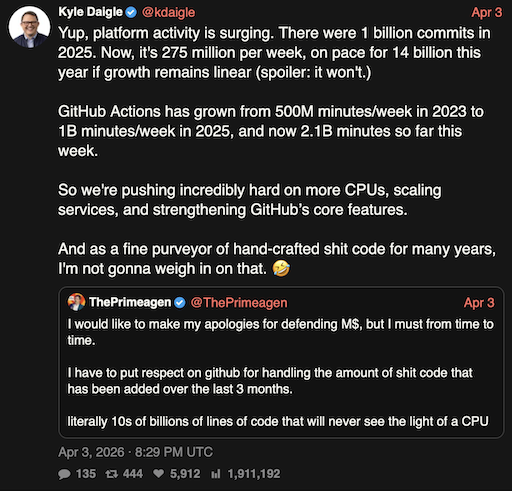
As I said a few days ago: the code is mostly fine. It gets the job done. I've seen worse. I reviewed worse. I've inherited worse. I think the thing that concerns me the most is that there has to be a lot of code like this being uncritically accepted after generation2, which in turn is surely going to be feeding back into future training. So while I can't deny that something has improved in the last six or so months, when it comes to agent-generated code, might it be that we are at peak quality right now? Might it be that from this point on we start to decline as "eh, it's... fine" code starts to overwhelm the most popular forge we have?
I suppose the main benefit still is that this approach is nice and cheap. Right?
Actually, I think it did hard-code the filenames throughout the codebase, initially, until I asked it not to. Perhaps I'm misremembering, but agents do seem to love magic strings and numbers for some reason (I think we know the reason). ↩