Posts tagged with "LLM"

NGMCP v0.2.0

1 min read

The experiment with building an MCP server continues, with some hacking on it happening over a couple of hours while killing time in an Edinburgh coffee shop.

It is, of course, a solution looking for a problem, and I suspect I'm the only person who will ever use it, and even then only as a test, but building it is proving interesting.

The main changes in v0.2.0 are:

  • I turned the current search_guide tool into a line_search_guide tool (because that's what it was doing: a line-by-line search).
  • I added a body_search_guide tool that treats all the lines in an entry as a single block of text and then does the search in that (so searches over line breaks will work).
  • I added a read_entry_source tool that, rather than rendering the entry of a guide as plain text with all the markup removed, it instead delivers the underlying "source" for the entry; something that could be useful if you wanted to get an agent to convert it into another marked-up body of text.
  • I added a markup glossary resource, which technically tells an agent everything it needs to know about Norton Guide markup.

The latter one is interesting. I added it and did some experimenting locally and it seemed to be helpful and I could ask questions about markup and Copilot seemed to use it. Meanwhile, having installed v0.2.0 globally on my machine, and having enabled it, I'm finding that Copilot seems to have zero clue about the markup and instead is using the server to go off and read the guides to work out the markup1.

On the other hand, the new "get source" tool seems to work a treat.

Peeking at the source for an entry

So I suspect I still have some reading/experimenting to do when it comes to resources, so I can better understand why I'd want to provide them and what problem they solve.


  1. All credit to it: it did find CREATING.NG and read the markup out of that. 

Global and local MCP servers with Copilot CLI

1 min read

This morning I'm tinkering some more with NGMCP. Having done a release yesterday and tested it out by globally installing it with:

uv tool install ngmcp

I was then left with the question: how do I easily test the version of the code I'm working on, when I now have it set up globally? Having done the global installation I had ~/.copilot/mcp-config.json looking like this:

{
  "mcpServers": {
    "ngmcp": {
      "command": "ngmcp",
      "args": [],
      "env": {
        "NGMCP_GUIDE_DIRS": "/Users/davep/Documents/Norton Guides"
      }
    }
  }
}

whereas before it looked like this:

{
  "mcpServers": {
    "ngmcp": {
      "command": "uv",
      "args": ["run", "ngmcp"],
      "env": {
        "NGMCP_GUIDE_DIRS": "/Users/davep/Documents/Norton Guides"
      }
    }
  }
}

But now I want both. Ideally I'd want to be able to set up an override for a specific server in a specific repository. I did some searching and reading of the documentation and, from what I can tell, there's no method of doing that right now1. So I've settled on this:

{
  "mcpServers": {
    "ngmcp-global": {
      "command": "ngmcp",
      "args": [],
      "env": {
        "NGMCP_GUIDE_DIRS": "/Users/davep/Documents/Norton Guides"
      }
    },
    "ngmcp-local": {
      "command": "uv",
      "args": ["run", "ngmcp"],
      "env": {
        "NGMCP_GUIDE_DIRS": "/Users/davep/Documents/Norton Guides"
      }
    }
  }
}

and then in Copilot CLI I just use the /mcp command to enable one and disable the other. It's kind of clunky, but it works.


  1. I did see the suggestion that you can write your MCP server so that it does a non-response depending on the context, but that seems horribly situation-specific and wouldn't really help in this case anyway because I want it to work in both contexts, depending on what I'm doing. 

NGMCP - An MCP experiment

2 min read

Recently I've been thinking that it would be interesting to get to know a little about the Model Context Protocol and see what it's about and get a feel for how useful it might be, if at all, for anything I do.

As always happens when I want to try out something new, I reached for a problem I know well so I don't have to get bogged down in solving the problem itself. As almost always happens, I decided I should base it around Norton Guides.

Part of the point of MCP seems to be providing an interface over sources of data and actions, that an LLM might not otherwise be able to cope with, and so it sounded to me like providing a bridge to the content of Norton Guide files would be a perfect test. Of course, this isn't the first time I've bridged LLMs and NG files, but this is obviously intended to be a more generic solution than throwing a Markdown file at NotebookLM.

Earlier this afternoon I sat down and did some reading, and then decided to throw the problem at GitHub Copilot. I told it I wanted to use my NGDB library as the core of the tool, and that it should wrap it up with FastMCP. The initial result was... a bit of a mess. It sort of worked, sort of, but it also seemed to try and put together a project that mostly looked how my Python repos look, but with some bits just wrong.

I did some cleaning up, did some testing, did some tweaking, and eventually I had something working.

Asking what NGMCP can do

So far I've given the code a fairly quick read over, and I can see what it's doing and how it's going about this. This approach obviously has the disadvantage that I didn't hand-write it so there's still a lot to read to really appreciate what's going on; on the other hand, it does have the advantage that it's implemented a tool based on my library so I know what to expect it to be doing.

There will be more code reading happening, and I also intend to look to tidy up the code more and perhaps hand-add some more features.

Looking at the credits of a guide

I very much doubt that this particular MCP server is going to be any use to anyone, but as a proof of concept it works well for me. If I were in a position of needing to build something genuinely useful, I now have a start and a vague idea.

Reading some text from a guide

On the other hand: once again, as with other projects I've done related to Norton Guides, this is a tool that helps keep the content available and accessible; that alone is one reason for me to tidy this up and move it towards v1.0.0 and keep it maintained.

If you fancy having a play, some (currently Copilot-generated) documentation can be found on the server's dedicated site. When I get a bit more time I'm going to flesh this out.

obs2nlm v1.2.0

1 min read

Three months back I released obs2nlm, a tool that takes an Obsidian vault and turns it into a single Markdown file so it can be used as a source for NotebookLM.

Since then I've been using it a lot and it's working out really well.

Meanwhile, one of my vaults has started to creep up towards the documented word limit for a single source in NotebookLM (500,000 words). Right now it's sitting at around 75% and is steadily creeping up.

So, with this in mind, I've made a change I've been planning from the start and have added a --split option. If used, if the generated file looks like it's going to hit the word limit, a second (or more) file will be created. The naming scheme is simple enough: if you ask obs2nlm to create an output file called dirt.md and it needs to run over, it'll then create dirt-2.md, dirt-3.md, and so on. The idea then is that, rather than upload that single Markdown file as a source, you upload all of the generated Markdown files.

Given you get up to 50 sources per notebook, this should see me right for any reasonable vault. As for if it will affect the quality of the results I get when I query the notebook... that's hard to say until I find myself in that situation. If Google are to be believed it shouldn't be an issue, and the alternative is to fall foul of the limit so this seems like the only sensible solution.

I've also added a --dry-run command line switch too; this should be handy for checking how big a vault is when compared to the word limit, without actually generating any files.

BlogMore v2.3.0

1 min read

I've just pushed BlogMore v2.3.0 up to PyPI. This release has a couple of bug fixes and a couple of significant new features.

The first new feature, which came in as a request, is to add support for control over the themes used for code blocks, including independent control of the themes used for light and dark mode. With these you can specify any of the Pygments styles to use for code blocks. Personally, I prefer to have things blend in, but this now also gives you the chance to have them really contrast (use a light mode theme for dark-mode blog, or a dark mode theme for a light-mode blog).

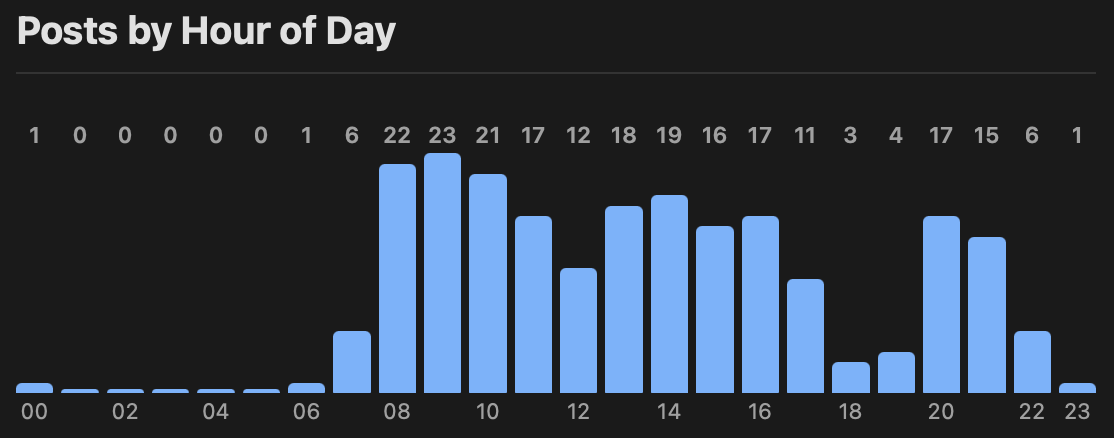
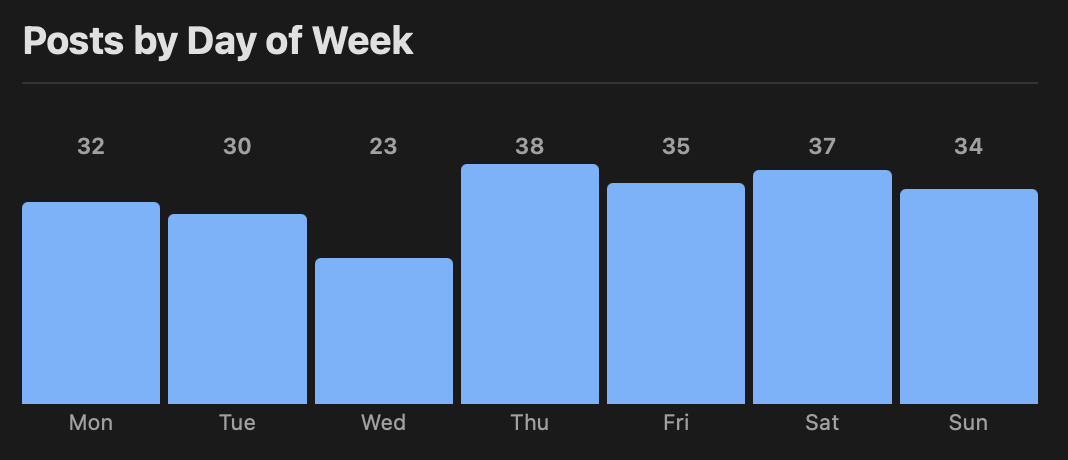
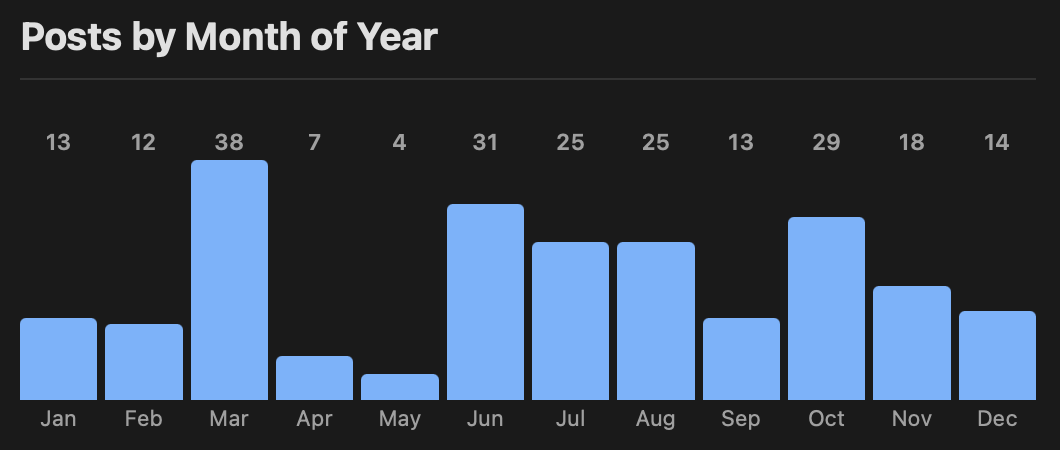
The other big feature popped into my head earlier today and once I thought about it I had to have it. It's similar to something I had for the photography section of the older version of my website, consisting of a bunch of useless but fun stats and facts about the content.

Things like which hour of the day I tend to post during:

Hour of day

Or the day of the week:

Day of week

Or the month of the year1:

Month of year

This is designed to be turned off by default -- I can imagine most folk would not want this sort of thing on their blog -- but it can easily be turned on with with_stats. The location of the stats can also be controlled using stats_path.


  1. Unsurprisingly March is leaping ahead as of the time of writing. 

Copilot rate limits

1 min read

Last night, while tinkering with another BlogMore feature request, I ran into the sudden rate limit issue again. As before, there was no warning, there was no indication I was getting close to any sort of limit, and the <duration> I was supposed to wait to let things cool down was given as <duration> rather than an actual value.

So this time I decided to actually drop a ticket on GitHub support. Around 12 hours later they got back to me:

Thanks for writing in to GitHub Support!

I completely understand your frustration with hitting rate limits.

As usage continues to grow on Copilot — particularly with our latest models — we've made deliberate adjustments to our rate limiting to protect platform stability and ensure a reliable experience for all users. As part of this work, we corrected an issue where rate limits were not being consistently enforced across all models. You may notice increased rate limiting as these changes take effect.

Our goal is always that Copilot remains a great experience, and you are not disrupted in your work. If you encounter a rate limit, we recommend switching to a different model, using Auto mode. We're also working on improvements that will give you better visibility into your usage so you're never caught off guard.

We appreciate your patience as we roll out these changes.

So, in other words: expect to be rate limited more on this product we're trying to get everyone hooked on and trying to get everyone to subscribe to.

Neat.

I especially like this part:

We're also working on improvements that will give you better visibility into your usage so you're never caught off guard.

You know, if it were me, if I wanted to build up and keep goodwill for my product, I'd probably do that part first and communicate about it earlier rather than later.

I guess this is why I don't hold the sort of position that gets to make those decisions.

BlogMore v2.2.0

1 min read

I've just bumped BlogMore to v2.2.0. This release adds post counts to the archive page.

Post counts in the archive

The overall count appears at the top of the page, with further counts broken down for each year and each month. I've tried to ensure that the counts appear subtle enough, but still readable.

Also, serving the same purpose, but giving more information at a glance, I've added the same counts to the table of contents that appears to the right of the archive if you're on a suitably wide display.

Counts in the ToC

This means I can easily see that I've posted more times this month than I have in any other month since I started this blog. In fact, I've posted more times this month than I have in quite a few individual years in the past.

So... that's today's "I thought I'd added everything but oh look here's another thing to add" feature. Which goes some way to explain why there are so many posts this month, I guess.

BlogMore v2.1.0

2 min read

It's been a couple or so days since I last made any changes to BlogMore -- mainly because I've been messing with blogmore.el -- but yesterday morning I decided to make a change I've been wanting to make for a wee while.

Ensuring fenced codeblocks were handled was one of the things that was important when I started planning BlogMore and, while the result was looking good (thanks to Pygments), the way the block itself looked in the page wasn't quite to my taste. So yesterday I wrote out how I wanted things to be changed and tasked Copilot with getting the job done.

I'm pretty happy with the result.

(defun greet (name &optional (greeting "Hello"))
  "Prints a greeting to standard output."
  (format t "~A, ~A!~%" greeting name))

For the sake of any future reader, should I happen to tweak this even more at some point in the future, here's what the above looks like at the time of writing:

Example code block

As you can see: the language for the block is now shown to the left, and there's a handy "copy to clipboard" icon to the right. I'm still not sure I'm loving the subtle border around the sides and the bottom, I think I'm going to live with that for a few days and see how it sits with me.

I'm also wondering if I should tweak the name of the language a little too, so that it's capitalised correctly. Of course, I could just get into the habit of writing the language name in the start of the block with the correct casing...

def greet(name: str, greeting: str = "Hello") -> None:
    """Print a greeting to standard output.

    Args:
        name: The name of the person to greet.
        greeting: The greeting to use.
    """
    print(f"{greeting}, {name}!")

but given how many code blocks I've got in my blog by this point, where I've typed them in lower case... it's probably easier to just tweak it when presenting it. Moreover, I do want to try and keep my Markdown sources compatible with as many rendering engines as possible and I can't be sure that all of them would downcase before doing the language lookup (although you'd hope they all would).

Meanwhile... given how much more I like how code is looking now, I'm going to have to find more reasons to include code, and Pygments supports so many languages too! Even ones from my distant past...

Function Greet( cName, cGreeting )
   If cGreeting == NIL
      cGreeting := "Hello"
   EndIf
   ? cGreeting + ", " + cName + "!"
Return NIL

As an aside: I also just noticed that they list FoxPro, Clipper, xBase and VFP as aliases for xBase-type languages, but no Harbour! I might have to see about doing a PR for that...

BlogMore v2.0.0

3 min read

Well... I thought I was done with all the major changes with BlogMore, but then a fairly simple request came in and that kicked off a whole load of changes (which in turn ran into one or two problems with GitHub Copilot).

I dived into this because I liked the idea anyway and I think it's time that I, as much as possible, moved the layout of my blog to clean URLs almost everywhere. I can't reasonably do it for actual posts because a) lots of posts point to other posts so there's a whole editing job to do there1 and b) there are some links out there that point to my blog posts2.

The result is BlogMore v2.0.0.

Anyone who's been following the experiment with BlogMore might wonder that the version number is up to v2 already, given it's barely a month old. The answer to that is pretty simple: I'm using semver for the version number and there's a breaking change in this release with no real way of maintaining backward compatibility.

So what's changed? First the simple ones: I added some more *_path configuration options to control the locations of:

All of those keep their default values from before, and so can remain backward compatible. Personally, I've updated the configuration for this blog so that I'm using:

archive_path: "/archive/index.html"
categories_path: "/categories/index.html"
search_path: "/search/index.html"
tags_path: "/tags/index.html"

which, combined with:

clean_urls: true

results in cleaner URLs for all of those site features.

Another thing that came to mind was what to do about pagination. Things like the date-based archives, categories, tags, and so on, can all run to multiple pages and so all generated pages of content using a pagination scheme. This needed its own approach. I decided on adding a setting to control the first page of content (page_1_path) and a setting for all subsequent pages (page_n_path). But there was a problem here: to keep this approach backward compatible I'd need to have different settings per area of the blog. That would mean something like tags_page_1_path, tags_page_n_path, year_page_1_path, year_page_n_path, month_page_1_path, month_page_n_path, and so on; the reason being each one would need its own set of variables so the user can set where {tag} goes in the path, or {year}, or {month}, but one of those is no use in another context, and so on.

All of this would have been total overkill and an unnecessary explosion of things that can and might need to be modified in the configuration file; it would also be a nightmare to document.

So I decided this: the page_1_path and page_n_path settings simply describe what goes on the end of any other URL in the blog, and because of that the defaults would have to be incompatible. I think the result is a lot tidier.

This also felt like a good time to make this change because, aside from one other blog out there, I don't think anyone else other than me is using BlogMore at the moment.

This change did mean that I'd need to edit some of the posts in my blog to update for the slightly changed layout, but it was a small enough job with minimal impact so it was worth it. I also used a tweaked setting for page_n_path:

page_n_path: "/page/{page}/index.html"

so that any paginated page has a URL that ends something like .../page/2/. This holds for any page on the blog that has multiple pages.

This is the point where I'd say something about how I think that's all the big changes in this project done... but I'm starting to suspect this isn't the plan the coding gods have for BlogMore.


  1. Although I suspect I could agent the shit out of that problem

  2. Although few enough that I probably shouldn't let it stop me doing this. 

Too much work for Copilot?

1 min read

I don't know if it's just that GitHub Copilot is having a bad time at the moment, or if I've run into a genuine problem, but all isn't well today. After merging last night's result I kicked off another request related to a group of changes I want to make to BlogMore. It's a little involved, and it did take it a wee while to work on, but mostly it got the work done.

Again, as I said in the earlier post, I won't get into the detail of these changes yet, but they're fairly extensive and do include some breaking changes, so it's probably going to take a wee while to have it all come together. Claude's first shot at the latest change was almost there but with the glaring bug that it did all the work but didn't actually add the part that reads the configuration file settings and uses them (yeah, that's a good one, isn't it?).

So I asked it to fix it. It went off, worked on the issue, and then suddenly...

Denied

This surprised me. After the past few weeks I've had sessions where I've requested it do things way more frequently than this morning. I'm also nowhere near out of premium requests either:

Number of requests left

While the error, as shown, might be valid and might be down to my actions, it's massively unhelpful and doesn't really explain what I did to cause this or even how I can remedy it. This is made all the more frustrating by the fact that it seems to be saying I need to wait <duration> to try again. Yes, literally a placeholder of <duration>. O_o

One thing is for sure: this is another useful experiment in the current experiment. It's worth having the experience of having the tool screw with the flow. It doesn't come as a surprise, but it's a good reminder that using an agent that is hosted by someone else means you fully rely on their ability to keep it working, the whims of their API limits, and perhaps even your ability to pay.