Posts tagged with "Markdown"

OldNews v1.3.0

1 min read

OldNews

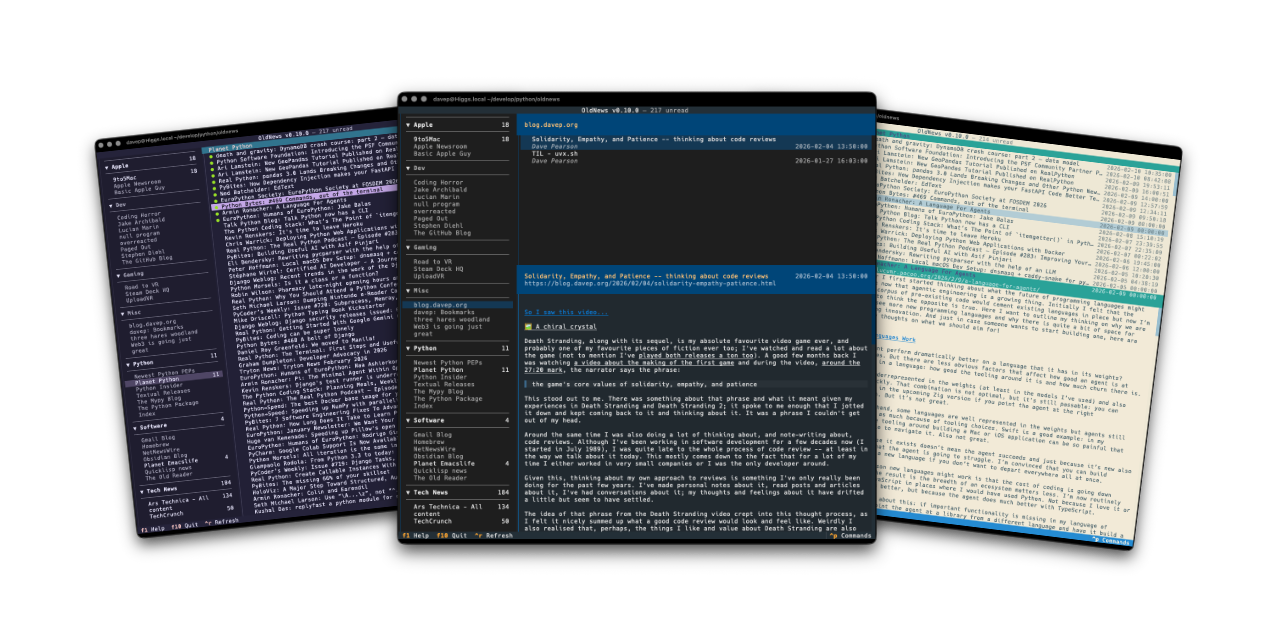
Yesterday evening I released v1.3.0 of OldNews, my terminal-based client for TheOldReader.

The main reason for this release is that html_to_markdown had a major release and the one function I use from it fundamentally changed the return type, causing OldNews to crash any time you tried to read an article.

It was a quick enough fix, although it's one I want to go back and review and perhaps see if there's a better approach, or see if this new return type offers something I could be making better use of.

The one other change, which I made a wee while ago but hadn't got round to releasing yet (I've been kind of distracted recently), is that OldNews now only makes a call out to the API to mark an article as read when you read it, but only if it was previously unread. A small internal change nobody should really notice, but it saves on work.

If you're a user of TheOldReader and fancy interacting with it from the terminal too then it's out there to try out. It's licensed GPL-3.0 and available via GitHub and also via PyPI. If you have an environment that has pipx installed you should be able to get up and running with:

pipx install oldnews

It can also be installed using uv:

uv tool install oldnews

If you don't have uv installed you can use uvx.sh to perform the installation. For GNU/Linux or macOS or similar:

curl -LsSf uvx.sh/oldnews/install.sh | sh

or on Windows:

powershell -ExecutionPolicy ByPass -c "irm https://uvx.sh/oldnews/install.ps1 | iex"

Once installed, run the oldnews command.

BlogMore v2.6.0

1 min read

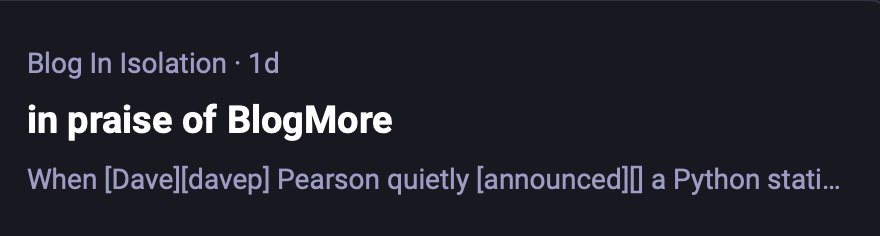
Yesterday I read a rather positive post about BlogMore, which was lovely to see. But... when I saw the link for it over on Mastodon I noticed something wasn't quite right about the description in the preview:

The preview of the post

See, when BlogMore makes a post, if the author of the post hasn't provided a description in the frontmatter, the first paragraph of text will be used instead. When doing this the code should strip out any markup (and also skip any initial images, that sort of thing).

But, as you can see, there are things like [Dave][davep] in that description. So I checked in with Andy and that was something that came from the underlying Markdown. After a bit of checking, it became obvious that the code in BlogMore was only looking for and removing inline links, but wasn't doing anything about reference links.

So, as usual, one prompt later and the issue was handled.

As it stands, I don't think I'll keep up with the current approach. It doesn't feel quite right to me. The whole point is that the Markdown should be rendered down to pure text and then the first actual paragraph of text is used. The code I have there now is doing some regexp-based mucking about as an approximate approach. It works, more or less, but it feels like it's implementing a poor Markdown parser when there's a Markdown parser already built in.

Given this, at some point soon, I might have a play and look at the idea of "let's have a Markdown to pure text parser" and then use that. I could see it being useful for other purposes too.

Anyway, the upshot of all of this is that BlogMore v2.6.0 is now available and it handles the stripping of reference links from the description, plus the recently-added strikethrough markup too.

Hike v1.4.0

1 min read

Hike, my wee terminal-based Markdown viewer/browser, has had an update to v1.4.0. In this update I've made a change I've been meaning to make for ages: some support for "wiki links".

By that I mean the sort of link markup you often see in Markdown documents made with Obsidian:

In other words [[this]] instead of [this](kind-of-link.md)

Personally it's something I seldom need, but on the occasion I have been delving into my Obsidian vaults with Hike I've wished the links at least rendered "correctly", even if they wouldn't fully work.

On that note, it's worth keeping in mind that this "wiki link" implementation in Hike doesn't support something that Obsidian does: find the most likely target file for a given link. If you click such a link, Hike expects the file to be exactly where the link suggests. There's no going off and finding the most likely match in the "vault", etc (Hike obviously has no concept of a "vault").

I'm open to the idea of extending this at some point, perhaps, but not yet. The intention here isn't to build a terminal-based Obsidian-a-like, but instead to build and maintain a workable Markdown browser/viewer (and occasional editor).

Hike is licensed GPL-3.0 and available via GitHub and also via PyPI. If you have an environment that has pipx installed you should be able to get up and going with:

pipx install hike

If you're more into uv:

uv tool install hike

If you don't have uv installed you can use uvx.sh to perform the installation. For GNU/Linux or macOS or similar:

curl -LsSf uvx.sh/hike/install.sh | sh

or on Windows:

powershell -ExecutionPolicy ByPass -c "irm https://uvx.sh/hike/install.ps1 | iex"

BlogMore v1.12.0

1 min read

Another day, another tweak to BlogMore. This bump adds a couple of features relating to headings. The main change being that I've added support for custom IDs for links. To borrow from the docs:


If you need a specific id β€” for example because the auto-generated one is too long, or because you want a stable id that won't change if you reword the heading β€” you can set it explicitly by appending {#your-id} to the end of the heading line:

### My Great Heading {#custom-id}

This produces:

<h3 id="custom-id">My Great Heading</h3>

The custom id overrides the auto-generated one. Headings without a {#…} suffix keep their auto-generated IDs as usual.


Headings, of course, have a default "slugged" ID if a custom one isn't provided.

The other main change is that it's now easier for a reader to discover a link to a heading should they want to link someone to a specific part of a post or page. Again, to borrow from the docs:


To make it easy for readers to share a link to a specific section, BlogMore renders a small ΒΆ symbol at the end of every heading. The symbol is invisible by default and appears when the reader moves the mouse over the heading. Clicking the symbol navigates the browser to that heading's URL fragment, where the address can be copied from the browser's location bar.

The anchor appears and disappears with a smooth fade and does not affect the layout of the page in any way.


Another small change I added was to the "Generated by BlogMore" text that appears at the bottom of every generated page. I always think it's nice if some tool lets you turn that sort of thing off, and I'd not paid attention to that yet. So as of v1.12.0 you can add this to the configuration file:

with_advert: false

and you then don't have to have that at the bottom of each page.

Credit BlogMore if you want, but you don't have to.

Hike v1.3.0

1 min read

I've just released v1.3.0 of Hike, my little terminal-based Markdown browser. It's about a year now since I made the first release and I've been making the odd update here and there, but mostly it's a pretty stable tool. There's a few other things I'd like to do with it but I keep getting distracted by different ideas.

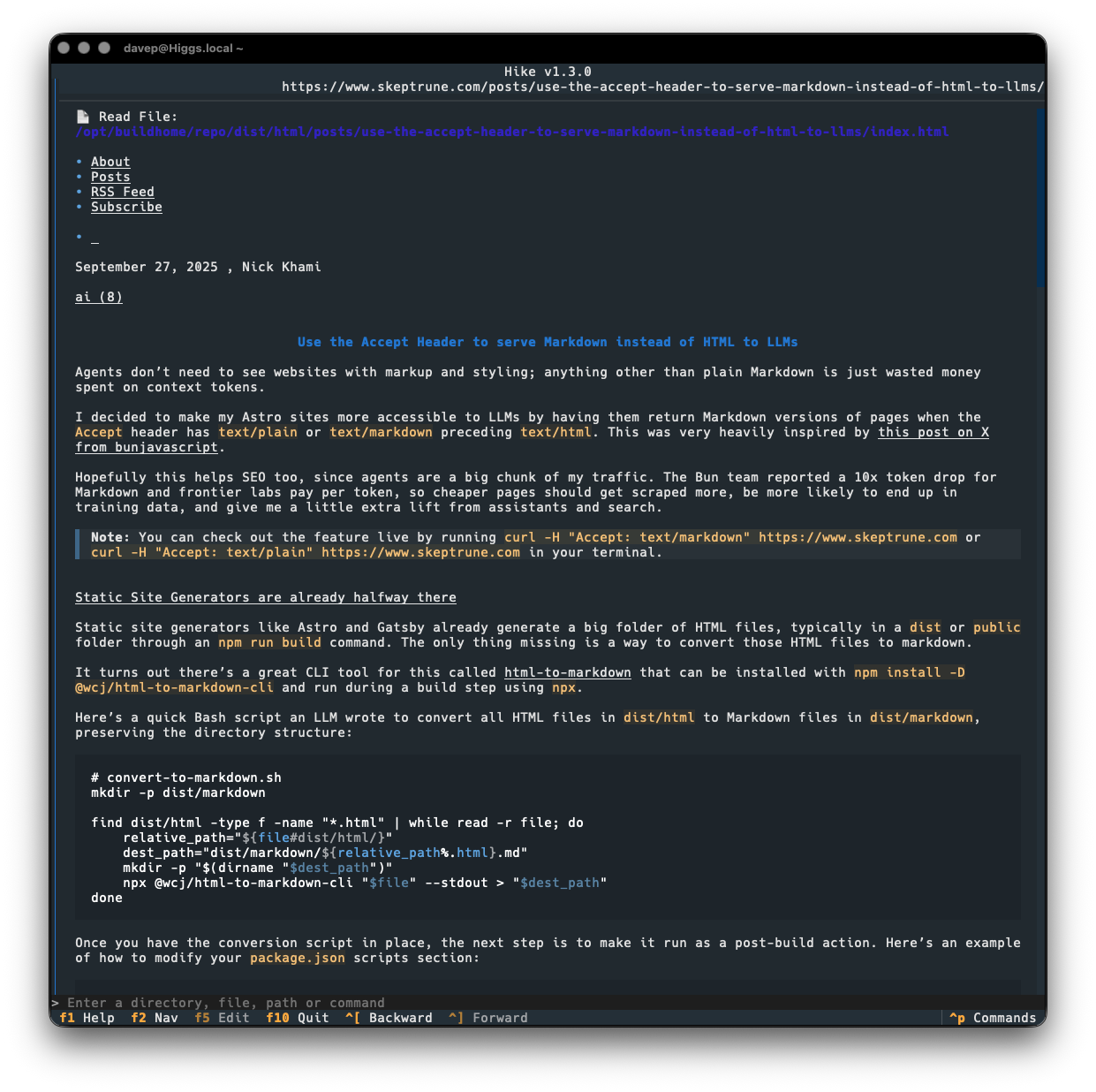
Today's release sort of rides on the coattails of the current love for all things Markdown because of "the AI". It seems that some folk are now keen on the idea of serving Markdown from their websites, when asked for it: as you can see in this post for example. While that might be handy for some LLM bot or whatever, it's also pretty handy if you happen to have a web-friendly Markdown browser!

So v1.3.0 makes a small change to how a URL is looked at when deciding if it might be a Markdown document, by saying "hey, web server, I like Markdown more than anything else, so feel free to serve me that up". If we get a Markdown type back, we go ahead and load it into Hike.

This means that the post mentioned above loads up just fine now:

Viewing a Markdown site in Hike

Previously, Hike would have gone "nah, that's not a Markdown document" and would have handed off to the environment's web browser.

Hike is licensed GPL-3.0 and available via GitHub and also via PyPi. If you have an environment that has pipx installed you should be able to get up and going with:

pipx install hike

If you're more into uv:

uv tool install hike

If you don't have uv installed you can use uvx.sh to perform the installation. For GNU/Linux or macOS or similar:

curl -LsSf uvx.sh/hike/install.sh | sh

or on Windows:

powershell -ExecutionPolicy ByPass -c "irm https://uvx.sh/hike/install.ps1 | iex"

ng2nlm - Feed NotebookLM a Norton Guide

2 min read

After having knocked up obs2nlm the other day I realised there was another source of sources available to me that might be fun to throw into NotebookLM: one or more of the Norton Guide files in my collection!

And so, after a wee bit of hacking on a wet Sunday afternoon, ng2nlm was born.

In terms of what it does, it's pretty much the same as obs2nlm, only it uses ngdb to read the contents of a Norton Guide and turn it into a single Markdown file which can then be used as a source in NotebookLM.

So far it seems to be working a treat.

Learning abut low-level DOS programming

Here I grabbed the guide to assembly language Norton Guide, and the DOS interrupts Norton Guide, turned them into sources, created a notebook and let it do its thing.

I can't vouch for how valid the answer to my question is -- it's a long time since I wrote any 8086 assembler code and it's a moment since I last had to dig into DOS interrupts and the like -- but I like the result.

Probably the biggest issue I see at the moment is with the code examples: it seems to have a habit of adding some sort of citation marker that links to nowhere when it's emitting code. I think this is down to the instructions I've given it in the source I output, at least that's what it's suggesting when I ask it:

Me: What are all the numbers in square brackets for?

NotebookLM: The numbers in square brackets are passage indices used to cite which specific part of the sources supports each statement [Instruction]. Within the source files themselves, these markers identify distinct entries or sections within the Norton Guide databases.

Given I am trying to encourage it to cite its sources, I think this is where the confusion comes from. In "normal" paragraphs it does do a good job of citing its source and linking to it:

NotebookLM citing a source

so presumably, when it "thinks" it's outputting code it doesn't do the markup to actually do the linking, and so things end up looking a little confused.

If I ask that citations aren't included in the code, this does seem to have the desired effect:

No citations in the code

So, given this, perhaps I can use the --additional-instructions switch for the particular source to encourage it to not add citation links to code? Or of course I could tweak ng2nlm itself to include that instruction to start with. While it's a little specific to one use case, Norton Guide files do tend to be coding-related so it could make sense.

Anyway, in the very unlikely event that you have a need to turn one or more Norton Guide files into sources to throw at NotebookLM or similar tools: ng2nlm exists.

obs2nlm - Feed NotebookLM an Obsidian Vault

2 min read

I'm sure I've mentioned a couple of times before that I've become quite the fan of Obsidian. For the past few years, at any given point, I've had a couple of vaults on the go. Generally I find such vaults a really useful place to record things I'd otherwise forget, and of course as a place to go back and look things up.

But... even then, it's easy enough to forget what you might have recorded and know that you can even go back and look things up. Also I tend to find that I can't quite figure out a good way of getting a good overview of what I've recorded, over time.

Meanwhile: I've been playing around with Google's NotebookLM as a tool to help research and understand various topics. After doing this with my recent winter break coding project (more on that in the future) I realised I really should get serious about taking this approach with my Obsidian Vaults.

I'm sure this is far from novel, I'm sure lots of people have done similar things already; in fact I'd quickly dabbled with the idea a few months ago, had a bit of a laugh at some of the things the "studio" made of a vault, and promptly forgot about it.

This time though I got to thinking that I should try and take it a little more seriously.

And so obs2nlm was born.

The idea is simple enough: enumerate all the Markdown files in the vault, wrap them in boundary markers, add some instructions to the start of the file to help NotebookLM "comprehend" the content better, throw in a table of contents to give clues to the structure of the vault, and see what happens when you use the resulting file as a source.

So far it's actually turning out to be really helpful. I've been using it to get summaries regarding my work over the past 18 months or so and it's helped me to consolidate my thoughts on all sorts of issues and subjects.

It's not perfect, however. I've had it "hallucinate" some stuff when making things in the studio (most notably in the slide deck facility); for me though I find this an acceptable use of an LLM. I know the subject it's talking to me about and I know when it's making stuff up. This, in turn, makes for a useful lesson in how and when to not trust the output of a tool like this.

Having tested it out with a currently-active vault, I'm now interested to find out what it'll make of some of the archived vaults I have. Back in 2024 I wrote a couple or so tools for making vaults from other things and so I have a vault of a journal I kept in Journey for a number of years, a vault of a journal I'd kept before then in Evernote, and I also have a vault of all the tweets I wrote before I abandoned Twitter. I also have a vault that was dedicated to recording the daily events and thoughts of my time working at Textualize. It's going to be fun seeing what NotebookLM makes of each of those; especially the last one.

Anyway, if Obsidian is your thing, and if you are dabbling with or fancy dabbling with NotebookLM, perhaps obs2nlm will be handy for you.

Hike

1 min read

Hike

The run of writing new terminal-based tools that I want still keeps going. First there was Braindrop, then there was Peplum, and now, released today, there's Hike.

Hike is yet another terminal-based Markdown browser. While it's far from the first, and unlikely to be the last, it's mine and it looks and works exactly how I need. Perhaps it'll be your sort of thing too?

Hike viewing its README

This initial release has a bunch of handy features, including things like:

  • A command line where file names, URLs and commands can be entered.
  • A persistent history for the command line.
  • A local file browser.
  • A simple bookmarking system.
  • A browsing history.
  • Commands for quickly loading and viewing files held on GitHub, GitLab, Codeberg and Bitbucket.

As there's a lot to discover in the application, I've tried to make the help screen as comprehensive as possible:

Hike help

and there's also the command palette to help with discovering commands and the keys that are associated with them:

The command palette in action

Once again, themes are supported so no matter your taste you should find something that's easy on your eyes:

Dark Light Tokyo Night Solarized Light

Hike is licensed GPL-3.0 and available via GitHub and also via PyPi. If you have an environment that has pipx installed you should be able to get up and going with:

pipx install hike

It can also be installed with Homebrew by tapping davep/homebrew and then installing hike:

brew tap davep/homebrew
brew install hike

Expect to see more updates in the near future; this is very much an ongoing tinker project.

Markdown all the things

4 min read

Recently I've been on a bit of a "turn stuff into Markdown files and slap them in an Obsidian Vault" trip. This kicked off a couple of months back when I made a decision unrelated to coding.

On and off, since my teenage years, I've kept journals. Since those teenage years it's been more off than on, but a couple of times in my adult life it's been really helpful to actually write one. The last time this happened was early 2019. It was pretty vital I did that at the time and it was a really sensible and helpful decision, and an approach to the situation I was in that I'd recommend to anyone (and have done on occasion to anyone going through the same thing).

The actual motivation for starting that particular journal is long behind me, but I'd got into the habit of writing it and so, until a couple or so months back, I kept jotting something down every day. But I came to the realisation that I didn't need to and that it had become something of a chore.

I'd been using an application called Journey. It's a great app, does the job well, but was also suffering from the creep of "AI" (I've had a few apps ion my arsenal that don't need it, acquire a useless "AI" feature). This privacy-problematic change of direction, combined with the realisation that I didn't need to write about my day, every day, any more, made me decide it was time to stop and cancel the subscription.

Thankfully Journey has a pretty comprehensive export option so I used it and didn't think too much more about it for a while.

Meanwhile I also had a subscription to Evernote that I didn't really use any more. Within it I had held a handful of years of journal entries from a decade or so ago, along with other "remember this for some point in the future" stuff. For the longest time I was on some really cheap tier that didn't exist any more, one that was low enough that I didn't really notice the cost go out each month so I kept putting off exporting things and closing it all down until "next month".

Then I got an email from them to say they were forcing me onto some new tier that was more expensive. So that was the final straw there. I made an export of what I had in Evernote and closed that account down too.

A wee while went past and then I got to thinking that it might be interesting to try and combine both these sources into one archived journal. I had stuff from around 2010 to 2015, and I also had stuff from 2019 until 2024; the former in the Evernote archive and the latter in the Journey archive. Surely I could write a couple of tools to turn that data into one consolidated Obsidian Vault?

Over the course of a couple of weekends journey2md and evernote2md were born. While both of those tools work differently, they're both designed to populate the same Obsidian Vault. Once I was happy with this I did the mass conversion and I was happy with the result.

Now I have years of journal entries, all converted to Markdown files and made available for reading via an application that lets me rummage through history using dates and tags and all sorts of other searching.

So I was happy with that and didn't give it much more though.

Then last week I got to thinking...

Twitter has turned into the worst place possible and I can't for the life of me think why any right-thinking person who has an ounce of humanity or has anything approaching a humanistic outlook on life would remain an active user. Honestly I stuck it out longer than was sensible, but in June 2023 I finally quit for good.

Back when the new owner was confirmed I, like a lot of people, extracted my archive. It's since been sat in storage doing nothing, yet there's a lot of data in there that could be interesting to work with, or just to go back and look through. So last week's thought was "why don't I also turn this into an Obsidian Vault?".

So I did...

The graph of my Twitter Obsidian Vault

The tool I built to do this is bird2glass. As you'll see in the README it makes a few assumptions about the state of Twitter archive dumps and also what a user wants from this. Personally I'm pleased with the result.

The main aim of the tool is to break the tweets down into a hierarchy of year, month and day...

Viewing a tweet

...and also to connect them with any account that was being replied to or mentioned in some way...

Viewing a user

This user view is handy when viewing backlinks, as it gives you a list of all the tweets that mention that user (and, of course, if you're into Obsidian's graph it will make for some interesting connections within there).

I sense there's more I can do with this, and I imagine I will continue to tinker with it. Meanwhile though, if that sounds like something you'd benefit from do feel free to grab it and play with it and hack on it. Keep in mind the notes and assumptions that are in the README, and really be prepared for a lot of files to be created if you did a lot of tweeting like I did (I do think that over 50,000 individual files for an Obsidian Vault is a bit silly, if I'm honest).

Meanwhile... I might need to look at other applications and think about how I can turn the data into useful Markdown collections!