Posts tagged with "mkdocstrings"

Zensical

3 min read

After first getting involved with Textual, back in 2022, I became acquainted with MkDocs/mkdocs-material. It was being used for the (then still being written) Textual docs, and I really liked how they looked.

Eventually I adopted this combination for many of my own projects, and even adopted it for the replacement for davep.org. It's turned into one of those tools that I heavily rely on, but seldom actually interact with. It's just there, it does its job and it does it really well.

Recently though, while working on OldNews, something changed. When I was working on or building the docs, I saw this:
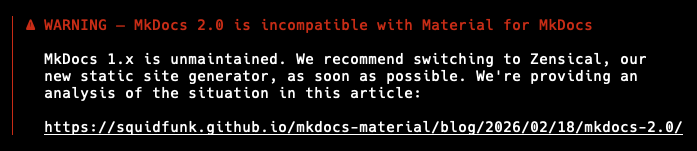
MkDocs warning

This was... new. So I visited the link and I was, if I'm honest, none the wiser. I've read it a few times since, and done a little bit of searching, and I still really don't understand what the heck is going on or why a tool I'm using is telling me not to use itself but to use a different tool. Like, really, why would MkDocs tell me not to use MkDocs but to use a different tool? Or was it actually MkDocs telling me this?1

Really, I don't get it.

Anyway, I decided to wave it away as some FOSS drama2, muse about it for a moment, and carry on and worry about it later. However, I did toot about my confusion and the ever-helpful Timothée gave a couple of pointers. He mentioned that Zensical was a drop-in replacement here.

Again, not having paid too much attention to what the heck was going on, I filed away this bit of advice and promised myself I'd come back to this at some point soon.

Fast-forward to yesterday and, having bumped into another little bit of FOSS drama, I was reminded that I should go back and look at Zensical (because I was reminded that there's always the chance your "supply chain" can let you down). Given that BlogMore is the thing I'm actively messing with at the moment, and given the documentation is in a state of flux, I thought I'd drop the "drop-in" into that project.

The result was, more or less, that it was a drop-in replacement. I did have to change $(mkdocs) serve --livereload to drop the --livereload switch (Zensical doesn't accept it, and I'd only added it to MkDocs recently because it seemed to stop doing that by default), but other than that... tool name swap and that's it.

Testing locally the resulting site -- while themed slightly differently (and I do like how it looks) -- worked just as it did before; which is exactly what I was wanting to see.

There was one wrinkle though: when it came to publishing to GitHub pages:

uv run zensical gh-deploy

Usage: zensical [OPTIONS] COMMAND [ARGS]...
Try 'zensical --help' for help.

Error: No such command 'gh-deploy'.

Oh! No support for deploying to the gh-pages branch, like MkDocs has! For a moment this felt like a bit of a show-stopper; but then I remembered that MkDocs' publishing command simply makes use of ghp-import and so I swapped to that and I was all good.

So, yeah, so far... I think it's fair to say that Zensical has been a drop-in replacement for the MkDocs/mkdocs-material combo. Moreover, if the impending problems are as bad as the blog post in the warning suggests, I'm grateful to this effort; in the long run this is going to save a lot of faffing around.

The next test will be to try the docs for something like Hike. They're a little bit more involved, with SVG-based screenshots being generated at build time, etc. If that just works out of the box too, without incident, I think I'm all sorted.
  1. Turns out that it was Material for MkDocs doing this; I wish the warning had said this. 

  2. It's not the first I've seen in my years, and I doubt it'll be the last. 

MkDocs/mkdocstrings 404 CSS TIL update

1 min read

Following on from my post this morning, regarding the problem I was having with _mkdocstrings.css being 404 any time I deployed my documentation, built with mkdocs/mkdocstrings, to GitHub Pages...

It's come to light that I was doing this on hard mode, pretty much.

While trying to figure out the best way of deploying the docs, I'd stumbled on ghp-import and had been using that. On the other hand, MkDocs has it's own command for doing the same thing: mkdocs gh-deploy.

Timothée pointed out to me that he never runs into this problem, but he used this command. As it turns out, if you use mkdocs gh-deploy it creates the .nojekyll file by default.

And how does it do this? It uses the ghp-import code and uses a switch it has to achieve exactly this. In fact... the command line version even has a switch for it!

-n, --no-jekyll      Include a .nojekyll file in the branch.

This is off by default, when you run the command itself, but I wish I'd noticed this when I was first experimenting. O_o

Anyway, thanks to Timothée's pointers, I've now managed to simplify how I build and publish the docs from textual-fspicker, and I'll apply this to other projects too.

Documenting textual-fspicker (plus a TIL)

4 min read

I've just made a wee update to textual-fspicker, my dialog library for Textual which adds FileOpen, FileSave and SelectDirectory dialogs. There's no substantial change to the workings of the library itself, but I have added something it's been lacking for a long time: documentation!

Well... that's not quite true, it's always had documentation. I'm an avid writer of Python docstrings and I make a point of always writing them for every class, function, method or global value as I write the code. As such the low-level "API" documentation has always been sat there ready to be published somehow, eventually.

Meanwhile the description for how to use the library was mostly a pointer to some example code inside the README. Not ideal, and something I really wanted to improve at some point.

Given I'm still on a bit of a coding spree in my spare time, I finally decided to get round to using the amazing mkdocstrings, in conjunction with mkdocs, to get some better documentation up an running.

The approach I decided to take with the documentation was to have a page that gave some general information on how to use the library and then also generate low-level documentation for the all the useful content of the library from the docstrings. While latter isn't really useful to anyone wanting to use the library in their own applications, it could be useful to anyone wanting to understand how it hangs together at a lower-level, perhaps because they want to contribute to or extend the library in some way.

While writing some of the general guide took a bit of work, of course, the work to get the documentation up and running and generating was simple enough. The effort comes down to 3 rules in the Makefile for the project:

##############################################################################
# Documentation.
.PHONY: docs
docs:                    # Generate the system documentation
    $(mkdocs) build

.PHONY: rtfm
rtfm:                    # Locally read the library documentation
    $(mkdocs) serve

.PHONY: publishdocs
publishdocs: docs        # Set up the docs for publishing
    $(run) ghp-import --push site

The rtfm target is useful for locally-serving the documentation so I can live preview as I write things and update the code. The publishdocs target is used to create and push a gh-pages branch for the repository, resulting in the documentation being hosted by GitHub.

A wee problem

NOTE: I've since found out there's an easier way of fixing the issue.

This is, however, where I ran into a wee problem. I noticed that the locally-hosted version of the documentation looked great, but the version hosted on GitHub Pages was... not so great. I was seeing a load of text alignment issues, and also whole bits of text just not appearing at all.

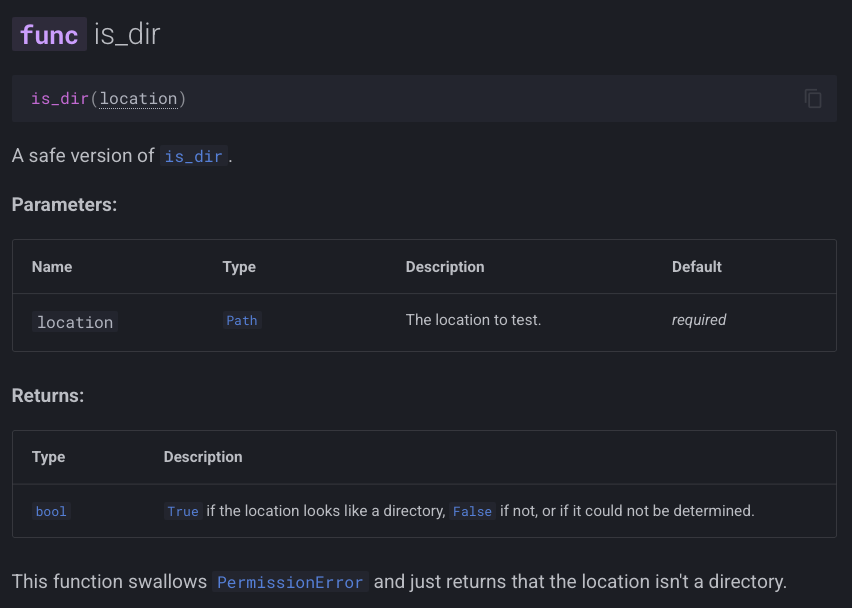
Here's an example of what I was seeing locally:

Good layout

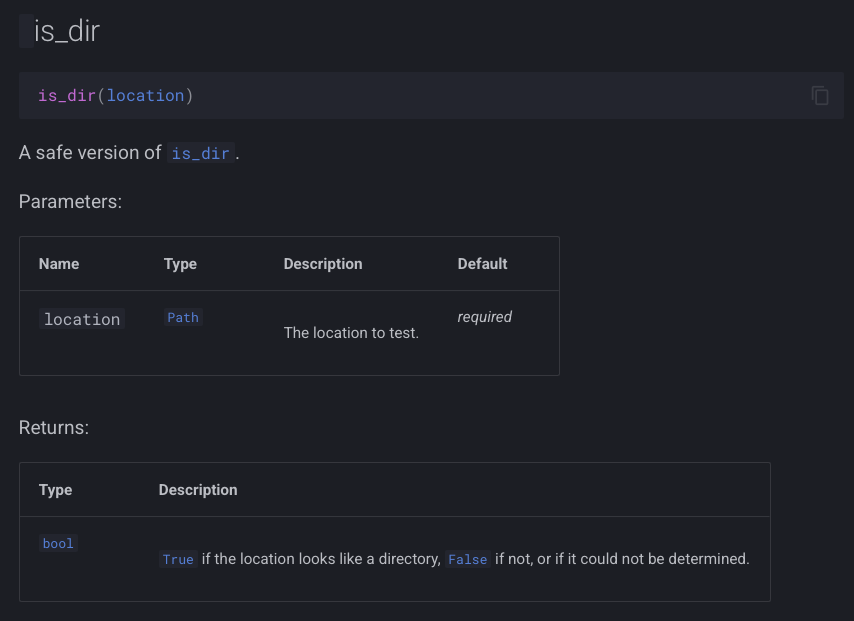
and here's what I was seeing being served up from GitHub Pages:

Bad layout

As you can see, in the "bad" version the func label is missing from the header, and the Parameters and Returns tables look quite messy.

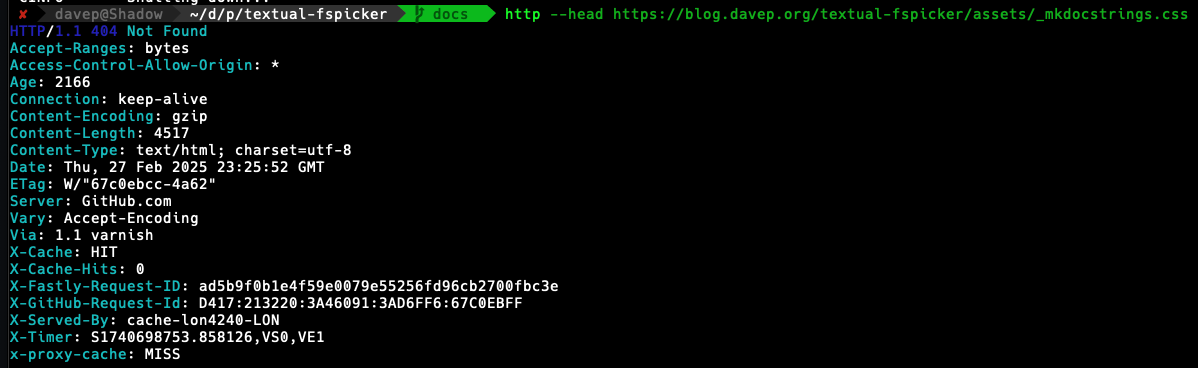
I spent a little bit of time digging and, looking in Safari's console, I then noticed that I was getting a 404 on a file called _mkdocstrings.css in the assets folder. Problem found!

Only... was it though? If I looked in the gh-pages local branch the file was there (and with fine permissions). If I looked in the remote branch, it was there too. Thinking it could be some odd browser problem I even tried to grab the file back from the command line and it came back 404 as well.

Testing from the command line

At this point it was getting kind of late so I decided I must have screwed up somehow but I should leave it for the evening and head to bed. Before doing so though I decided to drop a question into the mkdocstrings discussions to see if anyone could see where I'd messed up.

As it turns out, it looked like I hadn't messed up and the reply from the always super-helpful Timothée was, in effect, "yeah, that should work fine". At least I wasn't the only one confused.

Fast forward to this morning and, with breakfast and coffee inside me, I decided to try and methodically get to the bottom of it. I wrote up the current state of understanding and looked at what might be the common cause. The thing that stood out to me was that this was a file that started with an underscore, so I did a quick search for "github pages underscore" and right away landed on this result.

Bingo!

That had to be it!

A little bit of testing later and sure enough, the documentation hosted on GitHub Pages looked exactly like the locally-hosted version.

So, TIL: by default sites hosted by GitHub Pages will pretend that any asset that starts with an underscore doesn't exist, unless you have a .nojekyll in the root of the repository, on the gh-pages branch (or whatever branch you decide to serve from).

To make this all work I added .nojekyll to docs/source and added this to mkdocs.yml:

exclude_docs: |
  !.nojekyll

All done!

And now I've worked out a simple workflow for using mkdocs/mkdocstrings for my own Python projects, in conjunction with GitHub Pages, I guess I'll start to sprinkle it over other projects too.