Posts tagged with "NotebookLM"

It's all so vague

3 min read

The recent changes to pricing and usage, in relation to AI, aren't just about agents and coding. Not only have I seen GitHub Copilot and Gemini CLI hugely restrict their offerings for the same price, it's also come to at least one "general" tool I use too.

For a while now, as part of a Google One subscription I keep, I've had a Gemini AI Pro subscription. I've generally found this useful, mainly using the Gemini app on my iPhone to research things1, and also commonly using the web application to help proofread blog posts, and sometimes explore coding problems. Another way I use it is via NotebookLM. The subscription has meant that I can do all of this without ever having to worry about hitting any usage limits. While I'm sure they were there, I was never aware of them and never hit them.

In the last 48 hours, along with the changes to the coding agent offerings, Gemini itself has moved to a compute-based usage limit approach.

Gemini will move to compute-based usage limits that will refresh every 5 hours until you reach your weekly limit. Calculation of your usage will factor in the complexity of your prompt, the features you use, and the length of your chat. Paid users have higher limits than users without a Google AI subscription.

The thing that bothers me about this -- and I've seen this with other companies in this market too -- is just how vague the wording is. Look at this table that is supposed to inform you about your usage limits, depending on your plan:

PlanLimit
Without a planStandard limits
AI Plus2x higher than standard limits
AI Pro4x higher than standard limits
AI Ultra5x or 20x higher than AI Pro depending on your subscription

Okay, great, thanks to my Pro plan I get 4x the limits. Awesome. But... 4x what exactly? What exactly are the standard limits? How do I assess which plan is better for me? How do I compare Google's product against another offering?

I suspect, for the most part, I'll be fine where I am. So far today I've used Gemini to proofread the previous post I wrote, there was a bit of back and forth as I edited my post, and that cost me 1% of my five hour window.

My usage limits

What impact that has on my weekly usage, I don't know, but based on this it would appear to be almost nothing.

I can appreciate that it's been a bit of a free party for a while, and now each provider has to start to have this cost them less -- if not actually make them money -- before the whole thing collapses. Fair enough. But it's annoying as hell to not be able to gauge what I'm actually getting, or easily compare products.

That's not to say that I know how this can be communicated well. There's a flip-side to all of this. If I go and look at the Anthropic website and their detailed pricing information it seems to take it to the other extreme. There's so much you need to know and understand, and you'd need to know so much about how their models work and how your needs would interact with them... it feels like you need specialised training to comprehend any of it. While I can't find it back at the moment, I seem to remember a similar issue with trying to follow such information with GitHub Copilot.

If it doesn't exist already, I suspect there's a market here for a site that makes it incredibly simple to plug in your requirements and have a product recommendation be made.


  1. In the past six months I've found it's generally a far better method of finding things than simply using a search engine; no ads, cited sources, results that are easy to revisit, etc. 

obs2nlm v1.2.0

1 min read

Three months back I released obs2nlm, a tool that takes an Obsidian vault and turns it into a single Markdown file so it can be used as a source for NotebookLM.

Since then I've been using it a lot and it's working out really well.

Meanwhile, one of my vaults has started to creep up towards the documented word limit for a single source in NotebookLM (500,000 words). Right now it's sitting at around 75% and is steadily creeping up.

So, with this in mind, I've made a change I've been planning from the start and have added a --split option. If used, if the generated file looks like it's going to hit the word limit, a second (or more) file will be created. The naming scheme is simple enough: if you ask obs2nlm to create an output file called dirt.md and it needs to run over, it'll then create dirt-2.md, dirt-3.md, and so on. The idea then is that, rather than upload that single Markdown file as a source, you upload all of the generated Markdown files.

Given you get up to 50 sources per notebook, this should see me right for any reasonable vault. As for if it will affect the quality of the results I get when I query the notebook... that's hard to say until I find myself in that situation. If Google are to be believed it shouldn't be an issue, and the alternative is to fall foul of the limit so this seems like the only sensible solution.

I've also added a --dry-run command line switch too; this should be handy for checking how big a vault is when compared to the word limit, without actually generating any files.

ng2nlm - Feed NotebookLM a Norton Guide

2 min read

After having knocked up obs2nlm the other day I realised there was another source of sources available to me that might be fun to throw into NotebookLM: one or more of the Norton Guide files in my collection!

And so, after a wee bit of hacking on a wet Sunday afternoon, ng2nlm was born.

In terms of what it does, it's pretty much the same as obs2nlm, only it uses ngdb to read the contents of a Norton Guide and turn it into a single Markdown file which can then be used as a source in NotebookLM.

So far it seems to be working a treat.

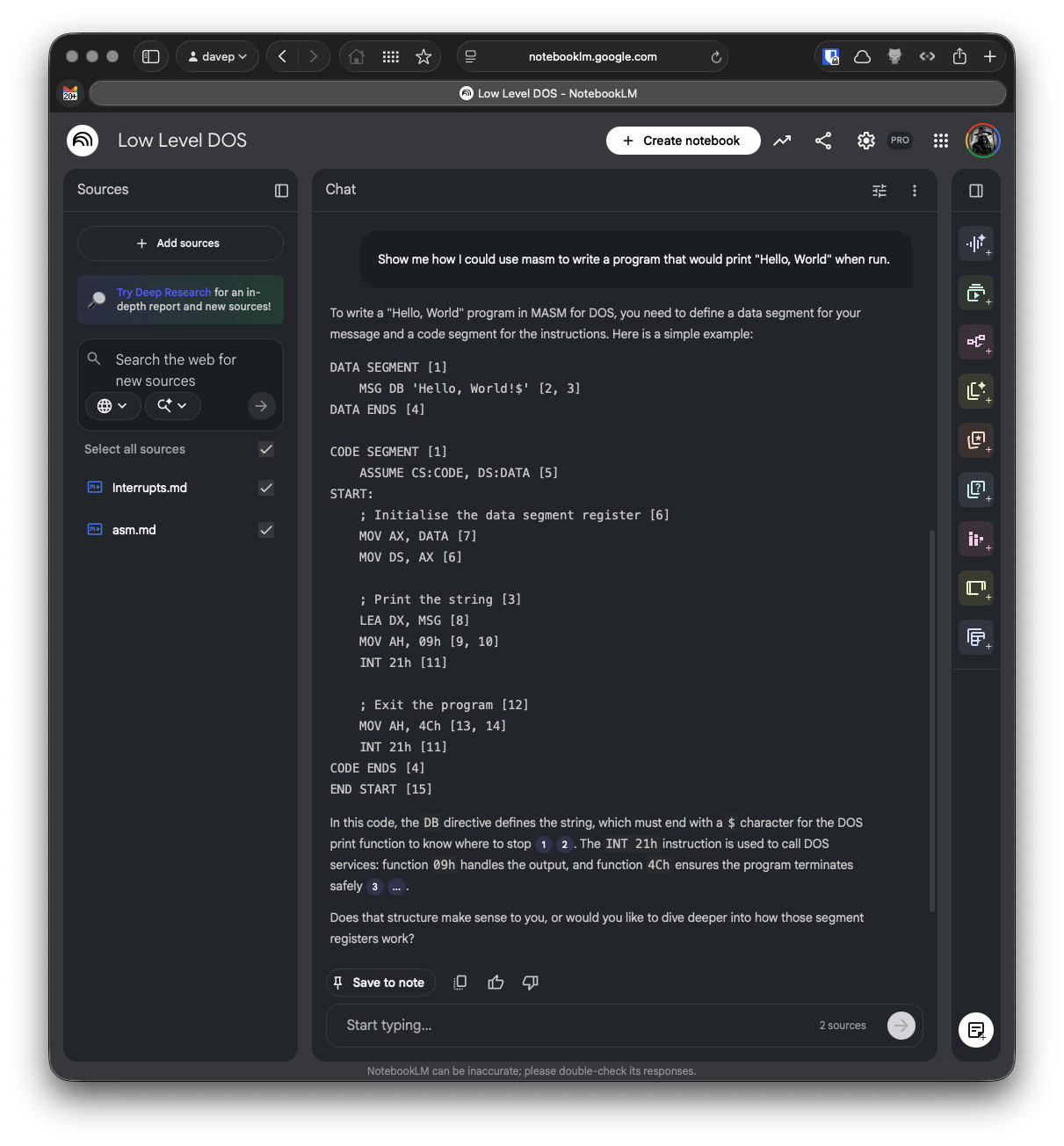
Learning abut low-level DOS programming

Here I grabbed the guide to assembly language Norton Guide, and the DOS interrupts Norton Guide, turned them into sources, created a notebook and let it do its thing.

I can't vouch for how valid the answer to my question is -- it's a long time since I wrote any 8086 assembler code and it's a moment since I last had to dig into DOS interrupts and the like -- but I like the result.

Probably the biggest issue I see at the moment is with the code examples: it seems to have a habit of adding some sort of citation marker that links to nowhere when it's emitting code. I think this is down to the instructions I've given it in the source I output, at least that's what it's suggesting when I ask it:

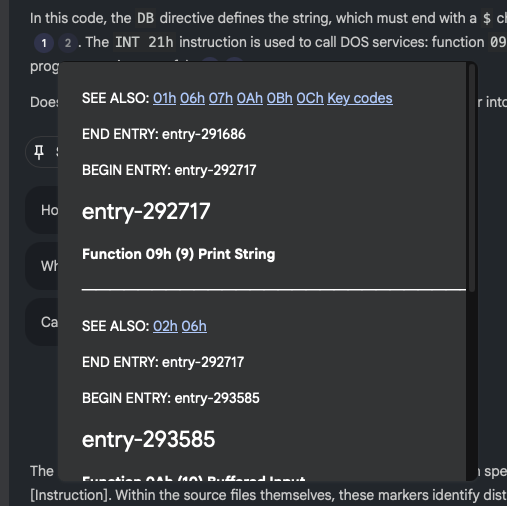
Me: What are all the numbers in square brackets for?

NotebookLM: The numbers in square brackets are passage indices used to cite which specific part of the sources supports each statement [Instruction]. Within the source files themselves, these markers identify distinct entries or sections within the Norton Guide databases.

Given I am trying to encourage it to cite its sources, I think this is where the confusion comes from. In "normal" paragraphs it does do a good job of citing its source and linking to it:

NotebookLM citing a source

so presumably, when it "thinks" it's outputting code it doesn't do the markup to actually do the linking, and so things end up looking a little confused.

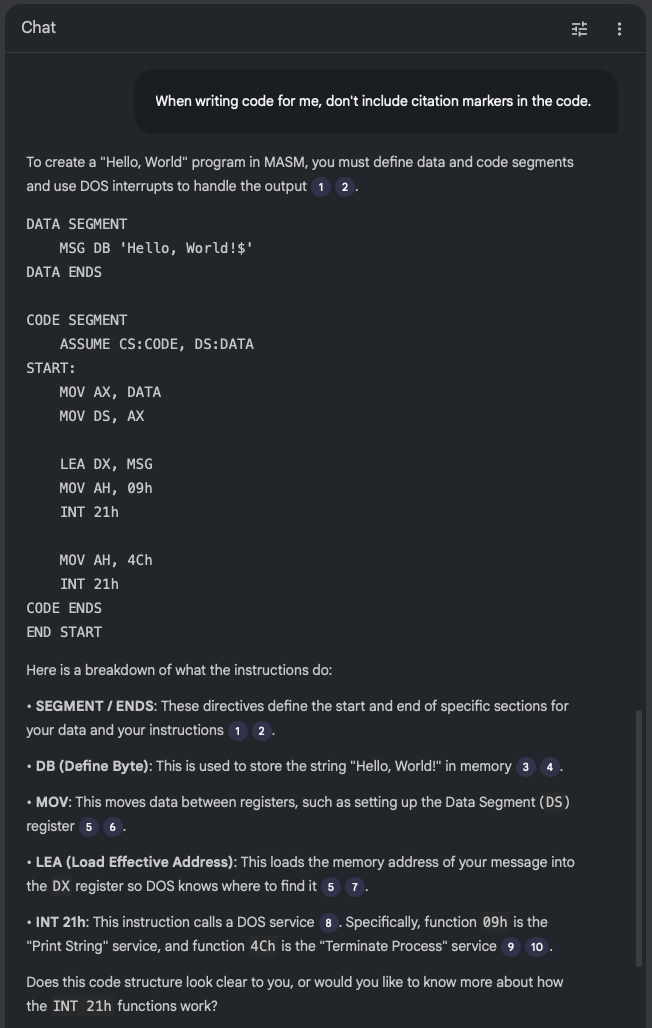
If I ask that citations aren't included in the code, this does seem to have the desired effect:

No citations in the code

So, given this, perhaps I can use the --additional-instructions switch for the particular source to encourage it to not add citation links to code? Or of course I could tweak ng2nlm itself to include that instruction to start with. While it's a little specific to one use case, Norton Guide files do tend to be coding-related so it could make sense.

Anyway, in the very unlikely event that you have a need to turn one or more Norton Guide files into sources to throw at NotebookLM or similar tools: ng2nlm exists.

obs2nlm - Feed NotebookLM an Obsidian Vault

2 min read

I'm sure I've mentioned a couple of times before that I've become quite the fan of Obsidian. For the past few years, at any given point, I've had a couple of vaults on the go. Generally I find such vaults a really useful place to record things I'd otherwise forget, and of course as a place to go back and look things up.

But... even then, it's easy enough to forget what you might have recorded and know that you can even go back and look things up. Also I tend to find that I can't quite figure out a good way of getting a good overview of what I've recorded, over time.

Meanwhile: I've been playing around with Google's NotebookLM as a tool to help research and understand various topics. After doing this with my recent winter break coding project (more on that in the future) I realised I really should get serious about taking this approach with my Obsidian Vaults.

I'm sure this is far from novel, I'm sure lots of people have done similar things already; in fact I'd quickly dabbled with the idea a few months ago, had a bit of a laugh at some of the things the "studio" made of a vault, and promptly forgot about it.

This time though I got to thinking that I should try and take it a little more seriously.

And so obs2nlm was born.

The idea is simple enough: enumerate all the Markdown files in the vault, wrap them in boundary markers, add some instructions to the start of the file to help NotebookLM "comprehend" the content better, throw in a table of contents to give clues to the structure of the vault, and see what happens when you use the resulting file as a source.

So far it's actually turning out to be really helpful. I've been using it to get summaries regarding my work over the past 18 months or so and it's helped me to consolidate my thoughts on all sorts of issues and subjects.

It's not perfect, however. I've had it "hallucinate" some stuff when making things in the studio (most notably in the slide deck facility); for me though I find this an acceptable use of an LLM. I know the subject it's talking to me about and I know when it's making stuff up. This, in turn, makes for a useful lesson in how and when to not trust the output of a tool like this.

Having tested it out with a currently-active vault, I'm now interested to find out what it'll make of some of the archived vaults I have. Back in 2024 I wrote a couple or so tools for making vaults from other things and so I have a vault of a journal I kept in Journey for a number of years, a vault of a journal I'd kept before then in Evernote, and I also have a vault of all the tweets I wrote before I abandoned Twitter. I also have a vault that was dedicated to recording the daily events and thoughts of my time working at Textualize. It's going to be fun seeing what NotebookLM makes of each of those; especially the last one.

Anyway, if Obsidian is your thing, and if you are dabbling with or fancy dabbling with NotebookLM, perhaps obs2nlm will be handy for you.