A small update to Port79, bumping up to v1.1.0. This release adds a resolve method to the FingerURI class.
I'm currently tweaking Rogallo's rendering of some responses from finger services and being able to resolve URIs relative to the underlying page is going to be very helpful.
I've just made a small release to Rogallo, bumping the version to v2.1.0. This release mostly has some small cosmetic fixes and improvements, and one new feature.
The cosmetic improvements include:
Fixed the verification method and client certificate status icons in the viewer title bar so they don't use the "this is clickable" mouse cursor when there's nothing worth clicking.1
Adjusted the styling of tooltips so they better stand out against the background text.
Fixed the cosmetics of the viewer when the content is set to a narrowed state (some of the changes in v2.0.0 had inadvertently changed some of the styling).
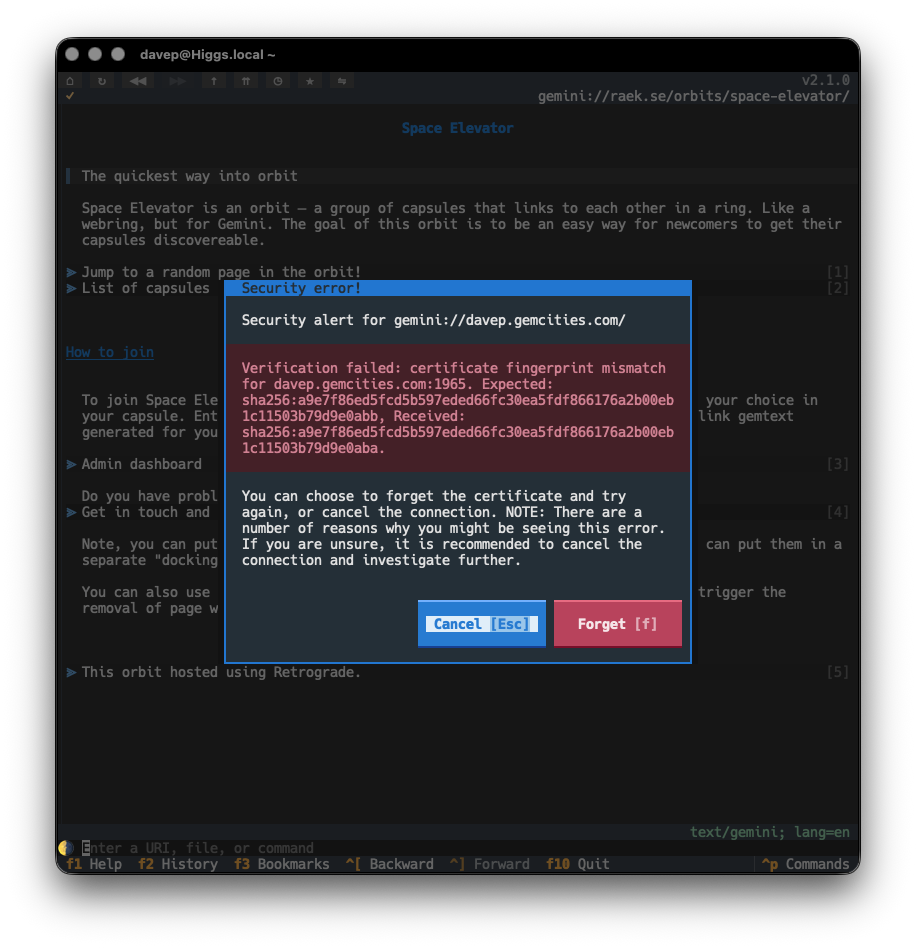
The new feature is one of the last issues I wanted to address when it came to all things related to Gemini and security: the option to "forget" the certificate fingerprint of a host when the fingerprint has changed.
Until now, if you visited a site that was using a self-signed certificate, and the fingerprint for that certificate had changed, you'd just get an error toast and the page would not be loaded. Technically this is the safest thing to do, but it's not the most pragmatic approach most of the time; capsules will change up certificates and you probably know you can still trust them.
So, from now on, rather than simply refusing to load the page, Rogallo will tell you about the issue and then offer to forget the fingerprint and try again.
This should make the issue more noticeable and also easier to handle.
A quick little update to Wasat, bumping the version to v1.7.0. In service of a feature I'm adding to Rogallo, I've added a forget method to the trust store class, so that a certificate fingerprint for a particular host/port combination can be forgotten.
This came about because, if a fingerprint does change for a Gemini capsule, I want a Rogallo user to be able to decide to either avoid it or forget it and re-establish trust. While the fingerprint mismatch should be a warning to distrust the capsule, there might be a legitimate reason why the certificate has changed, and I want to make that decision fairly frictionless.
I've just released v2.0.0 of Rogallo. This release has quite a lot of changes, one or two of them "breaking changes", hence the bump to v2.0.0. I will add though that, when I say "breaking changes", nothing should actually break, it's just some features have changed in an incompatible way and some application commands have been removed or renamed (and so some default keyboard bindings have changed). The worst that might happen is a keyboard binding you set up no longer works.
While Rogallo supported the creation and use of client certificates for use with Gemini capsules, it never made it that easy to work with them. Creating and using them was pretty frictionless, but if you were someone who wanted to bring your own certificate from another application, you were on your own. Actually doing that was easy enough, if you were comfortable with diving into the certificate directory and hand-editing the JSON file to create the association. What was lacking though was a good interface to manage all of this in the application.
This version solves that problem. Rogallo now contains a client certificate manager that lets you:
Create new client certificates
Add and remove associations for client certificates
Delete client certificates
Import client certificates
Export client certificates
Also, when you encounter a capsule that demands a certificate and you don't have one associated, you can pick an existing one from your certificate library; before the only option you had was to create a new one.
Initially, when I first started work on Rogallo, I had a simple history list that could be popped in/out on the side of the display. Then, when I added bookmarks, this became a sort of toggle, with either the history showing, the bookmarks showing, or both hidden. The command to show the history would hide the bookmarks; the command to show the bookmarks would hide the history; both would toggle themselves to hide. This was... kind of messy, but it worked.
When I started work on the certificate manager it made sense that it also occupied the same space. However, the code for managing this, and the resulting user experience, started to get pretty messy. I wasn't at all happy with it so ended up going on a bit of a side-quest to clean this up.
The result is that Rogallo now has a tabbed side panel (similar to the one in Hike). This contains the bookmark manager, history manager and client certificate manager.
This is where one of the main breaking changes comes in: the ToggleHistoryManager and ToggleBookmarksManager commands have been removed from Rogallo and their default keyboard bindings have been freed up. Also, to clean up the naming of things, I've renamed JumpToSidebar to JumpToSidePanel.
I feel this side panel approach is far cleaner and far easier to work with.
It's also worth noting that it's moved over to the left side of the display. However, if you'd prefer it on the right there's a configuration option for that.
As part of the work on managing client certificates, I added a dialog that lets you view details of a certificate. As well as being available in the certificate manager, it can also be used to view any certificate that might be in use when viewing the current page. The AboutClientCertificate command (bound to Shift+F7 by default) can be used to bring up the view.
For the folk who lean more on the mouse, the key icon that appears in the title bar of the viewer can be clicked on to get the same view.
The command line in the application now tries to be a little bit smarter when it comes to understanding input. Before now, if you were to type in example.com, Rogallo would assume that you were attempting to visit a Gemini capsule on that host and process the input as if it were gemini://example.com/. This release extends this a little.
If the input doesn't appear to be anything else and it includes a @ it will be turned into a finger URI. So user@example.com becomes finger://example.com/user and @example.com becomes finger://example.com/.
If the first part of the host has a recognisable protocol name, it will be assumed that that protocol should be used. In other words:
I've overhauled the code that does emoji removal if you toggle removal on. More work is done to identify "real" emoji. This should mean that all the usual colourful image-like candidates are removed, but now things like braille and box drawing characters, etc, won't be removed.
Also, when removing an emoji, if there is a space following it, that space will also be removed. This solves the cosmetic problem of "👉 This" being turned into " This" when it would make more sense that it is turned into "This".
It's worth keeping in mind here that this isn't intended to be a 100%-correct solution. It's aimed at being a good-enough solution to clean up most of the emoji clutter if you don't like that sort of thing.
My general approach to developing anything is one of "make it right then make it fast". I've never been a fan of early optimisation, and when I've watched people obsess over such things far too early in a codebase's lifecycle I've generally watched them get into a mess. I like to try and avoid that mess.
So this was my approach with Rogallo. When it came to building the widget that displayed the content of a page, I spent my time trying to ensure it was correct, not that it was fast. Quite quickly, however, I found that once a page had quite a few links on it -- especially when you got to many 100s of links -- performance was terrible. I'd had an issue sat in TODO for this from the start, but hadn't gone back to address it.
Then the other day someone else noted this issue so I decided it was time to go back and work on it. As of this release of Rogallo you should find that a page with 1,000 links on it performs about as well as a page with a handful of links.
In doing this work I've also made a lot of optimisations to how a page is initially built; so not only should a page be more responsive as you navigate it, it should be noticeably quicker to appear in the first place.
There's a lot in this release and I'm really delighted with how it's turned out. I wasn't intending to make quite so many large changes, but each bit of work naturally caused the next bit of work and... well, here we are.
With this work out of the way I can start to look at the one remaining protocol that's currently on the TODO list, and also look at making some other quality-of-life improvements.
While it might seem that it's been pretty quiet on the Rogallo front the past few days, I've been doing some work on it every day. There are a lot of changes and improvements coming. As I got the next release ready, I realised that some of the support libraries I've built for it were stuck with 0.x versions while, at the same time, having proven to be quite stable.
So I've just made v1.0.0 updates to the following:
There are no material changes in any of these releases, the only real change being the bump to v1.0.0, and so marking them as stable and, of course, guaranteeing that semantic versioning promises are now in place.
The client certificate management PR for Rogallo is very close to completion now -- although the thing has grown arms and legs and turned into a bit of a UI overhaul1. Something I wanted to add was a quick and easy way for the user to view the details of a client certificate that's being used for the current page. Rogallo lets you do this for the server certificate, but not the client certificate.
It was at this point that I realised I'd never provided easy access to the ClientCertificate on the Response object. So v1.6.0 addresses this and provides Response.client_cert.
With this in place, I think I can finally get that Rogallo PR over the line...
Not unrelated. The UI overhaul was in support of the client certificate manager. ↩
I'm still working on the client certificate management PR for Rogallo, which, of course, heavily leans on the API of Wasat. In most cases, I've noticed that something I want to do in the PR can already be done, but the work to perform the action would seem like unnecessary detail in a client application; I want to make using Wasat as frictionless as possible.
With this in mind, v1.5.0 adds interfaces for exporting and importing client certificate data.
I've just made a small but important bug fix to Rogallo. Currently, I'm working on a more comprehensive approach to managing client-side certificates and, in doing so, I noted a bug with how such certificates are currently created by Rogallo.
Simply put: by default, Rogallo should create certificates that effectively never expire (the actual expiry time is the end of 9999-12-31). Instead, if no actual expiry time was given, the certificates were being created to expire a year after creation.
This does mean that, if you've created a client certificate with Rogallo and didn't specify your own expiry date, it currently has a far more limited lifespan than you were probably expecting. As such, you might want to review them and consider making fresh ones and setting them up well before they expire (expiry probably being some time in July next year, given that Rogallo itself has only been fully usable since around July this year).
Apologies if you've used this facility and it accordingly results in a little extra work. Thankfully it came to light sooner rather than later, and it has come to light while I'm giving client certificate management a big overhaul.
Another bump to Wasat, this being v1.4.0. This release is in support of some work I want to do on Rogallo, where I intend to add proper client certificate management.
While Wasat provided good support for the generation, storage, and use of client certificates, there was no real public API that would allow for the management of those certificates. This version addresses that.
Now there are methods for doing things like:
Listing all client certificates
Getting a specific certificate's details
Creating a certificate
Associating and disassociating a certificate with a URI
Deleting a certificate
This should give me everything I need to implement a simple client certificate user interface in Rogallo.
For a wee while now I've been wanting to tweak the way the navigation history works. Up until this release, this was simply a backward/forward affair with no attempt to restore the actual context of a page you've gone back to. This could best be felt if you're a fan of AstroBotany. If you were to visit the flowering plants in your community garden, with a view to visiting each one and picking petals, the natural thing to do would be to visit a specific plant, pick a petal, then go Backward twice to get back to the list of flowering plants. The problem at that point is that the link for the just-visited plant would no longer be focused. This made it just a bit more faff to go to the next plant on the list.
From this release, when going backward and forward through navigation history, Rogallo attempts to ensure that the link you had followed on that page is focused again.
Internally, this caused a fairly big overhaul of how history navigation information is recorded. I've done a fair bit of testing and all seems good; but do let me know if you experience any oddness.
This is a small fix. If you were to visit a URI that resulted in an empty document being received, the viewer would disappear. The viewer is supposed to disappear if you are visiting nowhere, but it shouldn't disappear if you're visiting somewhere that has nothing to show. This is now fixed.
Rogallo has a couple of commands that make it easier to navigate to the parent directory of a visited location, and also to the root. However, I'd only implemented this for Gemini and Spartan URIs and sort of forgotten to finish this off. With this release Gopher and Nex get to join in on the parent/root navigation party.
This one came up because, as of the time of writing, the server where my wee capsule lives is dead1. This meant that if I checked if it was there, and got impatient and went to navigate somewhere else, the somewhere else would load and then, after the defined timeout, the error about the previous request would pop up.
Rogallo now ensures that, if you have an in-flight request running, and then navigate elsewhere, that pre-existing request is cancelled.
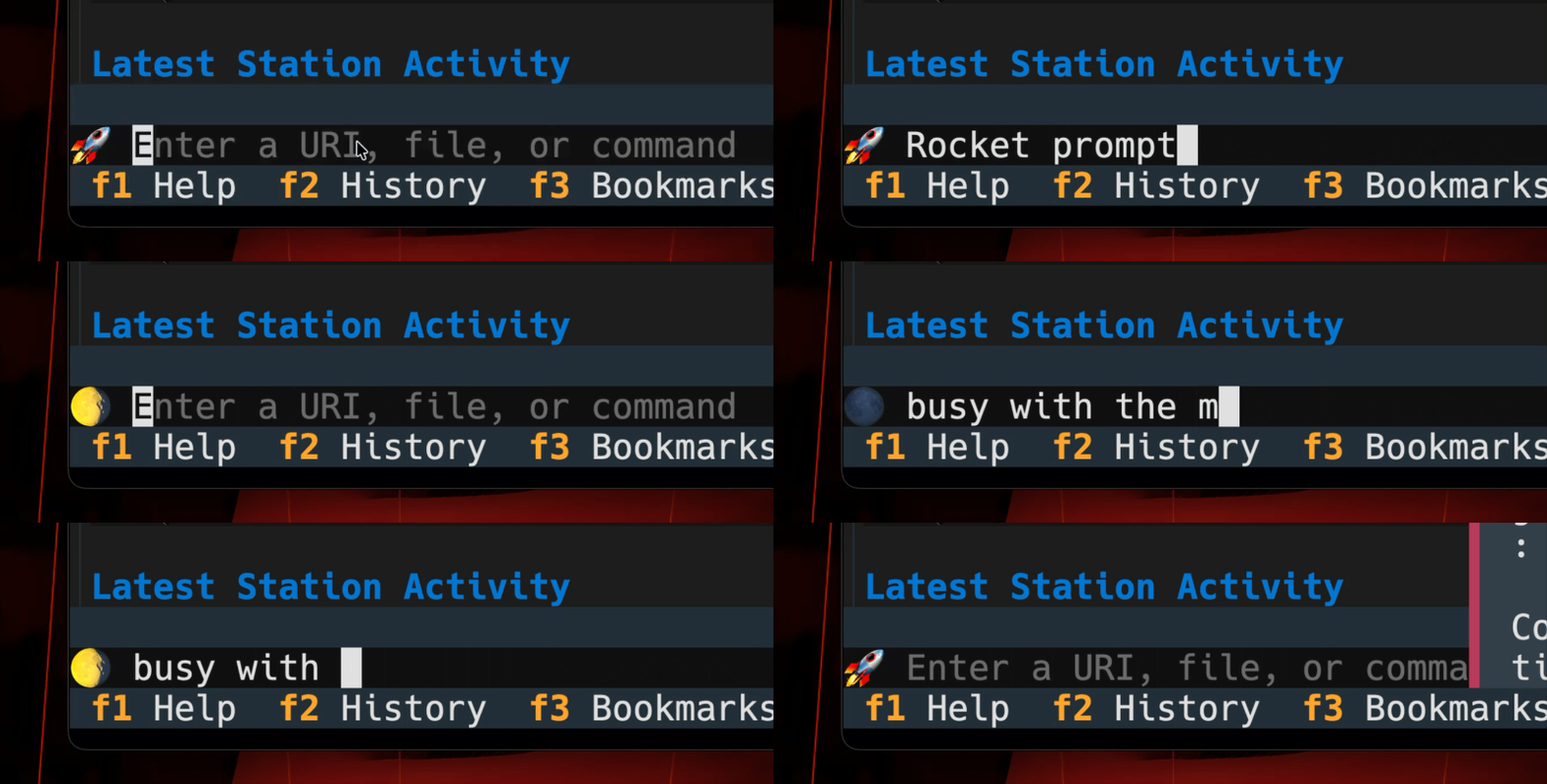
The in-application command line of Rogallo has two styles of prompt. The normal input prompt (shown as >), and the busy prompt (shown as a series of braille characters that animate as dots snaking around). I realised that some folk might enjoy setting their own prompts. While I think the defaults are nice and clean, if you wanted something more colourful and on-theme (in a Gemini sense anyway, which tends to be space-oriented), you could update your configuration file with:
I'm currently running with this for my own installation of Rogallo and it's rather growing on me.
From what I've seen, someone managed to break in and pretty much rm -rf / the thing. The restore of the server is being used as a good moment to change the architecture of the services it offers. This does mean it'll be a wee while before I get my capsule back. ↩