While I'm having a moment of calling code stable, I've bumped Wasat to v1.0.0 as well. There's no actual difference here when compared to the last release, other than the development status classifier in the PyPI metadata and the version number.
The library feels pretty stable at this point. I've been using Rogallo every day for a wee while now and I've seen no surprising problems.
Thirty-three days ago, back on the 18th of June, I created a development directory called rogallo, and started adding dependencies and laying out the main user interface of Rogallo. It's been tons of fun working on it while exploring Geminispace. Given that it's quickly turned into my daily driver, and I'm finding it stable, I've decided it's time to drag it out of the 0verse and consider it worthy of being v1.0.0.
I was going to hold off a little longer, mainly because I wanted to flesh out the documentation some more, but that seems like a poor reason to keep it stuck somewhere in v0.x.
To recap, for anyone who might not have followed the development so far: Rogallo is a terminal-based client for the Gemini Protocol. I've built it for my own education. I've built it for fun. I've built it because I want to use it. I've built it hoping that someone else might enjoy it too. Some of the key features, as of this first "stable" release, are:
Keyboard-first TUI interface with good mouse support too.
Bookmark support.
Forward/backward navigation.
Location history.
Home page.
Designed to work on macOS, GNU/Linux and Windows.
Trust-on-first-use support.
In-application creation of client-side certificates.
Full support for user input, both normal and sensitive.
Full support for redirections.
Context-sensitive help screens.
All main application commands available via a command palette or an in-application command line.
Themes.
Responsive layout that dynamically adjusts to terminal resizing.
Support for viewing Gemtext files in the local file system.
View source support.
Copy-to-clipboard support for URIs or page content.
Optionally-numbered links with quick-jump support.
Supports ANSI escape sequences in content.
Supports filtering out ANSI escape sequences.
Emoji filter (lets you remove emojis from most text).
Support for handing off unsupported content to the operating system (with safety checks).
Probably some other stuff I've forgotten right now.
On top of this, there's more to come. v1.0.0 isn't the end of the line with Rogallo. I'm having plenty of fun using it, and improving it, and there's more I want to add. I very much want to add in-app support for the Finger Protocol, and I can see myself falling down the Gopher rabbit-hole1 at some point too. While I don't want the application to grow out of hand, I can see plenty of extensions and enhancements that will be satisfying to add.
If any of this sounds interesting and you want to have a play, Rogallo is licensed GPL-3.0 and available via GitHub and also via PyPI. If you have an environment that has pipx installed, you should be able to get up and running with (note that Python 3.12 or later is required):
Now that Rogallo is starting to settle down somewhat, with all the main Gemini Protocol work falling into place, I've been thinking about adding one or two adjacent protocols. The two most common and obvious ones are Finger and Gopher. While I'm still undecided about adding the latter, the former seems like a fun one to include (if only because I've had an account on plan.cat for around four years now).
With that in mind, much like I did with Wasat, I wrote a spec for what I wanted and pointed Antigravity at it. The result is Port79. As well as providing a library, there's also a small finger clone CLI, which can be run with python -m port79 (if it's installed as a library) or with port79 (if installed along with any command scripts).
To be clear: this isn't intended to be a serious finger command (like, why would anyone even need that?), it's just a tool within the library that can be used to do some testing within a development (v)environment.
At some point soon I'll be adding port79 as a dependency of Rogallo and adding finger as a "native protocol".
The first change is a simple addition of a !theme command to the command line. As much as possible, I've tried to make sure that every command that's in the command palette can also be run from the in-app command line, but I'd managed to leave this one out. Now you can type !theme and get the theme picker.
Next is the addition of an OpenFile command, bound to Ctrl+o by default. This opens a dialog for browsing the filesystem, allowing for easy access to local gemtext files.
Related to this, if you now enter the name of a directory in the command line, the same dialog will open, starting at that directory. Both these changes should make finding local gemtext files a smoother experience.
Another change is to the way that the recently added emoji removal works. I decided that it was a little too aggressive, in that it shouldn't remove them from the content of pre-formatted text. In my experience in Geminispace, so far, pre-formatted text is where the more creative displays happen. Indeed, I had a go at this myself for my new page:
Here I've used ANSI escape sequences and half-block characters to recreate my usual avatar. The problem is: the emoji-removal approach I've used sees the half-blocks as something to remove. The result isn't great.
Given that the unwanted emojis will generally be those in body text, links, quotes and headers, I've tweaked the way that pre-formatted text is shown, with it not having emojis removed. I feel this is a sensible approach.
I guess, if anyone really objects to this, I could add a configuration switch that dictates how aggressive the removal is.
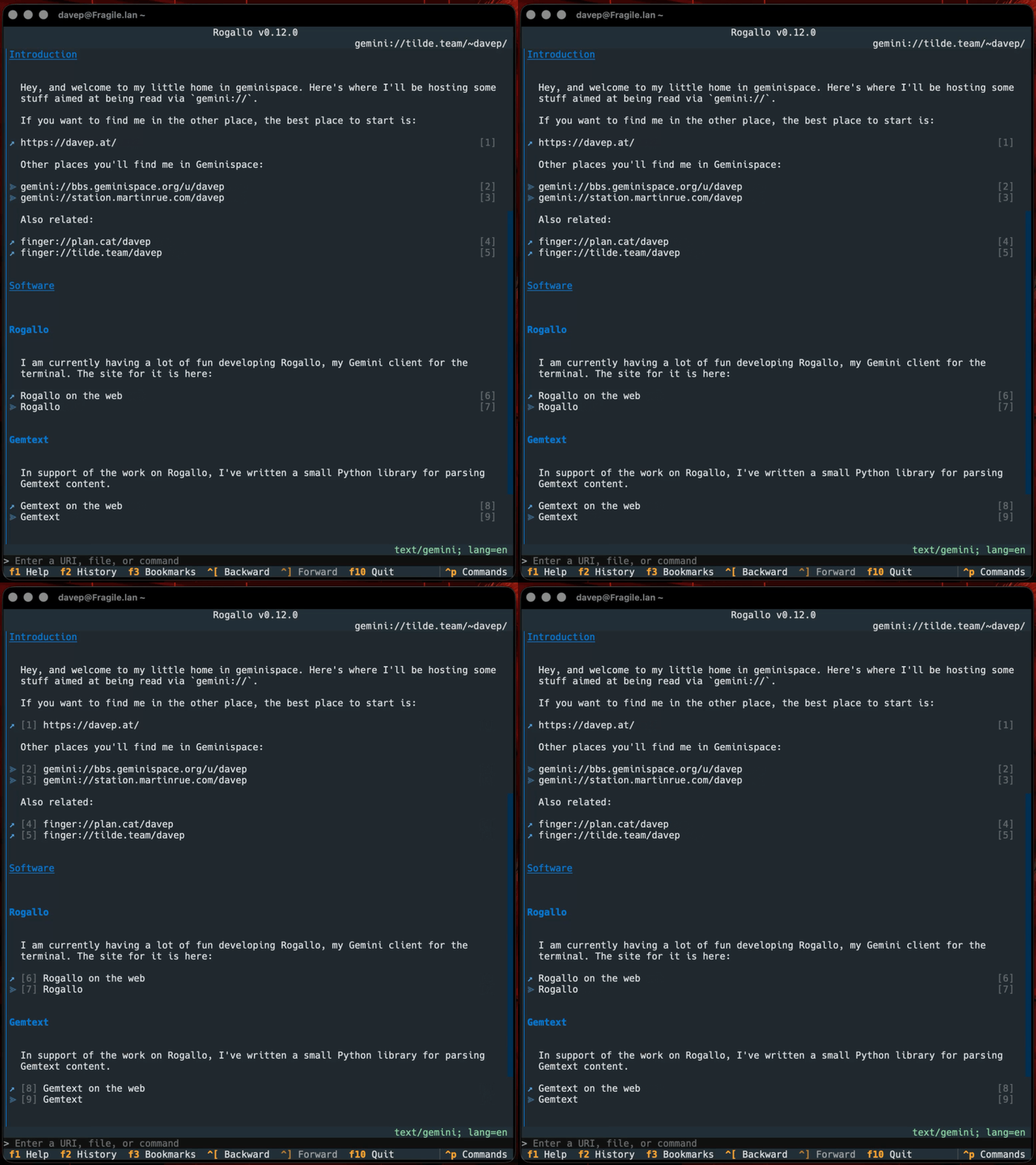
The final change is something I wasn't really ever planning on doing, and I felt I'd removed the need for it when I added link stripes. But I got a request to do it and, really, the cost of doing it is nothing. The request? An option to move the link jump labels over to the left.
So now there's a ToggleCosyLinkNumbers command (bound to Super+F8 by default1) which does what it says:
Personally, I prefer them on the right, where they don't disrupt the left-aligned margin for all the text, but I can see why this would be far more comfortable for others, so... why the heck not?
One day I'll write a post about why I'm giving every command a default binding, even if it's not so accessible in less-advanced terminal emulators. Mostly it's down to one of my least favourite design decisions in Textual mixed with my wish to have a command-based interface that works via the palette first and bindings second. ↩
A quick update to Rogallo, with changes concentrating on giving the user more control over the content of a rendered page.
Despite the fact that the Gemini Protocol and gemtext are all about things being minimal, some capsules can deliver pretty busy content. Personally, I rather like it, and I'm generally impressed at how creative some people are with these tools. On the other hand, I've noticed that some people don't always appreciate the use of emojis or ANSI escape sequences to provide colour. So, with this in mind, I've added a couple of features to help control the content.
The first is a command to toggle emoji removal. If you're finding the emojis in a page too distracting, use the command to toggle them off and on (bound to F6 by default).
The setting is sticky too, so if you're so inclined, you can turn emojis off and they'll stay off.
There's a similar command related to the handling of ANSI escape sequences. While some applications let you toggle this at the capsule level (AstroBotany is one example where it's part of the game's settings), not all do. So I've added a command to toggle this (bound to Shift+F6 by default).
With both these commands, if this sort of view isn't to your taste:
You can quickly and easily turn it into this:
I think I prefer the richer view, but I can see the utility of the more austere view.
Somewhat related to the above, I've also added the ability to configure the main "icons" that get used inside the rendered content. So if you don't like the choice of ⪢ for links within a capsule, ↗ for links outwith a capsule, or • for a list item bullet, you can change them in the configuration file.
Rogallov0.10.0 is now available. This release has a number of changes, including some new features, some changes to the user interface, and a couple of quality-of-life improvements.
While, personally, I prefer Rogallo's default behaviour (I work in an environment where I can resize a window, and I'm capable of doing it), I can appreciate that someone might want to cap it. So for folk who prefer this, they can now make Rogallo look like this (with maximum_document_width set to 80):
For the moment this can only be set via the configuration file. At some point I might make this more of a dynamic thing. I can imagine this being something handy, or at least fun, to change up as you're viewing different content.
The same feedback "suggested" that the link jumping facility that Rogallo has should have a timeout that clears the buildup of the number being looked for. This seemed like a reasonable thing to ask for. So, before, if you typed 1, a link with a label of 1 would be selected. If you did nothing for a while, and then typed 2, a link with the label of 12 would be highlighted. With the new timeout (set to 1 second by default, configurable in the configuration file), if you type 1 and then 2 more than a second later, first link 1 will be selected, then link 2 will be selected. On the other hand, if you type 1 then 2 within a second, 12 will be selected.
Setting the timeout to 0 disables this and Rogallo's link jumping facility will work as it did before.
With this new feature, if you send input text to a capsule and it rejects it for some reason, the input will be held on to. If you then visit the same URI again, the input dialog will be pre-populated with what you attempted to send a moment ago. This gives you the opportunity to edit anything wrong with the submission and try again.
Added all application commands to the command line
If you prefer to use Rogallo's command line more than the command palette, I've now ensured that all bindable application commands can be accessed via the command line. There's a difference in their form, to stay in keeping with the command line. So whereas in the command palette you'd run GoHome by typing go home, in the command line it becomes a !-prefixed snake-case command: !go_home.
All possible commands are listed in the help screen if it's brought up while the command line has focus.
Rogallo now has two new commands for quickly navigating within the current capsule path. GoToParent will navigate up a level in the path of the current URI, and GoToRoot will go to the root of the capsule.
The icon for links is now used to show if a link is already in the location history (and so has been visited before), or not:
Here you can see that Account settings isn't in the visit history, but the other two links are. I was going to do the whole link, but I've never been a fan of how web browsers do this, so I've gone with just the icon. I've also made it subtle but still noticeable. So far, I'm much preferring this; I don't need it blasting out the difference, I just need it to be enough for me to notice1.
Until now the "history" and "bookmarks" shortcut keys advertised in the footer brought up the sidebar-based management widgets. This made sense when that's all I had in Rogallo. For a while now though I've had palette-based search tools for both history and bookmarks. Normally I want to search for and select a bookmark or history item way more than I want to manage those lists. So I've relegated the sidebar-based tools to a secondary position and placed the palette-based search tools up front.
This also means that the default bindings have changed a bit. As always, you can discover the bindings with rogallo
bindings.
I know I've nodded towards this before, but I think I'm getting close to making a v1.0.0 release. I want to daily-drive for a few more days, and I'd also like to expand the website. I'd also like to build a Gemini/Gemtext-based site for Rogallo -- it'd be pretty weird if I only documented it in http(s)space. I won't let those wishes become blockers for moving to calling Rogallo "stable", but it would be nice to have.
I do recognise that there's an a11y issue here with the subtle difference; there's some work to be done at some point to allow for a high-contrast theme that will resolve this sort of issue. ↩
I've released v0.9.0 of Rogallo. The first big change in this release is the addition of syntax highlighting to pre-formatted text.
Much like in Markdown, Gemtext also supports pre-formatted text bounded by code fences. Gemtext supports the concept of "alt-text" for such text, like this:
Until now Rogallo would simply show the text as-is (with some styling to make it stand out from normal paragraphs). From this release, if there is alt-text for the pre-formatted block, and if it's the name of a supported language, the content will have syntax highlighting applied.
Another significant change is to the user input dialog. As mentioned in an earlier post, the Gemini protocol imposes limits on how much text can be submitted to a capsule. As documented, the limit is for a resulting URI of 1024 bytes1. To save someone typing out a long entry, only to have it lost2, I've added a count of how much input is left available (calculated from the size of the URI that would result):
To help ensure that the user doesn't submit too much, I've also added an error display if you go over the limit, which also refuses to submit the input.
With these in place it should be a lot harder to run into an unexpected loss of input.
One final tweak is a small change to the optional link stripe system I recently added. While playing around with some other themes, I noticed that the styling didn't show up well, or at all, in many of them. So I've changed it a little so it now shows in all available themes. I'm still not convinced it's quite right -- I'll play some more. But at least now it's visible in all cases.
Right away I'm now thinking it might be a good idea to re-populate the input dialog in such a situation. I'll have to remember to make that a TODO issue. ↩
I've bumped Gemtext to v1.0.0. I've gone from "this is test code" to "this is stable code" mostly because the library is so simple and I'm unlikely to add any radically new features to it1.
This bump also has one small addition: I've added an alt_text property to the PreFormatted class. This exists to capture and make available any text that comes after the pre-formatted text marker. For example, this text: