It's been over a week now since I last had contact with customer services and there's still been no word. So, earlier today, I sent off an email. Short and sweet, requesting that I possibly get an answer to the questions I'd asked them:
Hi, it's over a week now since I answered the couple of questions you asked and asked a couple of my own. Is it possible to get a reply and an update on what's happening?
Later on in the day I got a reply:
Dear Dave
Thank you for your email dated 6th June 2016 concerning the tickets that you have not booked with us yet and the fact that your Mobile App ticket wallet is not able to show you anything after you have installed it.
I am sorry to hear that there has been a mix up with the confirming to you if your email address has been registered or not and a such I wish to clarify this for you, also that there has been such a delay in responding to you.
I can now confirm that your email address davep.org+virgin@gmail.com is registered on our website and that you have signed up for our Ticket wallet app successfully. We apologise for telling you that it was not but this could well have been that we were searching your email address that you have been emailing us from and this is what has caused the confusion.
With regards to the use of our Ticket Wallet app before you have made a booking with us either on that or on our desktop site, it is believed that you will not be able to see much at all within the app before you make a booking with us however we have made the raise about this for you and we chased this up on the 27th June when you emailed us previously.
I will chase this up again however if possible please confirm what page you get to in the ticket wallet app at the moment so that we can identify if this is normal for a customer has no booking allocated to the app.
At this point I'm starting to seriously consider the idea that I'm being trolled. To start with, there's this bit:
concerning the tickets that you have not booked with us yet
It's hard not to read that as sarcasm. Any way I look at it it comes across as sarcasm. Sure, of course I've not booked any tickets direct with them (although I have booked lots of tickets with them this year via other websites) because of the issue -- that's the damn issue!
Anyway, possible over-sensitivity on my part aside...
The reply still seems to think that the problem is that I'm not seeing tickets I've not booked inside the Ticket Wallet app. That isn't the problem. The problem, as I clearly stated from the very start, is that I can't even log into the app. I. CAN'T. LOG. IN!
I've said this plenty of times. I've made it very clear that this is the problem. And still I'm being asked:
please confirm what page you get to in the ticket wallet app
I'm really wondering what part of "I can't even log into the app" is so hard to understand.
On the other hand, at least I've now got my second confirmation of the fact that I do actually have an account on their website, after being told I don't. I suppose that's something.
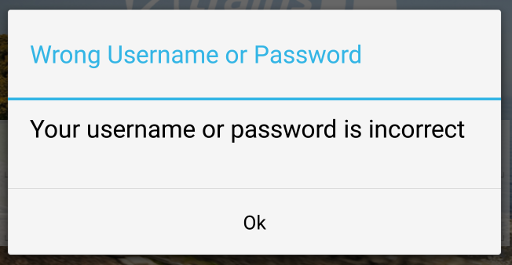
Meanwhile.... the Ticket Wallet app is still telling me that my user name or password are incorrect.
PS: "Thank you for your email dated 6th June 2016" -- it's July, not June.
Quick update on where things are at with the attempt to get help with the apparent inability to log into the Virgin East Coast Ticket Wallet app using an otherwise perfectly valid account...
As mentioned yesterday I had an email from them. I replied (after writing yesterday's blog post):
I'm very concerned and very confused by your question about if I've even registered with the main website. Yes, I have. I've confirmed this more than once now. During my first phone conversation with support I was told I wasn't in the system and then, when I demonstrated that I had to be, I was magically "found" after some magic "fix" was applied on the fly. Now I'm being told I don't exist again.
I seem to be going backwards with this rather than going forwards, and what's even more frustrating is that any question I ask seems to get ignored while I keep being asked the same basic questions time and again.
Yes, I did register with the main website. That's how I found there was an Android app that works with it. That's how I followed the link to it. That's how I found the support report form and managed to drop you a line in the first place.
So, just so I'm 100% clear on this: which email address are you looking for? How are you looking for it? Where are you looking for it? How come someone looked for it before, didn't find it, and then found it when looking again? If I'm not in the system how is it possible for me to log into the main website?
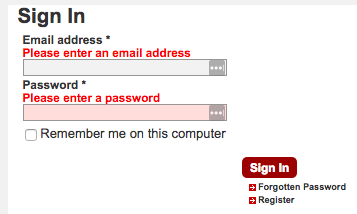
I also added a couple of screenshots, with explanation, that shows me logging in with the address they claim doesn't exist in their system.
I've had no reply to my questions so far. I've had no reply at all so far.
After posting yesterday's post I did the usual thing of tweeting it and, obviously, mentioned @Virgin_TrainsEC in the tweet.
This lead to a little exchange on twitter where I mentioned that the main reason I was trying to switch to Virgin's own system, rather than use someone line TheTrainLine, was so that I could get the free WiFi and save myself a tenner each trip.
All credit to Virgin East Coast: they contacted me directly and have provided me with 10 one-use WiFi access codes to keep me going while this gets sorted out. It's not a solution to the problem, but it does remove the extra cost I was trying to get rid of for the next 5 standard class round trips (I sometimes sneak in a first class journey if the price is too good to ignore).
So.... no still no solution, but some welcome help from them to be going on with. Can't grumble at that.
Yesterday, realising it had been a week since I'd last had any contact with Virgin East Coast support, I dropped them a line to find out what was going on. Given that they'd generally been pretty quick to reply and deal with things initially (albeit in ways that didn't really seem to fix the problem) it seemed odd that they'd gone so quiet.
I've had a reply this morning:
Dear Dave
Thank you for your email chaser today with regards to the Mobile app that you registered on and now cannot sign into it to test the device before you book.
I am sorry to hear that you have not been in receipt of a reply with regards to this and as such I will try and solve this for you now.
We did not receive anything back from our second line support team and as such we may need to do more troubleshooting before we chase this with them.
Please can you confirm if you have actually registered on the desktop version of our web site please?
I know that you stated that you have signed up for the mobile app and registered on this but your email address does not show on our system as being registered so we just want to ensure that we have explored all areas.
Once we have this from you we can then add this to the valuable information that you have already provided and chase this up for you.
Honestly, this is starting to get silly now. I don't mind so much that they've been slow in getting back to me on the problem because they've been waiting on "second line support" to get back to them, but that doesn't seem to really make sense in the light of them saying afterwards that my email address doesn't even show in their system.
Really, if they can "see" that I'm not even registered in their system, why would they have passed things to "second line support"? That makes no sense.
But, actually, it gets even worse. During my original phone conversion with them the lady I spoke to made the exact same claim. She told me that my email address wasn't even in the system, hadn't been registered via the website. Of course it had (I even sent the initial message for support from their website, while logged in). I pointed this out and she went off to look into it; she came back to say it was there now. When I asked what had happened she mumbled something about how there'd been a problem and she'd got someone to fix it.
No, I have no exact details about it, but quite simply she said I wasn't in the system, I provided her good evidence I was and then she made "magic" happen and suddenly I was visible.
But, now, apparently, I'm not visible again.
Either someone at Virgin East Coast is fibbing to me, or their system has a bad habit of losing people's details. It's not like I'm so stupid to think I've registered but actually haven't. I can log into the website with the details I registered with. I've had a member of staff confirm I'm in the system. I've had subsequent support chats take place where the person I'm dealing with is satisfied that I exist in the system. I even had them ask me to try and reset my password -- something I imagine isn't possible if you've not even registered with the system yet!
This is getting really silly now. This is possibly getting beyond silly.
The serious side of this is, of course, I can't trust the Virgin East Coast website or their booking system, so I have to continue using a third party, which means Virgin still get to grab an extra tenner off me on every trip so I can have WiFi and get some work done.
Another update to the saga of trying to get the Virgin East Coast Ticket Wallet app up and running.
Late on yesterday afternoon (a Sunday, it has to be said, so that's some dedication to solving the problem) I got a reply to the email I'd sent them previously. It didn't contain anything in response to what I'd written (so it looks like I'm never going to find out what a TOC is! sadface) but it did say this:
To Dave Pearson,
Thank you for your response.
Please attempt to change your password via the ‘forgotten password’ process.
Once you have amended your password, please attempt to sign into your Virgin Trains East Coast Ticket Wallet App.
I apologise for the inconvenience, and thank you for your patience.
I'll admit that I wasn't convinced by this plan. There was no explanation as to why I'd want to change my password, or why I'd want to pretend that I'd forgotten my password (I hadn't forgotten it, obviously), there wasn't a suggestion that something had been changed or fixed such that this would tickle a solution into working. It appeared to imply that I'd actually forgotten my password and that I should go about setting it again.
Fair enough... I did. It didn't make a jot of difference. Same problem. I've written back to say so.
The actual act of saying I'd forgotten my password was a little odd. I did the obvious thing of going to the main website and saying I wanted to sign in.
Once clicked, that took me to the actual login page, which has the link to say you've forgotten your password.
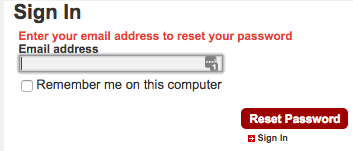
When you click on that link you get taken to.... a login page!
There you then have to say, again, that you've forgotten your password. Only once you've done that do you get somewhere where you can say you've actually forgotten your password.
Not horrific, of course, but a rather odd route, needing to click pretty much the same link twice to say the same thing.
Anyway, I tried it, it didn't work, they've had an email to say as much. Now I wait for the next step.
This morning I called back on the number I'd been given yesterday evening. I explained briefly why I was calling and how I was returning someone's call but, sadly, ended up back in support script-following hell: they started asking for booking reference and all that stuff again. I stopped them, explained the issue again, and they then started to ask for ticket details and so on.
Deeply frustrating. The problem I had was that I was trying to set everything up so I could even stand a chance of booking a ticket. How could I have a ticket I could tell them about if I'd not even got to that part?
When I made this clear, in as polite but firm way as possible, I was passed onto that person's supervisor.
As luck would have it he was the person who'd called and left a message last night. He quickly filled me in on what was happening, saying they weren't sure what the problem was but that the details had been passed to the tech people. He also asked if he could send me an email with some questions in it that would help get to the bottom of things; he said it would ask things like OS type and version, device type, etc. It all seemed to make sense
I said I'd be happy to and we left it at that.
I've had the email. This is what it asked:
1 - Origin and Destination
Gah! Here we go again. The whole support thing appears to be predicated on the idea that you're having a problem getting somewhere. They seem to not understand that if you can't even use the system in the first place you can't even have booked a ticket.
2 - Date and Time
Without a ticket, there can be no date and time.
3 - Number of passengers and railcards if any
Seeing a pattern here?
4 - Ticket name and price
I... erm... hello?
5 - Browser name & version
Finally! We're getting somewhere! Only... my problem isn't in a web browser. My problem is with logging in with their Android app. I'm sure I mentioned this to them at least once.
6 - Screenshot if possible showing the error
Yay! Finally! We're getting somewhere! I pasted in the screenshot that was included in yesterday's blog post. You know the one. The one where it's just some text that says the username and password are invalid. Because... images are better than the text in them, right?
7 - Name of the TOC
I have no clue what this means. TOC? What the heck is a TOC?
8 - Email address of the user
This I can do! I know this one! (I still suspect that this is the cause of the problem).
9 - Booking ref
Gaaarrrrrggghhhhhh!
10 - Screen shot showing exact error and exact steps to recreate the error
Wait... didn't I get asked that in question 6? How is this screenshot going to be different from the other screenshot? Still, at least it asks for the steps to recreate now. So I answered that:
Create a new account on the Virgin East Coast website. Ideally use an email address that contains both a full stop and a plus sign, as mine does. Also ensure that you use a password that is the same length as mine.
Log in and look at registered devices.
See there are none and follow the links it provides to the applicable app that will result in a device being registered. In this case the Ticket Wallet.
Download and install on a suitable Android device.
Attempt to log in and, likely, find that you're told that the username and password is incorrect.
So that's all sent off now. Now I wait for another call back at some point in the near future.
Curious how the thing it didn't ask was what app I was using, what version it was, what mobile device it was being used on, what OS, what OS version, etc...
This year has seen me travelling up and down the east coast of England (and into Scotland) quite a bit. Unsurprisingly this means I've been using Virgin East Coast a lot. While I'm no stranger to the rail network (I grew up in York, my father worked for what was once called British Rail, etc) I've not been a regular user since the mid 1990s (when I used to travel from Winchester to London every day).
Much has changed since the last time I used the trains a lot; the big (good) change being that you can do a ton of stuff online and, even more usefully, you can do most things on your mobile phone. Being able to buy tickets from my desk or sofa, and being able to carry all the useful info (times, seat numbers, etc) inside an app makes for an almost stress-free journey.
Up until now I've being using TheTrainLine to do all the booking. The website is uncluttered and easy to use. The same is true of their Android app. I have no complaints at all about how their system works.
But there is one small downside...
The journey I do takes about 4 hours so it makes sense that I settle down and get some work done. Working, of course, requires that I have some sort of Net connection. Ideally I'd just connect via my phone but I find that the signal can't be relied on for large parts of the journey. But that's okay, the trains have WiFi.
It's not cheap though. On Virgin, if you're not travelling first class (something I do do if I can get the right sort of deal) you need to pay £10 to get enough WiFi time to last the trip. Not horrific, but over a few journeys it adds up.
Recently though Virgin East Coast have been doing this thing where, if you book direct via them, you get the WiFi for free. So, while I have no complaints about TheTrainLine, it makes sense for me to book direct with Virgin and hopefully save myself a tenner on the WiFi.
A couple or so weeks back I finally created an account with VEC. I did my usual thing that I do and used a variation on my Gmail email address. You know the sort of thing, make use of the fact that anything after the + in the address doesn't "count" but can be useful to filter things and keep track of who's selling on your contact details.
So I registered as davep.org+virgin@gmail.com. The website accepted it just fine.
The next job was to install their wallet app. According to the website this lets you travel without even needing to faff around with printed tickets: you can do it 100% with your phone (something TTL now do too, I believe). So I downloaded the app, went to log in, and...
I tried a few times, just to be sure that I wasn't being an idiot and messing up but... nope, it just wasn't going to let me log in.
Dammit!
After a few more attempts I gave up and went back to using TTL. Yesterday, however, I decided to look into this again. The problem persisted so I logged into the VEC website, followed the links for getting help with the site (I couldn't see help for the app) and sent a message using the form on the website.
In the initial query I pointed out that I'd like to use the system to book tickets -- especially so I could enjoy free WiFi -- but that the app wouldn't let me log in. I asked how I might fix the problem.
The first reply was:
Could you please confirm which Mobile App you have downloaded and we will advise you accordingly.
Okay, fair enough. I'd spoken about "the app" (although I'd only been offered one via the site) and it seems there's more than one. So I wrote back and confirmed I was talking about the Ticket Wallet.
They replied:
Could you please provide us with your booking reference number and we will advise you accordingly.
I... erm.... Hello? Booking reference? I smell a faint whiff of Catch-22 here.... Never mind. I write back and point out that there is no booking, I'm asking about a problem with their app.
Could you please confirm if you have registered on the Virgin Trains East Coast website and we will advise you accordingly.
Well this is getting fun. I'd been logged in and used their contact form when I sought help. You'd think that it would record this information in some way. Fair enough, perhaps not. So I confirm that, yes, I had created an account with their website and was trying to use that to log in (I also quoted a line from my original message where I'd said this, right from the start).
If you have registered with us please provide us with the email address used as the email address in the original email davep.org+virgin@gmail.com is not recognised on our system.
Erm... Well this is getting silly now. That's absolutely the email address I'd registered with and was logging in with. That's why I was trying to log into the app with it! So I replied confirming that that was the address I'd registered with and hence my confusion.
The reply? This:
I can confirm Virgin Trains East Coast has two Mobile Application, the Virgin Trains East Coast App and the Virgin Trains East Coast Live App.
When you purchase an eligible Virgin Trains East Coast ticket on the website you will be offered the option of having your ticket delivered to your mobile device as an m-ticket.
To use the app, simply sign in with your Virgin Trains East Coast login details, and the app will synch with your online account. If you haven’t registered that device before, it will ask you to name your device. That name will then be shown in your account and when buying tickets, so you can choose which device to send your tickets to.
Thank you for contacting the Virgin Trains East Coast web support team, should you require any further assistance please don’t hesitate to contact us on 03457 225 111.
I... erm.... what? I'm still unsure what this was really telling me. The words made sense, it seemed to be filled with facts, but none of this seemed to pertain to what I was asking them. Worse still, it seemed to give the impression that you needed to have purchased a ticket before you could use the mobile app (at least that's one interpretation I'm getting from the above) and yet, when you follow the links on the website, it says something very different.
I replied pointing out that I was failing to see how that addressed what I'd asked, and I reiterated my problem.
At this point I got a little frustrated and tweeted my frustration:
While I get that social media staff, more than any, can be overworked and are often trying to put out all sorts of fires, this wasn't in any way helpful to me. I pointed out what the actual issue was:
@Virgin_TrainsEC The problem goes deeper than that. I’ve never been able to log in. Ever. Support says ac doesn’t exist. But it does. O_o
That tweet got a reply from them asking if I was talking about the wallet app (I was, of course) and if I'd registered with the website first. O_o
So, after a lot of back and forth, I'd got nowhere with this. I did, a little while later, get an email asking for my phone number so they could call me; I replied with it.
The phone call came a little later on. It didn't go well.
At first I was told that the problem was that I needed to purchase a ticket and then that would mean I'd be able to log into the mobile app. Let's just take a moment to really appreciate what's being said: I SHOULD SPEND A HUNDRED POUNDS OR MORE SO I CAN EVEN LOG INTO THE APP.
Only... that's nonsense. According to the website it works very different from that. What the website implies is:
You create an account on the website.
You download the wallet app.
You log into the wallet app with the username and password you use on the website.
This then registers the mobile device with the system.
Then, and only then, can you buy a ticket.
When I pointed this out to the nice lady on the other end of the line she seemed confused by the idea and had to go and check it. She then came back and confirmed that, yes, that's how it works. At which point I asked her how I was supposed to actually log in if it kept telling me my username and password were wrong.
She then suggested that, yes, perhaps there was a problem and could I send a screenshot of the wallet app so they could look into it. A screenshot. O_o
Sure, I guess I could send in a screenshot. You can see it above. It's quite simply the text "Your username or password is incorrect". That's it. That's the problem. It's nice and easy to type. It's text. It's English. I can't see any special pixels that would help debug the issue.
But, nope, it needed a screenshot.
I asked if, perhaps, I could speak with these "technical" people who'd be dealing with this. I was told that that wouldn't be possible and that, instead, she'd have her manager call me. She then hung up pretty sharpish after that.
Right now, as of the time of writing, I'm waiting on that call.
While I do wait, I'm going to make a prediction as to the cause of this. I'm willing to bet the problem is with the choice of email address. So many large companies have systems that assume that + isn't a valid character for an email address. I'm going to further guess that Virgin East Coast isn't one of them when it comes to their website. When it comes to their Wallet App though...
Later in the evening: I never did get a call from the woman's manager, but an hour or so later I did get a call from someone at their "web support team". Sadly I wasn't in a position to take it so I'm no wiser as to what the call was actually going to be about. I'll return the call tomorrow and, all being well, write a second post about what happened.
The main thing I take away from this today though is that, if you (as appears to have happened a few times today) follow a script and don't actually read what the customer is writing, it's going to turn into a very frustrating experience; especially for the customer.