Posts tagged with "Copilot"

BlogMore v1.11.0

2 min read

I was going to call this one "Yet more BlogMore" but I think, even after two posts with that naming scheme, the "...more BlogMore" thing has had its day. But here I am: another day, another wee change to the blogging engine I'm building as an experiment with developing using AI.

Just a couple of simple changes in this release. The first comes from the fact that I was updating my blog to include more of the "socials" icons (the ones you'll see towards the bottom of the sidebar if you're on a wide enough display, or in the collapsible header if not) and when I deployed some were missing. Which, after a moment of puzzling, made sense.

See: I made a change a while back such that I stopped using the full FontAwesome stylesheet, and instead only used a specially-built subset. This is handy in that it really reduces how much data goes into a page. But the downside, of course, is the browser will cache this file; so if you then add more "brands" to the list their icons will be missing until the cached version of the old generation of the CSS file goes stale.

So in this release I've added a generation-based cache buster; it's just the simple ?v=thing approach but it should work fine for what I need here.

The other change is I've added the generated FontAwesome CSS file to the list of files that get optionally minified at generation time. While it's not a massive change in terms of the total amount of data that gets pulled down, every little helps.

I feel like, at this point, I've managed to add everything I could possibly want from this little static site generator; yet somehow each day I have a new idea and off I go again.

It'll be finished soon. I'm sure.

Even more BlogMore

3 min read

While the additions have, for sure, slowed down, I'm still tinkering away with BlogMore. Recent changes stem from the fact that someone else has been mad enough to want to experiment with rebuilding their blog with it too, which, if I'm honest, is massively helpful with the ongoing GitHub Copilot experiment. Somehow it feels a little different, ganging up with the agent to implement changes for someone else's benefit.

Recent changes include:

  • Tweaking the size and layout of the "social" icons that appear in the sidebar (this one was for my benefit)
  • Making it possible to customise the title for the socials section in the sidebar (also for my benefit)
  • Providing control over the path used for posts -- this one was a request that made a ton of sense, it's at this point it stops being a tool for me and starts being a more general tool

Next up is the first breaking change where I'm going to remove a feature. This came from my very initial experiment last month, where I was concentrating purely on building a tool for my blog and my blog alone. I'd made it such that the /attachments directory in the content directory had special status, and it would be copied over to the output directory in full. Oddly, however, this never made it into the documentation.

Meanwhile, the /extras directory also had special status with its content, full hierarchy included, being copied over but moved up one level in the output. So, for example, extras/humans.txt became /humans.txt in the resulting site, etc.

Presumably, at this point, you can see where this is going. Why the heck did I have a special attachments folder being copied over, when a folder of any name could live below extras and also get copied over?

So, now, my blog, which uses /attachments for all inline images and covers, has been updated so that the attachments live under extras and it all works as it did before; no special messing with a special folder name.

Given all this, the next release of BlogMore will remove treating /attachments as a special case, making it less hard-coded for my habits and more of a general tool that could be useful for others.


Mildly related to this: I did a lunchtime talk at work today, having turned Five days with Copilot into a 20-25 minute presentation. It was fun to do. I've not written or given a talk or presentation in a long time -- probably the last time was when I helped run Newton's Astronomical Society in the early 2000s -- so the preparation for this was a little daunting to start with.

While doing this, not wanting to break a long streak of never having used PowerPoint, I discovered and gave sli.dev a go. Writing a single Markdown file to power the talk was exactly my kind of approach. I don't have any experience with any other such tools, but if you're ever looking for something like this I recommend giving it a try.

I'm also open to suggestions of other options, given I might end up doing this some more.

An eager fix

2 min read
AI

An eager fix

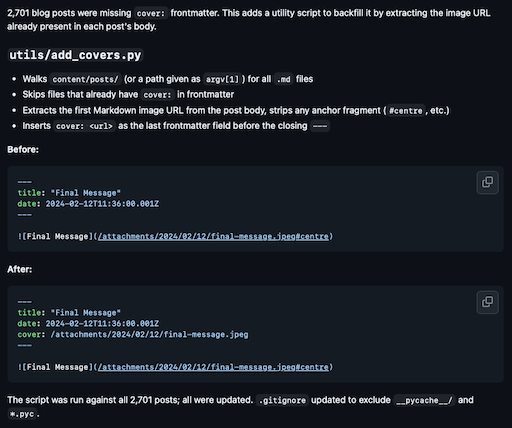
Yesterday, while looking at starting to post to my photoblog again, I noticed I'd missed a trick when I added the first and second sets of photos when I created seen-by.davep.dev: I'd left off any cover frontmatter from all of the posts!

While I doubt it's super important -- I can't imagine people will be sharing photos from the blog after all, especially not older ones -- it felt like I'd failed to use a useful feature that I'd made sure BlogMore had.

This was obviously easy to fix. I could just write a tool that would go through all of the Markdown files, find the image that is being displayed in the post, pull out the path to the file, and add a cover to the frontmatter. Not exactly the hardest thing to write, but kind of boring for a one-off fix.

So this felt like another good time to get Copilot to do the hard work. Liking this plan, I wrote an issue for the prompt and set it to work.

The result was unexpected, and in retrospect this is how I should have approached it in the first place; Copilot wrote the script, then ran it, and then submitted the PR including the script and all of the changes after running it! It's like it was super eager to do the fix so went ahead and just did it.

The resulting PR

This, for me, highlights a trick/approach I'm still not fully mindful of: where I might once have written some throwaway code to do a job, run the code, and then made use of the result, when it comes to using an agent I always have the option of saying what I want done to the content of the repository and just let it do it.

When I'm next faced with a problem like this, I think this is the approach I'll take: rather than ask it to write the tool to do the work, I'll just say what the work is I want done and let it go about it. This feels like where an agent should shine and where it's really useful.

Meanwhile I can get on with the fun stuff.

Seen by davep revived

2 min read

A different glen

Following on from the rescue of my photoblog, followed by the rescue of the original incarnation, I've been thinking that I should get into the habit of posting the odd image here and there again, when the desire takes me.

The problem is the workflow. The point and purpose of the last two incarnations was that I just had to take image, manipulate image, post image and then lots of other things would happen. As I've mentioned in the posts linked to here, and others here on this blog, it's much harder these days to achieve that seamless and frictionless workflow we used to enjoy during the rise and the peak of "Web 2.0".

So yesterday I decided on an approach that, while it's neither seamless nor frictionless (yet), it feels like it will work. So here's the plan:

  • Take photo
  • Manipulate photo1
  • In Apple Photos add a description to the image
  • Export JPEG file to a Photoblog Inbox folder in iCloud Drive
  • Later, when I'm at my desk, import the image into the photoblog
  • Publish the updated blog

So, yeah, more manual steps are required, at least for the moment. I suspect though that if this works well I might be able to increase the automation involved and do it in such a way that I'm in control of the steps and services (or at least I'll be able to do it in a way that I can swap out a step should whatever service being be lost).

As an aside, for anyone who might have been following along with my experiments with GitHub Copilot: the import tool I link to above was written from a prompt. This, for me, feels like the ideal use for such a tool. Writing that script was going to be a chore, I wanted to get on with the bigger picture thing, so asking Copilot to write it while I attended to other things felt sensible and useful.

I'll likely tidy up the code soon, but for now what was produced works and it let me try all of this out in the time I had available on an otherwise busy Sunday afternoon.


  1. Still using Snapseed. Snapseed is always fun for evoking the mood. 

More BlogMore

3 min read

I've just released v1.7.0 of BlogMore, my ongoing experiment with GitHub Copilot. Since the last release I wrote about I've made a couple of cosmetic changes, and also addressed a couple of bugs.

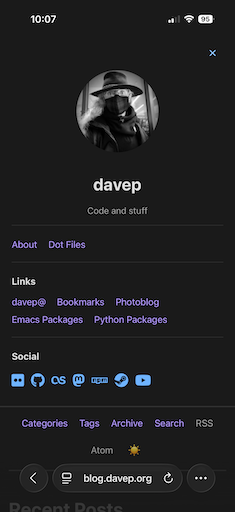
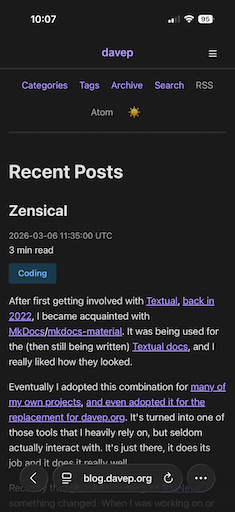
The first cosmetic change relates to how the blog appears on mobile devices1. In such a circumstance, before the change, the sidebar content would, by design, relocate to the top of the page. This made sense, it meant that the information was still available, but it also had the unfortunate effect of pushing the actual post content way down the screen, sometimes off the bottom of the screen.

The expanded view

Not great.

So I decided to try and improve the mobile layout. As I have done so many times now, I started out with an issue that served as a prompt and assigned it to Copilot; despite the fairly vague request and the fact that I gave it an image to consider, and essentially gave it a hand-waved ASCII diagram of what I wanted, it mostly managed to one-shot the problem.

Now, when I visit the site on my phone, I see a lot less "admin" stuff at the start.

The collapsed view

As a reader I can still toggle the "sidebar" information into view and out of the way again, but the important thing is I can get into the post itself right away.

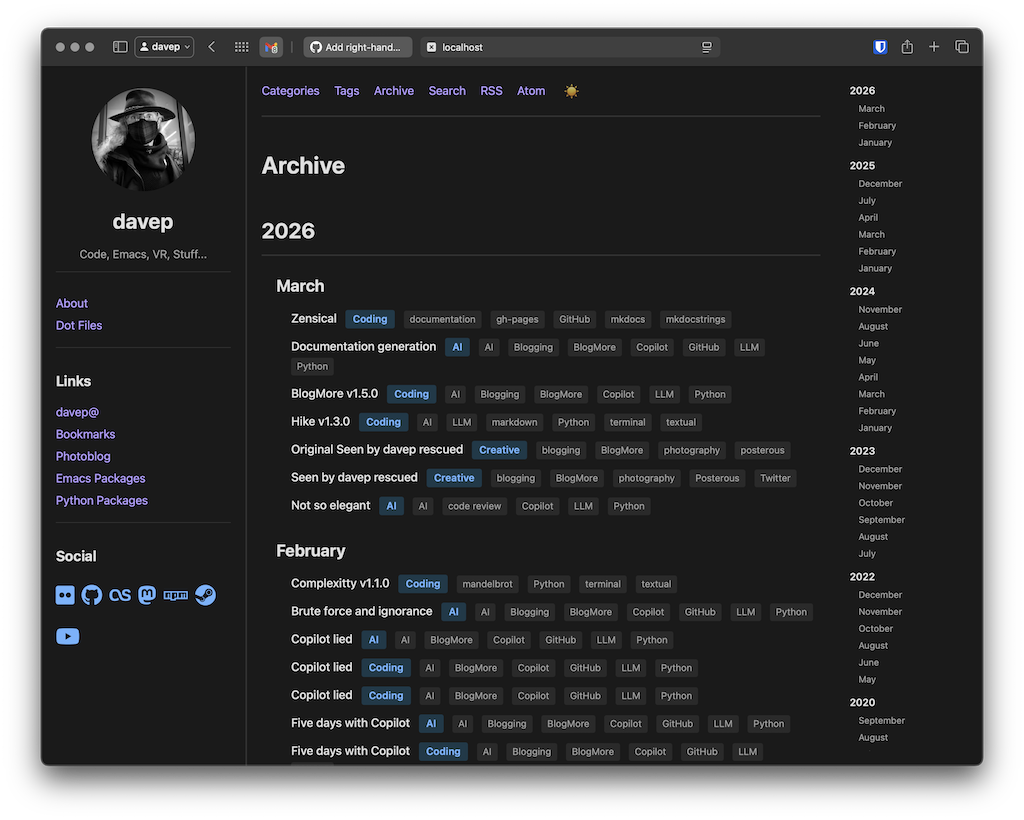
Another change that's mostly cosmetic, although has a purpose too, is an index in the archive page. I've created this to only be available on wider displays; a tool to make use of any "dead" space on the right hand side of the page. This gives a table of contents of years and months so the reader can skip around the archives faster.

The archive table of contents

There have been some under-the-hood changes too. One was an effort to reduce the repeated boilerplate that I noticed was creeping into the templates. While I'm mainly building this tool for myself and the "out of the box" design is how I want my blog to look, I do want the templates to be usable and as efficient and as easy to modify as possible.

As mentioned earlier, there's also been a couple of bug fixes; one example being tackling some misbehaviour on GNU/Linux when it comes to site generation. That issue was an interesting one in that I wasn't able to reproduce the problem, so I decided to let Copilot have at it and make its best deduction. From what I can tell it came through (I still need confirmation that it has solved the problem; but it does seem to have identified an actual edge-case that was worth taking care of).

At this point I'd also like to give a shout out to @andyc. He's been a great source of testing and feedback as I've been toying with this experiment. While I set out to build a useful tool for me and me alone, he's raised a few good issues that should push it in the direction of being of more general use.

I highly recommend having a read of his post reviewing a good number of static site generators. As I keep tinkering with BlogMore I'll be keeping this post in mind.


  1. Okay fine any narrow viewport but you know what I mean! 

Documentation generation

2 min read
AI

While I've written a lot of documentation in my life, it's not something I enjoy. I want documentation to read well, I want documentation to be useful, I want documentation to be accurate. I also want there to be documentation at all and sometimes the other parts mean it doesn't get done for FOSS projects1.

When I started the experiment that is BlogMore, I very quickly hashed out some ideas on how it might generate some documentation, and the result was okay. In fact, if anything, it was a bit too much and there was a lot of repeated information.

So, this morning, before I sat down for the day's work, I quickly wrote an issue that would act as a prompt to Copilot to rewrite the documentation. This time I tried to be very clear about what I wanted where, but also left it to work out all the details.

The result genuinely impressed me. While I'll admit I haven't read it all in detail (and because of this have left the same warning right at the start), on the surface it looks a lot clearer and feels like a better journey to learning how to use BlogMore.

blogmore.davep.dev hosts the result of this.

I have a plan to work through the documentation and be sure it's all correct and all makes sense, but if it's as correct and as useful as I think, I might have to consider the idea of taking this approach more often. Writing down the plan for the documentation and then letting it appear in the background while I get on with my actual day makes a lot of sense.

I fear I might be warming to these tools, a little bit. :-/


  1. Although I've made a point of doing it for almost every one of my recent Textual-based projects. 

BlogMore v1.5.0

3 min read

Since switching over on the 19th of last month I've been making lots of changes to BlogMore. While there's been a good few bug fixes and QoL changes, I've also been adding new features that I've found myself wanting.

Here's a list of some of the significant additions I've added in the last couple of weeks (and, yes, as per the experiment, all of these have been developed by me prompting GitHub Copilot):

  • All parts of a date in a post's timestamp can be clicked to get to an archive of that point in time.
  • Added fully-client-side full text search (I'm finding this especially useful).
  • Added sitemap generation.
  • Added a general fallback description for any page that doesn't have one.
  • Added fallback keywords for any page that doesn't have any.
  • Added author metadata to the header of all pages.
  • Hugely optimised the use of FontAwesome.
  • Made best possible use of all the usual og: type metadata in the head of all pages.
  • Added optional CSS minification, improving page load times.
  • Added optional JavaScript minification, improving page load times.
  • Where appropriate, all pages now have rel="prev" and rel="next" tags in the <head>.
  • Added a rel="canonical" tag to the <head> of all pages.
  • Improved the style and workings of the pagination of all archive type pages.
  • Improved the cosmetics of the category and tag clouds.
  • Improved how the first paragraph is discovered for a page or post, when using it as the default description in the <head> of a page.
  • Cleaned up the generated HTML so it's more compact.
  • Added support for custom 404 pages.

As I say, they're just the improvements I've made that have come to mind as I've used BlogMore. I've also done a lot of bug fixing too. You can read the full changelog over on the BlogMore website1.

I feel that the pace of updates and additions has started to slow; I think I've now got more or less everything I wanted from this. I'm pretty sure I can do everything I ever bothered to do with Jekyll and Pelican, and I am enjoying "owning" the code such that, if I have an idea for something I want, it's easy enough to make it happen.

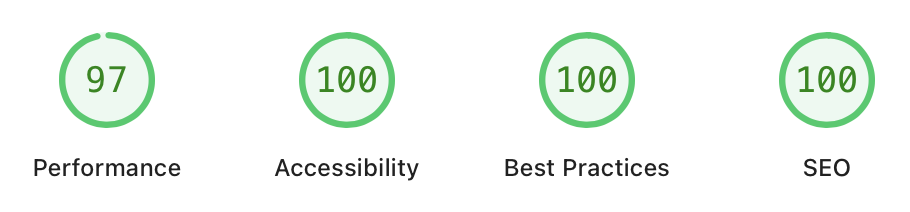
I'm also pretty happy with how well the results perform. Despite the fact I'm not a web developer, and despite this blog being served by GitHub Pages (which, let's be honest, isn't the most speedy host), the measurements for a single page in the blog look fairly good:

Desktop

That's measuring loading in a desktop context. Even measured as mobile (which I've tried to make work well too) it's not too shabby:

Mobile

I think I can rightfully be satisfied with those values, given this isn't normally my primary focus when it comes to software development.

Anyway, if you like messing with static site generators, and one that is blog-centric sounds useful, and if you're not put off by the fact that this is a deliberate "use GitHub Copilot" experiment, feel free to take a look.


  1. Which, somewhat amusingly, is built with MkDocs. 

Not so elegant

2 min read
AI

One thing I've been noticing with my current experiment with GitHub Copilot is that it seems to know Python well enough to write code that gets the job done, and sometimes it knows it well enough to write more modern idiomatic Python code, but it also seems to write the inelegant version of it.

It's hard to pin down exactly, and of course it's a matter of taste (my idea of elegant might burn someone else's eyes), but on occasion, as I review the code, I find things that make me go "ugh".

Here's an example: there's a function that Copilot wrote to extract the first non-markup paragraph of an article (so that it can be used as a page description). One thing it needs to do is skip any initial images, etc. It takes a pretty brute force approach of looking at the start of each stripped line, but it gets the job done -- I can't really argue with that.

But here's how it does it:

# Skip markdown image syntax
if stripped.startswith("!["):
    continue

# Skip markdown linked image syntax ([![alt](img)](url))
if stripped.startswith("[!["):
    continue

# Skip HTML img tags
if stripped.startswith("<img"):
    continue

Now, this is good: it's using startswith. There are less-elegant approaches it could have used so I'll give it bonus points for using that method. The thing is though, it's testing each prefix one string at a time, pretty much rolling out a load of boilerplate code.

What bothers me here is that startswith will take a tuple of strings to test for. I find it curious that the generated code is idiomatic enough to know that startswith is a sensible option here, but at the same time it still writes the list of things to test out in a long-winded way.

This is exactly the sort of thing I'd call out in a normal code review. Technically, if this wasn't mostly a "let's see how it goes about this with minimal input from me" experiment, I'd have called it out here too (as an experiment, I might go back prompt it to "think" about this).

If I ever find myself using this sort of tool for generating code in a work setting, this is exactly the sort of thing I'll be watching for.

Brute force and ignorance

5 min read
AI

My experiment with coding with an agent continues, and from the point of view of the usability of the results, I'd say it's going well. From the point of view of learning more about this sort of tool and the pitfalls: I'd also say it's going well.

The one thing I'm really starting to get an appreciation for is just how much it employs a sort of brute force and ignorance approach to getting to a solution for some sort of problem. I noticed this on and off as I watched the agent's chat, as it worked away.

One example I enjoyed was when it was trying to add a new dependency to BlogMore. For reasons I should probably try and understand1 it knew it should be using uv to add a dependency and it knew how to use it to update the lock file, but it didn't have uv to hand:

The lock file (uv.lock) needs to be updated to include rcssmin. Since uv isn't available, I'll need to note this in the PR. The lock file should be generated by uv when the pyproject.toml is updated.

So it decided the best solution was probably to... "hand-edit" the lock file.

The lock file needs to be updated with rcssmin. Since uv is not available in this environment, I need to update it manually or find another way.

I need to update the uv.lock file to include rcssmin. The uv.lock file needs to include:

  1. The rcssmin package entry with hashes
  2. The rcssmin dependency in the blogmore package section

Let me look at the PyPI page for rcssmin 1.2.2 to get the hash.

It then grabs rcssmin from PyPI and checks out the information it wants; after which it goes:

I need to update the uv.lock file with the rcssmin package information. The uv.lock file uses SHA256 hashes. Let me look at the existing format in more detail to understand what I need to add, and then I'll query PyPI for the hashes.

Actually, let me think about this differently. The uv.lock file is a generated file, and updating it manually is error-prone. The proper way to update it is to run uv sync or uv lock. Since uv is not available in this environment, I have two options:

  1. Let the CI update the lock file (risky if CI fails on the locked version)

So... around this point it has some sort of plan for hand-patching the lock file, but also recognises that this is a dodgy approach and it should be using uv to update the lock file.

I also really like the part where it says it has two options, then goes on to provide an exhaustive list of... one.

After this it runs this code:

import json, urllib.request
url = 'https://pypi.org/pypi/rcssmin/json'
try:
    with urllib.request.urlopen(url, timeout=10) as f:
        data = json.load(f)
    v = '1.2.2'
    releases = data['releases'].get(v, [])
    for r in releases:
        print(f'filename: {r[\"filename\"]}')
        print(f'  url: {r[\"url\"]}')
        print(f'  sha256: {r[\"digests\"][\"sha256\"]}')
        print(f'  size: {r[\"size\"]}')
        print(f'  upload_time: {r[\"upload_time_iso_8601\"]}')
except Exception as e:
    print(f'Error: {e}')

after which it concludes:

Now I have all the information I need to update the uv.lock file. I need to add:

  1. The rcssmin package entry in the lock file
  2. Add rcssmin to the blogmore package dependencies

I mean... okay, I guess. Again, I'll admit that I'm still getting used to setting this sort of thing up and working with it (and keep in mind none of this was done locally; this is all via GitHub Copilot, up on GitHub), but it's kind of funny and wild that the approach taken was to recognise that using uv to remake the lock file was the best approach so... let's hand-edit the lock file.

But that's not the best part. This is where it gets really fun. It had decided that the lock file must be in alphabetical order. Okay, sure, why not:

The lock file has packages sorted alphabetically, so rcssmin should go between pygments and python-dateutil (since "r" comes before "py" actually... no, wait - "r" comes after "p" in the alphabet. Let me check the order again).

Since "r" comes before "py."

Since "r" comes before "py."

o_O

O_o

Extra credit here for giving me a good giggle. I really appreciate the way that it catches itself mid-sentence and remembers how the alphabet actually works.

As to the outcome of all of this? Sure, the feature I wanted to add got added; it worked away and got to a working solution in the end. But the route it took was, I think it's fair to say, a "brute force and ignorance" approach.

I've not been spending too much time reading the agent's own chatter, but when I have I've found myself amused by the dead ends it'll wander down and then work its way back out. There is, without question, a recognisable process here: I believe it would be a dishonest developer who says they've never had times in the past, or just one of those off days, where they've fallen down a rabbit hole of a solution, only to realise it's the right solution implemented in the worst possible way. There's also a resemblance here to how more junior developers work a problem until they really develop their skills.

I think I'm going to keep an eye on the agent chat a bit more from now on. While I imagine things will only improve as these tools improve, for the moment it's a good source of coding comedy.


  1. Presumably there's things I can be doing to make its life easier. 

Copilot lied

4 min read
AI

This morning, with my experiment with Copilot having settled down a little bit, I thought I might try and use the result for another little experiment. For a long time now I've maintained a (currently lapsed) photoblog. It was always very much tied to "the site formerly known as twitter" and, since I fully erased my account after the site turned into a Nazi bar, I've not done anything to update how it gets populated.

So I got to thinking: I have a full backup of all the images in a couple of places; perhaps with a bit of coding (and some help from "the AIs") I can revive it using BlogMore?

I tinkered for a wee bit and mostly got something going (albeit I'm going to have to do some work to back-port the actual dates and times of some earlier images, and there's a load of work to do to somehow pull out all the tags). But then I hit a small hitch.

When building BlogMore I made the decision to let it write both the code and the documentation. It documented a couple of features I never asked for, but which seemed sensible so I never questioned. On the other hand neither did I test them at the time (because they weren't important to what I needed).

It's the exact reason I added this warning at the start of the documentation:

âš ī¸ Warning

BlogMore is an experiment in using GitHub Copilot to develop a whole project from start to finish. As such, almost every part of this documentation was generated by Copilot and what it knows about the project. Please keep this in mind.

From what I can see at the moment the documentation is broadly correct, and I will update and correct it as I work through it and check it myself. Of course, I will welcome reports of problems or fixes.

With this warning in mind, and with the intention of working through the documentation and testing its claims, I decided to test out one of the features when building up the new photoblog.

Whereas with this blog I keep all the posts in a flat structure, this time around I thought I'd try out this (taken from the Copilot-generated BlogMore documentation):


BlogMore is flexible about how you organise your posts. Here are some common patterns:

Flat structure (all posts in one directory):

posts/
  ├── hello-world.md
  ├── python-tips.md
  └── web-development.md

Note: Files can be date-prefixed (e.g., 2026-02-18-hello-world.md) and BlogMore will automatically remove the date prefix from the URL slug. The post will still use the date field from frontmatter for chronological ordering.

Organised by date:

posts/
  ├── 2024/
  │   ├── 01/
  │   │   └── hello-world.md
  │   └── 02/
  │       └── python-tips.md
  └── 2025/
      └── 01/
          └── web-development.md

Organised by topic:

posts/
  ├── python/
  │   ├── decorators.md
  │   └── type-hints.md
  └── web/
      ├── css-grid.md
      └── javascript-tips.md

Using the hierarchy approach, especially with dates, seemed ideal! I'd drop the actual images in such a hierarchy, and also drop the Markdown posts in a parallel hierarchy too. Perfect!

So I set it all up to do that, fired up blogmore serve, visited the URL and... No posts yet. What the hell?

So I checked the code for BlogMore and, sure enough, despite the fact the documentation was selling me on this handy way to organise my posts, no such feature existed!

As an experiment I then asked Copilot what the heck was going on. Much as I expected, rather than coming back with an answer to the question, it went right ahead and fixed it instead. Which is fine, that's where I would have taken this, but I do wish it would answer the question first.

â„šī¸ Note

I imagine I could get an answer to the question if I took a more conversational route with Copilot, rather than writing the question in an issue and then assigning that issue to it. I must remember to try that at some point.

So, yeah, unsurprisingly Copilot flat out lied1 in the documentation. I'm not in the least bit shocked by this and, as I said, I fully expected this. But it was amusing to have an example of this turn up so early in the documentation, in such a glaring way, and in a way that was so easily fixed (really, it was just a swap of Path.glob to Path.rglob).

As I play with this more it's going to be fun to see what other bold claims turn out to not be true; or perhaps even the reverse: what neat features lurk in the code that haven't been documented.


  1. Yes, as I mentioned yesterday, that's an anthropomorphism. Folk who take such things as an indication that you don't understand "AI" might want to think about what it is to be a human when communicating.