On to something new

Posted on 2017-12-12 13:59 +0000 in Life • Tagged with coding, work, life, news • 2 min read

Today is a fairly significant day for me. For the past 21 (and a bit) years I've worked for the same company. I know that, for lots of people in my industry, that's a hell of a long time to be in one position. It was a setup that served me pretty well; the company was small (I'm not much of a big company person), I generally got to dictate the development tools and direction, and I also got to work from home.

The working from home part was especially helpful as other life events involved me and happened around me. The job I've been in has seen a marriage come and go, and a move from Hampshire to Lincolnshire, and then from Lincolnshire to Midlothian. There's been a few adventures along the way.

But, three months ago, I got a call to say that I was to be made redundant. This sucked, obviously. It also appeared pretty stupid on the part of my employer: a company that is based around software had decided it no longer wanted an in-house software developer. A bold, and I think unwise, choice. From this point on they've decided to only go with contract developers and only contract developers from overseas (or so the story goes).

As it goes, things have turned out okay. Today is my last day with my old employer and, as I'm sat here typing this out while having some lunch, I'm actually glad that it's coming to a close and that I can get to move on.

I have a new employer, and will be starting in my new position during the first week of January. It'll be very different. It'll all be different. Not only will I be back working in an office (one where jeans and t-shirts are the norm, thankfully!), I'm also going to be working in an industry (as a developer still, of course) that I have no background in and no real knowledge of. It's going to be a seriously exciting challenge.

New book

Over the next couple of weeks I've got a fair amount of background reading (and video watching) to be doing. This isn't so much that I can get on with the job of development (although there will be a good bit of that to do too -- who doesn't want to be trying to understand new options for development?), it's more about understanding the language of the industry I'll be in and so that I can understand the needs of my users.

Goodbye fashion retail and all related things. Hello genetics and... well, I don't know, I'm going to find out. :)


More revamping of my Emacs config

Posted on 2017-07-13 15:25 +0100 in Emacs • Tagged with Emacs, Lisp, coding, Emacs Lisp • 2 min read

I've been pretty quiet on here since I last wrote about how I'd done a further revamp of my Emacs config, so I thought that subject would be a good reason to write another blog post.

It'll be a mostly short one, and one to muse over something that's been bugging me for a while now: my decision to lean heavily on customize to set all sorts of settings.

Initially, when I nuked my original config over a year ago, it seemed to make a lot of sense. Let all the tweaks and set values "hide" in a file of their own and try and keep the hand-edited config files as small and as clean as possible. Recently though I've got to thinking that this obscures too much, hides too much detail, and removes the ability to actually document what I'm doing and why. It also does make it tricky to adapt some settings to different platforms or even environments on a single platform.

Another problem I've run into is this: when I made the second round of changes and decided to lean heavily on use-package, I soon ran into the minor issue of some packages not making sense, or even being needed, on some platforms (stuff that's useful on my macOS machines isn't always useful on my Windows machines, that sort of thing). While use-package can handle this easily thanks to the :if keyword, I'm still left with the fact that package-selected-packages still gets populated.

Having package-selected-packages contain a list of installed packages likely makes sense if you're using just the Emacs package system and you're not doing the installing with use-package and :ensure. But with use-package and :ensure I feel like I've got far more control over things and can adapt what gets installed when depending on which Emacs I'm running where.

But, because I'm syncing my ~/.emacs.d/.custom.el to all my machines too, any use-package that has a :if to not bother using a package has little effect because the package still ends up being listed/loaded/seen as part of the installation.

Ideally, I think, I'd like to be able to have package-selected-packages held in its own file, or I'd only ever use ~/.emacs.d/.custom.el for local stuff (and so stop syncing it).

Starting today I'm going about a process of moving as much as I can out of ~/.emacs.d/.custom.el and into hand-edited files. In some respects I guess I am going back to how I used to manage Emacs configuration, but this time it's not a massive monolithic file-of-Lisp, it's neatly broken down into sensible sections and it's also biased towards a "grab and config this package" approach.

Meanwhile, I've not seen any good discussions online about customize vs "hand-edit", which strikes me as a little odd as it feels like the perfect "religious issue" for people to have endless disagreements over. I guess, over the next couple or so weeks, I'll find out if switching back was a good idea.


Another revamp of my emacs config

Posted on 2017-04-01 10:02 +0100 in Emacs • Tagged with Emacs, Lisp, Emacs Lisp, coding • 4 min read

Just under a year ago I decided to totally rewrite my GNU emacs config. As I wrote at the time, it'd been following me around all sorts of machines since the early 1990s, starting life on an OS/2 Warp machine and travelling via MS-DOS, GNU/Linux, Windows and, these days, macOS.

The changes I made last year have served me really well, but there were two related issues with it that bothered me a little: the fact that I was maintaining a local library of elisp code in the repository and, worse still, I was storing the packages I'd installed from elpa and melpa in the repository as well.

While this did mean it was pretty easy for me to start up a new installation of emacs on a machine -- all I had to do was clone the repo and run up emacs -- I wasn't happy with the duplication involved. I didn't like holding code in my .emacs.d repo that was already held in package archives.

The solution I saw was in two parts:

  1. Get some of my code, that might be useful to others, into melpa.
  2. Somehow sort my own package archive for my personal code.

Over the past week or so I've worked on this approach. It initially started with me tackling item 1 above: I tidied up and submitted obfusurl.el, protocols.el, services.el, thinks.el and uptimes.el. This was a really helpful process in that it allowed me to brush up on my elisp and emacs knowledge. It's a good 15+ years since I last wrote any significant elisp code and things have moved on a little in that time.

Having done that I'd managed to move a handful of my own packages out of my local library of code, and so out of my .emacs.d repo, but it left me with the problem of what to do with the rest of it.

That's when I discovered package-x and:

,----[ C-h f package-upload-buffer RET ]
| package-upload-buffer is an interactive compiled Lisp function in
| package-x.el.
|
| (package-upload-buffer)
|
| Upload the current buffer as a single-file Emacs Lisp package.
| If package-archive-upload-base does not specify a valid upload
| destination, prompt for one.
`----

(plus package-upload-file too, of course). This meant I could, in effect, start my own personal package archive and look at tackling issue 2 above.

This did give me one small problem though: how and where would I host the archive? I did consider hosting it on a DigitalOcean droplet, but that felt a little like overkill for something so simple. And then I realised: GitHub Pages! All I needed to do was keep the package archive in its own repo (which I would have done anyway) and then make the whole repo the source for a GitHub Pages site. A quick test later and... it worked!

So, by this point, I'd farmed some of my code off to melpa, and now had the rest of it in "delpa" (which I'd called my personal archive). I could now use the emacs package management system to install third party packages and also my own.

But I was still left with one issue: I was still holding the installed packages inside my .emacs.d repo by way of ensuring that all machines were in sync in terms of what was installed. Now I needed to work out how to solve that.

Around this time, as luck would have it, @tarsius had suggested I look at a package called use-package by @jwiegley. This was the bit I was missing.

With use-package I would be able to declare which packages I needed, how they'd be installed and, most important of all, it could be set to handle the fact that the package wasn't even installed. If a package is requested and there is no local install use-package is smart enough to get the emacs package system to install it.

So, given that, all I need to do was create a startup file that would declare the packages I use and I'd have a setup that should, once I'd cloned .emacs.d, self-install.

Except... yeah, one more issue. use-package isn't part of GNU emacs yet so I'd need a method of getting it to auto-install so it could then handle everything else. As it was that was as easy as adding this to the start of my init.el.

;;;;;;;;;;;;;;;;;;;;;;;;;;;;;;;;;;;;;;;;;;;;;;;;;;;;;;;;;;;;;;;;;;;;;
;; Make sure the package system is up and running early on.
(require 'package)
(add-to-list 'package-archives '("melpa" . "http://melpa.org/packages/"))
(add-to-list 'package-archives '("delpa" . "http://blog.davep.org/delpa/"))
(package-initialize)

;;;;;;;;;;;;;;;;;;;;;;;;;;;;;;;;;;;;;;;;;;;;;;;;;;;;;;;;;;;;;;;;;;;;;
;; Bootstrap `use-package'
(unless (package-installed-p 'use-package)
  (package-refresh-contents)
  (package-install 'use-package))

With that in place I was able to nuke all my config on a machine, clone a fresh copy of .emacs.d (having now ceased tracking and storing the installed packages in that repo), run up emacs, wait a few moments and then find that everything was installed and ready to use.

Perfect!

My .emacs.d is now a lot smaller than it was before and, I think, even easier to maintain. Right now I think I'm very close to the ideal emacs config that I wanted to create when I did the complete rewrite a year ago.


I want to like Gboard

Posted on 2017-03-13 08:29 +0000 in Tech • Tagged with Google, Android • 3 min read

I want to like Gboard. On paper it looks really rather good. It's a keyboard from Google, it ties in with your account, it syncs things, it has clever searching for emoji and gifs and the like... what's not to like?

Problem is, I've been a user of SwiftKey since around 2011 (I think it was). I'm very used to how SwiftKey works and it also contains a lot of handy things. I like that it has smart completion, that it learns how I type a bit skewed and that it takes this into account, that I can turn off the fancy swipe typing and instead make use of handy gestures like swipe-left to delete a word. I like some of the themes a lot.

Into the mix comes my iPad, which I use on occasion. The standard Apple keyboard is horrible and, sadly, I find SwiftKey on iOS just as frustrating. It seems to lack enough key features there (especially the word deletion gesture, as far as I can tell) that it's also a bit annoying. My dream of a consistent typing experience across all devices just wasn't happening -- until I found Gboard on iOS.

That felt almost right. And from what I could tell it worked almost exactly the same on iOS and Android. So it felt like a good time to try and force myself to use Gboard on my Google Pixel and Nexus 7.

Sadly, though, I'm just not getting on with it. It's okay. It's not bad. It's just... not good. I'm finding that it lacks enough useful things that it's a frustrating experience. Little things like: when I enter Google Search, there's no word completion in the keyboard (SwiftKey has that); the word deletion gesture (swipe left from the backspace key) seems very hit-and-miss; the most obvious completion for a word sometimes appears in the middle slot but, other times, in the left slot. And so on.

Nothing huge. Nothing that's a show-stopper. But a handful of a little things that make me miss the comfortable home that is SwiftKey.

Don't get me wrong, it does have some very handy and cleaver features too. The searching for emoji -- including showing them up as word completions -- is rather clever. The gif-search thing is all kinds of fun too (mostly used to annoy the hell out of my son on twitter).

None of those quite make up for the bits I miss from SwiftKey though.

All that said, I've being making a point of pushing on with Gboard, thinking that most of my issues might just be because I'm too used to my "old home". Mostly this was working well, until I noticed something this morning. While reading the description for Gboard I noticed this handy thing in the "Pro Tips" section:

Sync your learned words across devices to improve suggestions (enable in Gboard Settings→ Dictionary → Sync learned words).

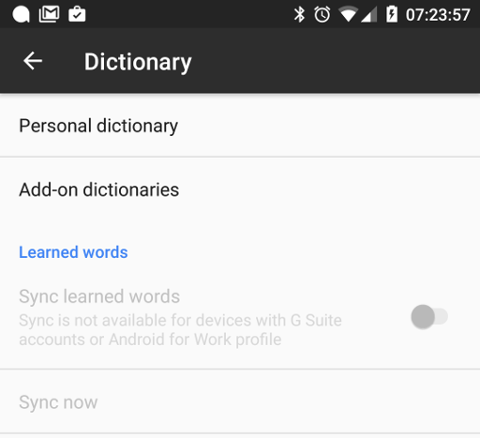
Useful! I'd assumed that this was the case anyway -- it's Google after all -- but it's good to know I can ensure it's turned on. So I went to turn it on. This is what I found:

Gboard WTF

What the hell Google? Sure, I do have a Gsuite account on my phone -- as in various apps have access to a Gsuite account (Gmail, Drive, etc...) -- but it's not the primary account on my phone and it's not the account I'd really want to be doing the dictionary sync with anyway. If I've got dictionary sync I want it tied to the keyboard no matter the app I'm in, and no matter the account I'm using in that app. I want the keyboard to be tied to a specific account when it comes to sync (just like SwiftKey does it).

This, I think, is a show-stopper for me.

I can overlook the other niggles, I can learn to cope with it not being quite so perfect in some situations; but the blanket inability to do something as simple as cloud-sync the predictions and learn from how I type -- things that are, these days, central to what Google's about -- it's frankly stupid.

I guess I'm going to have to keep Gboard as a backup keyboard for those times when I need to find the perfect gif.

Google WTF


Google Now Achievements?

Posted on 2017-03-12 12:16 +0000 in Tech • Tagged with Google • 1 min read

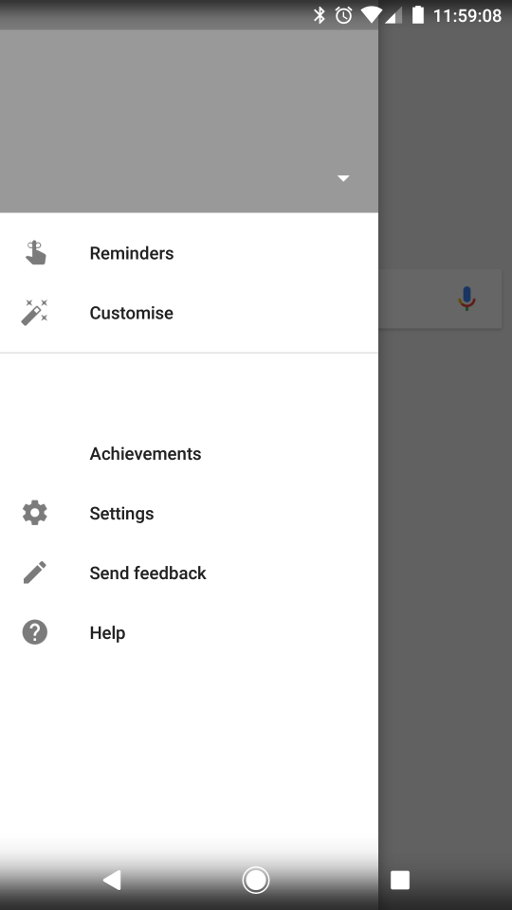
Over the past couple or so weeks I've been having some issues with Google Now. It first seemed to start on my Nexus 7, then appeared on my Nexus 6. More recently, even as of today, I've seen it on my Google Pixel. The problem is that, in the Google Now launcher (or on the Pixel, in the Pixel launcher), the Google Now page (that you swipe to the left for) sits empty for ages. All I see is the little animated waiting circle and nothing else. Once or twice I've had the Google app die and restart or, more often than not, after quite some time it finally loads up.

The latter happened a little earlier and I noticed something I'd not seen before:

Blank Google Now

What's with that "Achievements" menu option? You'll notice that the whole of the menu is blank -- no profile picture or anything and none of the menu options seemed to work.

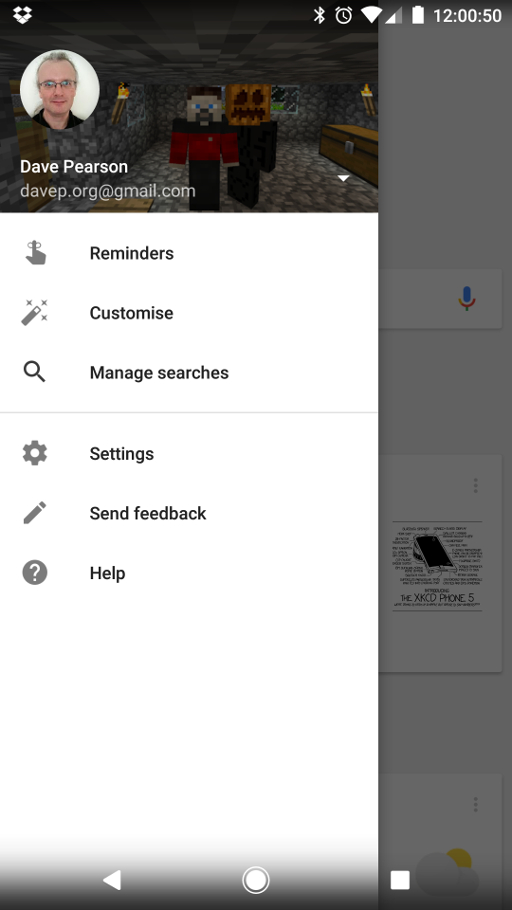
Eventually, after I'd left it for a while, it ended up working.

Google Now finally working

And, once this happened, no "Achievements" option.

Presumably this is some back-end server issue, I'm being served up something I'm not supposed to be seeing and it's confusing the client app. Okay, I don't know that's the case, but it has that sort of feel.

So now I need to go looking for what this Achievements thing is all about.

Using Google, obviously.


jsNG

Posted on 2017-03-10 10:14 +0000 in Coding • Tagged with Norton Guide, Coding, JavaScript • 3 min read

Like many programmers, I have a couple of "Hello, World" projects that I've carried with me over the years. One is 5x5 (which has been used to get to grips with things as diverse as the Palm Pilot and GNU emacs). Another is Norton Guides database readers.

I've made Norton Guides tools that have allowed web servers to serve guides (w3ng), that have allowed you to convert guides to HTML (ng2html), that have let you read guides on OS/2 and GNU/Linux (eg) and also have let you read guides in Microsoft Windows (weg). It's a problem I know fairly well and one where I know the solution well enough so I can concentrate on learning the new language or environment.

Recently I wanted to get to grips with some "pure" ES6 coding while also getting to know node.js. A new version of the Norton Guide code, written for this environment, seemed like a good thing to do.

And so jsNG was born.

At its core is a library of code for opening and reading data from Norton Guides databases. While I doubt it's good ES6 code, or even good node.js code, it's been very useful in giving me a fun problem to solve and it'll carry on being something I'll tweak and tinker with by way of trying new things out.

On top of this I've built a handful of tools for working with Norton Guides databases. The most useful one at the moment (the others are more in the "test the library" than the "make something handy with the library" category) is ngserve. This is designed as a simple Norton Guides database HTTP server.

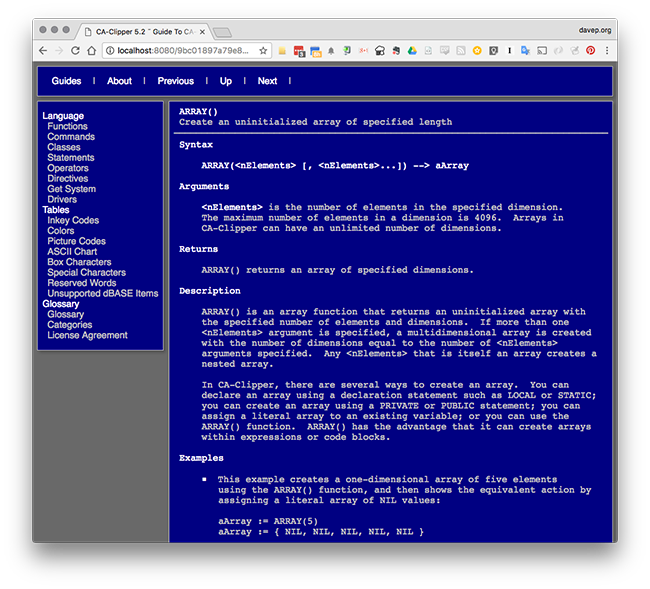
ngserve in action

When run, you give it a list of guides to serve:

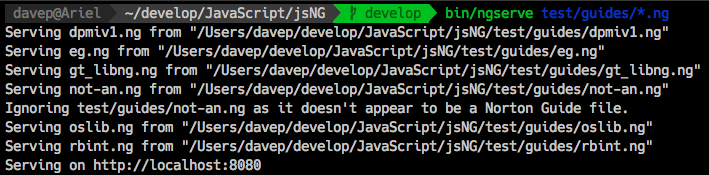
Starting ngserve

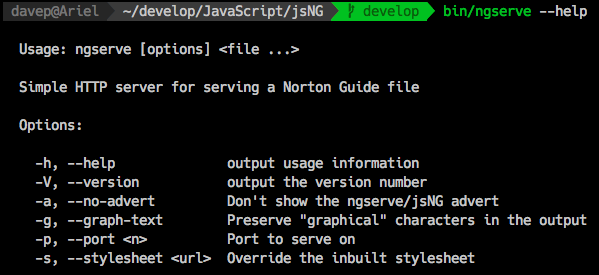
and it does the right thing. It has a small number of command line options that help configure what it does:

ngserve command line options

Possibly the most useful are the ones that let you change how it handles "higher" DOS characters and, if you don't like the default colours and stuff, the option that lets you point to your own style sheet (note for now you'll need to host the stylesheet somewhere else -- ngserve won't serve it for you; I'm aiming to change that in some way in the near future).

jsNG does have a fairly basic design compromise at its heart. In the very early version I started out using the async functions for opening and reading the guides. This got very tedious very quickly and I could see that it was going to make for a very messy library with a very messy interface. While it might not be in the spirit of node.js programming I decided to go with the sync version of the file IO functions and code up the core library based around this.

This approach also means that I took another leap that I never have done with Norton Guides before: rather than doing the traditional thing of keeping an open handle into them and reading direct from the file as you navigate the guide, I simply read it all into a buffer in one go and keep it in memory. This is a "guides are small, memory is cheap, things will go faster" approach.

It does mean that when you load up a load of guides into ngserve they're all sat in memory. The upside of this is that things should be a lot faster and the code is a lot easier to follow (I think). To put this in some perspective: I have a directory here that contains 110 Norton Guides files. They total 36M in size. If that seems like a lot of stuff to hold in memory... remind me how much is being used by your web browser so you can look at some hilarious kittens. ;)

Anyway, that's where I'm at with it right now. The code is mostly settled and mostly tidy. I need to write up some documentation for it (and so I need to take a look at good JavaScript documentation tools) and perhaps tinker with ngserve a little more. I'd also like to do a new version of ng2html with this -- a version that makes it far easier to control the style of the output. I'm also tempted to do a CLI-based reader in pure ES6; something similar to EG or WEG.

All in good time.


Hello Google Pixel

Posted on 2017-03-08 12:22 +0000 in Tech • Tagged with Google, Android, Phone • 3 min read

For the past two years I've, mostly, being happily using a Google Nexus 6 as my phone. In the past six months or so I've started to notice that it hasn't been quite as good as it was. The main problem, for me, was that the camera was starting to play out. The issues were the ones that I've seen reported elsewhere: use of the camera would quickly make the phone laggy, very slow response times on pressing the shutter, occasional failure to save an image, etc. This was generally frustrating and, even more so, because I'd got back into photoblogging.

Meanwhile... I've been lusting over the Google Pixel ever since it was originally shown off. I was some way off my phone contract renewal and the price of a new Pixel was something I just couldn't justify. Last week though an offer cropped up that meant I could renew early and get a Pixel (including a free Daydream headset thrown in).

Fast forward to Monday just gone and...

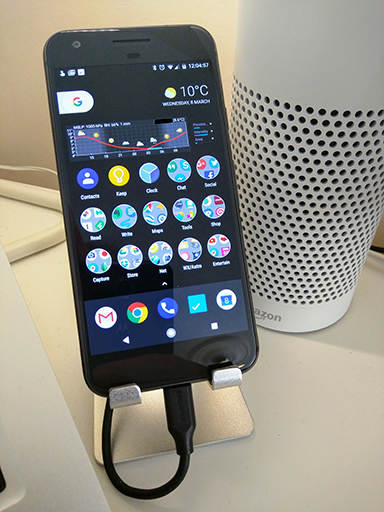
My new Pixel

So far I'm liking it rather a lot. It is odd that it's smaller in my hand than the Nexus 6 was (the XL wasn't an available option and I was also starting to think it was time to drop down in size a little again) but I'm also finding it a little easier to work with; it's also nice that it fits in trouser pockets as well as jacket pockets.

It feels very fast (although every Android phone and tablet I've ever had have felt fast to start with) and smooth to use. I especially like the default feedback vibration -- it's a lot smoother yet also more reassuring than any I've felt before.

The Google Assistant is proving to be very handy. I'm sort of used to it anyway thanks to having owned an Android Wear watch for a couple of years but having it on the phone like this seems like a natural next step.

Another thing I'm getting very used to very quickly, and really liking a lot, is fingerprint recognition. I didn't think I needed it but now I'm wondering how I ever managed without it. Combined with the notification pull-down gesture that the recognition area supports it seems like a perfect way to open the get going with a phone.

There's a couple of niggles with it, of course. The main one for me is the lack of wireless charging. That was something I really liked about the Nexus 6: I could be sat at my desk and have the phone sat on top of a charging pad, staying topped up. No such handy setup with the Pixel. The other thing is the lack of water resistance. To be fair: it's not something I've ever really felt I needed with other phones and I'm not in the habit of sticking them under water; but knowing that it doesn't matter too much if it gets exposed to rain would be nice.

Other than that... there's not much else to say right now. It works and works well, the move from the N6 to it was pretty smooth and the Pixel has fallen perfectly into my normal routine.


Seen by davep (the return)

Posted on 2016-11-15 15:52 +0000 in Creative • Tagged with blogging, photography • 2 min read

A few years back, not long after I got my first smartphone (a HTC Magic), I started maintaining a photoblog that was based around photos I took on that phone. The blog itself was very important to me as it covered a pretty difficult time in my life -- many of the images on it contained and conveyed feelings and emotions that seem a world away now, but which I never want to totally forget.

It served as a visual diary, a note to future me.

And, hopefully, it provided some entertainment for those who viewed it.

Sadly the company who hosted it closed down and the whole thing was lost, except for a hasty (and only partially successful) backup to a Wordpress blog.

After the blog died I sort of lost interest in trying to maintain one and, to some degree, lost interest in active photography in general. Between the blog disappearing and another disappointing event relating to photography I sort of lost confidence in myself and my ability to dare to publish photos online.

This year, despite how shitty it's been for the world in general, has been a really good one for me. Lots of positive changes have happened and continue to happen and I noticed that I was starting to do the phone-based photoblog thing again, albeit only via twitter.

From up the hill

Finally, this week, I've cracked and decided to make it "official". My old "Seen by davep" blog is reborn, with new content and the same old purpose. You can find it here: seenbydavep.blogspot.com

The blog itself is still driven by twitter and the posts will still appear on twitter. In the background I have an IFTTT process running, watching for any tweet of mine with the #photoblog tag and creating a post on the blog from it.

As for how often and what the content will be... simple: it'll be when I see something that I need to capture.


A bit of a backlog at the Apple store

Posted on 2016-11-03 13:45 +0000 in Tech • Tagged with Apple, iMac, OS X • 2 min read

Over the past couple or so weeks my Macbook air has started to develop a minor, but irritating, hardware problem. Simply put, the left shift key fails now and again. I can press it and it does nothing. It's irritating because it messes with the flow of typing (especially when writing code) and the key also feels like it's sticking or clicking in a way that's different from all the other keys.

Macbook Keyboard

Given that I pass through Edinburgh on a pretty regular basis I thought I'd drop in and have a quick chat with someone about it. While I didn't expect a fix there and then (although finding out it was a trivial issue would have been nice) I was hoping someone could take a quick look and let me know what might be going on.

So, this morning, on the way to Waverley Station, I dropped in to the Apple store on Princes Street.

I walked in and looked for a member of staff, all seemed to be busy to start with but one soon noticed that I looked a little lost and asked me if they could help. I explained the issue and she said I needed to pop upstairs to chat with the staff up there.

So far so good.

So, I headed up to the first floor and caught the attention of another member of staff. Having explained the exact same thing to them I was told I needed to speak with yet another staff member. The chap I needed to speak to had a queue (yes, a physical queue of people) waiting to speak to him.

I joined the queue.

About five minutes later I got to speak with him. I, again, explained the problem and was told that looking at it would be no problem and they could do so at around 4pm. This was at about 10am. Having gone through 3 people and spent 10 minutes doing so I found out that there was a six hour queue to have someone actually take a quick look at the issue.

By that time I wouldn't even be in the same country, let alone the same city. So I had to say thanks but no thanks.

So now it looks like I have to make an appointment for some point in the future and make a special trip into Edinburgh just so someone can check out a sticky key on my Macbook.

Remind me again how the nice thing with Apple gear is that it "just works"...


Virgin East Coast 21

Posted on 2016-11-03 13:00 +0000 in Life • Tagged with travel, Virgin • 2 min read

Yesterday I got the call about the Virgin East Coast Ticket Wallet app that I was promised last week (well, actually, promised a couple of months back). It didn't go well.

Well, I say "didn't go well", the conversation itself went very well, the chap I spoke to was polite and apologetic and helpful, but the outcome wasn't really very brilliant.

It didn't get off to a brilliant start when I was first told that the solution to my problem was that I needed to uninstall and then reinstall the app (something I've done more than once while trying to get to the bottom of the problem). I asked if that was really necessary and I was informed that it was the only way to fix the problem of the tickets not showing. Problem is... that wasn't my problem. So I then had to explain the exact nature of the fault I was experiencing (and also explained my guess as to what the cause of the problem was).

After that, much of the content of the conversation involved vaguely confidential information (nothing too terrible or that big a secret -- just stuff that isn't generally known yet) which I'm not going to repeat here. The upshot of the chat though is this: they can't do anything for me.

Simply put: they acknowledge there's a problem with the app, the problem is at their end, it's a problem that needs to be fixed and there's nothing they can do to fix it any time soon.

The causes of this will sound familiar to anyone with experience of large companies who outsource much of their development and get involved in areas that they might not have much experience with.

I also found out the cause of some of the delay in actually getting back to me: the person who was supposed to originally call me went on maternity leave just after they'd first tried to call and, it seems, nobody thought to pick up their workload. This left me in the bizarre position of trying to call someone who was off work for an extended period of time, and whose phone wasn't being answered in any way.

Of course, it doesn't explain why that person's boss, who I was promised a call from a short while after, never bothered to call.

So, I think, to some degree, that's the end of this silly saga. Their software is buggy, they can't fix it any time soon, and I'm out of luck.

As for the extra free tickets I was promised a couple of weeks back now... they've still not appeared. Time for me to chase that up again.